This thread has been locked.

If you have a related question, please click the "Ask a related question" button in the top right corner. The newly created question will be automatically linked to this question.

Powering MSP-EXP430F5529LP from an External 5V USB Pack

Other Parts Discussed in Thread: TPS2041B

I would like to power this launchpad from an external 5V USB battery pack. However, 5V and 3.3V is not detected at the isolation jumpers. Only when a USB from a computer is used will the 5V and 3.3V rails can be detected at the jumpers. The voltage seems to stop at U401 for 5V and U403 for 3.3V. These 2 ICs are nowhere to be found on the schematic. My guess is that they are load switches for the two rails. My question: Is there a correct way to power from an external USB like a battery pack or a wall wart or is there an easy to bypass the load switches by depopulating a component or 2 without needing to hack the board with wires and such.

Thanks,

Jordan

  • Jordan Bonner said:
    These 2 ICs are nowhere to be found on the schematic.

    Check Page 4 of the schematic. Files are in this zip archive.

    EZFET_VBUS goes directly from J401 to JP1, GND on JP3 and 3.3V on JP2. 3.3V comes from U402 (buck converter) and should be on whenever 5V is present on the J401 VBUS pin.

  • Brian Boorman said:

    Check Page 4 of the schematic. Files are in this zip archive.

    EZFET_VBUS goes directly from J401 to JP1, GND on JP3 and 3.3V on JP2. 3.3V comes from U402 (buck converter) and should be on whenever 5V is present on the J401 VBUS pin.

    This is partly why I am confused. While the schematics shows VBUS ties directly to J1, my multimeter says otherwise.

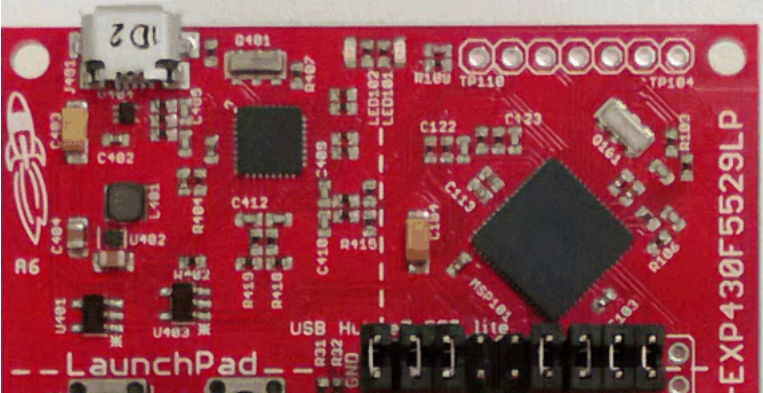
    However, after looking back at the schematic, the schematic is for Rev 1.5. The revision of my launchpad is Rev. 1.4. To me, it looks like U401 and U403 were taken out of Rev. 1.5.

    You can see the ICs in question (U401 and U403) on the bottom left in this image: 

  • So, if you read SLAU533A, there is an FAQ section towards the end (Page 55).

    Q: I'm trying to power the LaunchPad from a USB power supply (not an actual USB host), and it is not working. Does the LaunchPad not support this?

    A: Unfortunately Rev1.4 does not. USB hubs typically shouldn't enable power to their downstream devices until the hubs themselves enumerate on the host, and that's what the TUSB2046 on the Rev1.4 F5529 LaunchPad does through the TPS2041B power switches. If the hub never enumerates, power is not provided to the target F5529. Because the downstream device is permanently attached in this application, the TPS2041B switches are not required by the USB specification. Rev1.5 and newer F5529 LaunchPads have these switches removed, to avoid this problem. Again, the benefit of the hub is single-cable development. Other power supplies can still be applied via the power header.

    You should look into using the newer Rev 1.5 Launchpad Board.

  • Thank you, Brian! This answers my question.

**Attention** This is a public forum