This thread has been locked.

If you have a related question, please click the "Ask a related question" button in the top right corner. The newly created question will be automatically linked to this question.

EVM430-F6779

Other Parts Discussed in Thread: MSP430F6779, MSP430F67791, MSP-FLASHER

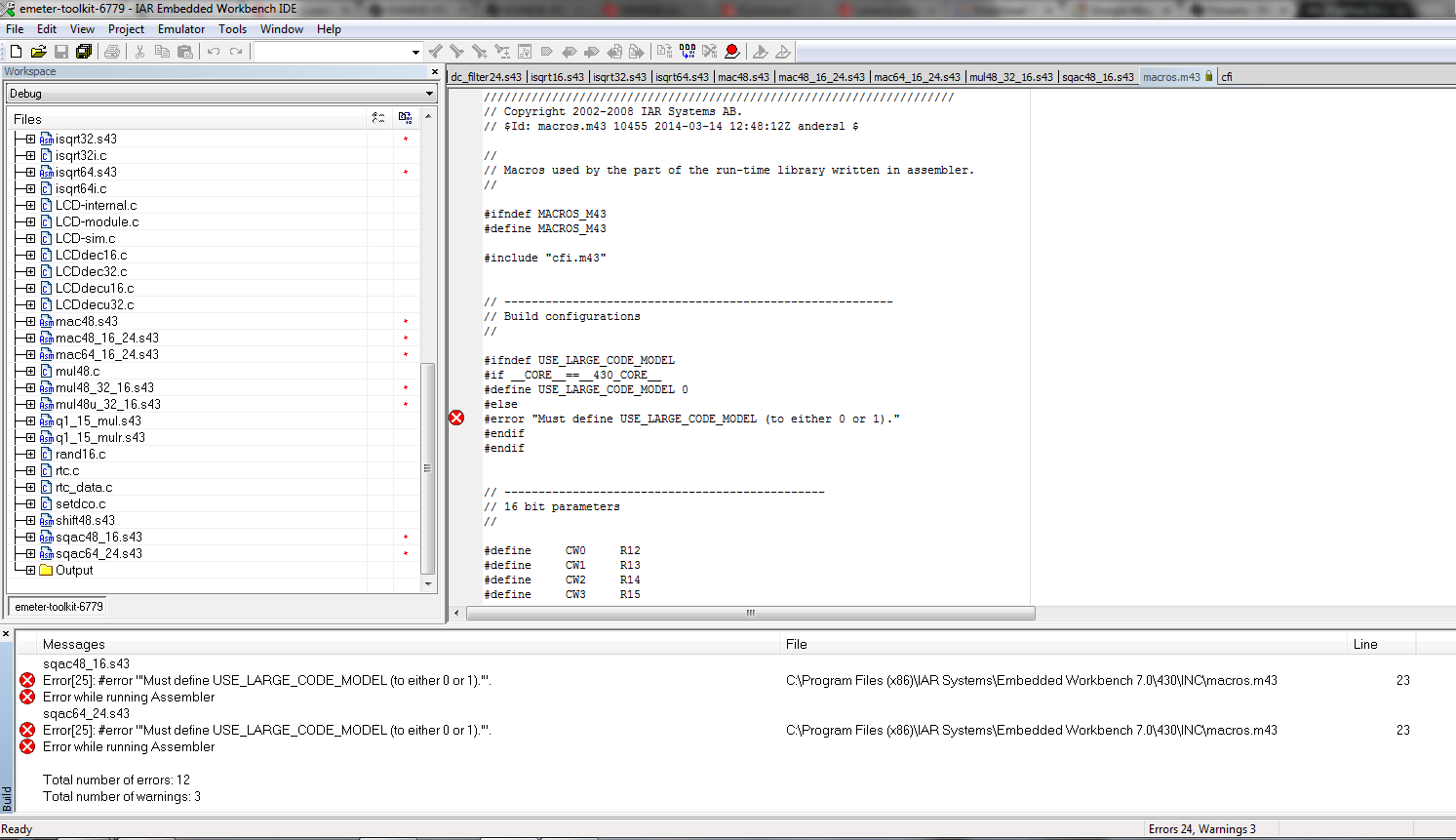
I'm trying to Rebuild All emeter-toolkit-6779.ewp from slaa577e.

I am using IAR Workbench Version 6.10.1

I have 12 errors all associated with a file named macros.m43 Line 23.

I expect that a clean version of this project with no edits should build cleanly.

The attachment should show the problem.

Bart
  • Bart,

    Looks like it is looking for a memory model distinction.

    If you go to the properties of the project and navigate to Build -> MSP430 Compiler -> Processor Options, you will see drop down options for the code memory model and data memory model. You can specify what memory model you want to use here.

    My guess is in your project, no distinction is made, and throwing these errors because of this.

  • In my version of IAR, the path that you describe does not exist but poking around I found that if I

    traveled Project-> Options

    General Options -> Target tab has radio buttons for the size of code memory model and data memory model.

    I tried setting both to Small with no change in behavior and also tried setting the device to both MSP430F6779 and MSP430F67791 again with no change in behavior.

    Thank you,

    Bart Bergman

  • Bart,

    My apologies, what I had written was how to set the memory model for CCS, not IAR.

    I also just imported the project into my IAR (v 5.60.2), and no compilation errors occurred at all. I am working on getting the updated version 6.10 and will update you on what I see when I get a chance to import the project into that version.

    Did you make any edits to the code, or was this just imported directly from the .zip file contents?

  • It was just imported directly from the .zip file contents?

    slaa577e

  • Bart,

    I was able to get the project to compile on the new IAR. It seems that the translation left out a definition in the project properties for the USE_LARGE_CODE_MODEL symbol.

    If you navigate from the right click -> Options window to Assembler -> Preprocessor, you can add USE_LARGE_CODE_MODEL to the list of defined symbols. Also ensure that you are using the large code model in the General Options -> Target -> Code Model option.

    This should get the program to compile fully without warning/error. 

    Let me know if this works for you as well.

  • Tyler,

       I was able to compile emeter-toolkit-6779.ewp with those switch setting changes then I tried to Rebuild All emeter-6779.ewp and received the following fatal error -- 

    Linking
    Fatal Error[e89]: Too much object code produced (more than 0x2000 bytes) for this package
    Error while running Linker

    Total number of errors: 1
    Total number of warnings: 2

    Bart

  • The compiler you use is the code-size limited free version. It allows only an application size of up to 8k. The emeter application is larger and won’t compile (or rather won’t link) with the free compiler. You’ll need a full version of the compiler – or have to remove code.

     Tyler, I don’t want to hijack this thread, but since I’m already here: is there any CE conformity declaration available for this EVM? In Europe, this (along with an internal documentation set proving the conformity) is mandatory if you want to sell a product like this (well, almost any product). For many people, gathering the documentation and providing the declaration is more difficult than designing the hardware and firmware itself

  • Since my EVM430-F6779 was not preflashed, my EVM does not operate. I would like a solution that allows me to evaluate the default operation of the product without starting the clock ticking on a 30 day IAR evaluation license.

    I can think of at least 2-3 ways to go forward. Can someone please help me?

  • You might find a precompiled binary in your demo project folder. You can flash it by using the free Elprotronic tool or the MSP-Flasher.

  • Thank you for the response and for the information. I still have some strange issues to resolve

    but your information is very useful and welcomed.

**Attention** This is a public forum