


Dear Sir:
I am new to the MSP430f5529 product line. I purchased the Launchpad Evaluation Kit.
This is the problem. I followed Lab 1 of the TI RTOS Workshop. This lab verifies that the Code Composer (CC) 5.3 software has been installed correctly. The lab only seeks for the operator to import a user defined target configuration and launch the target configuration.
When I launch the target configuration this error message is returned:
MSP430: Error initializing emulator: No USB FET was found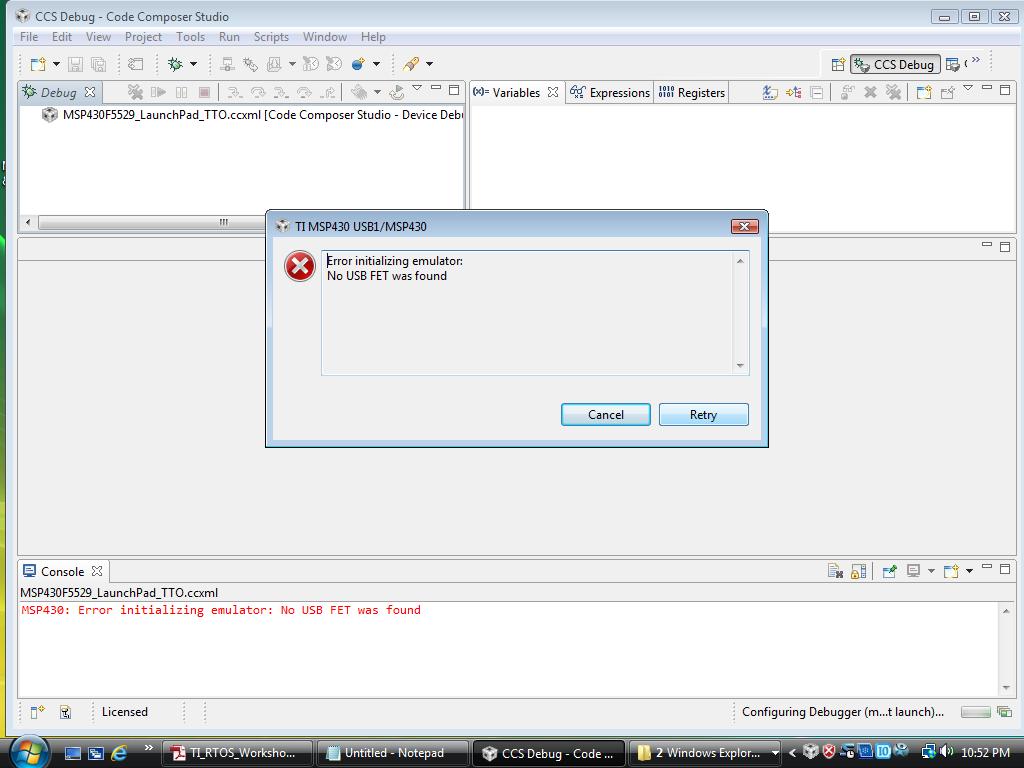
I know that for some unknown reason the TI software install failed.
I am enclosing a copy of a document that may tell you where the source of the error lies.
Log started 05/31/2014 at 20:26:35
Preferred installation mode : win32
Trying to init installer in mode win32
Mode win32 successfully initialized
Preparing to Install
[20:26:54] eclipsedir =
Preparing to Install
Creating directory C:\ti\fetdrivers\emulation
Creating directory C:\ti\fetdrivers\emulation\drivers
Creating directory C:\ti\fetdrivers\emulation\drivers\msp430
Creating directory C:\ti\fetdrivers\emulation\drivers\msp430\DPInst
Unpacking files
Unpacking C:\ti\fetdrivers\emulation\drivers\msp430\DPInst\DPInst64.exe
Unpacking C:\ti\fetdrivers\emulation\drivers\msp430\DPInst\DPInst.exe
Creating directory C:\ti\fetdrivers\emulation\drivers\msp430\USB_CDC
Unpacking files
Unpacking C:\ti\fetdrivers\emulation\drivers\msp430\USB_CDC\msp430tools.inf
Unpacking C:\ti\fetdrivers\emulation\drivers\msp430\USB_CDC\msp430tools.cat
Creating directory C:\ti\fetdrivers\emulation\drivers\msp430\USB_eZ-RF
Unpacking files
Unpacking C:\ti\fetdrivers\emulation\drivers\msp430\USB_eZ-RF\430CDC.inf
Unpacking C:\ti\fetdrivers\emulation\drivers\msp430\USB_eZ-RF\430cdc.cat
Creating directory C:\ti\fetdrivers\emulation\drivers\msp430\USB_FET_Vista_32
Unpacking files
Unpacking C:\ti\fetdrivers\emulation\drivers\msp430\USB_FET_Vista_32\umpusbvista.sys
Unpacking C:\ti\fetdrivers\emulation\drivers\msp430\USB_FET_Vista_32\ump3410.cat
Unpacking C:\ti\fetdrivers\emulation\drivers\msp430\USB_FET_Vista_32\umpf3410.i51
Unpacking C:\ti\fetdrivers\emulation\drivers\msp430\USB_FET_Vista_32\usbuart3410.inf
Unpacking C:\ti\fetdrivers\emulation\drivers\msp430\USB_FET_Vista_32\WdfCoInstaller01009.dll
Unpacking C:\ti\fetdrivers\emulation\drivers\msp430\USB_FET_Vista_32\difxapi.dll
Creating directory C:\ti\fetdrivers\emulation\drivers\msp430\USB_FET_Vista_64
Unpacking files
Unpacking C:\ti\fetdrivers\emulation\drivers\msp430\USB_FET_Vista_64\umpusbvista.sys
Unpacking C:\ti\fetdrivers\emulation\drivers\msp430\USB_FET_Vista_64\ump3410.cat
Unpacking C:\ti\fetdrivers\emulation\drivers\msp430\USB_FET_Vista_64\umpf3410.i51
Unpacking C:\ti\fetdrivers\emulation\drivers\msp430\USB_FET_Vista_64\usbuart3410.inf
Unpacking C:\ti\fetdrivers\emulation\drivers\msp430\USB_FET_Vista_64\difxapi.dll
Unpacking C:\ti\fetdrivers\emulation\drivers\msp430\USB_FET_Vista_64\WdfCoInstaller01009.dll
Creating directory C:\ti\fetdrivers\emulation\drivers\msp430\USB_FET_Win7_32
Unpacking files
Unpacking C:\ti\fetdrivers\emulation\drivers\msp430\USB_FET_Win7_32\umpusbvista.sys
Unpacking C:\ti\fetdrivers\emulation\drivers\msp430\USB_FET_Win7_32\ump3410.cat
Unpacking C:\ti\fetdrivers\emulation\drivers\msp430\USB_FET_Win7_32\umpf3410.i51
Unpacking C:\ti\fetdrivers\emulation\drivers\msp430\USB_FET_Win7_32\usbuart3410.inf
Unpacking C:\ti\fetdrivers\emulation\drivers\msp430\USB_FET_Win7_32\WdfCoInstaller01009.dll
Unpacking C:\ti\fetdrivers\emulation\drivers\msp430\USB_FET_Win7_32\difxapi.dll
Creating directory C:\ti\fetdrivers\emulation\drivers\msp430\USB_FET_XP_32
Unpacking files
Unpacking C:\ti\fetdrivers\emulation\drivers\msp430\USB_FET_XP_32\umpusbvista.sys
Unpacking C:\ti\fetdrivers\emulation\drivers\msp430\USB_FET_XP_32\ump3410.cat
Unpacking C:\ti\fetdrivers\emulation\drivers\msp430\USB_FET_XP_32\umpf3410.i51
Unpacking C:\ti\fetdrivers\emulation\drivers\msp430\USB_FET_XP_32\usbuart3410.inf
Unpacking C:\ti\fetdrivers\emulation\drivers\msp430\USB_FET_XP_32\WdfCoInstaller01009.dll
Unpacking C:\ti\fetdrivers\emulation\drivers\msp430\USB_FET_XP_32\difxapi.dll
Creating directory C:\ti\fetdrivers\emulation\drivers\msp430\USB_FET_XP_64
Unpacking files
Unpacking C:\ti\fetdrivers\emulation\drivers\msp430\USB_FET_XP_64\umpusbvista.sys
Unpacking C:\ti\fetdrivers\emulation\drivers\msp430\USB_FET_XP_64\ump3410.cat
Unpacking C:\ti\fetdrivers\emulation\drivers\msp430\USB_FET_XP_64\umpf3410.i51
Unpacking C:\ti\fetdrivers\emulation\drivers\msp430\USB_FET_XP_64\usbuart3410.inf
Unpacking C:\ti\fetdrivers\emulation\drivers\msp430\USB_FET_XP_64\WdfCoInstaller01009.dll
Unpacking C:\ti\fetdrivers\emulation\drivers\msp430\USB_FET_XP_64\difxapi.dll
Creating directory C:\ti\fetdrivers\emulation\drivers\msp430\USB_VCP_Vista_32
Unpacking files
Unpacking C:\ti\fetdrivers\emulation\drivers\msp430\USB_VCP_Vista_32\umpusbvista.sys
Unpacking C:\ti\fetdrivers\emulation\drivers\msp430\USB_VCP_Vista_32\ump3410.cat
Unpacking C:\ti\fetdrivers\emulation\drivers\msp430\USB_VCP_Vista_32\umpf3410.i51
Unpacking C:\ti\fetdrivers\emulation\drivers\msp430\USB_VCP_Vista_32\usbuart3410.inf
Unpacking C:\ti\fetdrivers\emulation\drivers\msp430\USB_VCP_Vista_32\WdfCoInstaller01009.dll
Creating directory C:\ti\fetdrivers\emulation\drivers\msp430\USB_VCP_Vista_64
Unpacking files
Unpacking C:\ti\fetdrivers\emulation\drivers\msp430\USB_VCP_Vista_64\umpusbvista.sys
Unpacking C:\ti\fetdrivers\emulation\drivers\msp430\USB_VCP_Vista_64\ump3410.cat
Unpacking C:\ti\fetdrivers\emulation\drivers\msp430\USB_VCP_Vista_64\umpf3410.i51
Unpacking C:\ti\fetdrivers\emulation\drivers\msp430\USB_VCP_Vista_64\usbuart3410.inf
Unpacking C:\ti\fetdrivers\emulation\drivers\msp430\USB_VCP_Vista_64\WdfCoInstaller01009.dll
Creating directory C:\ti\fetdrivers\emulation\drivers\msp430\USB_VCP_Win7_32
Unpacking files
Unpacking C:\ti\fetdrivers\emulation\drivers\msp430\USB_VCP_Win7_32\umpusbvista.sys
Unpacking C:\ti\fetdrivers\emulation\drivers\msp430\USB_VCP_Win7_32\ump3410.cat
Unpacking C:\ti\fetdrivers\emulation\drivers\msp430\USB_VCP_Win7_32\umpf3410.i51
Unpacking C:\ti\fetdrivers\emulation\drivers\msp430\USB_VCP_Win7_32\usbuart3410.inf
Unpacking C:\ti\fetdrivers\emulation\drivers\msp430\USB_VCP_Win7_32\WdfCoInstaller01009.dll
Creating directory C:\ti\fetdrivers\emulation\drivers\msp430\USB_VCP_Win7_64
Unpacking files
Unpacking C:\ti\fetdrivers\emulation\drivers\msp430\USB_VCP_Win7_64\umpusbvista.sys
Unpacking C:\ti\fetdrivers\emulation\drivers\msp430\USB_VCP_Win7_64\ump3410.cat
Unpacking C:\ti\fetdrivers\emulation\drivers\msp430\USB_VCP_Win7_64\umpf3410.i51
Unpacking C:\ti\fetdrivers\emulation\drivers\msp430\USB_VCP_Win7_64\usbuart3410.inf
Unpacking C:\ti\fetdrivers\emulation\drivers\msp430\USB_VCP_Win7_64\WdfCoInstaller01009.dll
Creating directory C:\ti\fetdrivers\emulation\drivers\msp430\USB_VCP_XP_32
Unpacking files
Unpacking C:\ti\fetdrivers\emulation\drivers\msp430\USB_VCP_XP_32\umpusbvista.sys
Unpacking C:\ti\fetdrivers\emulation\drivers\msp430\USB_VCP_XP_32\ump3410.cat
Unpacking C:\ti\fetdrivers\emulation\drivers\msp430\USB_VCP_XP_32\umpf3410.i51
Unpacking C:\ti\fetdrivers\emulation\drivers\msp430\USB_VCP_XP_32\usbuart3410.inf
Unpacking C:\ti\fetdrivers\emulation\drivers\msp430\USB_VCP_XP_32\WdfCoInstaller01009.dll
Creating directory C:\ti\fetdrivers\emulation\drivers\msp430\USB_VCP_XP_64
Unpacking files
Unpacking C:\ti\fetdrivers\emulation\drivers\msp430\USB_VCP_XP_64\umpusbvista.sys
Unpacking C:\ti\fetdrivers\emulation\drivers\msp430\USB_VCP_XP_64\ump3410.cat
Unpacking C:\ti\fetdrivers\emulation\drivers\msp430\USB_VCP_XP_64\umpf3410.i51
Unpacking C:\ti\fetdrivers\emulation\drivers\msp430\USB_VCP_XP_64\usbuart3410.inf
Unpacking C:\ti\fetdrivers\emulation\drivers\msp430\USB_VCP_XP_64\WdfCoInstaller01009.dll
Directory already exists: C:\ti\fetdrivers
Unpacking files
Unpacking C:\ti\fetdrivers\MSP430_USB_Drivers_Software Manifest_WIN.pdf
Executing C:\ti\fetdrivers\emulation\drivers\msp430\DPInst\DPinst.exe  /q /se /sa /path "C:\ti\fetdrivers\emulation\drivers\msp430\USB_eZ-RF"
Script exit code: 256

Script output:


Script stderr:
 Program ended with an error exit code

Error running C:\ti\fetdrivers\emulation\drivers\msp430\DPInst\DPinst.exe  /q /se /sa /path "C:\ti\fetdrivers\emulation\drivers\msp430\USB_eZ-RF" : Program ended with an error exit code
Executing C:\ti\fetdrivers\emulation\drivers\msp430\DPInst\DPinst.exe /q /se /sa /path "C:\ti\fetdrivers\emulation\drivers\msp430\USB_FET_Vista_32"
Script exit code: 256

Script output:


Script stderr:
 Program ended with an error exit code

Error running C:\ti\fetdrivers\emulation\drivers\msp430\DPInst\DPinst.exe /q /se /sa /path "C:\ti\fetdrivers\emulation\drivers\msp430\USB_FET_Vista_32" : Program ended with an error exit code
Executing C:\ti\fetdrivers\emulation\drivers\msp430\DPInst\DPinst.exe /q /se /sa /path "C:\ti\fetdrivers\emulation\drivers\msp430\USB_CDC"
Script exit code: 256

Script output:


Script stderr:
 Program ended with an error exit code

Error running C:\ti\fetdrivers\emulation\drivers\msp430\DPInst\DPinst.exe /q /se /sa /path "C:\ti\fetdrivers\emulation\drivers\msp430\USB_CDC" : Program ended with an error exit code
Executing C:\ti\fetdrivers\emulation\drivers\msp430\DPInst\DPinst.exe /q /se /sa /path "C:\ti\fetdrivers\emulation\drivers\msp430\USB_VCP_Vista_32"
Script exit code: 256

Script output:


Script stderr:
 Program ended with an error exit code

Error running C:\ti\fetdrivers\emulation\drivers\msp430\DPInst\DPinst.exe /q /se /sa /path "C:\ti\fetdrivers\emulation\drivers\msp430\USB_VCP_Vista_32" : Program ended with an error exit code
Creating Uninstaller
Creating uninstaller 25%
Creating uninstaller 50%
Creating uninstaller 75%
Creating uninstaller 100%
Installation completed
Log finished 05/31/2014 at 20:27:07
I hope you will be able to click on this document and read the installation error messages.
This error document is my best guess as to the source of the error message that I saw in the screenshot.
I am using the Vista O/S and I do not know why the installation failed (if this is the source of the problem).
I was hoping that you could reply with some feedback and what I should do to remedy my problem. I believe that it is possible that a correct sequence of software installation may have to be followed. If this is the case, I need to know the correct uninstallation method and the correct software installation sequence to follow.
Thank you for your time.

