This thread has been locked.

If you have a related question, please click the "Ask a related question" button in the top right corner. The newly created question will be automatically linked to this question.

Where to re-set the watchdog

As you know we have the following line to kick the watchdog and in order not to reset the MCU. However, I was told that I need to re-set it back just in case if the program crashes. So, where is the right place to do so? any idea?

  WDTCTL = WDTPW + WDTHOLD;                 // Stop WDT

  • That line disables the WDT rather than kicking it. There's some discussion about using the WDT as a watchdog here:

    http://e2e.ti.com/support/microcontrollers/msp430/f/166/t/67148.aspx

    When using the WDT as a watchdog, the WDTCNTCL bit is used to "kick" (reset) the watchdog. Searching for WDTCNTCL is more likely to give helpful results than just WDT, as it should exclude most results about using the WDT as a timer.

  • I have a wild idea of how to use WDT to recover from crashes. Only my train of thoughts is presented below; so that you know what leads to this wild idea.

    Aeons ago when computers are very slow and unreliable, I was faced with the task of running a program that takes many CPU MTBF (mean time between failure) to finish.

    The solution was, I modified that program slightly so that it periodically, at intervals much shorter than CPU MTBF, do a “core dump” onto a Magnetic Tape, erase the previous one, and then continue the execution as usual.

    If the CPU failed before this program is finished (this happens a lot), I reboot the computer, reload the latest “core dump”, and resume the execution from that point on.

    The modified program ran only slightly slower -- due to the time it took to do “core dump”. But it managed to finish with many CPU crashes in doing so. Making progress each time before it crashed, instead of having to start from the beginning each time.

    Now, back to the present. The hardware is a lot more reliable now. But the nature and quality of Embedded programs are more vulnerable to crashes. So we still need something to recover from crashes.

    We can assume that the code is in Flash and will not modify itself. So the “core dump” can be limited to only the CPU registers, some of the peripheral registers, and part of the SRAM. Instead of Magnetic Tape, it is quite possible to do this “core dump” onto the unused Flash area.

    Do you see what this leads to my wild idea of making use of WDT?

  • You kick-the-dog (no animals was abused while....) with same way you start it in watchdog mode:

    /* WDT is clocked by fSMCLK (assumed 1MHz) */
    #define WDT_MRST_32         (WDTPW+WDTCNTCL)                                  /* 32ms interval (default) */

    as the x2xx series only have 15bit max counter, you can never go longer than 32ms before you kick-the-dog

    If you have 32k crystal, you can go 1 second before kicking it.
    /* WDT is clocked by fACLK (assumed 32KHz) */
    #define WDT_ARST_1000       (WDTPW+WDTCNTCL+WDTSSEL)                          /* 1000ms  " */

    If you Div the SMCLK or ACLK of course you can now go longer, but you may be using that same clk for something.
    So your code can not pause or go and do some work that takes a very long time.
    So your code needs to be more like a state-machine that always comes back to the main loop in just a few mS

  • Tony Philipsson said:

    You kick-the-dog (no animals was abused while....) with same way you start it in watchdog mode:

    /* WDT is clocked by fSMCLK (assumed 1MHz) */
    #define WDT_MRST_32         (WDTPW+WDTCNTCL)                                  /* 32ms interval (default) */

    as the x2xx series only have 15bit max counter, you can never go longer than 32ms before you kick-the-dog

    If you have 32k crystal, you can go 1 second before kicking it.
    /* WDT is clocked by fACLK (assumed 32KHz) */
    #define WDT_ARST_1000       (WDTPW+WDTCNTCL+WDTSSEL)                          /* 1000ms  " */

    If you Div the SMCLK or ACLK of course you can now go longer, but you may be using that same clk for something.
    So your code can not pause or go and do some work that takes a very long time.
    So your code needs to be more like a state-machine that always comes back to the main loop in just a few mS

    Yes Tony here is the same approach to kick the watchdog or stop it:

    /* Watchdog mode -> reset after expired time */
    /* WDT is clocked by fSMCLK (assumed 1MHz) */
    #define WDT_MRST_32 (WDTPW+WDTCNTCL) /* 32ms interval (default) */
    #define WDT_MRST_8 (WDTPW+WDTCNTCL+WDTIS0) /* 8ms " */
    #define WDT_MRST_0_5 (WDTPW+WDTCNTCL+WDTIS1) /* 0.5ms " */
    #define WDT_MRST_0_064 (WDTPW+WDTCNTCL+WDTIS1+WDTIS0) /* 0.064ms " */
    /* WDT is clocked by fACLK (assumed 32KHz) */
    #define WDT_ARST_1000 (WDTPW+WDTCNTCL+WDTSSEL) /* 1000ms " */
    #define WDT_ARST_250 (WDTPW+WDTCNTCL+WDTSSEL+WDTIS0) /* 250ms " */
    #define WDT_ARST_16 (WDTPW+WDTCNTCL+WDTSSEL+WDTIS1) /* 16ms " */
    #define WDT_ARST_1_9 (WDTPW+WDTCNTCL+WDTSSEL+WDTIS1+WDTIS0) /* 1.9ms " */

    But I have don't know if it is accurate!

  • Robert Cowsill said:
    That line disables the WDT rather than kicking it.

    Kicking meaning that stop it ...means that kick it out or avoid the rest!

    Is there any command line to set it back?

    Maybe the following?

    WDTCTL = ~WDTPW+~WDTHOLD;

  • >Kicking meaning that stop it

    No 'kick it' referrers to setting it back to a zero counter value,
    As it's then it reaches 32768 it will cause the hardware reset.
    so if you very often and time-systematically 'kick-the-dog' it will never reach this value

  • Tony Philipsson said:

    time-systematically 'kick-the-dog' it will never reach this value

    Ok, then if you do so you avoid the system to reset, right?

    [/quote]

  • CaEngineer said:
    Kicking meaning that stop it ...means that kick it out or avoid the rest!

    You "kick the dog" (i.e. reset the count) so that it doesn't "bite you" (i.e. it resets the processor on you).

    Look in the User Guide for the proper bit to set to reset the count (plus add the WDTPW too).

    Then, you sprinkle these around in your code at strategic locations (this is an art) such that you kick the dog before it has a chance to bite you.

    You can even put this in a macro:

    // Need to read the WDTCTL register and apply mask, so we don't change clock source,
    //   timer mode, and timer interval settings. This example is for F5xx devices. See SLAU208M
    //   page 459.
    #define KICK_THE_DOG    (WDTCTL = (WDTCTL & 0x0077) | WDTPW | WDTCNTCL)


    and then wherever you need it you just:

        // some code....
        KICK_THE_DOG;
        // more code....


  • old_cow_yellow said:

    I have a wild idea of how to use WDT to recover from crashes. Only my train of thoughts is presented below; so that you know what leads to this wild idea.

    Aeons ago when computers are very slow and unreliable, I was faced with the task of running a program that takes many CPU MTBF (mean time between failure) to finish.

    The solution was, I modified that program slightly so that it periodically, at intervals much shorter than CPU MTBF, do a “core dump” onto a Magnetic Tape, erase the previous one, and then continue the execution as usual.

    If the CPU failed before this program is finished (this happens a lot), I reboot the computer, reload the latest “core dump”, and resume the execution from that point on.

    The modified program ran only slightly slower -- due to the time it took to do “core dump”. But it managed to finish with many CPU crashes in doing so. Making progress each time before it crashed, instead of having to start from the beginning each time.

    Now, back to the present. The hardware is a lot more reliable now. But the nature and quality of Embedded programs are more vulnerable to crashes. So we still need something to recover from crashes.

    We can assume that the code is in Flash and will not modify itself. So the “core dump” can be limited to only the CPU registers, some of the peripheral registers, and part of the SRAM. Instead of Magnetic Tape, it is quite possible to do this “core dump” onto the unused Flash area.

    Do you see what this leads to my wild idea of making use of WDT?

    Well, I know that I hate WDT when it is running OK and do not want him to reset my code. However, if I have an error and as you said the code crashes, I need it to reset the program. But, I am struggling to find where is the right place to put it in the code, as I cannot anticipate where is more error-prone. Flash memory, I can put a check-sum. registers as you said may cause errors too!

  • CaEngineer said:
    as I cannot anticipate where is more error-prone.

    That's not the point.

    You use it to tell the watchdog that your code is still running ok. you need to place enough of them in the right spots so that it restarts the counter before it resets your program.

    If you get in a bad state (or say, an infinite loop), then the watchdog doesn't get kicked, and it will reset the processor for you.

  • Brian Boorman said:

    as I cannot anticipate where is more error-prone.

    That's not the point.

    You use it to tell the watchdog that your code is still running ok. you need to place enough of them in the right spots so that it restarts the counter before it resets your program.

    If you get in a bad state (or say, an infinite loop), then the watchdog doesn't get kicked, and it will reset the processor for you.

    [/quote]

    Don't get me wrong, the code is Ok and does not reset. The point is the opposite. I want it to reset the code whew I have trouble. As you said gets stuck in an infinite loop!

  • Brian Boorman said:

    You "kick the dog" (i.e. reset the count) so that it doesn't "bite you" (i.e. it resets the processor on you).

     It's better to give Dog a cookie (Reset password) otherwise it bite your reset ;)

     The better place is, when code is a state machine, in a state where cycle regularly from all condition...

     Worst is if a never tested loop, defective from point of WD reset, come in place and it reset CPU before return. If a defective loop enter resetting WD never exit and never reset.

     Avoid blocking like delay and ready loop then Never reset WD in a timer loop nor in Interrupt nor in a waiting for ready loop.

     Avoid blocking call to peripheral and do independent timeout state, try reset WD on a cumulative delay from timer and other running interrupt task.


  • old_cow_yellow said:
    Do you see what this leads to my wild idea of making use of WDT?

     OCY, from beginning I encountered you across forum I think about old...

     But never I figured SO OLD!!! This was time of batch computing and I bet code was loaded from punched tape or punched card.

     WOWOW I like remember that old wild time :)

  • old_cow_yellow said:
    I have a wild idea of how to use WDT to recover from crashes.

    Nice story. And your suggestion is one of few that doesn't (ab)use the WDT for something it wasn't meant to be used for: restarting the CPU in case of software bugs. :)
    However, I wouldn't use the WDT for a 'core dump delay', as it would then be unable to serve its main purpose: resetting the CPU in case of a CPU (not program) crash, e.g. because of ESD or a VCC spike.

  • Guys!

    I noticed that the "kick" command keep the WDT disabled! In order to put him back I used the following command.

    IE1 |= WDTIE;   

    but had no success! (still no reset!)

    And nor th efollowing.

    WDCTL = (WDTCTL & 0xFF) | WDTPW | WDTCNTL;

    So, how can I make WD alive back?

  • Why are you messing with IE1?, are you not getting what a watchdog does?

    WDT in watchdog-mode does not generate a IRQ, it does not jump to some imaginary IRQ location to reset the mcu.

    When the counter reach 32768 a hardware switch will reset the MCU.

    You START and KICK the WDT this (and only this): WDCTL = WDTPW+WDTCNTCL

    And you stop the watchdog-mode with this (and only this): WDCTL = WDTPW+WDTHOLD

    In Watchdog mode, your code can NOT go longer than 32mS without Kicking the dog. (1mhz smclk)
    Turning WDT on and off when code routine is slower will lessen its effect as what can hang the mcu could probably happen there.

    If you Div (/2 /4 /8) the smclk you get more time and the same with aclk divided by /2 /4 /8

    Using ACLK clock for WDT gives you 1-8second WDCTL = WDTPW+WDTCNTCL+WDTSSEL
    if you have 32k crystal.

    >I was told that I need to re-set it back just in case if the program crashes
    What is a re-set?, turning it off? if the program crashes a wdt will reset the mcu
    Your code don't have to turn-it off as long the boot-up sequence don't take longer than 32ms

    If it does and you don't feel kicking the dog there, it's common to put WDCTL = WDTPW+WDTHOLD in the first lines of code as WDTCNTCL is the msp430's default state after a reset.

  • Tony Philipsson said:

    You START and KICK the WDT this (and only this): WDCTL = WDTPW+WDTCNTCL

    And you stop the watchdog-mode with this (and only this): WDCTL = WDTPW+WDTHOLD

    That depends on the device (which I didn't see specified in the OP). Some families allow you to set the clock source and timer interval (32 bit counter on F5xx devices!).

    On those devices you have to read/modify/write to maintain the clock source and counter interval settings.

    My code example comments explicitly stated it was for a F5xx style device.

  • >That depends on the device

    All devices have shorter time interval selections and also NMI selections for WDCTL
    But to keep it simple I say: this and only this

  • Tony Philipsson said:

    Why are you messing with IE1?, are you not getting what a watchdog does?

    WDT in watchdog-mode does not generate a IRQ, it does not jump to some imaginary IRQ location to reset the mcu.

    When the counter reach 32768 a hardware switch will reset the MCU.

    You START and KICK the WDT this (and only this): WDCTL = WDTPW+WDTCNTCL

    And you stop the watchdog-mode with this (and only this): WDCTL = WDTPW+WDTHOLD

    In Watchdog mode, your code can NOT go longer than 32mS without Kicking the dog. (1mhz smclk)
    Turning WDT on and off when code routine is slower will lessen its effect as what can hang the mcu could probably happen there.

    If you Div (/2 /4 /8) the smclk you get more time and the same with aclk divided by /2 /4 /8

    Using ACLK clock for WDT gives you 1-8second WDCTL = WDTPW+WDTCNTCL+WDTSSEL
    if you have 32k crystal.

    >I was told that I need to re-set it back just in case if the program crashes
    What is a re-set?, turning it off? if the program crashes a wdt will reset the mcu
    Your code don't have to turn-it off as long the boot-up sequence don't take longer than 32ms

    If it does and you don't feel kicking the dog there, it's common to put WDCTL = WDTPW+WDTHOLD in the first lines of code as WDTCNTCL is the msp430's default state after a reset.

    Ok, Let me explain you what I would like to do. I have a Show() Function that shows the Kilo Watt hours Register. In the code they set the WDT to WDTPW+WDTCNTCL+WDTSSEL that counts 1 sec. and during this I can see what display function produces. However, I would like the WDT to be stopped and if I put the following infinit loop right after the Show(), instead of getting frozen, it start over again.

    Show()

    while(1)

    {

    for(int i = 0 ; i <= 100 ; i++)

    {

    }

    }

    Tony Philipsson said:

    WDCTL = WDTPW+WDTCNTCL

    Yes, they have used this to clear the counter and set it to the a certain time.

    Tony Philipsson said:
    WDCTL = WDTPW+WDTHOLD

    And this stops counting but it goes to that infinite loop and gets stuck!

    Any idea?

  • >I would like the WDT to be stopped 
    So stop it then, you know how.

    >instead of getting frozen, it start over again.

    The loop starts over again?, the mcu starts over from main-label again?
    You want the loop to start over again? you want it to freeze to show that wdt is off?


    WDT can not restart the loop in watch mode, a reset always jumps to the RST vector stored at 0xFFFF

  • Tony Philipsson said:

    >I would like the WDT to be stopped 
    So stop it then, you know how.

    >instead of getting frozen, it start over again.

    The loop starts over again?, the mcu starts over from main-label again?
    You want the loop to start over again?
    WDT can not restart the loop in watch mode, a reset always jumps to the RST vector stored at 0xFFFF

    Yes, this is not easy to explain. I have many c files are running and in some of them WDT is set. The Show() Function is updating let's say:

    0

    2

    3

    6

    7

    12

    .

    .

    .

    right after "0" I would like to put an infinite loop. But I would like not to get stuck in that loop. When I put the following it starts to blink and does not proceed further!

    WDTCTL = WDTPW+ ~WDTHOLD ;

  • >WDTCTL = WDTPW+ ~WDTHOLD ;


    why are you using ~ ? , you are not even ANDN the register as you are using =
    And WDTCTL and the other password protected registers does NOT ALLOW for bitwise and/or anyway.
    = 'is equal to a mov.w and is the preferred way as to clear other bits.

    WDCTL does allow for XOR of bits, though WDTPW have to be changed to FXKEY
    xor.w #FXKEY+WDTHOLD,&WDTCTL

    But don't this as it's easy to get the opposite what you want if code misses a xor somewhere.
    So use as Is I stated before, this and this only !!! as I also meant how it's expressed as alternatives are not allowed.

    #define FRKEY               (0x9600u)  /* Flash key returned by read */
    #define FWKEY               (0xA500u)  /* Flash key for write */
    #define FXKEY               (0x3300u)  /* for use with XOR instruction */

  • Tony!

    I believe that we are on the same page but when I stop the watchdog meaning that I ask it not to bite and then I can do the regular stuff in my loop, but thereafter I would like him to bite and keep biting ... so not WDTCTL = WDTPW+ WDTHOLD 

    nor WDTCTL = WDTPW + WDTCNTCL can set it back. Do you know what I mean?


    As you said I may need to play with memory cells to ask him to bite!


  • You are not explaining what you want vey well.

    1: You want a reset if a 0 is received?
        Stop watchdog in the beginning of  main code.
         when a 0 is matched, start watchdog, go in to a infinitive loop. 
         After 1 second you have your reset.


  • Tony Philipsson said:

    You are not explaining what you want vey well.

    1: You want a reset if a 0 is received?
        Stop watchdog in the beginning of  main code.
         when a 0 is matched, start watchdog, go in to a infinitive loop. 
         After 1 second you have your reset.


    Correct!  I want a reset after it reaches 0. 

  • Main code: stop watchdog, set stack etc,

    Checkdisplay values
    If value=0
    {
      start dog
      while(1){}  // get stuck here forever 
     }

  • Tony Philipsson said:

    Main code: stop watchdog, set stack etc,

    Checkdisplay values
    If value=0
    {
      start dog
      while(1){}  // get stuck here forever 
     }

    I need to test this! Thanks dude! :)

  • Tony!

    Question for you please! Your method works in a small sample code but when it comes to apply in my huge project does not work! There is something set wrong that makes the display frozen!

    In the body of the code it stops the WDT, after display it starts the WDT but it still goes to the infinite loop and gets stuck there!

    I need to put some break point and see what the heck is going on!

  • Oh! I found out something! Actually it doe snot go to the infinite loop it updates the display but it does not initialize the new amount and it just shows 0 0 0 ....

    Seems I screwed up the other .c files!

  • Well, actually I am re-stating that it DOES go to the infinite loop! So, this shows that WDT is still disabled! :(

  • 1: You have to test that your C code can prove itself getting stuck in a loop.
       in ASM you would: jmp $
       in C I would not know as I avoid it.

      You could do something useful for the 1sec if you want, like blinking a LED 4 times.

    2: You have to make sure you never restart (kick) the dog while in the freeze-up loop.

    3: You have to make sure other IRQ's don't stop WDT or kick it
         You could always bic.w #GIE,SR
         before you start the WDT in your delayed-reset code.

  • Tony Philipsson said:
    in C I would not know as I avoid it.

    We have "goto" in C.

    Tony Philipsson said:
    2: You have to make sure you never restart (kick) the dog while in the freeze-up loop.

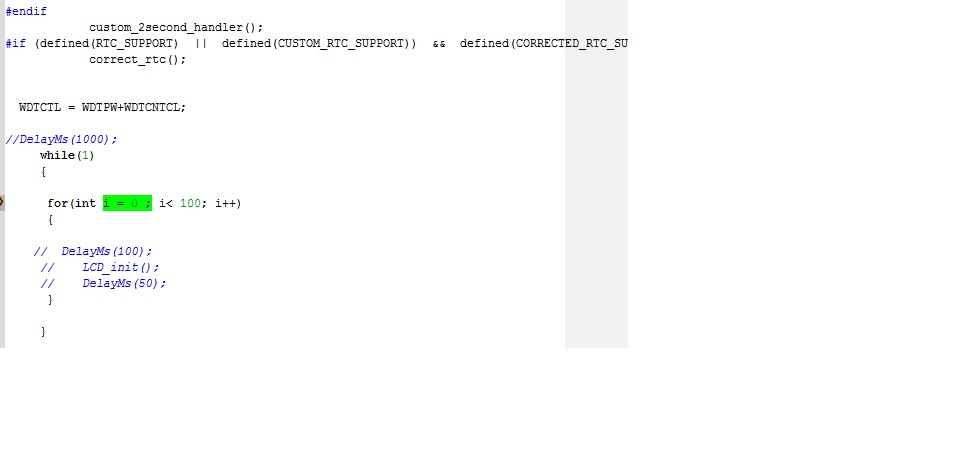
    My loop is short as follows.

         while(1)
         {
           
          for(int i = 0 ; i< 100; i++)
          {
       
          DelayMs(100);  
             LCD_init();
             DelayMs(50);
          }
           
         }

    This deletes the display.

    Tony Philipsson said:
    3: You have to make sure other IRQ's don't stop WDT or kick it
         You could always bic.w #GIE,SR
         before you start the WDT in your delayed-reset code.

    I just set it right before the infinite and also tested with delay as well! Non worked! 

  • Delete, one or all of the below, does the WDT do it's job and a reset will happen after 1 sec?

    DelayMs(100);  
     LCD_init();
     DelayMs(50);

    If yes, then one of those sub-routines kicks the dog or turn off wdt

    They need to be done before you go to a infinity-loop

  • That is so weird! 

    It still goes to the loop! :(

  • Goes to what loop?
    How is that Loop started?, is it a time based IRQ?
    Probably is, as delay() in C is whatever C wants it to be and you have no control.
    And a empty While(1){} may be deleted by C, so put something there.

    before the WDCTL line add this: _BIC_SR(GIE) 

  • Infinite loop! The one with delay as you pointed at!

    They have used timers and delay as well, yes.

    oh I see let me try then!

    Thanks!

  • When I add    _BIC_SR(GIE) ; before WDT, it does not even show the infinite loop! It kills everything!

  • If the loop keeps coming back where you check for value=0 and start wdt.

    Then you have to, as to start WDT only once as repeated starts = kicking it

    if wdt_flag=0{
    WDTCTL = WDTPW+WDTCNTCL+WDTSSEL
    wdt_flag = 1
    }

  • I still doubt whether the following can start the watchdog on my code or not!

    /* Watchdog mode -> reset after expired time */
    /* WDT is clocked by fSMCLK (assumed 1MHz) */
    #define WDT_MRST_32         (WDTPW+WDTCNTCL)                                  /* 32ms interval (default) */
    #define WDT_MRST_8          (WDTPW+WDTCNTCL+WDTIS0)                           /* 8ms     " */
    #define WDT_MRST_0_5        (WDTPW+WDTCNTCL+WDTIS1)                           /* 0.5ms   " */
    #define WDT_MRST_0_064      (WDTPW+WDTCNTCL+WDTIS1+WDTIS0)                    /* 0.064ms " */
    /* WDT is clocked by fACLK (assumed 32KHz) */
    #define WDT_ARST_1000       (WDTPW+WDTCNTCL+WDTSSEL)                          /* 1000ms  " */
    #define WDT_ARST_250        (WDTPW+WDTCNTCL+WDTSSEL+WDTIS0)                   /* 250ms   " */
    #define WDT_ARST_16         (WDTPW+WDTCNTCL+WDTSSEL+WDTIS1)                   /* 16ms    " */
    #define WDT_ARST_1_9        (WDTPW+WDTCNTCL+WDTSSEL+WDTIS1+WDTIS0)            /* 1.9ms   " */
    

    Everything is messed up! Ah!

  • Here is working nicely!

    oid main(void)
    {
     WDTCTL = WDTPW +WDTHOLD;                 // Do not rest! --- Disable the WDT
      // WDTCTL =   WDT_ARST_16 ;
    while(1)
    {
     
          //*** LCD Setups
          P7DIR = 0x00; // Redundant
          P8OUT = 0;    // Before set DIR
          P8DIR = 0x07; //P8.2=>EN, P8.1=>RW, P8.0=>RS
          
          DelayMs(100); 
          LCD_init();
          DelayMs(50);


    for(int j=0; j<=7;j++)
    {
        LCD_cmd(0x80);
      LCD_dat(esi[j]);
      DelayMs(1000);
    } 
      //******    reset here! --- Enable the WDt
        
    WDTCTL =   WDT_ARST_1_9  ;
     // WDTCTL = WDTPW+WDTHOLD;
    //DelayMs(1000);
      while(1)
       {
          for (int i = 0 ; i <= 100; i++)
          {
          DelayMs(100); 
          LCD_init();
          DelayMs(50);
          
          
        LCD_cmd(0x80);
      LCD_dat(0xFF);
            
          }
       }
    
    
    }
    
    }
    

    stop and before while(1) starts!

  • But on that complicated code I have timing problem perhaps! :(

  • Tony Philipsson said:

    If the loop keeps coming back where you check for value=0 and start wdt.

    Then you have to, as to start WDT only once as repeated starts = kicking it

    if wdt_flag=0{
    WDTCTL = WDTPW+WDTCNTCL+WDTSSEL
    wdt_flag = 1
    }

    Actually I found out that I cannot stop the WDT from "main.c", It will be stopped by "background.c" then I can start it from the Main which seems does not work properly!

  • Actually, the WDTCTL= WDT_ARST_1000 does not work!

  • Tony Philipsson said:

    If the loop keeps coming back where you check for value=0 and start wdt.

    Then you have to, as to start WDT only once as repeated starts = kicking it

    if wdt_flag=0{
    WDTCTL = WDTPW+WDTCNTCL+WDTSSEL
    wdt_flag = 1
    }

    Still gets stuck in the while!

               update_display();
           
              if (wdt_flg == 1)
              {
                 WDTCTL = WDTPW +WDTCNTCL+WDTSSEL+WDTIS0;
                
              wdt_flg *= 0;
              }
              
                while(1)
                {
                  LCD_cmd(0x80);
                  LCD_dat(0xFF);
                }
               

**Attention** This is a public forum