This thread has been locked.

If you have a related question, please click the "Ask a related question" button in the top right corner. The newly created question will be automatically linked to this question.

#1965 cannot open source file “intrinsics.h”

Other Parts Discussed in Thread: MSP430WARE

I am trying to do lab 3a from C:\msp430_workshop\FR5969_fram\lab_03a_gpio\lab_03a_gpio_readme.txt. I created a new project with a main.c file and started typing the code in doing builds as I went so that I would know as soon as there was a problem. I made it as far as ‘#include <driverlib.h>’ and started getting errors.

After some Google searches I imported the solution C:\msp430_workshop\FR5969_fram\solutions\lab_03a_gpio_solution.zip into C:\msp430_workshop\FR5969_fram\workspace. I verified that the solution project worked then copied the driverlib directory from C:\msp430_workshop\FR5969_fram\workspace\lab_03a_gpio_solution to C:\Users\BigChris\workspace_v6_0\Lab_3a_GPIO_CJH. Then I added the line "${PROJECT_ROOT}/driverlib/MSP430FR5xx_6xx" to the projects include options. That got me to these errors:

#1965 cannot open source file “intrinsics.h”

#1965 cannot open source file “stdint.h”


After some more Google searches I think CCS6 is looking for the files:

C:\ti\ccsv6\tools\compiler\msp430_4.3.3\lib\src\ intrinsics.h

C:\ti\ccsv6\tools\compiler\msp430_4.3.3\lib\src\ stdint.h

I don’t know if that is the problem and if it is how to direct CCS6 to those files.

Please help.

It does not seem that I should be having this much trouble typing in one of the first getting started labs

Thanks In Advance

  • Chris Humme said:
    After some more Google searches I think CCS6 is looking for the files:

    C:\ti\ccsv6\tools\compiler\msp430_4.3.3\lib\src\ intrinsics.h

    C:\ti\ccsv6\tools\compiler\msp430_4.3.3\lib\src\ stdint.h

    CCS should be looking for the files in the include directory in the compiler installation directory, which in your case is C:\ti\ccsv6\tools\compiler\msp430_4.3.3\include

    Chris Humme said:
    I don’t know if that is the problem and if it is how to direct CCS6 to those files.

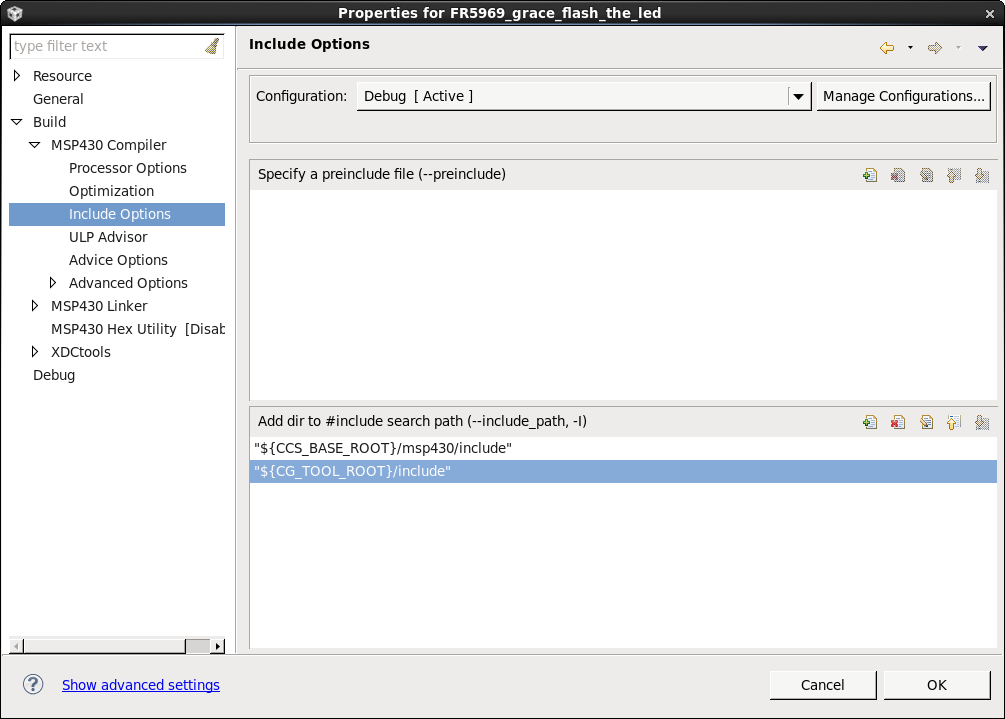
    In the Include Options in the CCS project properties there should a entry for "${CG_TOOL_ROOT}/include" in the #include search path which allows CCS to find the stdint.h and intrinsics.h include files:

  • Thanks for the response.

    I looked and the “${CS_TOOL_ROOT}/include” entry was in the #include search path as your screen capture showed. BTW thank for the screen capture rather than just saying include options and leaving me to hope I had found what you were describing.  The value for the system environmental variable CG_TOOL_ROOT is c:/ti/ccsv6/tools/compiler/msp430_4.3.3 which seems correct. What seemed wrong was that there is no copy of driverlib.h in the directory c:/ti/ccsv6/tools/compiler/msp430_4.3.3/include.

    There are 18 copies of driverlib.h on my PC (I installed the MSP_Workshop_Setup_V3.21.exe three times because it seemed incomplete). I considered copying driverlib.h to c:/ti/ccsv6/tools/compiler/msp430_4.3.3/include but there were 2 versions, with timestamps 6/25/2014 and 7/9/2014. That was when I found the suggestion to copy the driverlib directory to the project.

    So I guess the big question would be, is there supposed to be a copy of driverlib.h in the directory c:/ti/ccsv6/tools/compiler/msp430_4.3.3/include and if so should I reinstall CCS 6?

    Also is ‘#1965 cannot open source file’ a compiler or linker error and how would a person know?

  • The "driverlib.h" file is installed as part of the MSP430ware Driver Library. As with any library, the tricky part can often be getting all the include paths setup correctly.

    Since you are trying to complete one of the MSP430 Workshop Lab exercises, did you:

    • Install all the tools described in the Workshop Installation document?
    • Follow the step-by-step directions for the lab exercise found in the Student Workbook?

    In case you haven't, both of these PDF files can be found on the Workshop's wiki page:

    http://processors.wiki.ti.com/index.php/Getting_Started_with_the_MSP430_LaunchPad_Workshop

    In the lab steps, we describe how to create a new DriverLib project.

    • Lab 3a has you create a new empty project, as it sounds like you accomplished. Then, the next few steps show you how to add the Driver Library to your project. Finally, we add the bit of code to implement GPIO.
       
    • Lab 3b includes a shortcut. You can create a new MSP430 project that automatically includes the Driver Library code and references. This saves a few steps, so once I learned this, it's what I do every time from now on. (But, the shortcut hides some details which is why we start with the 'harder' example.)

    The MSP430ware Driver Library User's Guide also documents how you can create projects that utilze its code, but we've tried to include all the necessary details in the lab exercise steps of the workshop.

    I hope this helps point you in the direction of getting your code running!

    Take Care,
    Scott

**Attention** This is a public forum