This thread has been locked.

If you have a related question, please click the "Ask a related question" button in the top right corner. The newly created question will be automatically linked to this question.

RE: Creating a custom BSL for firmware update

Other Parts Discussed in Thread: MSP430FR5969, MSP430FR5739

I downloaded MSPBoot 1_01_00_00 from link ‘’ and tried to build MSPBoot on CCS version 6.0 with TI V4.4.2 compiler, it is throwing following errors. These errors are after I corrected the path of the included header files. Please help me to resolve this problem.

Thanks,

Deep

  • Hi Deep,

    I just tried this on the same version of CCS (6.0.1.00040) and v4.4.2 compiler.

    See the warning at the bottom? You need to go to Project > Properties and under General, you need to set the drop down to set the compiler version to the latest version, TIv4.4.2. What's happening right now is the project setting is still set to the older compiler version, even though you have a newer one installed. When I did this, the warning and errors went away.

    One other tip - you mentioned having to fix paths of header files - I did not have this issue. I'm wondering if, when you imported the project, if maybe you accidentally had "Copy files into workspace" checked? When I imported the project, I followed the steps in www.ti.com/lit/pdf/slaa600 and I see that it has copy files into workspace unchecked in the project import dialog - doing this I did not have to change any paths.

    Regards,

    Katie

  • Hello Katie,

    I did both changed the compiler version and unchecked copy files into workspace but still getting errors. Please find attachment.

    Regards,

    Deep

  • Hi Deep,

    I reproduced your issue - sorry for your difficulties. Try going to Project > Properties > Build > MSP430 Linker > Advanced Options > Runtime Environment and for the dropdown for Initialization model, try setting this to be blank instead of "Link using RAM Autoinitialization model". Then clean and rebuild. For me this resolves the issue - we are still determining the best way to fix it in our MSPBoot code on the web, but hopefully this will get you up and running.

    What seems to be happening is that boot.c in our MSPBoot project, is overriding _reset_vector and _stack in the runtime support library boot.c. This is happening correctly in the older compiler version (I found that it works correctly in 4.3.6) but in the newer ones (4.4.0 and later) we are getting this error. Setting the initialization model blank in this way forces it not to use the boot.c in the runtime support library and to use our custom boot.c instead, and this is why the error disappeared. Thanks so much for reporting the problem so we can update this project so others don't run into the same issue.

    Regards,
    Katie

  • Hi Katie,

    Now I am working on it further.... but I am working on FR5969 so I changed the project settings from FR5739 to FR5969 and tried to build it. Now I am getting following linking errors. Please help me to resolve these error and warnings.
    Regards,

    Deep

  • Hi Katie,

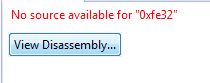
    Now I try to debug the project but getting above error. 0xfe32 is address to _c_int00.

    Regards,

    Deep

  • Hi Deep,

    When you changed the device to MSP430FR5969 in CCS, it added a linker cmd file for the FR5969 (lnk_msp430fr5969.cmd). However, MSP-BOOT uses a modified linker command file - see the Config folder in the project.

    What you need therefore is a modified linker file for the MSP430FR5969 to work for MSP-BOOT. Fortunately, we provide a script for generating MSP-BOOT linker files. See section 4.2.3 of the MSP-BOOT app note www.ti.com/lit/pdf/slaa600. Please read through this section to see how to use the script to generate these files for FR5969. Then you'll want to replace the linker file in the Config folder in your project (and delete the default lnk_msp430fr5969.cmd from your project).

    Hope this helps!
    Regards,
    Katie
  • Hello Katie,

    Instead I tried it by changing the contents of lnk_mspFR5969.cmd with lnk_msp430FR5739_I2C_1_5KB_Dual_Boot.cmd file. Additionally I generated a new cmd file as suggested by you but landed in the same issue. Below is the newly generated command file.

    --------------------------------------------------------------------------------------START OF CMD FILE-----------------------------------------------------------------------------------------

    /******************************************************************************/
    /* LINKER COMMAND FILE FOR MSPBoot BOOTLOADER USING MSP430FR5969  */
    /* File generated with MSPBootLinkerGen.pl on 04-24-2015 */
    /*----------------------------------------------------------------------------*/
    
    
    /****************************************************************************/
    /* SPECIFY THE SYSTEM MEMORY MAP                                            */
    /****************************************************************************/
    /* The following definitions can be changed to customize the memory map for a different device
     *   or other adjustments
     *  Note that the changes should match the definitions used in MEMORY and SECTIONS
     *
     */
    /* RAM Memory Addresses */
    __RAM_Start = 0x1C00;                 /* RAM Start */
    __RAM_End = 0x1FFF;                     /* RAM End */
        /* RAM shared between App and Bootloader, must be reserved */
        PassWd = 0x1C00;                 /* Password sent by App to force boot  mode */
        StatCtrl = 0x1C02;             /* Status and Control  byte used by Comm */
        CI_State_Machine = 0x1C03;         /*  State machine variable used by Comm */
        CI_Callback_ptr = 0x1C04;   /* Pointer to Comm callback structure */
        /* Unreserved RAM used for Bootloader or App purposes */
        _NonReserved_RAM_Start = 0x1C06; /* Non-reserved RAM */
    
    /* Flash memory addresses */
    /* Download area: C200-DDFE*/
    /* App area     : DDFF-F9FF*/
    /* Boot area    : FA00-FFFF*/
    _FLASHDOWN_START = 0xC200; /* Start if download area */
    __Flash_Start = 0xDDFF;             /* Start of Flash */
    __Flash_End = 0xFFFF;                           /* End of Flash */
        /* Reserved Flash locations for Bootloader Area */
        __Boot_Start = 0xFA00;         /* Boot flash */
        __Boot_Reset = 0xFFFE;                          /* Boot reset vector */
        __Boot_VectorTable = 0xFF90;      /* Boot vector table */
        __Boot_SharedCallbacks_Len = 8; /* Length of shared callbacks (2 calls =4B(msp430) or 8B(msp430x) */
        __Boot_SharedCallbacks = 0xFF88; /* Start of Shared callbacks */
        /* Reserved Flash locations for Application Area */
        _AppChecksum = (__Flash_Start);                 /* CRC16 of Application */
        _AppChecksum_8 = (__Flash_Start+2);             /* CRC8 of Application */
        _App_Start = (__Flash_Start+3);                 /* Application Area */
        _App_End = (__Boot_Start-1);                    /* End of application area (before boot) */
        _CRC_Size = (_App_End - _App_Start +1);         /* Number of bytes calculated for CRC */
        _App_Reset_Vector = (__Boot_Start-2);           /* Address of Application reset vector */
        _App_Proxy_Vector_Start = 0xF990; /* Proxy interrupt table */
        // Addresses for Dual Image support in download ares
            _AppChecksumDown = (_FLASHDOWN_START);      
            _AppChecksumDown_8 = (_FLASHDOWN_START+2);  
            _App_StartDown = (_FLASHDOWN_START+3);
            _App_EndDown = (__Flash_Start-1);
    
    /* MEMORY definition, adjust based on definitions above */
    MEMORY
    {
        SFR                     : origin = 0x0000, length = 0x0010
        PERIPHERALS_8BIT        : origin = 0x0010, length = 0x00F0
        PERIPHERALS_16BIT       : origin = 0x0100, length = 0x0100
        // RAM from _NonReserved_RAM_Start - __RAM_End
        RAM                     : origin = 0x1C06, length = 0x3FA
        INFOBOOT                : origin = 0x1800, length = 0x101
        // Flash from __Boot_Start -( __Boot_SharedCallbacks or INT_VECTOR_TABLE)
        FLASH                   : origin = 0xFA00, length = 0x588
        // Shared callbacks from __Boot_SharedCallbacks + Len (when used)
        BOOT_SHARED_CALLBACKS   : origin = 0xFF88, length = 8
        // Boot vector Table from __Boot_VectorTable- __Boot_Reset
        INT_VECTOR_TABLE        : origin = 0xFF90, length = 0x6E
        // Boot reset from __Boot_Reset-__Flash_End
        RESET                   : origin = 0xFFFE, length = 0x0002
    }
    
    /****************************************************************************/
    /* SPECIFY THE SECTIONS ALLOCATION INTO MEMORY                              */
    /****************************************************************************/
    
    SECTIONS
    {
        .bss        : {} > RAM                /* GLOBAL & STATIC VARS              */
        .data       : {} > RAM                /* GLOBAL & STATIC VARS              */
        .sysmem     : {} > RAM                /* DYNAMIC MEMORY ALLOCATION AREA    */
        .stack      : {} > RAM (HIGH)         /* SOFTWARE SYSTEM STACK             */
    
        .text       : {} >> FLASH |INFOBOOT   /* CODE                 */
        .cinit      : {} >> FLASH |INFOBOOT   /* INITIALIZATION TABLES*/
        .const      : {} >> FLASH |INFOBOOT   /* CONSTANT DATA        */
        .cio        : {} > RAM                /* C I/O BUFFER                      */
    
        .BOOT_APP_VECTORS : {} > BOOT_SHARED_CALLBACKS
        /* MSP430 INTERRUPT VECTORS          */
        .BOOT_VECTOR_TABLE : {} > INT_VECTOR_TABLE
        .reset       : {}               > RESET  /* MSP430 RESET VECTOR         */ 
    }
    
    /****************************************************************************/
    /* INCLUDE PERIPHERALS MEMORY MAP                                           */
    /****************************************************************************/
    
    -l MSP430FR5969.cmd
    
    ------------------------------------------------------------------------------------END OF CMD FILE------------------------------------------------------------------------------------

    Please let me know if I am doing something wrong.

    Thanks & Regards,
    Deep


  • Hi Deep,

    Which specific project in MSP-BOOT are you building, so that I can try to reproduce your issue? (list the path and name of the project you're using from the MSP-BOOT download). Please also list any steps I need to take to reproduce the issue (do I simply need to change the Project > Properties device to FR5969?)

    Regards,
    Katie
  • Hi Katie,

    I am building 'MSPBOOT\Target\FR5739_I2C\CCS\MSPBoot\BSLBased_DualImg'. The first thing I did is that I changed the Project->Properties to FR5969 and changed the cmd file too accordingly as discussed earlier. Then I tried to debug the it but the stated problem occurred.

    Regards,

    Deep

  • Hi Deep,

    I don't think I exactly reproduced your issue, but the exercise of trying this did cause me to run into a few things:

    On MSP430FR5969, the register names for the MPU and usage of the MPU for setting the boundaries are different. This is because the FR5969 allows you to set the boundaries with greater granularity. So on FR5739 there is the MPUSEG register that lets you set the boundaries for both segments at once, but on FR5969 there are now two registers MPUSEGB1 and MPUSEGB2. So the code in main.c needs to change to use these MPUSEGB1 and MPUSEGB2 registers instead for setting the boundaries. Taking into account that there are more bits needed for setting the boundary as well - the whole MPU_init function has to change - for reference compare the MPU boundary section of www.ti.com/.../slau272 FR57xx user guide to the MPU section of www.ti.com/.../slau367 the FR59xx user guide. I'd recommend comparing the MPU c-code examples for both devices as well to see how the boundary settings change.

    In addition, I found that I had to go to and change in the project settings, under Project > Properties > Build > MSP430 Compiler > Advanced Options > Predefined Symbols. You'll see here there is a symbol defined __MSP430FR5739__ . I changed this to be for __MSP430FR5969__ instead.

    I also noticed that it didn't look like you had generated the linker file with the right addresses for MSP430FR5969. You need to call the linkerGen perl script with the parameters for the FR5969 device - it has a different amount of RAM and the FRAM starts at a different address than on the FR5739. See the information in SLAA600 section 4.2.3 as well as comparing the parameters used in the .bat file for generating the FR5739 linker .cmd files, with the default MSP430FR5739 linker file .cmd file. Then you'll want to call with the correct addresses/parameters/device name etc in reference to the information in the MSP430FR5969 .cmd file instead.

    Regards,
    Katie
  • Hi Katie,

    Sorry that I didn't mention these things in my earlier post but of course I did change the main.c as following

    MPUSEGB1 = MPUB1;

    MPUSEGB2 = MPUB2;

    and under Project > Properties > Build > MSP430 Compiler > Advanced Options > Predefined Symbols the symbol __MSP430FR5739__ was automatically changed to __MSP430FR5969__. Else It would have not compiled...... I am facing problem when I try to Debug.

    Regarding cmd file...... Yes I didn't generated the linker file with the right addresses for MSP430FR5969. As it has more memory than MSP430FR5739...... so I think it should work even for MSP430FR5969 cmd file as it is all FRAM and can be left unused in many real scenarios. What is your opinion? Is it mandatory to use right addresses for MSP430FR5969?? This is the only thing left according to your reply.

    Regards,

    Deep

  • Hi Deep,

    I can take a look at your project, but it would be easier if you can zip your whole project. Can you send it?

    Regards,

    Luis R

  • Hi Luis,

    Please find the attached project. Hope I have attached correctly.

    Regards,

    DeepMSPBOOT.zip

  • Hi Deep,

    Based on your comments, you are only having problems while debugging now, correct?
    The problem seems to be that the debug symbols are disabled. Go to the project properties -> Build -> Advanced Options -> Advanced Debug Options -> Debugging Model -> Full Symbolic Debug

    Regards,
    Luis R

**Attention** This is a public forum
