This thread has been locked.

If you have a related question, please click the "Ask a related question" button in the top right corner. The newly created question will be automatically linked to this question.

Help for ez430-RF2500 UART communcation problem


I have a ez430-RF2500 kit which I connected to my laptop. I have  installed IAR Embedded Workbench and also Sensor Monitor according to the documentation. But I cannot receive the data. The data comes to the Hyperterminal but it is in garbled form which I have pasted here...


N :68F.9B,taetr:y13.,VtSerght0:15,%ERn: o

 doeH:BU,0eTpm :694.,FBtaetyr3:5.,VtSergnt:h00%0R,:Eon

oNed0:00,1eTpm :8.7F6B,taetyr3:1.,VtSrnetg:h50%0R,:Eon

oNedH:BU0T,me:p9 .6F4B,taetyr:.3V5S,rtnetg:h000,%ERn: o

oNed0:00,1eTpm:8 .7F6B,taetyr3:1.VS,rtnetg:h50%1R,En: o

oNedH:BU0T,me:p9 .6F4B,tatre:y.3V5S,rtnetg:h000,%ERn: o

NNed0:00,1Tme:p8 .7F6B,taetyr:.3V1S,rtnetg:h501,%ERn: o

 oedH:BU,0eTpm :694.FB,taetyr3:5.,VtSerntg:h00%0R,:Eon

oNed0:001T,me:p8 .7F6B,tatre:y.3V1S,rtnetg:h005,%ERn: o

NNedH:BU,0eTm:p9 .5F7B,taetyr:.3V5S,rtnetg:h00%0,ERn: o

 oed0:00,1eTpm :786.FB,taetyr3:1.,VtSerntg:h50%0R,:Eon


Please help!

  • Hi,


    Check the Com port settings like Baud rate and flow-control. The settings are mentioned in SLAU227C, the

    user Guide for the kit on page 5. Also you can see the serial communication in the Sensor Monitor, when selecting

    Menu/Console...


    Klaus

  • Dear Klaus,


    I have tried changing the settings from "9600-8-N-1 None " but the other settings just don't work. If I set the baud rate incorrectly the characters are just not readable like this...

    )ÔBK}kæ„'BïüJ·ÂCçAkæ„'BïüJ·Â7j)_

    So I think settings are not an issue as Sensor Monitor -> Menu/Console too shows the same the stuff that is data is valid but text garbled.


    I quote here the batch no. of my hardware for your ready reference as I think it can have a bearing on my problem. Here it is:

    LOT:02035970.1

    Date:12/2008

    Hope it helps!!

    I have checked everything in the manuals before seeing this forum. Kindly help.

  • Hey Sachin,


    the fact, that the "garbled text" seems to have a steady size including an End-of line character indicates, that the

    problem you have has nothing to do with the hardware nor with the COM-port settings.  The first thought, which

    I had about the "garbled text" is, that the expected ASCII characters come in in binary format So I guess, that this

    problem has something to do with your PC setup. Which OS do you use? (XP? Win7?) and which language?


    You might as well try to use a serial monitor to check the data coming in over the serial port. Here's a link to a

    freeware tool.

    http://www.hhdsoftware.com/Downloads/index.html


    Klaus

  • I am using Windows Xp Service Pack 3. I do coding in C language.

    Today I tried downloading the new version of Sensor Monitor Demo (Rev.C) into the kit but sadly that also is not working and giving compilation error.:(


  • What compilation error are you getting with the Rev. C version of the Sensor Monitor Demo?

    When you mention "coding in C language", to what are you referring?  Is this the MSP430 project or your own PC host application software?

  • Sachin,

    don't worry. You will make it work again. I had the same headache. Please carefully follow this explanation:

    Steps to successfully build the CCS Wireless Sensor Monitor project:

    1) The workspace should be opened in the following directory:

    ~/CCE_Source/Projects/Examples/peer_applications/eZ430RF

    2) Once created, the eZ430-RF2500_WSM project should be imported into the workspace:
        a. Select "Project > Import Existing CCS/CCE Eclipse Project"
        b. Navigate to your workspace and click OK
        c. Make sure the eZ430-RF2500_WSM project is selected and click Finish

    3) Ignore the "C/C++ indexin" error

    4) Select "Window > Preferences... > General > Workspace > Linked Resources > New..." to create a new path variable
        a. Name the variable: eZ430_WSM_ROOT
        b. Click on Folder and select the following directory:
       
        ~\eZ430-RF2500 Wireless Sensor Monitor\CCS_Source

    5) Build and download the new project

    This explanation came with the zip file of the Wireless Sensor Monitor Source code, which you will find on the TI homepage. Please take care, that you upload

    the Access Firmware and the Remote Sensor Firmware on the right target Micro. Please do not only depend on this forum for questions. The main effect on your

    knowledge and experience is reading, reading, reading, reading and working on the CCS and the target platform...


    Have fun, Klaus

  • Dear Klaus,


    Thanks I will try out the CCS project and let you know.


    Regards,

    Sachin

  • Hi Klaus,


    The problem was is solved although ambiguity remains.

    I did a re-install of all the MSP stuff and used the same firmware to see if the problem persists. But it didnot. Thank GOD..

    Though this is not a satisfacory but still works .. very strange!!


    Regards,

    Sachin

  • Two possible explanations (just guesses):

    Maybe in the project was the full printf support not enabled. If it isn't, the standard C library will treat printf just like puts and just print out the format string (maybe with the format specifyers removed, I don't know).

    It is a project/linker setting and NOT controlled through source code.

    Another possible reason is that on the PC side the incoming data was (mis)interpreted as 16 bit unicode text. It gives similar output.

  • Hi, I have the same problem!

    I think that the problem is in the configuration of the OS of my PC but I don't know how to change it. I can tell that because I tested my EZ430-RF2500 on my PC (with windows xp UE) and on a virtual machine (windows xp colossus edition running on virtualbox) and in the latter runs OK.

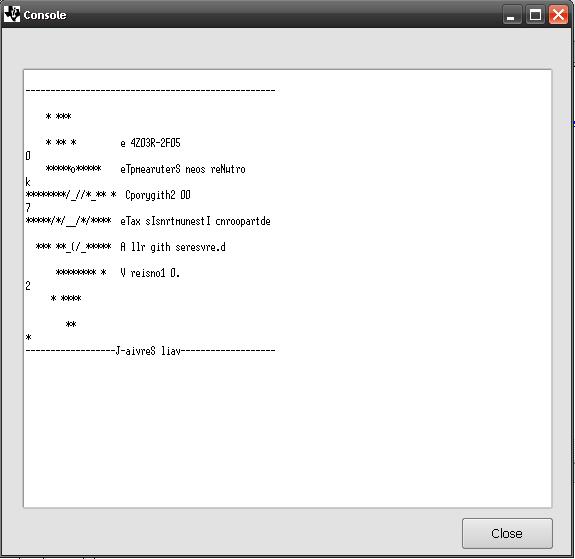
    See the Splash Screen that the EZ430-RF2500 Sensor Monitor gives on my PC (with windows xp UE)


    Note how, for example, the string "Javier Silva" at the end appears. It seems that the incoming byte is "pushed" on a stack (or buffer) to form a 16bits data and "poped" like 16bits but the two bytes are twisted.

    I hope that this gives us a clue to fix the problem.

  • Yes Javier, 


    You may  be right in the sense the problem has something do with settings of Windows but which are the settings except the Baud rate, data bits, parity and stop bits that are accessible to a windows user. Currently I am solving the problem by removing and attaching the kit multiple times. After doing this 2-3 times the data automatically comes in the right format. Try this yourself and see. One noteworthy thing in your case is the Splash Screen which comes when the communication between PC and AP starts. I am not getting that stuff however. Let it be. Just concentrating on the problem on hand. I think the TI people should take serious note of this and post some solutions on the problem. Otherwise people like us have no where to go. This is a serious and annoying issue. Typical of the Alpha and Beta tests. If the kit is properly tested then this issue should not come in the first place and that too out-of-the-box.


    Thanks Javier for post your comments. Yours and the previous posts are what makes us novices continue our efforts. Otherwise I would have given up far earlier. The fact that one cannot see data in its entity and correctfullness is demotivating. Anyways.. let us continue  our efforts.


    Regards

    sachin

  • Twisting letters is something that can happen if somewhere in the chain the incoming data is treated as UTF16 charset and then again printed as normal ASCII.
    It may happen that the (falsely taken) 16 bit data is adjusted from network byte order to machine byte order without being sent in network byte order at all (but as a chain of single-byte chars instead).
    I must admit it is a very constructed scenario.

    Anyway, the appearance of the mangled name is even more weird.

    -J-aivreS liav jas obviously 'iv','re','S ' etc. twisted. But then, '-a' and '-J' should be twisted too. Yet the 'a' is at the right place and 'J-' is twisted and not '-J'. This is strange. The algorithm mangling the text must have coughed at the 'a'.

    Same for eTax sIsnrt where the 'I' stands as single, not switched character.

    How is the data sent to the PC? serial? USB? If USB, maybe the single, correct letters are the last byte in an USB block and therefore not twisted.

    Anyway, the console seems to be TI-made and therefore I wouldn't expect this kind of things happen, unless you have an exotic OS setup (with System-language Kanji or Chinese or such)

  • hi.. i have recently purchase d the RF2500 wireless dev tool... i installed the driver in the laptop and worked on the demo wireless sensor project..it worked fine...

    but when i plugged in my home system, the led blinked and it stopped once in a while and its not blinking then....i am very tensed of what had exactly happened... plese tell me what should i do now..

    also wen i tried to perform the peer-to-peer demo project the CCS gave me a error while debugging that "ANOTHER DEVICE IS CONNECTED" , DEVICE NOT FOUND....please tell me what should i do now...


    regards

    aravind

  • Hi Aravind,


    I would like to suggest you to go for IAR Embedded Workbench for the first time. As you get experience move to CCS . 


    Hope this helps.


    Regards,

    Sachin

  • Someone found a solution for the "garbled text"?? Sometimes the problem goes away by removing and attaching the kit multiple times (like Sachin said), but this is not the solution.

    If someone find the final solution, please share it

    Thanks in advance to all.

  • Hi, all

    I has fixed this problem with following code.  In my environment, the problem completely disappeared.

    I hope this information may help you.

    Thanks,

    --

    Replace COM_init() in virtual_com_cmds.c (slac139f)

    --

    #define FIX_COM_PROBLEM 1 // resolve serial communication problem, may be...

    /******************************************************************************/
    // End Virtual Com Port Communication
    /******************************************************************************/
    void COM_Init()
    {
    #ifdef FIX_COM_PROBLEM
        // wait ~5 second for PC USB device driver initialization
        __delay_cycles(BSP_CONFIG_CLOCK_MHZ_SELECT * 1000000 * 5);
        // 2. Initialize all USCI registers with UCSWRST = 1 (including UCAxCTL1)
        UCA0CTL1 |= UCSSEL_2;                      // SMCLK
    #else
      P3SEL |= 0x30;                            // P3.4,5 = USCI_A0 TXD/RXD
      UCA0CTL1 = UCSSEL_2;                      // SMCLK
    #endif

    #if (BSP_CONFIG_CLOCK_MHZ_SELECT == 1)
      UCA0BR0 = 104;                            // 9600 from 1Mhz
      UCA0BR1 = 0;
      UCA0MCTL = UCBRS_1;
    #elif (BSP_CONFIG_CLOCK_MHZ_SELECT == 2)
      UCA0BR0 = 0xDA;                           // 9600 from 2Mhz
      UCA0BR1 = 0x0;
      UCA0MCTL = UCBRS_6;
    #elif (BSP_CONFIG_CLOCK_MHZ_SELECT == 4)
      UCA0BR0 = 0xA0;                           // 9600 from 4Mhz
      UCA0BR1 = 0x1;
      UCA0MCTL = UCBRS_6;
    #elif (BSP_CONFIG_CLOCK_MHZ_SELECT == 6)
      UCA0BR0 = 0x7B;                           // 9600 from 6Mhz
      UCA0BR1 = 0x2;
      UCA0MCTL = UCBRS_3;
    #elif (BSP_CONFIG_CLOCK_MHZ_SELECT == 8)
      UCA0BR0 = 0x41;                           // 9600 from 8Mhz
      UCA0BR1 = 0x3;
      UCA0MCTL = UCBRS_2;
    #elif (BSP_CONFIG_CLOCK_MHZ_SELECT == 10)
      UCA0BR0 = 0x79;                           // 9600 from 10Mhz
      UCA0BR1 = 0x4;
      UCA0MCTL = UCBRS_7;
    #elif (BSP_CONFIG_CLOCK_MHZ_SELECT == 12)
      UCA0BR0 = 0xE2;                           // 9600 from 12Mhz
      UCA0BR1 = 0x4;
      UCA0MCTL = 0;
    #elif (BSP_CONFIG_CLOCK_MHZ_SELECT == 16)
      UCA0BR0 = 0x82;                           // 9600 from 16Mhz
      UCA0BR1 = 0x6;
      UCA0MCTL = UCBRS_6;
    #else
    #error "ERROR: Unsupported clock speed.  Custom clock speeds are possible. See comments in code."
    #endif

    #ifdef FIX_COM_PROBLEM
      // 3. Configure ports.
      P3SEL |= 0x30;                            // P3.4,5 = USCI_A0 TXD/RXD
    #endif

      UCA0CTL1 &= ~UCSWRST;                     // **Initialize USCI state machine**
      IE2 |= UCA0RXIE;                          // Enable USCI_A0 RX interrupt
      __enable_interrupt();
    }

  • Taro Yamada said:
    #else
      P3SEL |= 0x30;                            // P3.4,5 = USCI_A0 TXD/RXD
      UCA0CTL1 = UCSSEL_2;                      // SMCLK
    #endif

    The problem is the assignment. While setting the clock source, it implicitely clears SWRST (while your fix doesn't, but the simple OR you use might select something else than SMCLK if UCSSEL_x isn't clear).
    The following baudrate settings are then done while the USCI isn't in reset anymore, which is illegal (see users guide) and causes the state machine to not properly initialize to the wanted baudrate. Possibly the MCTL setting is ignored or something like that.

  • Jens-Michael Gross said:

    The problem is the assignment. While setting the clock source, it implicitely clears SWRST.

    You are right.  The original code violates the recommended USCI initialization process described in MSP430x2xxx Family User's Guide.  But only this modification does not fix the problem.

    It needs longer delay to avoid this issue on my PC environment.

    // wait ~5 second for PC USB device driver initialization
    __delay_cycles(BSP_CONFIG_CLOCK_MHZ_SELECT * 1000000 * 5);

    Thanks,

**Attention** This is a public forum