This thread has been locked.

If you have a related question, please click the "Ask a related question" button in the top right corner. The newly created question will be automatically linked to this question.

MSP430FR69989 Watchdog Example

Other Parts Discussed in Thread: MSP430FR6989

Hello!

I've explored example projects for MSP430FR6989. Actually, I'm looking for an example of using watchdog timer for main function - to reset an MCU when some software dead loop occurs.

But I didn't find the example in C-language of using watchdog timer this way.

MSPWare 2_21_00_39 contains 4 examples for WDT:

msp430fr69xx_wdt_01 - Toggle P1.0 using software timed by WDT ISR
msp430fr69xx_wdt_02 - Toggle P1.0 using software timed by WDT ISR
msp430fr69xx_wdt_04 - Allow WDT+ in watchdog mode to timeout
msp430fr69xx_wdt_05 - This program demonstrates how a reset is executed if the CPU tries to fetch instructions from within the module register memory address range (0x0100 --0x0FEF) or from within unused address ranges.

Probably, msp430fr69xx_wdt_04 is what do I need. Here WDT is used for resetting the MCU. But here I can't find any lines of code, which sets up a WDT, no even one line.

Could anyone suggest me some more explicit example of using WDT in MSP430FR6989, where I can observe how to set up WDT period, how to make an MCU reset, etc.?

  • Hi Vyacheslav,

    by default the WDT module is already configured in watchdog mode sourced by SMCLK which will generate a reset after roughly 32ms. You need to reconfigure this behavior if you want to use the module in a different mode.

    Thanks and best regards,
    Christoph

  • Vyacheslav,

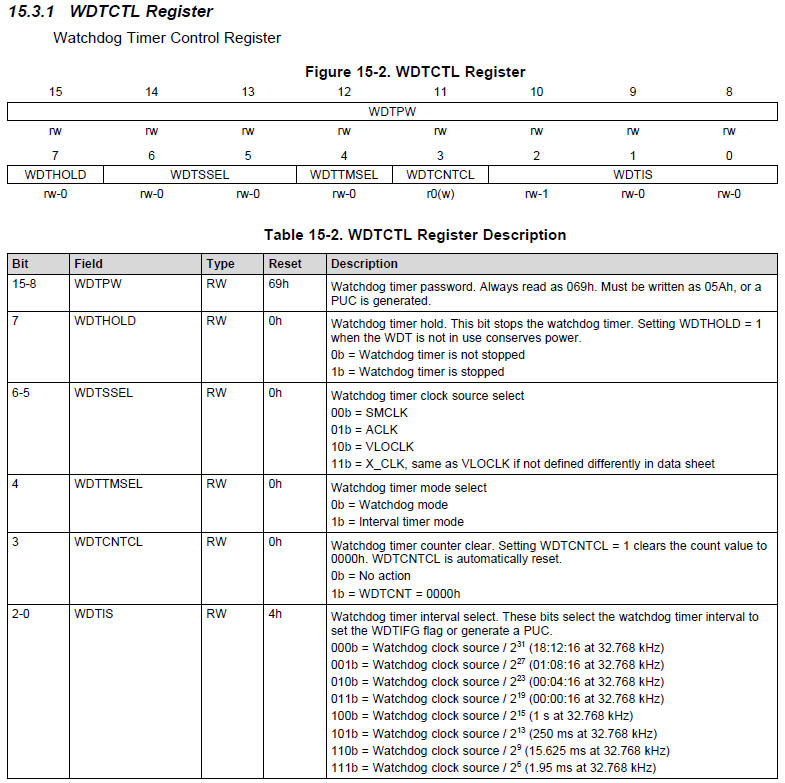
    you're right, there is no example for it in the given code examples for the processor. But have a look in the user's guide, chapter 15 Watchdog Timer (WDT_A). This chapter is very short because there is not much functionality given by the watchdog, so it's usage is quite simple. It has only one register which is almost self-explaining:

    It needs a clock source (SMCLK per default), must be set to watchdog mode (it is per default) and one of the eight selectable intervals. Then in your software you use the WDTCNTCL to reset the watchdog periodically before it hits the preset value. If your program hangs somewhere, then clearing the counter fails and the watchdog will become active. As you hopefully notice yourself, clearing the watchdog counter in a timer interrupt is not the right way. It should be done in your main program. The interval has to be chosen according to your longest possible program flow. Better choose a larger interval than a too short one, otherwise your program will fail because the watchdog comes into action. Why not in a timer interrupt? Imagine this:

    ...
    while( !USCI_RX_FLAG_SET ); // Wait for RX flag to be set
    ...

    Beside from the bad programming procedure in general, this statement can cause a full stop of your program if there is no data or it has been corrupted. But if you now serve the watchdog in a timer interrupt, then this interrupt will, of course, still pop up even if your normal program flow hangs at this statement, so the watchdog is useless. You should place the counter clear somewhere in your code where the program will normally loop over in each cycle of your program.

    And keep in mind that every access to the watchdog timer register has to be done in combination with the watchdog timer password WDTPW.

    Dennis

  • The expression "WatchDog Timer” can be a bit confusing. The WatchDog module can be used in two ways; As an ordinary Watchdog or as an additional (simple) Timer.


    When used as a 'Watchdog';

    It is true that the examples does not fully explain the use of the watchdog, but the use of the Watchdog is also highly dependent on the application. In my opinion the basis for the use of the Watchdog must not be re-booting wrongly coded software or faulty constructed hardware, but recovering a stalled processor by external influences and thus as a "Failsafe WatchDog”.

    The Timeout period of the watchdog is to be determined on the basis of the maximum allowable critical time. Should for example something to be switched on or off and the on or off time should not be longer than 100mS, take a watchdog timeout less than or equal to 100mS and reset the counter shortly before the action.

    Because the watchdog counter cannot be easily reset by changing the corresponding bit in the watchdog register using OR (|) the entire value of the register should be written each time. To control the configuration of the watchdog in one place I use a definition as "#define WatchDog  (WDTPW | WDTCNTCL | WDTSSEL__ACLK | WDTIS_5)".

    The clearing of the watchdog counter can occur at one central point in Main but also in any place in the program where a long 'waiting' (loop) can occur through eg waiting for a key press, or in an ISR.

    When LPM is used, define another timer to periodically exit from the LPM within the watchdog timeout period to reset the watchdog counter.

    Some example;

    #include <msp430.h>
    
    // WatchDog as WatchDog
    #define	WatchDog	(WDTPW | WDTCNTCL | WDTSSEL__ACLK | WDTIS_5)	// 16mS (depends on clock configuration)
    
    
    void main(void)
    {
    	// Stop WatchDog during initialization
    	WDTCTL = WDTPW + WDTHOLD;
    
    	//
    	// Init
    	// ...
    	//
    
    
    	WDTCTL = WatchDog;
    	_enable_interrupts();
    
    	while (1)
    	{
    		//
    		// Main program
    		// ...
    		//
    
    		SwitchOn();
    
    		WDTCTL = WatchDog;
    		__bis_SR_register(LPM0_bits + GIE);     // Enter LPM0, enable interrupts
    	}
    }
    
    void SwitchOn(void)
    {
    	WDTCTL = WatchDog;
    	//
    	// Switch something On, maximum allowable On time is 16mS
    	// Waits for the condition to turn off
    	// Switch Off
    	//
    }
    
    
    // Some interrupt service routine
    #pragma vector = Some1_VECTOR
    __interrupt void Some1_ISR (void)
    {
    	//
    	// Something to do
    	// ...
    	//
    
    	WDTCTL = WatchDog;
    }
    
    #pragma vector = Some2_VECTOR
    __interrupt void Some2_ISR (void)
    {
    	//
    	// Something to do
    	// ...
    	//
    
    	// Exit LPM to cycle trough main
    	// and clear WatchDog counter
    	__bic_SR_register_on_exit(LPM0_bits);   // Exit active CPU
    }
    

  • Vyacheslav Prokopiy said:
    Could anyone suggest me some more explicit example of using WDT in MSP430FR6989, where I can observe how to set up WDT period, how to make an MCU reset, etc.?
    There is a brief discussion of the Watchdog timer in Chapter 4 of the MSP Design Workshop. Additionally, check out two lab exercises which use the WDT timer:

    • lab_04b_wdt is a simple exercise which lets you count how many printf's can be completed before the processor is reset.
    • lab_05b_wdtBlink uses the watchdog timer as a simple interval timer.

    One last comment, we cover "system interrupts" as part of lab_09b_mpu_with_driverlib. While this lab is interested in memory protection errors, the system ISR routines also deal with watchdog violation interrupts. In other words, you can use this code to find out if a reset was due to a watchdog timeout (WDTIFG).

    Take Care,
    Scott

**Attention** This is a public forum