This thread has been locked.

If you have a related question, please click the "Ask a related question" button in the top right corner. The newly created question will be automatically linked to this question.

Debouncing Buttons Using Timer

Other Parts Discussed in Thread: MSP430F5529

Hello Dennis,

I have been working on a project using MSP430F5529 launchpad aiming to increment and decrement the duty cycle of PWM signal by 10% each time P1.1 and P2.1 push buttons are pressed. 
The program works fine using delays, but as you mentioned delay is not a good method and I want to debounce the buttons using timers. So I start a timer inside the port1 and port2 ISRs. I am not sure how to go back to port ISR after checking the press and release status in the timer ISR. I have created a variable PB and set it to 0 at first in the port ISR and when the debounce condition is met set it to 1, but I understand it is not a right method since PB is not a global variable when the button is released in the timerA1 interrupt.
Please let me know how I can correctly use the timers to debounce the buttons.
Thanks a lot for your time.
Here is the code using delays to debounce the buttons which works well:

/*****************************

 * This program generates a PWM output on P1.4 using push buttons P1.1 and P1.2.

 * The defalut period and duty-cycle of the clock are set to 1000 and 100.

 * The normal operating mode is LPM0 in which CPU is disabled and ACLK = 32KHz is active

 * By pressing P1.1 and P1.2 the level of stimulation increases and decreases by 10% respectively.

 * The timer period is ~(1000/32000)=31.2 ms.

 */

#include <msp430f5529.h>

#include <stdio.h>

#include <inttypes.h>


int DC = 0;                //Duty cycle set to 100

int Period = 1000-1; //Period set to 1000

int main()

{

       WDTCTL = WDTPW + WDTHOLD;


       P1DIR |= BIT4;             //set P1.4 as output

       P1SEL |= BIT4;             //set P1.4 as digital IO

       TA0CCR0 = Period;    //Timer A0 introduced


       P1REN |= BIT1;             //P1.1 Resistor enabled

       P1OUT |= BIT1;             //P1.1 pull-up resistor

       P2REN |= BIT1;             //P2.1 Resistor enabled

       P2OUT |= BIT1;             //P2.1 pull-up resistor


    P1IE |= 0x02;          //enable P1.1 interrupt

    P1IES |= 0x02;         //select high to low edge

    P1IFG &= ~0x02;        //clear P1.1 flag

    P2IE |= 0x02;          //enable P2.1 interrupt

    P2IES |= 0x02;         //select high to low edge

    P1IFG &= ~0x02;        //clear P2.1 flag

    __enable_interrupt();

       __bis_SR_register(LPM0_bits);            //set interrupts and go to LPM0

       __no_operation();

       while(1)

       {}

}

//Port1 interrupt

#pragma vector=PORT1_VECTOR

__interrupt void Port_1(void)

{

       if((P1IN & BIT1) != BIT1)

       {

              if(DC<999)

              {

                     int i;

                     DC = DC + 100;

                     for(i=0; i<30000; i++);

                     printf("%d\n", DC);

                     __low_power_mode_3();

              }

       }

       TA0CCTL3 = OUTMOD_7;

       TA0CCR3 = DC;

       TA0CTL = MC_1 + TASSEL_2 + TACLR;

       P1IE |= BIT1;

       P1IFG &= ~BIT1;

#pragma vector=PORT2_VECTOR

__interrupt void Port_2(void)

{

       if((P2IN & BIT1) != BIT1)

       {

              if(DC>1)

              {

                     int j;

                     DC = DC - 100;

                     for(j=0; j<30000; j++);

                     printf("%d\n", DC);

                     __low_power_mode_3();

              }

       }

       TA0CCTL3 = OUTMOD_7;

       TA0CCR3 = DC;

       TA0CTL = MC_1 + TASSEL_2 + TACLR;

       P2IE |= BIT1;

       P2IFG &= ~BIT1;

}

----------------------------------------------------------------------------------------

And here is the code using timer A1 to debounce the push buttons:

#include <msp430f5529.h>

#include <stdio.h>

#include <inttypes.h>


int DC = 0;                //Duty cycle set to 0

int Period = 1000-1; //Period set to 1000

int main()

{

       WDTCTL = WDTPW + WDTHOLD;


       P1DIR |= BIT4;             //set P1.4 as output

       P1SEL |= BIT4;             //set P1.4 as digital IO

       TA0CCR0 = Period;    //Timer A0 introduced


       P1REN |= BIT1;             //P1.1 Resistor enabled

       P1OUT |= BIT1;             //P1.1 pull-up resistor

       P2REN |= BIT1;             //P2.1 Resistor enabled

       P2OUT |= BIT1;             //P2.1 pull-up resistor


    P1IE |= 0x02;          //enable P1.1 interrupt

    P1IES |= 0x02;         //select high to low edge

    P1IFG &= ~0x02;        //clear P1.1 flag

    P2IE |= 0x02;          //enable P2.1 interrupt

    P2IES |= 0x02;         //select high to low edge

    P1IFG &= ~0x02;        //clear P2.1 flag


    TA1CCR0 = 160;         //Timer A1 introduced


    __enable_interrupt();

       __bis_SR_register(LPM0_bits);            //set interrupts and go to LPM0

       __no_operation();


       while(1)

       {}

}


//Port1 interrupt

int PB = 0;           //PB is a variable to control the debounce status of push button ( 0 meaning it is not debounced)

#pragma vector=PORT1_VECTOR

__interrupt void Port_1(void)

{

       if((P1IN & BIT1) != BIT1)         //if P1.1 is pressed

       {

              if(DC<999)

              {

                     TA1CCTL0 = CCIE;           //Timer-A1 enabled

                     TA1CTL = TASSEL_2 + MC_2 + TACLR;        //timer-A1 countmode

                     if (PB == 1)                                           // the push button is debounced

                     {

                           DC = DC + 100;                           //increment the duty cycle

                           __low_power_mode_3();


                     }

              }

       }

       //pwm signal

       TA0CCTL4 = OUTMOD_7;

       TA0CCR4 = DC;

       TA0CTL = MC_1 + TASSEL_2 + TACLR;

       P1IE |= BIT1;

       P1IFG &= ~BIT1;

}


#pragma vector=PORT2_VECTOR

__interrupt void Port_2(void)

{

       if((P2IN & BIT1) != BIT1)         //if P2.1 is pressed

       {

              if(DC>1)

              {

                     TA1CCTL0 = CCIE;           //Timer A1 enabled

                     TA1CTL = TASSEL_2 + MC_2 + TACLR;        //timer A1 countmode

                     if (PB == 1)               //push button is debounced

                     {

                           DC = DC - 100;             //decrement the duty cycle

                           __low_power_mode_3();

                     }

              }

       }

       //pwm signal

       TA0CCTL4 = OUTMOD_7;

       TA0CCR4 = DC;

       TA0CTL = MC_1 + TASSEL_2 + TACLR;

       P2IE |= BIT1;

       P2IFG &= ~BIT1;

}

//Timer A1 ISR

#pragma vector = TIMER1_A0_VECTOR

__interrupt void TIMER1_A0_ISR(void)

{

       long x = 5000;

       x += 160;

       if (x>=5320)               //2 successive period of 160 added

       {

              //button is pressed

              x -= 160;

              if(x <= 4360)        //6 successive period of 160 subtracted

              {

                     //button is released

                     PB = 1;

              }

       }

}

  • Hi Niloofar,

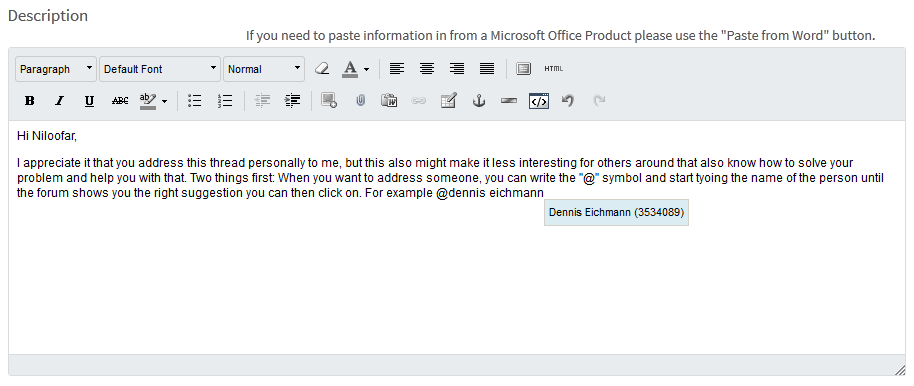
    I appreciate it that you address this thread personally to me, but this also might make it less interesting for others around that also know how to solve your problem and help you with that. Two things first: When you want to address someone, you can write the "@" symbol and start typing the name of the person until the forum shows you the right suggestion you can then click on. For example @dennis eichmann would look like this:

    Then when inserting code, please don't throw all your lines into the window since it is very hard to read. Instead, use the rich formatting which can be found on the lower right when pressing on reply, then use the code insertion tool:

    Your code then gets line numbers and is better layoutet.

    To your question - a method I like is the "comfort-routine" by Peter Dannegger which can be found on this site (it is german, but I hope Google Translate will do it's job right).

    Scroll down to Comfort routine (C for AVR)

    Maybe a good point to start from. It is easy to use, clever programmed and does not require much code.

    Dennis

  • To summarize the page Dennis linked to: the easiest way to use a timer for debouncing is to omit the port change interrupt, and use the timer for polling; the button is assumed to be pressed/released when the state has not changed after a few timer ticks.

  • Exactly! You can use a timer that generates an interrupt every 10ms, for example. In this interrupt you read your inputs and compare it to the state of the previous interrupt. If it has changed you can wait for the next interrupt and check if this changed state still exists - if so, you can register this event as a debounced button press and set a flag to signal the press to the main program. With the right timer interval you can debounce even the worst buttons. And for a human, pressing a button shorter than 10 or 20ms is almost impossible, so a detection is guaranteed.
  • Hi Dennis and Clemens,
    Thank you very much for your responses. I am rewriting my program to generate a timer interrupt to debounce. I totally understand it is very hard to read the code not properly highlighted.
    Once again thank you for your comments.
  • Niloofar, are there any news on your timer debouncing? Does it work?
  • Dennis, thank you so very much for following up with me. I have been thinking about it and decided to make a flowchart of the program before writing the code. I have attached the file. Please have a look at it and let me know what you think. Hope it makes sense.
    By PB1 and PB2, I am creating integer variables for push button 1 and push button 2.
    Thank you very much in advance.

    Debounce flow chart.vsd

**Attention** This is a public forum