This thread has been locked.

If you have a related question, please click the "Ask a related question" button in the top right corner. The newly created question will be automatically linked to this question.

MSP432 Launchpad installation Windows 7 no serial devices for XDS110

Other Parts Discussed in Thread: MSP430G2553, ENERGIA

It was working, but not anymore.

I am taking a class at Edx, computer interfaces and building a robot based on the MSP430G2553 launchpad. I was using Energia 1.6 to install a class sketch. It, the sketch, was not working correctly. I tried to revert to the previous sketch to see if I messed up the bread board which has the components used by the MSP. Energia will not install the older sketch (which it had installed OK the day before). Looking for answers to the error message (No unused FET found) when it tried to install on COM1 (Windows 7) I found some hints but re-installation as Admin for the XDS110 did not solve it. 15 minutes before this I had installed the newer sketch on COM3 with no problems. COM3 is gone. So is Other Devices section in Device Manager. No clue where they went. I tried to reinstall the XDS110 drivers, no change even though it says OK. Power cycle the system, off for an hour, no change.

When I initially did the install I had to do it twice to get the drivers to install OK. That worked fine for three weeks. It just 'broke' today, and I have no clue where to go for a resolution. I would uninstall it if I knew where to try that and then reinstall.

  • Edward,

    We are looking into this at the moment. I have notified an expert on Energia of this thread and should get back to you soon. Thanks!
  • Edward,

    You mentioned a MSP432P401R LaunchPad and a MSP430G2 LaunchPad. Can you confirm which LaunchPad you are using?

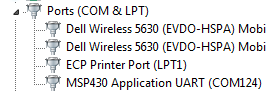
    Can you verify that nothing shows up in device manager when you plug in your G2 LaunchPad?  Normally, you will see a "MSP430 Application UART", like this (mine is installed on COM124):

    Which device drivers are you using? Did you follow the installation guide from Eneria here: http://energia.nu/guide/guide_windows/ for the MSP430G2 LanchPad? When you plug in the LaunchPad, is the green PWR LED illuminated? Finally, can you confirm your jumper configuration matches the configuration shown here? http://energia.nu/pin-maps/guide_msp430g2launchpad/

  • Yes. It is a MSP430G2553. When I first installed it about three weeks ago I had a COM3 (and a COM1) on Energia, in the menu where you pick the COM port. Took two tries to get the XDS110 drivers installed at first, they came up with the yellow triangle in Device Manager at first. Now I don't see the drivers in Device Manager and Energia only has a COM1.

    I left for vacation and forgot how to energize the bread board. I plugged the 9v+ into the + rail, and I think I fried the first processor. Not sure if I hurt anything else. The bigger IC to the right of the USB connector, on the other corner of the board, got 'warm'. I'll never forget, now, to put the battery to the input of the voltage regulator.

    I have a second processor chip, and I can swap out the current one (you must include 2 knowing this will happen). I don't want to do that if the rest of the board is dead. Does the COM3 only appear if the board is connected to the PC? I never did this type of stuff before, not sure how all these drivers and emulators work under Win7. I'm postponing a Win10 upgrade (read the driver install guide for Win8 and WIn10) until I get this project done.
  • Yes the green LED (Power) lights and the jumpers look like the picture (the left two are are tight angles to the others). We rotated them in class instruction to get messages back from the board into Energia to see function. That did work, and the debug data did come back to the PC.
  • Edward Lipson said:
    I left for vacation and forgot how to energize the bread board. I plugged the 9v+ into the + rail, and I think I fried the first processor. Not sure if I hurt anything else.

    You almost definitely have fried the MCU, and probably the emulator as well.

    Edward Lipson said:
    Does the COM3 only appear if the board is connected to the PC?

    Yes, the COM will only appear when the board is plugged into your computer.  Since it doesn't appear, I'm willing to guess the board is dead from the +9V and the computer isn't recognizing that anything is plugged in.  Replacing the MCU with the extra one included will probably not fix this, but it's worth a  shot. You will likely need to replace the entire development board.

**Attention** This is a public forum