This thread has been locked.

If you have a related question, please click the "Ask a related question" button in the top right corner. The newly created question will be automatically linked to this question.

*** EEPROM- I2C for MSP430F47197 is not working! ----------- NOT ANSWERED

Other Parts Discussed in Thread: MSP430F47197

There is an uncertainty in here. Do I need to set my PINS to I2C mode according to the datasheet of MSP430F47197 or just set the Clock and Data right for the EEPROM?
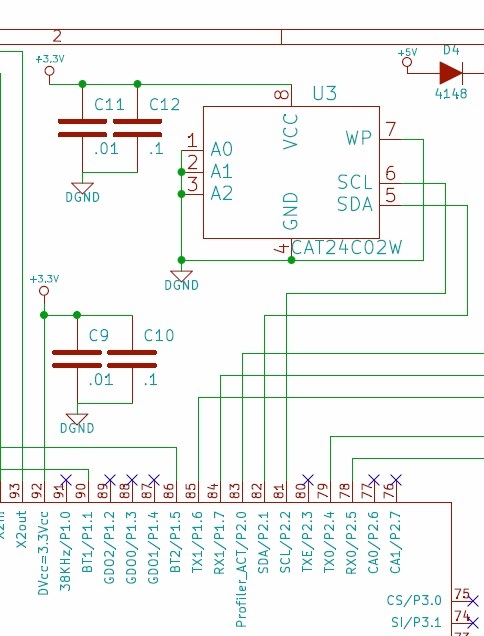
CPU + EEPROM

   Datasheet

Because we have RE/WR functions for EEPROm ready in the workspace but I am not quite sure that we need to use P2.2 and P2.1 for the I2C mode or not!
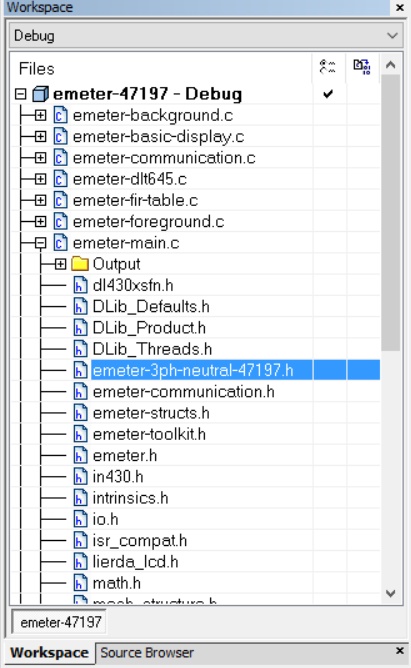
Workspace

We also have an I2C C file that communicates with the device with I2C capability.

www.ti.com/.../slaa208a.zip

So, now my confusion is Do I need to use something like 208 + my Wr/Re function?

This is really confusing and in either way it is not reading back from the EEPROM IC.

Any idea please?

  • CaEngineer,

    In order to use the MSP430 for I2C operations, you must set the correct pins to I2C mode. for an example of how to properly setup a MSP430F41791 for I2C Master operations, please see MSPWare example msp430x471x7_uscib0_i2c_08.c . you can find MSPWare within the TI Resource Explorer within CCS or at www.dev.ti.com .

    Also, I am not seeing any pullups for your I2C lines within the schematic snippet you showed. you must have these in order for I2C to work properly. Please see the MSP430F41791 User Guide for more information.

    Regards,
    JH
  • JH,

    This website's link is broken: www.dev.ti.com

    Hardware wise we fixed that issued and put two 1K resistors on each line of Data and Clock.
  • Sorry about that. think is actually https://dev.ti.com/

    Regards,
    JH
  • Got it! Thank you!
    BTW, is there any possibility to phone you guys and discuss about the EEPROM issue on the phone?
    Because when we debug the I2CRoutine.C it is not giving us the thing what we expect.
  • Debugging communication is - difficult. While a debugger is good for single-stepping algorithms, it will fail on anything that involves real-time events. Even though I2C is synchronous and you are debugging the master, it does not eman that debugging with an in-circuit debugger will help you. I'm not sure whether the 4x family implements stopping the clocks while the debugger has a brek (else you'll pile up interrupts whiel you slowly step through the code) and other problems.
    It's best to attach a logging device to the communications lines and look what really happens when no debugger interfers.
    I recommend the logic devices from www.saleae.com
    You shouldn't exceed 100kHz I2C clock, but going with less until it works is recommended. Start with 10kHz. Fas tmode (400kHz) requires mor thorough considerations rgarding the hardware connection.
    4k7 pull-up should be sufficient. 1k is very strong and requires 3mA output pin current to pull low. Don't forget the common GND connection.
    Slave address to use is 0x50 (1010-000). The r/w bit is automatically added at the end by the USCI depending on UCTR being set or not (write or read)

    To write or read, the first is always a write transfer. In case of a read, teh write only sends one byte: the address, then a restart is UCTR clear is done to read from this address on.
    Note that during write, subsequent writes write to the next memory location, but will wrap around on the next 16 byte boundary. So if you start writing to addres 0x1f, the second write will go to 0x10 and not 0x20. So you can't write mro than 16 bytes in a row, and only if these 16 bytes are in the same 'page' (same upper 4 addres bits). After sending the bytes, the device goes offlien until the internal flash write operation hos completed. If oyu try to immediately read a fter a write, you'll likely get a NACK (device not responding) for some time.
  • Michael,

    You are absolutely right! If we had EEPROM Analyser from those Californian guys that would just awesome! However, we realized that our initialization for Interrupt Enable and Flags were wrong and we it compiles it very well. But we still have the following issue.

    In this body of the code we call Write and say

     EEPROM_ByteWrite(0x0000,0x12);

    and Read it back like the following

      read_val[0] = EEPROM_RandomRead(0x0010);

    We still get back 12!  I was supposed to get FF not 10!

    what do you think the problem is?

    I have the Read as follows. It looks good but not sure what wrong is!

    unsigned char EEPROM_RandomRead(unsigned int Address)
    {
      unsigned char adr_hi;
      unsigned char adr_lo;
    
      while (UCB1STAT & UCBUSY);                // wait until I2C module has
                                                // finished all operations
    
      adr_hi = Address >> 8;                    // calculate high byte
      adr_lo = Address & 0xFF;                  // and low byte of address
    
      I2CBufferArray[1] = adr_hi;               // store single bytes that have to
      I2CBufferArray[0] = adr_lo;               // be sent in the I2CBuffer.
      PtrTransmit = 1;                          // set I2CBufferArray Pointer
    
      // Write Address first
      I2CWriteInit();
      UCB1CTL1 |= UCTXSTT;                      // start condition generation
                                                // => I2C communication is started
      __bis_SR_register(LPM0_bits + GIE);       // Enter LPM0 w/ interrupts
    
      // Read Data byte
      I2CReadInit();
    
      UCB1CTL1 |= UCTXSTT;                      // I2C start condition
      while(UCB1CTL1 & UCTXSTT);                // Start condition sent?
      UCB1CTL1 |= UCTXSTP;                      // I2C stop condition
      __bis_SR_register(LPM0_bits + GIE);       // Enter LPM0 w/ interrupts
      while(UCB1CTL1 & UCTXSTP);                // Ensure stop condition got sent
      return I2CBuffer;
    }


  • Now we got the issue resolved and we need to know which method is better: 1. Page read/write or Byte read/write?
  • It depends on the situation.
    reading can be done sequentially. IIRC, you just give the first address, and then read the number of bytes oyu want. It will wrap around at the end of the 256 byte block (full memory fo rthis device).
    The devices with more than 256 byte behave like 2 or 4 independent devices in one case (each with own device address and 256 bytes each).
    For writing, well, single byte writes are slow (the device will do a page write internally in any case) but make the code simpler (you don't have to care for a boundary if you only write one byte at once).
    If oyu often need to write multiple bytes, then you need to split the transfers at each page boundary and do independent block writes. Worst case, you writ etwo byte sacross a boundary, which will result in two single byte writes, but with the additional handling overhead to split the two writes. However, given the slowlyness of the I2C and the flash writ eoperation, it will still be the more performant code even in worst case.

**Attention** This is a public forum