This thread has been locked.

If you have a related question, please click the "Ask a related question" button in the top right corner. The newly created question will be automatically linked to this question.

MSP-EXP432P and Linux

Other Parts Discussed in Thread: ENERGIA

Hello everyone, I've got today my EXP432P Launchpad, I can use the Energia IDE and I can upload a "sketch" with the cloud ide but I'm not able to upload anything in normal C like "Out of Box Experience GUI" or "Blink LED" .


The Cloud IDE was not even able to build any of them as it could not found related libraries, now I can at least compile "Blink LED " but the cloud IDE can't upload/run, WTF I can't even copy the prompt of the error message...

As regards the other IDE: CCSv6 as far as I can see this is a 32bit software (seriously?) wich requires staff many years old... I'm not  confortable to try to force an install of all this staff as it may destroy my system, and the dipendencies listed on can't be found.


Is there a "decent" way to program this board and use debug / energy trace?

I guess maybe with Eclipse and GCC, but will I be able to use the the examples in the documentation?

Is there a guide to use this board wich such a setup on a modern distro?

  • Qwerwerwe,

    I'm not experiencing any of the issues you are referring to with the cloud. I'm not aware as to why you wouldn't be able to copy and past the error message that you get, can you try screenshoting it?

    With regards to building anything on the cloud IDE, can you try one of the examples: dev.ti.com/.../

    Make sure you click "Import to CCS Cloud" for the above.
    In CCS Cloud, go to Project > Build and it should compile. As long as you have your board connected to your PC over USB, you should also be able to run this program on the device.

    With regards to CCSv6, on linux, we are moving to 64bit very soon. The 32-bit version of Code Composer Studio for Linux will be discontinued in favor of a 64-bit version with the introduction of Code Composer Studio v6.2.0 in 1H16. Please plan the migration accordingly. The Windows version will remain 32-bit at that time. Happy holidays!
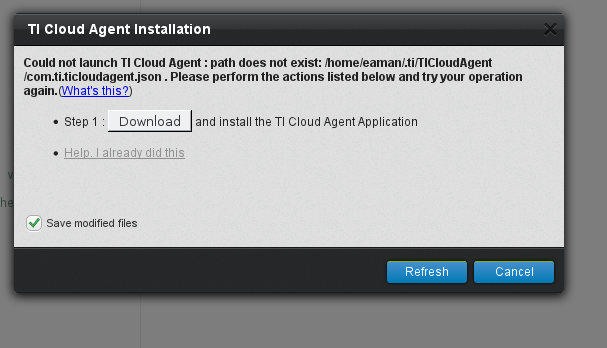
  • This is an example of a cloud IDE prompt where I can not copy anything:

    Same kind of prompt when I try to compile an ordinary C sketch.

    That's with:

    ii  iceweasel                                     43.0.1-1

    i  chromium                                      47.0.2526.80-3               

  • Qwerwerwe,

    Have you tried downloading the TI cloud agent and installing that as indicated by the error message? We do support 64 bit linux with dev.ti.com

    In addition, these links will be helpful for this process.
    https://dev.ti.com/faq
    processors.wiki.ti.com/.../TI_Cloud_Agent
  • Qwerwerwe,

    I'm going to close this thread for the time being. If you wish to reopen this discussion, please feel free to post in this thread and it will reopen.

**Attention** This is a public forum