This thread has been locked.

If you have a related question, please click the "Ask a related question" button in the top right corner. The newly created question will be automatically linked to this question.

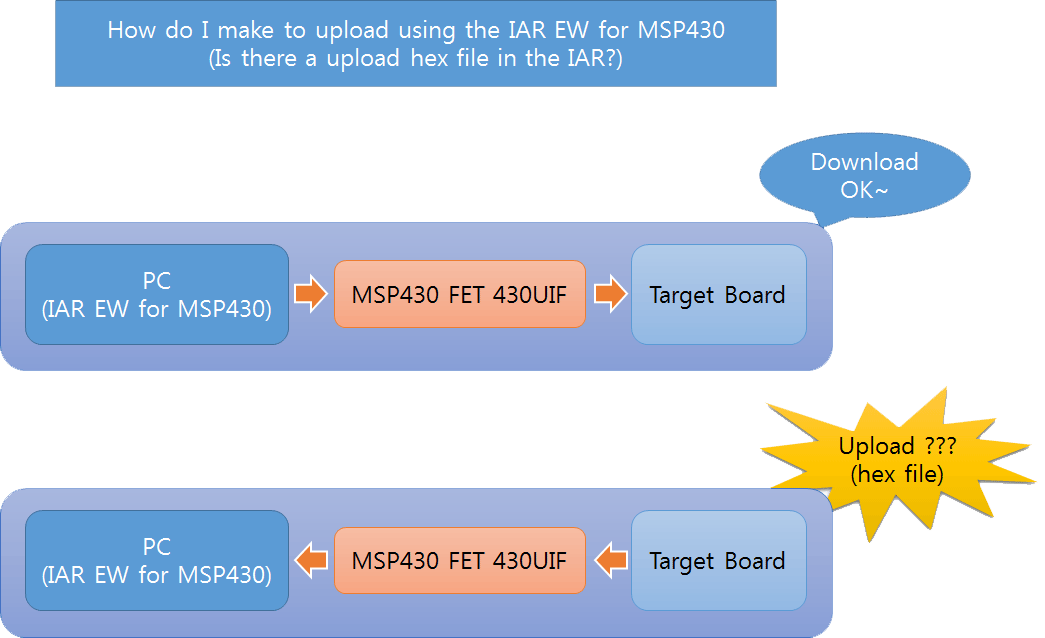
Is there a upload hex file in the IAR?


  • Exactly what do you mean by "hex file"?
    Please show me an example of a short hex file; and how you "upload" that to a target.
  • From the picture it looks like he wants to download (I would describe the actions conversely) the program from the microcontroller to store it's content in a file on the PC.
  • I think most people use IAR in the following way:

    (1) Enter the source code.
    (2) Compile & Link the source code to generate an internal file (with the extension D43). This file is not what I would call a hex file because it has far more information than the image of the Flash of the target.
    (3) Download the Flash image part of the D43 file to the target while feeding the other information in the D43 file to the debugger.

    It is very difficult, if possible at all, to reverse the above process. you cannot make the target to "upload" a D43 file.

    On the other hand, it is possible to make IAR to download a "Flash-image only file" to the target. And it is possible to make the target upload a "Flash-image only file".
  • What do you mean by upload?, saving a HEX file from IAR to be used with a custom C# BSL loader later, I often do.

    Using a real target board and unused memory will be 0xff,
    for simulated mode there is a settings in: linker/checksum to fill unused code memory with 0xff.

    Compile your code as normally(green arrow) or debug a running target (white arrow)
    Now click View/Memory from top menu, select Flash region
    right click a spot in window and select Memory Save...
    Save from 0xc000 to 0xffff for example, with options of output format.

    I actually prefer the MSP_txt as my C# program understands the header start location and transforms ascii to hex.
    As you always have to end with 0xffff to get the interrupt vectors included, I push up my code start location to the end of flash
    as I'm using the first 4K of flash for saved time-stamps, plus it makes the saved hex file smaller.
    My C# BSL loader detects continues 128bytes of 0xff and skips that block.


  • Hello Kang,

     Adding to Tony's post, you may also want to take a look at this document IAR Embedded Workbench Version 3+ for MSP430 User's Guide

    There is a way to do a Memory Dump. With your target connector, select the Emulator Advanced Memory Dump.

      Hopefully this helps,

         David

  • I'm marking the thread closed due to inactivity, but you can always use "reject answer" or simply post back to re-open it if you need more help on this issue.

**Attention** This is a public forum