This thread has been locked.

If you have a related question, please click the "Ask a related question" button in the top right corner. The newly created question will be automatically linked to this question.

How do you set up an example imported from CCS Cloud to CCS Desktop.

Other Parts Discussed in Thread: MSP430WARE

The FAQ says you can import an example project from CCS Cloud to CCS Desktop here:

Q: Can I transfer my CCS Cloud projects to CCS Desktop?

A: Yes you can download any of your projects from your cloud workspace to your local machine. Once you have downloaded them you can import them into CCS Desktop. For projects that use software that is outside of your project (such as a "ware" package) you will need to adjust the project so that it can find this package on your local machine.

How do I "adjust the project so that it can find the driverlib on my local machine (Ubuntu 15.10 64 bit).  I have played around quite a bit, but it isn't easy finding all the dependencies.  Any assistance would be deeply appreciated.  

The reason I need to do this is that MSPWare doesn't work on Ubuntu. Nothing happens when you try and load the project, or PDF or anything else from MSPWare.  The version I am using is:  MSPWare_3_10_00_75

Thanks,

Rob

  • Hi Rob,

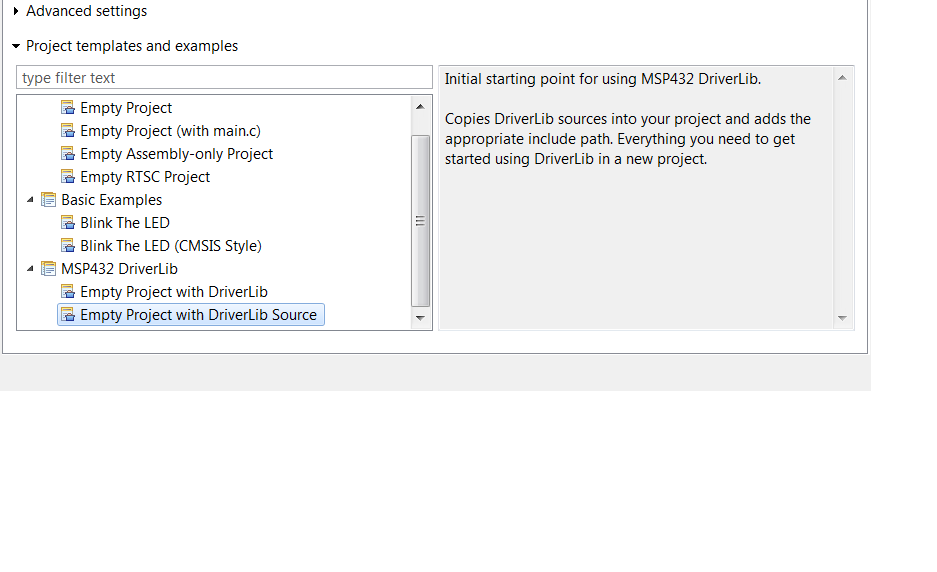
    I suggest creating a project in CCS linking the driverlib source, I screencapped the option. Then copying over the MSPWare files that you downloaded into the project. Let know if there's any issues when trying to create a driverlib project.

    Sincerely,

    Sean

  • Hi Sean,

    I tried to just reply in my email client to this, but it doesn't seem to work, so I'm replying here.

    Your suggestion doesn't work! The basic problem is that the developers of CCS have been testing things only on Windows or OS X, not on Linux. Linux file systems are case sensitive. On the wiki (processors.wiki.ti.com/.../Projects_and_Build_Handbook_for_CCS) it states that
    "Avoid upper/lowercase characters in file names, as Windows does not differentiate between them but Linux does." The CCS and MSP430Ware developers need to adhere to this. They have not been in recent releases (over roughly the last year, problems have cropped up). In Linux, if you make a new skeleton project as you suggested above, it will not build. The first issue is that the Build Settings, have the directory as "${PROJECT_ROOT}/driverlib/msp432P4xx", and the file system has it as driverlib/MSP432P4xx. Even if you change the build settings, it still won't compile, though it gets a little further. Someone with access to the revision control system needs to go through all the changes, and fix case issues like this. It is easy to load VirtualBox, and a Linux OS. There are a lot of good developers that would like to use TI processors, but prefer to develop on Linux. I think it is worth the effort to fix this.

    Thanks,

    Rob
  • Hi Rob,

    Sorry about the previous post, I didn't realize the deeper issue with CCS driverlib in the Linux environment. What MSP device are you currently intending to use with driverlib? I've reached out someone on the driverlib team to further resolve the issue with Linux development.

    Sincerely,
    Sean
  • Thanks Sean,

    At present I am working with an MSP432P401R. A similar test with the MSP430F5529LP driverlib seems to work, however, I believe the issue is much bigger than just the driverlib. For example, on Linux, the CCS App center is blank. The Examples are blank. A revision before this, you could see the examples, but you couldn't load one into the project space. The basic problem is that the development is done on machines that are case insensitive. If it were done on machines that were, the issues would be found quickly. Now pretty much the whole MSP430Ware needs to be looked at and tested on Linux. At this point, there is a tremendous amount that simply doesn't work, and it is because of developers who are not careful with their cases on file names, because it doesn't matter on the Windows and OS X machines they use. Perhaps TI should move the verification suite to Linux, or perhaps it should just add a Linux verification suite.

    Thanks for your efforts!

    Rob
  • Hi Sean,

    The file to fix the template with the case error I found is:
    ~/ti/msp430/MSPWare_3_20_00_37/driverlib/eclipse/plugins/com.ti.mcu.msp432.driverlib.product.ui_3.10.0.09/plugin.xml
    and there are two instances to fix.

    I'm still looking for the next problem.

    Rob
  • Hi Sean,

    I found a way to make the driverlib skeleton project build. You need to include at the top of the list in the Build Settings -> MSP423 Compiler->Include Options, the path "${CCS_INSTALL_ROOT}/../msp430/MSPWare_3_20_00_37/driverlib/inc"
    and it I think you should also remove the "${CCS_BASE_ROOT}/arm/include". This will not fix the template, but it is a work around. And I suspect that the real problem is another case error somewhere else. The issue is that the msp432.h file found in the driverlib/inc directory is not included, but the one at "${CCS_BASE_ROOT}/arm/include" is. The header files at each location are evidently not the same.

    Rob

    Rob
  • Hi Sean,

    In case anyone else is looking for a work around, using your first idea, I was able to get an example project working. What I did, was to add the files that seemed appropriate from the MSPWare examples directory, and those were the main C program, and startup_..._ccs.c and the system_..._.c programs. I needed to remove main.c and the corresponding startup C files, the .cmd file, as well as set up the includes as mentioned above. Now I finally have an example building. It seems to work with the regular examples as well.

    It builds and I can debug the program now. The adc14_single_channel_temperature_sensor.c example does a divide by zero because cal30 and cal85 both come up with 65535, but the programs builds and I can even use the debugger.

    Rob
  • Hi Rob,

    Thank you for keeping us updated throughout your troubleshooting experience, I'm sure your steps will be very useful in guiding further development and debugging for the current driverlib version in CCS Linux. The MSPWare code examples can always be modified, updated, and improved. Hopefully someone directly from the driverlib team will give you the relevant information with regards to Linux CCS support.

    Sincerely,
    Sean
  • Hi Rob,
    This seems to be an MSP432 specific driverlib bug that is causing the new project wizard to fail. I have filed a bug and we will get it fixed in the next release.
    Sorry for the inconvenience.
    Thanks,
    Kasthuri

**Attention** This is a public forum