This thread has been locked.

If you have a related question, please click the "Ask a related question" button in the top right corner. The newly created question will be automatically linked to this question.

MSP432P401R - C# Serial Communication Problem

Other Parts Discussed in Thread: ENERGIA

Hi everyone, I'm using MPS432P401R LaunchPad with Energia IDE. But, i have a problem C# serial communication. 

I'm seamlessly upload but doesn't work communication. (smooth for C# and Energia code) For example;

/////// Energia Code ///////

#include <Servo.h>

Servo servoEks6, servoEks5, servoEks4, servoEks3, servoEks2, servoEks1;

int aci;
int servo=0;

void setup()
{
   Serial.begin(9600);
   servoEks1.attach(8); //1000
   servoEks2.attach(9); //2000
   servoEks3.attach(10); //3000
   servoEks4.attach(11); //4000
   servoEks5.attach(12); //5000
   servoEks6.attach(13); //6000


   servoEks1.write(90);
   servoEks2.write(10); 
   servoEks3.write(110); 
   servoEks4.write(60); 
   servoEks5.write(90); 
   servoEks6.write(30); 
}

void loop()
{
}

void serialEvent()
{
   aci = Serial.parseInt();
   servo = aci/1000;
   aci = aci % 1000;

      if(aci!=0)
      {
         if(servo==1)
         {
            servoEks1.write(aci);
         }

         else if(servo==2)
         {
            servoEks2.write(aci);
         }

         else if(servo==3)
         {
            servoEks3.write(aci);
          }

         ..........
         ........
         .....
         ....

       }
}


Also, this code works in Arduino UNO (Arduino IDE)

Thanks.


*Sorry for my English (:

  • Hi,

    First, welcome to E2E and thanks for providing your code.

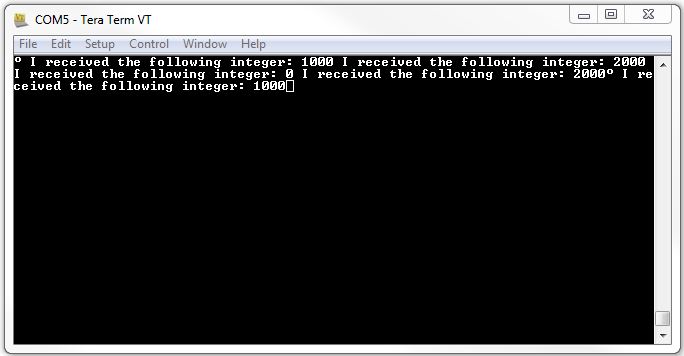
    For simulating the "aci" integer being sent from your C# application, I just used a Tera Term terminal (COM5, 9600 baud rate). After calling the "serialEvent()" function from inside the "loop()" function, I was able to read the integer (1000, 2000, etc.) that was entered in the terminal.

    This should fix your communication problem. Below, I've attached my code and a screenshot of the terminal for your reference.

    #include <Servo.h> // Include servo library
    
    Servo servoEks6, servoEks5, servoEks4, servoEks3, servoEks2, servoEks1; // Declare servos
    
    int aci;
    int servo=0;
    
    void setup() {  
      
     // Setup the serial interface
     Serial.begin(9600);
     
     // Attach the servos to specific pins on MSP432
     servoEks1.attach(8);   // Attach to pin 8,  selected by entering 1000 in terminal
     servoEks2.attach(9);   // Attach to pin 9,  selected by entering 2000 in terminal
     servoEks3.attach(10);  // Attach to pin 10, selected by entering 3000 in terminal
     servoEks4.attach(11);  // Attach to pin 11, selected by entering 4000 in terminal
     servoEks5.attach(12);  // Attach to pin 12, selected by entering 5000 in terminal
     servoEks6.attach(13);  // Attach to pin 13, selected by entering 6000 in terminal
    
      // Initialize the servos
      servoEks1.write(90);
      servoEks2.write(10); 
      servoEks3.write(110); 
      servoEks4.write(60); 
      servoEks5.write(90); 
      servoEks6.write(30); 
    }
    
    void loop() {
      
      // Put your main code here, to run repeatedly:
      serialEvent();
    }
    
    void serialEvent() {
      
      // Determine if a value has been entered in the terminal
      if (Serial.available() > 0) {
        
        // Read the incoming integer
        aci = Serial.parseInt();
        
        // Print the received integer for confirmation
        Serial.print(" I received the following integer: ");
        Serial.print(aci, DEC);
        
        // Identify and configure the servos
        servo = aci/1000;
        aci = aci % 1000;
        
        if(aci!=0) {
          if(servo==1) {
            servoEks1.write(aci);
          }
          
          else if(servo==2) {
            servoEks2.write(aci);
          }
          
          else if(servo==3) {
            servoEks3.write(aci);
          }
          
          else if(servo==4) {
            servoEks4.write(aci);
          }
    
          else if(servo==5) {
            servoEks5.write(aci);
          }
          
          else if(servo==6) {
            servoEks6.write(aci);
          }      
        }
      }
    }

    Also, here are some valuable resources related to using serial communication with Energia:

    http://energia.nu/Serial.html

    http://energia.nu/Serial_Read.html

    http://energia.nu/Tutorial_SerialEvent.html

    Regards,

    James

    MSP Customer Applications

  • James Evans said:

    Hi,

    First, welcome to E2E and thanks for providing your code.

    For simulating the "aci" integer being sent from your C# application, I just used a Tera Term terminal (COM5, 9600 baud rate). After calling the "serialEvent()" function from inside the "loop()" function, I was able to read the integer (1000, 2000, etc.) that was entered in the terminal.

    This should fix your communication problem. Below, I've attached my code and a screenshot of the terminal for your reference.

    #include <Servo.h> // Include servo library
    
    Servo servoEks6, servoEks5, servoEks4, servoEks3, servoEks2, servoEks1; // Declare servos
    
    int aci;
    int servo=0;
    
    void setup() {  
      
     // Setup the serial interface
     Serial.begin(9600);
     
     // Attach the servos to specific pins on MSP432
     servoEks1.attach(8);   // Attach to pin 8,  selected by entering 1000 in terminal
     servoEks2.attach(9);   // Attach to pin 9,  selected by entering 2000 in terminal
     servoEks3.attach(10);  // Attach to pin 10, selected by entering 3000 in terminal
     servoEks4.attach(11);  // Attach to pin 11, selected by entering 4000 in terminal
     servoEks5.attach(12);  // Attach to pin 12, selected by entering 5000 in terminal
     servoEks6.attach(13);  // Attach to pin 13, selected by entering 6000 in terminal
    
      // Initialize the servos
      servoEks1.write(90);
      servoEks2.write(10); 
      servoEks3.write(110); 
      servoEks4.write(60); 
      servoEks5.write(90); 
      servoEks6.write(30); 
    }
    
    void loop() {
      
      // Put your main code here, to run repeatedly:
      serialEvent();
    }
    
    void serialEvent() {
      
      // Determine if a value has been entered in the terminal
      if (Serial.available() > 0) {
        
        // Read the incoming integer
        aci = Serial.parseInt();
        
        // Print the received integer for confirmation
        Serial.print(" I received the following integer: ");
        Serial.print(aci, DEC);
        
        // Identify and configure the servos
        servo = aci/1000;
        aci = aci % 1000;
        
        if(aci!=0) {
          if(servo==1) {
            servoEks1.write(aci);
          }
          
          else if(servo==2) {
            servoEks2.write(aci);
          }
          
          else if(servo==3) {
            servoEks3.write(aci);
          }
          
          else if(servo==4) {
            servoEks4.write(aci);
          }
    
          else if(servo==5) {
            servoEks5.write(aci);
          }
          
          else if(servo==6) {
            servoEks6.write(aci);
          }      
        }
      }
    }

    Also, here are some valuable resources related to using serial communication with Energia:

    http://energia.nu/Serial.html

    http://energia.nu/Serial_Read.html

    http://energia.nu/Tutorial_SerialEvent.html

    Regards,

    James

    MSP Customer Applications

    Firstly, thank you for help. 

    Program worked smoothly. But there is one small problem. For example;

    - Servo motors is giving late response ( ~0.5 s),  jump occurs. No similar problems in Arduino. Maybe because of baud rate? (MSP432=9600, Arduino=115200)


    Regards

    Eren

**Attention** This is a public forum