This thread has been locked.

If you have a related question, please click the "Ask a related question" button in the top right corner. The newly created question will be automatically linked to this question.

Cannot initialise an array in uVision with msp432!


Hello everybody! Please help! I have such code:

#define ...
...
static unsigned char TTS_boot_data_lengths[4]={15,15,15,15};
...

int main(void){
...
}

When I launch the code it turns out that instead on 15s, all the elements in the declared array are zeros and some garbage!!  Why is it so? If I declare the same array inside a function (without "static"), or as a "const" then everything is fine. Sorry it is probably something silly, I am a newbie please help! I tried to ask Keil guyz the same question, but they said that since I had a shareware version of uVision - they would provide no help. 

  • Stanislav Ossovskiy said:
    When I launch the code it turns out that instead on 15s, all the elements in the declared array are zeros and some garbage!!

    I don't use uVision, but guess that the project is missing the start-up code which copies the data segment initializers from flash to RAM.

    Looking at the example projects in the APNT_276.ZIP file referenced on uVision Lab for the TI MSP432 LaunchPad Board the example projects have startup code in the RTE\Device\MSP432P401R directory.

    Suggest you follow the steps in the Texas Instruments MSP432: Cortex™-M4 Tutorial Using the MSP432P401R LaunchPad Board and ARM Keil MDK 5 Toolkit to add the core and startup files to your project.

  • Thank you for the reply, Chester. Actually I have both those files included in my project. The startup_msp432p401r_uvision.s file had a reference to a __main function, which was nowhere, so I had to "fix" it. I understand I do something ridiculously wrong, but I cannot figure out what exactly. Do you know perhaps, how that necessary part of init code should look like? Because I am just frustrated and helpless here.
  • Stanislav Ossovskiy said:
    The startup_msp432p401r_uvision.s file had a reference to a __main function, which was nowhere, so I had to "fix" it.

    From looking at the Keil documentation the __main function should be part of the C run time library start-up code. Do you a linker error about __main being undefined?

  • It used to!! And it doesn't now. Oh my, what is going on?.. I have replaced all the "fixed" startup files with the original ones, the project compiles with no problems and yet despite the project to compile (arrays still don't work), I searched the whole project for "__main" and there is no such thing anywhere, except for the reference in .S startup file!   

  • Stanislav Ossovskiy said:
    I searched the whole project for "__main" and there is no such thing anywhere, except for the reference in .S startup file!   

    I installed the free uVision V5.21.1.0 and successfully compiled one of the example projects. The linker .map file reported that the __main was linked from entry.o(.ARM.Collect$$$$00000000) which is presumably part of the run time library.

    Will try your example of initialized global variables when get access to a MSP432.

  • Chester Gillon said:
    Will try your example of initialized global variables when get access to a MSP432.

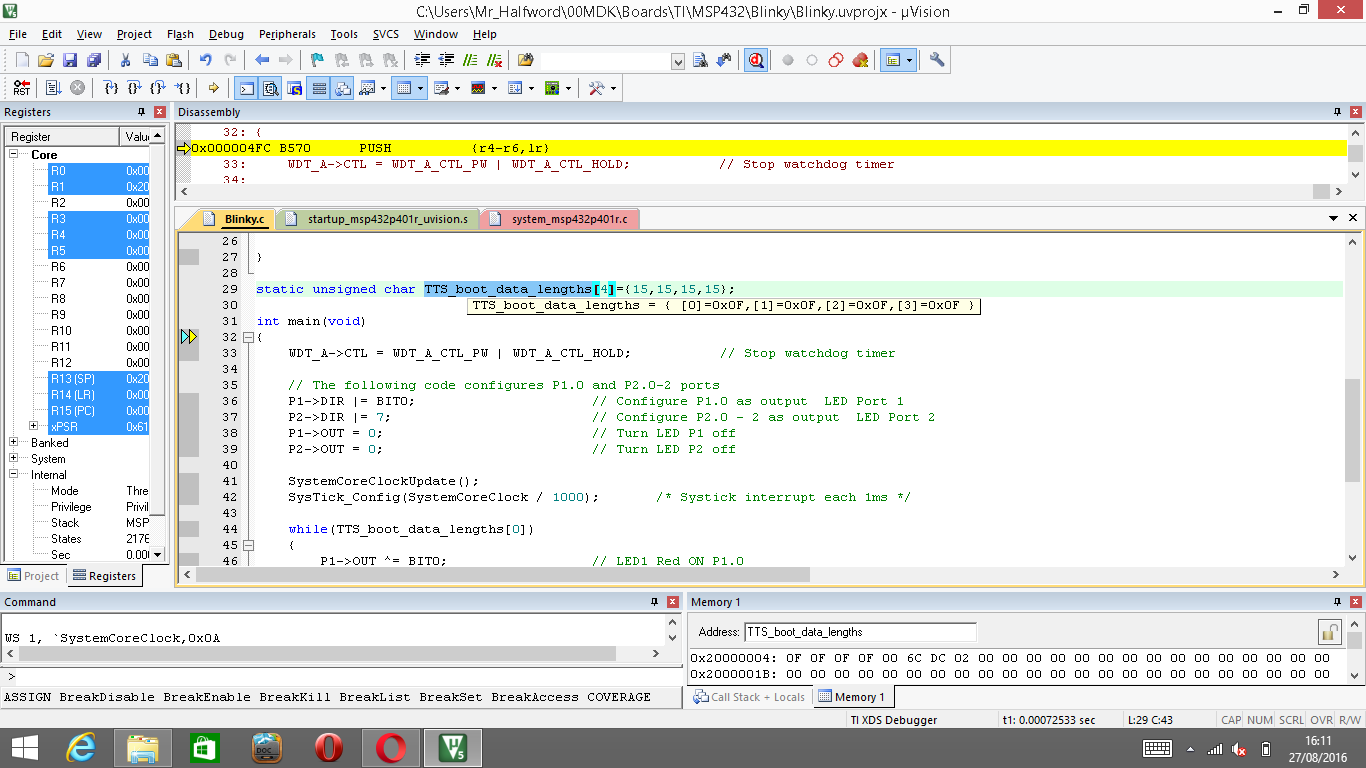
    I added the following to the Blinky example, and added a reference to the array to avoid getting a warning about an unused variable:

    static unsigned char TTS_boot_data_lengths[4]={15,15,15,15};

    The uVision debugger showed that the TTS_boot_data_lengths array had been initialized with the expected values. The only quirk of the debugger I noticed was that if you hover the cursor over the TTS_boot_data_lengths array, without selecting the array name, the tooltip incorrectly reports the first value in the array is 0x0:

    Whereas if you select the TTS_boot_data_lengths variable in the editor the tooltip then shows the expected values:

    The Memory window displays the expected contents of the TTS_boot_data_lengths array in both cases.

  • Thanks Chester for trying it out. I will now try to reinstall uVision and try the same blinky project once again. It should work ok after that.
    Many thanks again.

**Attention** This is a public forum