This thread has been locked.

If you have a related question, please click the "Ask a related question" button in the top right corner. The newly created question will be automatically linked to this question.

CCS/MSP430FR2633: SPI connection between TRF7960a and MSP430FR2633

Part Number: MSP430FR2633
Other Parts Discussed in Thread: TRF7960A, MSP430F2370, MSP430WARE, MSP430FR4133

Tool/software: Code Composer Studio

I am working with two boards one is MSP430FR2633 board and second one TRF7960A Evaluation board. Basically I wanted a SPI connection between these two boards as i have disconnected all the connections which were in the TRF7960a board along with MSP430F2370. I don't want to use MSP430F2370 micocontroller as I need a SPI connection between TRF7960a and MSP430FR2633. Can somebody help me in the programming using code composer studio?

Thank you.

  • Hi Vivek,

    MSP430Ware provides examples for how to perform SPI communication on the MSP430FR2633. There are examples for 3-wire and 4-wire modes as well as for slave and master modes. Once MSP430Ware has been downloaded and installed, it can be accessed through the Resource Explorer in CCS.

    Best regards, 
    Caleb Overbay

  • Hi Caleb,

    thanks for the help, but unfortunately its not what I want. I need an SPI connection between TRF7960A EVM and MSP430FR2633. Could you help me in this because the examples in the MSP430 ware are not helping me.  I want an RFID setup so that when I put a tag it will show me the name of that tag that's why I am using TRF7960A EVM.

    Thanks

  • Hi Vivek,

    I don't think I'm understanding what you're asking for. The examples provided in MSP430WARE show how to properly setup SPI communication between and MSP430 and another device. The other device could be anything you'd like it to be including the TRF7960A EVM.

    If you're looking for something more specific to the EVM, here are some code examples showing all the code used for the TRF7960A EVM. You could use these to see how SPI communication was performed between the TRF7960A and the MSP430F2370, then alter them to work with the MSP430FR2633.

    If you're asking how to properly connect the MSP430FR2633 to the TRF7960A EVM, I would first start by looking at the EVM's schematic and how it is connected to the MSP430F2370.

    Best regards, 
    Caleb Overbay

  • Hi Caleb,

    thanks again, why I am using MSP430FR2633, because I need a capacitive touch button in my project and I also want to use RFID which  I found in TRF7960A EVM board, so basically I cannot use the two msp430 at the same time. What i did is, I disconnected the SPI lines which were in the TRF7960A EVM board connected with MSP430F2370. After disconnection I used those SPI lines (after looking at the EVM's schematic) and connected with hard wire along with MSP430FR2633. I connected the lines as follows:

    TRF7960A MSP430FR2633
    I/O 4 (5) (SLAVE_SELECT) P1.0
    DATA_CLK UCA1CLK(CAP1.1) P2.4
    I/O 6 (7) (SOMI) UCA1SOMI (CAP 1.2) P2.5
    I/O 7 (8) (SIMO) UCA1SIMO (CAP1.3) P2.6
    EN CAP 0.2 = P2.3
    ASK/OOK CAP3.0 = P2.7
    IRQ P1.1
    MOD not used
    Captivate Touch CAP0.0

    I made a code for that, but unfortunately I am not able to get the clock signals (DATA_CLK).

    Could you please help me in that? Thank you for your support.

    Best regards

    Vivek

  • Hi Vivek,

    In the examples I linked to in my most recent post (code examples) there is an implementation of SPI communication between the TRF7960A and the MSP430F2370. While this is not exactly what you're looking for, it is similar to what the code would be on the MSP430FR2633. It shows how to setup the clock as well. 

    I would use this example, along with the MSP430WARE examples to construct software to do the job. It also wouldn't hurt to read Section 22 of the MSP430FR4xx and MSP430FR2xx Family User's Guide.

    Best regards, 

    Caleb Overbay

  • Hello Caleb,

    greetings,

    What I did:
    I made a RFID project as you recommended me where I am using SPI interface using the MSP430FR2633 board and I have also uploaded my code for the better understanding.

    The Problem:

    After debugging my code I am not able to generate the Clock signal UCA1CLK at pin (CAP1.1) P2.4, UCA1SOMI at pin (CAP 1.2) P2.5 and UCA1SIMO at pin (CAP1.3) P2.6.

    Could you please tell me what am I doing wrong in the code and what exactly I have to change?

    Thank you for efforts and for the help.

    Project_RFID.tar.gz
    regards,

    Vivek Garg

  • Hi Vivek, 

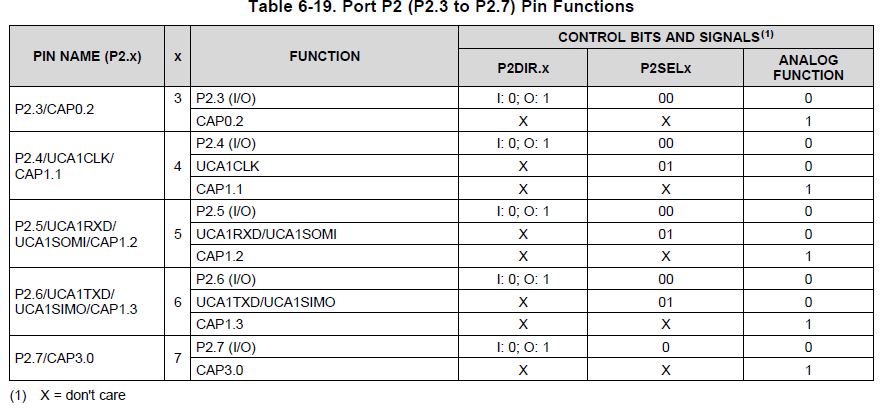
    Thank you for providing the detailed description. After looking at your code, I suspect the issue is caused by improper setting of the P2SELx bits:

    	P2SEL0 = BIT4 | BIT5 | BIT6;
    	P2SEL1 = BIT4 | BIT5 | BIT6;

    When looking at the data sheet for the MSP430FR2633, it shows the following:

    While the representation of the P2SELx bits is confusing, it shows they are supposed to be set to "01" to achieve your desired functionality. I believe you are setting them to "11" with the above code. Again, this is a confusing representation because you are not sure which bit to set (eg P2SEL0  or P2SEL1). Typically, this is explicitly stated in the data sheet. I've submitted a request for clarification on this issue and will update you when I receive a response. However, I suspect that this is signalling to set P2SEL0 and reset P2SEL1. Try it out and let me know the results. 

    Best regards, 
    Caleb Overbay

  • Hello Caleb,

    Thanks again.

    I have done as you stated and changed P2SELx section as follows:

        P2SEL0 = BIT4 | BIT5 | BIT6;
        P2SEL1 &= ~(BIT4 + BIT5 + BIT6);

    After changing this the oscilloscope shows me 3.3 Volts on P2.6/UCA1SIMO/CAP1.3 and 3.3 Volts on P1.0 for the select slave pin. But what I also want is the clock signal P2.4/UCA1CLK. I tried a lot of times but I am not able to get the clock signal. Nothing is happening on the clock signal. Could you please tell me what am I doing wrong?

    Thanks a ton.

    Best regards

    Vivek Garg

  • Hi Vivek,

    I'm not sure how familiar you are with SPI communication so please excuse me if I state anything you already know. During SPI communication, the clock is only active when data is being transmitted. So after setting those bits you wouldn't expect to see the clock until you start communication. Have you tried loading a value into UCA1TXBUF then monitoring the SPI bus? When you place a value in the transmit buffer, the clock will start and data should be sent.

    Best regards,
    Caleb Overbay
  • Hello Caleb,

    I understood what you have said and this is my first time with the SPI so I am not so much good in that. I read datasheets and some pdf's related SPI. But as you said I made an update in the program, what I did is I just added the transmission and receiving part into a buffer. But the problem is still the same. I am not able to see the clock signal. I don't have any idea what's left or what am i doing wrong. So if possible could you please help me out in this or if possible could you send me sample code that represents the SPI interfacing between TRF7960a and MSP430FR2633?

    I am uploading my code again. Could you please take a look on it?tpm_weihnachts_prototyp.tar.gz

  • Dear Caleb,

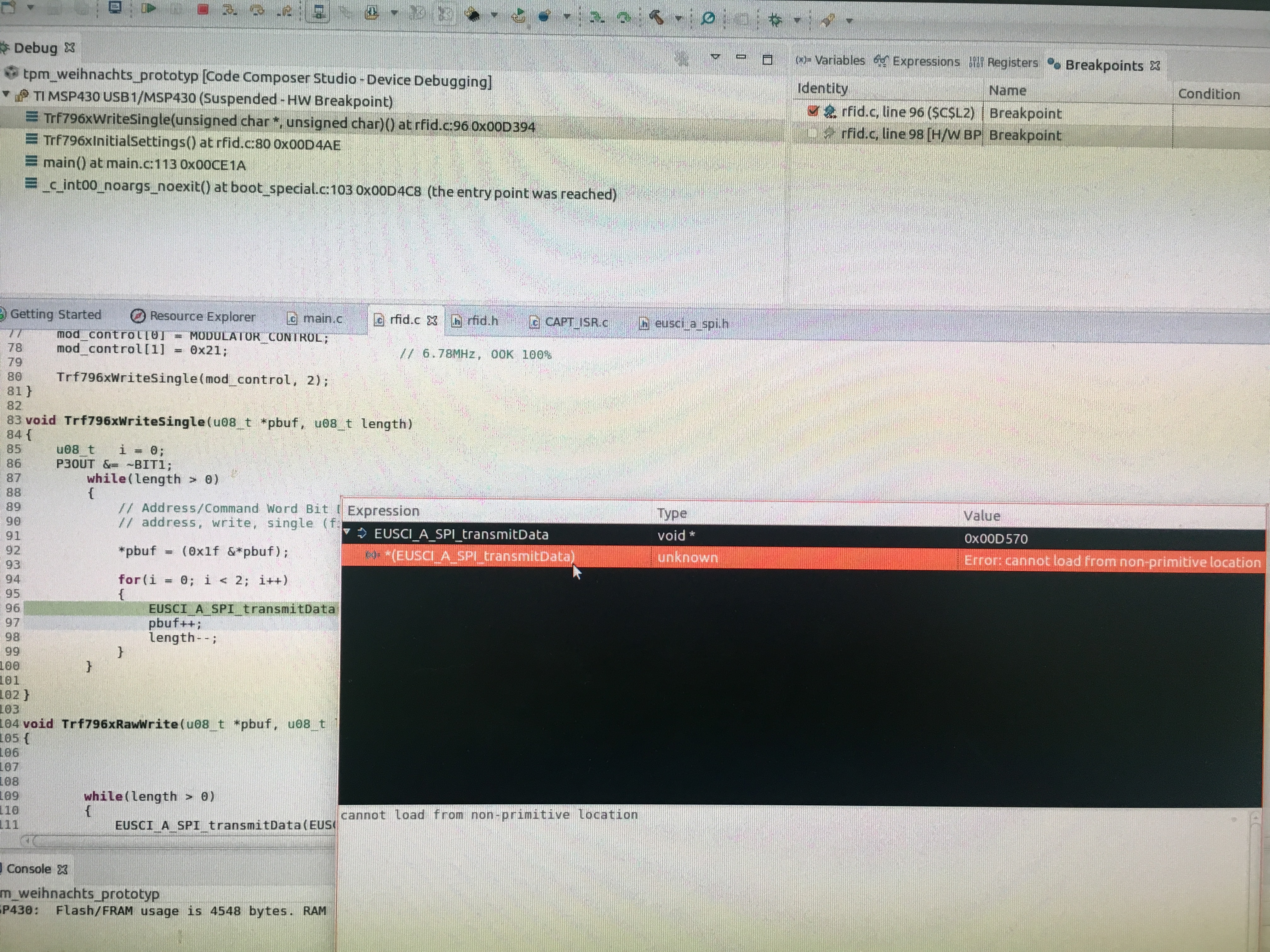
    I have done the SPI interfacing between TRF7960a and MSP430FR2633 according to the examples and some pdf's and trying to send some data into a buffer but what I found is that in the watch window its showing a message (cannot load from non-primitive location) and I suspect that this is the reason why transferring is not working. Could you please help me out in this and I am also uploading a picture and my code for the better understanding.

    8877.tpm_weihnachts_prototyp.tar.gz

    Thank you in advance.

    Regards,

    Vivek Garg

  • Hi Vivek,

    Why are you using the EUSCI_A_SPI_transmitData function? The communication code that is in the example code that was previously provided shows proper communication and does not use this function.

    I recommend looking back at the example code I linked to previously. This code has been tested and is proven to work appropriately with a MSP430FR2370 and the TRF7960A. The communication code does not require significant changes to function properly. The only thing that needs to be changed is the setup of the EUSCI module and ensuring that all SPI registers addressed reflect this change.

    Looking at the code from this example I see that Trf796xWriteSingle() is structured as follows:

    void
    Trf796xWriteSingle(u08_t *pbuf, u08_t length)
    {
    	if(SPIMODE)								// SPI mode given by jumper setting
    	{
    		SpiWriteSingle(pbuf, length);
    	}
    	else									// parallel mode
    	{
    		ParallelWriteSingle(pbuf, length);	
    	}
    }

    You can see that SpiWriteSingle is being used since we are communicating via the SPI bus. Looking into that function we see:

    void
    SpiWriteSingle(u08_t *pbuf, u08_t length)
    {
    	u08_t	i = 0;
    		
    	SLAVE_SELECT_LOW; 						// Start SPI Mode
    
    	while(length > 0)
    	{	
    		// Address/Command Word Bit Distribution
    		// address, write, single (fist 3 bits = 0)
    		*pbuf = (0x1f &*pbuf);				// register address
    		for(i = 0; i < 2; i++)
    		{	
    			while (!(IFG2 & UCB0TXIFG))		// USCI_B0 TX buffer ready?
    			{
    			}
    			UCB0TXBUF = *pbuf;  			// Previous data to TX, RX
    
    			while(UCB0STAT & UCBUSY)
    			{
    			}
    
    			temp = UCB0RXBUF;
    
    			pbuf++;
    			length--;
    		}
    	}
    	while(UCB0STAT & UCBUSY)
    	{
    	}
    	if(direct_mode == 0x00)
    	{
    		SLAVE_SELECT_HIGH; 					// Stop SPI Mode
    	}
    }

    Here, some changes need to be made. I believe you're using the UCA1 peripheral so you'll need to changes registers like UCB0RXBUF to UCA1TXBUF and so on. Also, be sure that you've got your CS signal connected correctly and the  polarity is correct. 

    Finally, please refer to Solutions to Common eUSCI and USCI Communication Issues on MSP430 MCUs for more detail on debugging these issues. 

    Best regards, 
    Caleb Overbay

  • Hi Vivek,

    Also, the reason EUSCI_A_SPI_transmitData isn't showing appropriately in the watch window is because it is a function. You can only watch variable values in this window.

    Best regards,
    Caleb Overbay
  • Dear Caleb,

    greetings, thank you so much for the help. I did the way you told me and after adding the function (void SpiWriteSingle(u08_t *pbuf, u08_t length) in the code for transferring the data, I am still not able to see the clock signal (UCA1CLK) at pin P2.4 on the oscilloscope. There are two pins high which are UCA1SIMO and UCA1STE at pins P2.6 and P2.3. But the clock signal is not there. What should I change or add in my code so that I can see the clock signal?

    I am uploading my code for the better understanding.

    6318.tpm_weihnachts_prototyp.tar.gz

    Thank you in advance.

    Best regards,

    Vivek Garg

  • Hi Vivek,

    Since you're unfamiliar with SPI communication I recommend doing some reading on the protocol. A quick google search will give you many resources to read up on. Then once you feel comfortable that you know how the protocol works, I would go to the examples in MSP430Ware via the Resource Explorer in Code Composer Studio. I understand that these examples are not exactly what you're looking for, but you first need to familiarize yourself with how SPI communication is accomplished on an MSP430 before trying to debug a more complex project. These examples show how to get SPI communication up and running and only show the bare minimum that is required for functionality. It's the best starting point in a scenario like this. I think the msp430fr243x_euscia0_spi_09.c example will be most applicable to your situation.  Please try this out before trying to debug the more complex project further. 

    Best regards,

    Caleb Overbay

  • Hi Vivek,

    Have you made any progress on this that you'd like to share?

    Best regards,
    Caleb Overbay
  • Hello Caleb,

    Thank you for asking.

    I made some progress regarding the communication between TRF7960a and MSP430FR2633. I have uploaded a picture which shows the monitoring of SPI signals. The signals are as follows:

    1. The yellow line represents the slave select (SS*) signal.

    2. The green line represents the data clock (DATA_CLK) signal.

    3. The blue line represents the receiving (SOMI) signal.

    4. The pink line represents the transmitting (MOSI) signal.

    Unfortunately, I am not getting any receiving signal (SOMI). The blue line is 0. Even when you look at my code, RxDATA gives 0. Everything is working fine except this receiving signal (SOMI).

    Could you please guide me what I have to do next to get my receiving signal? Even though I tried the examples from the TRF7960A_06_2011. But after trying a lot of times I have no idea what I am doing wrong.

    I have uploaded my code too. Please find the attachment.

    Thank you.

    Regards,

    Vivek Garg

    BOx.tar.gz

  • Hello Vivek,

    I work on the apps team that supports the TRF7960A and I am going to provide you a code base which you can develop from that should help solve a lot of your issues, I was hoping to get to that today as I have to make a few tweaks to it but I haven't had a chance yet. Please give me another 1-2 work days and I will be able to give you a much more solid code base to work from that what is provided in the TRF7960A_06_2011 project.
  • Hello Jacobi,

    Thank you so much for the help and I am looking forward for the solution.

    Best regards,
    Vivek Garg
  • Hello Vivek,

    I am attaching below a project which is used with the TRF7960A and the MSP430FR4133. This firmware is recent (unlike the TRF7960A project you currently have) and well organized with comments plus a fully working driver for the TRF7960A which handles the SPI communication already.

    You should be able to port this to the FR2633 without much difficulty and then leverage this project to create your own NFC application.

    TRF7960A_FR4133_FRL_Reader.zip

  • Hello Ralph,

    Thanks a lot for providing me with a code. I made some changes to configure with my microcontroller MSP430FR2633. The SPI communication between TRF7960A and MSP430FR2633 is working and giving me the values I wanted only when I press the reset button on the evaluation board of MSP430FR2633. While not pressing the reset button, I am not able to see the signals on the oscilloscope (there is no triggering), either they just show high like 3.3 volts or 0 volts. So is there something else which I have to add or change? I am uploading my project code for the better understanding.Nochmal.tar.gz

    Thanks a lot for your efforts.

    Best regards,

    Vivek Garg

  • Hello Vivek,

    That would be expected. The TRF7960A doesn't run on it's own. It needs constant instruction from the MCU (in this case, FR2633). You need to use API's to trigger the device to search for tags.

    If the while(1) loop has no API's to the TRF7960A, then you will only see initial configuration and nothing else.

    Try using the NFC_findISO15693Tag API in the while(1) loop and see if you can detect an ISO15693 tag with it.

**Attention** This is a public forum