This thread has been locked.

If you have a related question, please click the "Ask a related question" button in the top right corner. The newly created question will be automatically linked to this question.

Arbitary waveform generator using a micro-controller

Other Parts Discussed in Thread: MSP430FR2111

Hello dear friends,

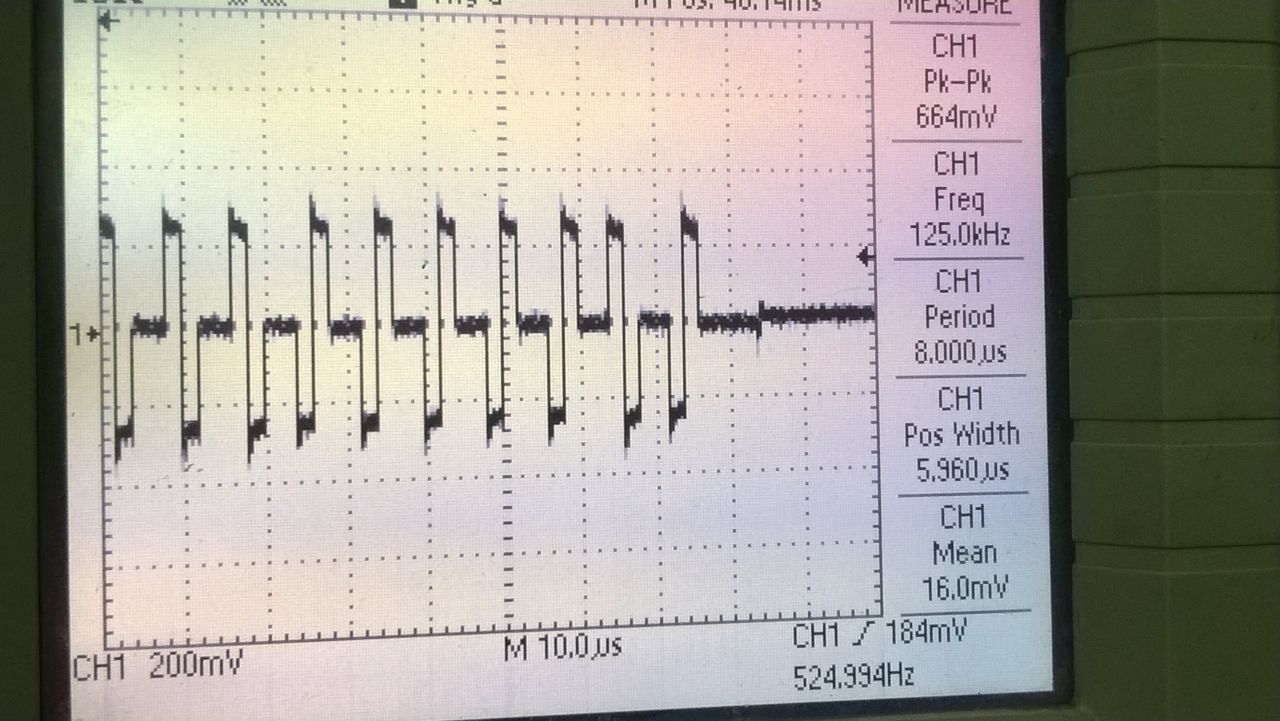
The following image is that of a Data signal, one waveform is used to represent logic level 1 and other 180 degree phase shifted waveform represents logic 0. Can someone please provide some input on how I may be able to generate the following waveforms on a micro-controller ?

Regards,
TM

  • Hi Tapajit,

    Since your common mode voltage appears to be 3VDC and goes up to 4VDC, this voltage exceeds the maximum input of most MSP430 devices. Thus, it may be best for you to utilize a microcontroller like the MSP430FR2111 with an external DAC to achieve this waveform.

    Also, take a look at the PWM DAC Using MSP430 High-Resolution Timer app note.

    Regards,

    James

    MSP Customer Applications

  • With a 5 V power supply, you can generate the three voltages with a reconfigurable voltage divider:

    When both A and B are grounded, the output is 2 V. When A is grounded and B connected to 5 V, the output is 3 V. When both A and B are connected to 5 V, the output is 4 V.

    The opamp is there to decrease the output impedance (if you want to put a load on the output).

    The MSPs do not run at 5 V, so use an allowed power supply (3.3 V or lower) instead, and configure the opamp to amplify the signal appropriately.

    If you want a sine wave, configure the opamp as a low-pass filter.

    There are multiple methods to output the A/B signals from two GPIO pins. Writing the PxOUT register from an interrupt handler probably has too much latency and jitter, but you can use two timer outputs, or use an MSP model with DMA and configure it to write a new value to PxOUT whenever a timer expires.

  • Dear Clemens,

    This image below is the signal on an Oscilloscope. The signal is generated from a Training Setup. Please let me know if any modification is required to the above circuit.

  • If I interpret the labels correctly, the voltages are different.

    So what are the voltages that you actually want?
  • Dear Clemens,

    I will clarify on the Oscilloscope reading.

    Meanwhile may I request you to guide me how to identify the rise time, fall time, propagation delay if I am using a MCU GPIO pins to control A and B in the above circuit. Since the time period is in "micro-sec", what minimum rise time should I opt for ? Is there TI whitepaper or similar I may look at for better understanding.

    Thanking you for your support, with my best regards
    Tapajit
  • What do you mean with "identify"? Do you want to know how to measure them with the oscilloscope, or how to design the circuit?

    I do not know what rise time you need; this depends on your application. But the curves in the first picture imply that the exact shape of the signal does not matter.

  • Hi,
    Can you please explain it in a little more detail, "But the curves in the first picture imply that the exact shape of the signal does not matter".

    The first image is my interpretation, the second image is from oscilloscope connected to a Trainer unit similar to the main system.
  • The first image shows both a digital signal and a curve. But if you want the shape to be similar to the oscilloscope trace, you need a digital (square-wave) signal.

    Anyway, you would connect the GPIOs directly to A and B. What exactly is the question you have about that?

**Attention** This is a public forum