Other Parts Discussed in Thread: MSP430G2231
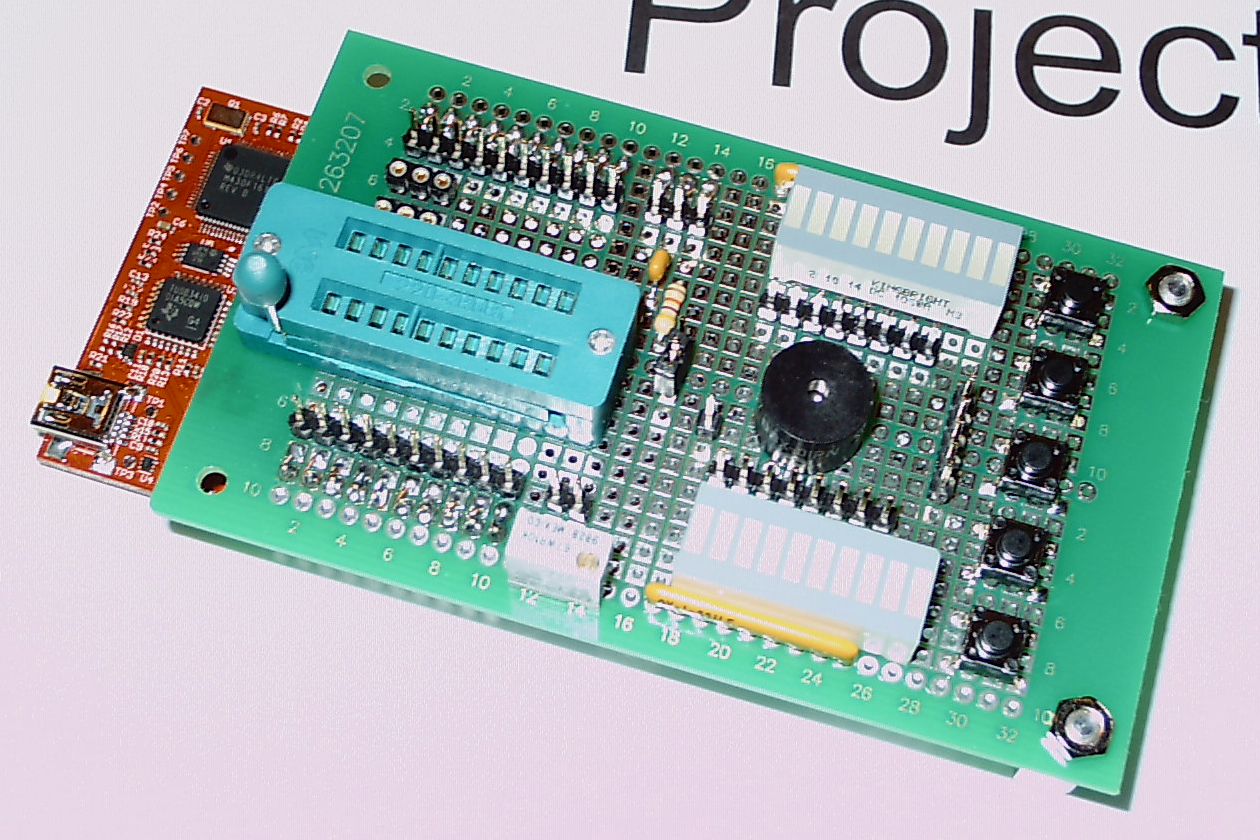
I just finished building an expansion board for my LaunchPad. I"ve tried insterting a picture of it in this post. If this doesn't work, see my user profile's Files section.
Description. The expansion board has the following features: 20-pin ZIF socket, sockets for high speed crystal and associated caps, 5 pushbuttons (active low), one of which can be used as a reset button via jumper, two banks of 8 LEDs each (active high), multi-turn 10K pot, piezo tone transducer. All connections (other than common grounds) are via headers and jumper cables.
Building Method. Thru-hole plated perf board (Jameco 263207/PCB-463) and point-to-point wiring. The two outboard legs are 9/16ths hex standoffs with an additional nylon washer.
Notes. The MSP430 chip can be put either on the LaunchPad or in the zif socket. The pull-up resistor and pull-down cap for S2/P1.3 on the LaunchPad were removed. If a 32768 Hz clock crystal is to be used, it and the MSP430 should be mounted on the LaunchPad and resistors R28 and R29 removed. (I plan on having two LaunchPads, one without the clock crystal and one with it installed.) J6 as well as J1 and J2 were brought up to the satellite board. Only 8 of the 10 LEDs in the bar graph displays are used. One display is bright red (Mouser 604-DC10SRWA) with 330 ohm dropping resistors, the other is green (Mouser 604-DC10GWA) with 220 ohm dropping resistors. (I used Bourns resistor networks.) The MSP430 pins for the pushbuttons must use internal pull-up resistors. The connections to Pins 20 and 19 on the ZIF socket are criss-crossed to and from the crystal/cap sockets so the ground connections on these are in the middle.
Comments. I did not draw a schematic for this project, as it is so straight-forward. I expect this board to be useful as a programming platform for projects that don't use a clock crystal on XIN/XOUT, and it will also allow me to try out more programming exercises (e.g., multiple button input, tone production, A-to-D conversions, lots of pretty flashing LEDs, etc.) than the LaunchPad itself. The TI developers were wise in designing the LaunchPad headers to allow such expansion boards.
Cheers, Andy