This thread has been locked.

If you have a related question, please click the "Ask a related question" button in the top right corner. The newly created question will be automatically linked to this question.

MSP430F425: Battery

Other Parts Discussed in Thread: MSP430F425

Tool/software: TI C/C++ Compiler

Hi,

I have to work on MSP430F425. I added a battery to the counter (emeter) but I have a problem on the configuration of the battery is there is an idea that can help me at the level of configuration !!! 

I use the software library tidc299 i want to know how configure the process of the battery .

  • Hello,

    I'm assuming that you're still using the EVM430-FE427A, but please correct me if I'm wrong. I'm sorry, but I don't fully understand what you're asking. Please provide more details about how you're planning to use the battery in your application. Are you using the battery as the power supply, backup battery, etc.? What kind of configuration are you trying to do?

    Regards,

    James

    MSP Customer Applications
  • HI JAMES

    Yes i have to use EVM430-FE427A to configure my MSP430F425. I have a battery backup that works in low power mode. I have found the battery code in the TI TIDC299 software but there are errors such as
    POWER_GOOD_SENSE and POWER_GOOD_THRESHOLD_HIGH that are not defined and I did not understand their utlity


    this is the place of configuration in emeter RTC where i find this errors


    #if defined(__MSP430__)
    if (operating_mode == OPERATING_MODE_POWERFAIL)
    {
    int i;
    int j;
    /* Select the higher comparator threshold for starting up. This ensures we should have
    enough energy in the capacitors to keep the meter running until it works out what to
    do next. */
    POWER_GOOD_THRESHOLD_HIGH;
    /* We are required to start quickly, so we cannot do much
    debouncing here */
    power_down_debounce = POWER_RESTORE_DEBOUNCE;
    i = POWER_GOOD_SENSE;
    while (--power_down_debounce >= 0)
    {
    j = POWER_GOOD_SENSE;
    if (i != j)
    {
    i = j;
    power_down_debounce = POWER_RESTORE_DEBOUNCE;
    }
    }
    if (j)
    {
    /* This appears to be a real power-up. */
    #if defined(BASIC_LCD_SUPPORT)
    display_power_normal_message();
    #endif
    custom_lcd_wakeup_handler();
    _BIC_SR_IRQ(LPM3_bits);
    }
    power_down_debounce = 0;
    }
    #endif
    #endif
    #endif
    #if defined(LIMP_MODE_SUPPORT)
    if (operating_mode == OPERATING_MODE_LIMP)
    {
    /* We need to kick things, to give the foreground activities a chance
    to do their work. */
    _BIC_SR_IRQ(LPM0_bits);
    }
    #endif
    #endif
    kick_watchdog();
    }
    #endif


    thanks for helping me

  • Hi,

    Thanks for your patience. After looking deeper into the code from TIDC299, I found that POWER_DOWN_SUPPORT wasn't defined in the 'emeter.h' file, but if you're getting the errors described above, I'm assuming that you've changed this to be defined. Unfortunately, I'm unable to contact the author of this code, so I'm assuming that since this feature wasn't enabled by default, it may have been included as a reference.

    If you look at Line 98 in 'emeter-rtc.c', there's a OR statement where the code checks if the MSP430 has the Comparator_A module. Since the MSP430F425 doesn't have the Comparator_A module, this OR statement checks on the POWER_GOOD_SENSE and POWER_GOOD_THRESHOLD_HIGH definitions. After searching through the project, I found a function on Line 1524 in 'emeter-background.c' that checks if POWER_GOOD_SENSE has been defined. If it hasn't, the code proceeds to configure the comparator. Line 1522 and 1523 make me think that the POWER_GOOD_ variables are associated with using a general I/O pin to check if the supply voltage is failing or not. Perhaps this could be done using a resistor divider circuit and checking for a logical 0 or 1 at that pin. Perhaps, VIH and VIL levels are used, which may be what the POWER_GOOD_THRESHOLD_LOW and POWER_GOOD_THRESHOLD_HIGH variables are referring to. I'd recommend using the SVS module, since it can monitor an external voltage or AVCC. You can set a specific level and can access the output of the SVS comparator via software too. Line 1537 in 'emeter-background.c' is where the code is checking for falling supply voltage and the operating mode is changed to OPERATING_MODE_POWERFAIL. This area in the code is where you'd want to implement your code that checks the supply voltage.

    Hopefully this helps point you in the right direction.

    Regards,

    James

    MSP Customer Applications
  • Hi,

    thank you for your reply

    For the problem of powerfull mode I used a pine I / O to control the power failure and the SVS pine for the return to normal mode.

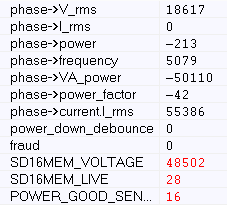
    I have another problem for the voltage results display after the measurement made by the voltage calculation function

    I changed the scale factor value to calibrate the voltage but there are no stable values.

    If defined (VRMS_SUPPORT)

        #if defined (SINGLE_PHASE)

    Int32_t voltage (void)

        #else

    Int32_t voltage (struct phase_parms_s * phase, struct phase_nv_parms_s const * phase_nv)

        #endif

    {

        Int16_t i;

        Int32_t x;

        / * Calculate the RMS voltage in 10mV increments. Return -1 for overrange

           (I.e. ADC clip). * /

       If ((phase-> status & V_OVERRANGE))

          Return -1;

        X = div_sh48 (phase-> V_sq_accum_logged, 26 - 2 * ADC_BITS, phase-> sample_count_logged);

        #if defined (LIMP_MODE_SUPPORT)

        If (operating_mode == OPERATING_MODE_LIMP)

            I = phase_nv-> V_rms_limp_scale_factor;

        Else

        #endif

            I = phase_nv-> V_rms_scale_factor;

        X = isqrt32 (x);

        X = (x >> 12) * 67997; // 18034;

        X >> = 14;

        Return x;

    }

    #endif

    Here are my results in capture screen

**Attention** This is a public forum