This thread has been locked.

If you have a related question, please click the "Ask a related question" button in the top right corner. The newly created question will be automatically linked to this question.

CCS/MSP430FR2311: Timer based PWM output glitches

Part Number: MSP430FR2311
Other Parts Discussed in Thread: LM5111, , MSP430F5529

Tool/software: Code Composer Studio

Hello,

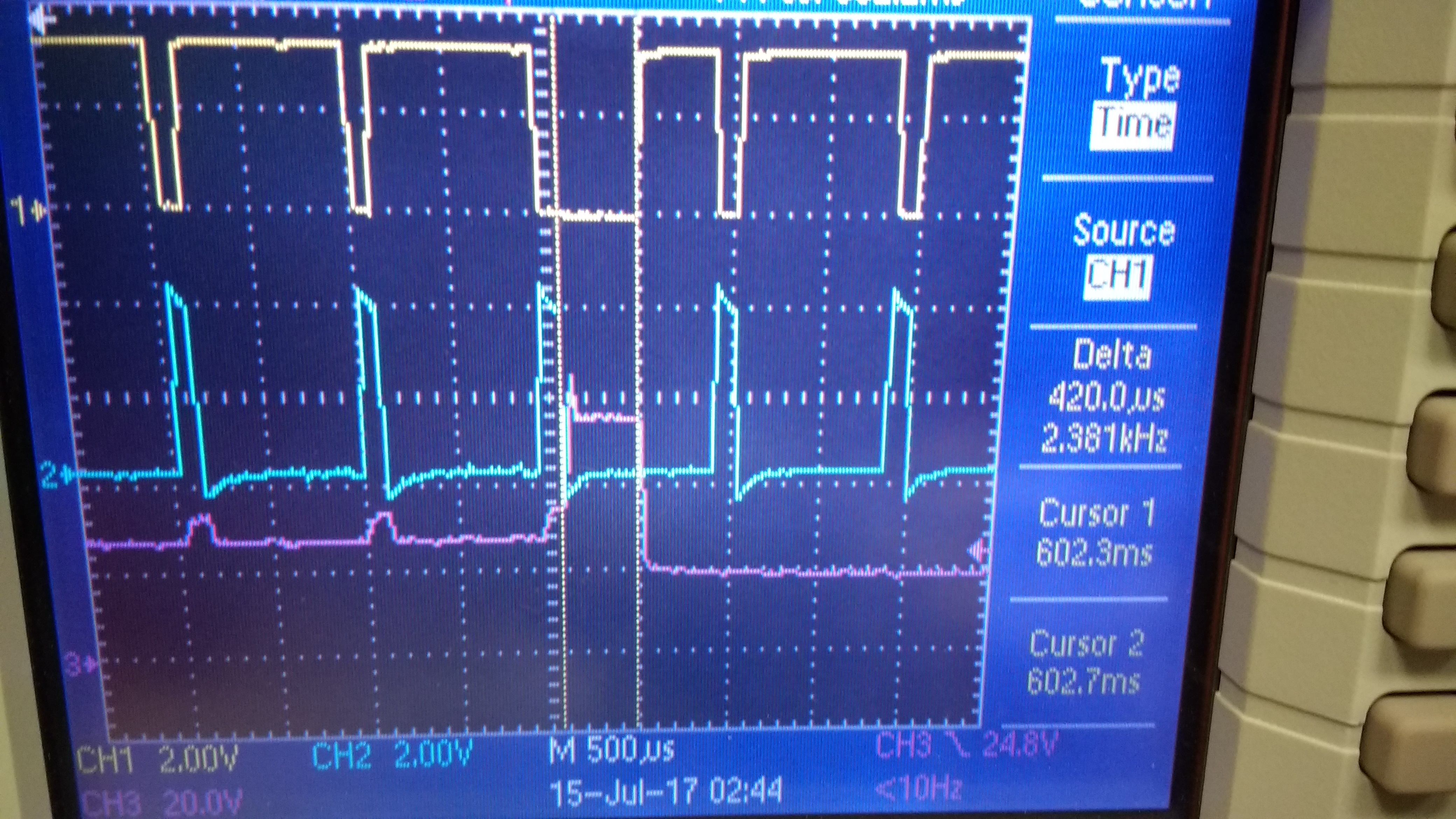
I am generating two  variable duty cycle PWMs based on a analog voltage. One PWM output is the inversion of the other. This PWM outputs is connected to the LM5111 gate driver to drive FETS to control LED brightness. When I run the code there is a period where both PWM outputs are low which causes the LED driver to restart. Therefore the LEDs are blinking rather than being ON continuously.

I am using the msp430FR2311 Lanchpad and code composer to generate code for the PWM outputs. UP/DOWN timer mode is being used on the timer. I am reading the analog voltage on P1.4 and I am generating the PWM signals on P1.6 and P1.7.

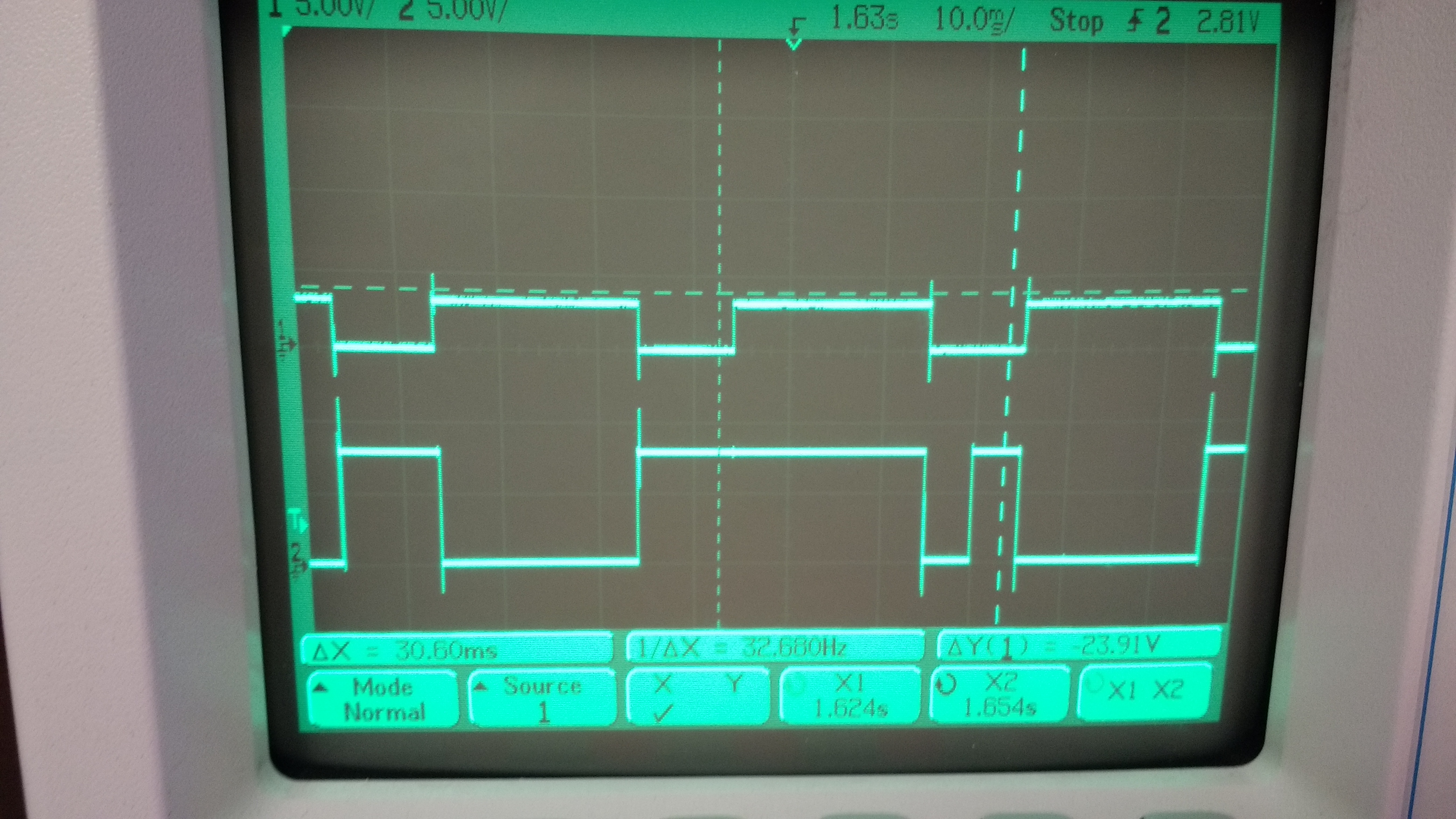
I have attached two images. In the first image the top two waveforms are the PWM outputs and the bottom waveform is the LED driver voltage. The top(yellow) waveform has a glitch. In the second image the two waveforms are the PWM outputs. Notice the bottom waveform has a glitch. Is it a problem to use the same port for timer outputs and a ADC reading?
  • Hello,

    This issue could be caused by your SYSCFGx settings. Please refer to the following two threads for some related discussion.

    Regards,

    James

    MSP Customer Applications

  • Hi James,

    I checked the Cout pin and there is no voltage correlation between the PWM output and P2.0. Also I am not using P2.0 for any function in my program.

    I also added the recommend line "SYSCFG2 |= TB0TRGSEL;" because I am using TB0 and it did not stop the glitches. Alternately I tried using  "SYSCFG2 |= TB1TRGSEL;" and that did not stop the glitches either. 

    The P2.0 voltage is the top waveform below and one of the PWM outputs is below. The voltage is only about 100mV on P2.0.

    Do you know of any other solutions?

  • Can I get an answer to my last question by the end of the day? I have a deadline to complete for a customer by Friday.
  • I also tried using Port 2 to generate the PWM and that did not solve the glitch issue.
  • Hello Neville,

    I think the glitch in your code may be caused by your usage of Toggle/Reset and Toggle/Set on the CCR registers and the fact that you don't stop the timer when you update the CCR values.

    When you change your duty cycle without stopping the timer, you could be putting your CCR registers into unknown states where it isn't clear whether they will toggle high or low next. Using Set/Reset and Reset/Set, as well as stopping the timer before changing the CCR values, will help to mitigate this.

    Additionally, you are using polling to get your ADC value and then changing your CCR values every time. A better way would be to use an interrupt to get your ADC value and then compare that to the previous one. You should then only update your duty cycle if the ADC value has changed significantly.

    Regards,
    Matthew
  • I made the changes where I stop the timer before making changes to the CCR values, I only change the CCR values if the ADC value changes by a certain amount,

    and I changed the output mode to Set/Reset and Reset/Set. This did not solve the issue. However the blinking now happens less. This may be because the ADC

    is not doing as many conversions as when it was polling.

  • Is it possible to dynamically change the CCR values without altering the PWM pulses? How would you solve this issue?

  • Hey Neville,

    I'm not sure I'm understanding your question. What kind of alterations to the PWM pulses are you trying to avoid?

    Regards,
    Matthew
  • Matt,

    To clarify the alterations are incorrect PWM pulse widths as a result of changing the CCR value during a cycle.
  • Hey Neville,

    Can you post a picture from the oscilloscope or a diagram to illustrate what kind of incorrect PWM pulse widths you are talking about?

    However, without seeing a picture, I'd say your best bet is stopping your timer before changing the registers. If you can't do that, you'll need to fairly extensively identify and account for any edge cases so that you don't have unexpected conditions upon changing the registers.

    Regards,
    Matthew
  • Hey Matt,

    The oscilloscope images are at the very top of this forum. I stopping the timer but it has not solved the issue.

    I also received an app note on generating variable duty cycle PWM signals using a MSP430F5529. They use a method of checking the value of the CC timer output using the CCI bit in the TBxCCTLx register in order to choose an appropriate CCR value. Also they don't stop the timers before setting the CCR values. What are your thoughts on that method?

    app note: www.ti.com/.../slaa513a.pdf

    Here is a code snippet of their interrupt.

    /*Multiple timebase PWMs
    *Period is determined by the sum of the two TBCCRx offset values
    *Duty cycle is determined by the ration of the high/low TBCCRx value
    *to the total period.
    */
    
    // Timer B0 interrupt service routine
    #pragma vector=TIMERB0_VECTOR
    __interrupt void TIMERB0_ISR (void)
    {
    if(TBCCTL0 & CCI) // If output currently high
    {
    TBCCR0 += 300; // 75% high
    }
    else
    {
    TBCCR0 += 100; // 25% low
    }
    }
    
    // Timer_B1 Interrupt Vector (TBIV) handler
    #pragma vector=TIMERB1_VECTOR
    __interrupt void TIMERB1_ISR(void)
    {
    switch(__even_in_range(TBIV,14))
    {
    case 0: break; 
    case 2: if(TBCCTL1 & CCI)
    {
    TB0CCR1 += 100; // 33% high
    }
    else
    {
    TB0CCR1 += 200; // 66% low
    }
    break;
    case 4: if(TBCCTL2 & CCI)
    {
    TB0CCR2 += 1250; // 31.25% high
    }
    else
    {
    TB0CCR2 += 2750; // 68.75% low
    }
    break;
    case 6: if(TBCCTL3 & CCI)
    {
    TB0CCR3 += 4000; // 80% high
    }
    else
    {
    TB0CCR3 += 1000; // 20% low
    }
    break; 
    case 8: if(TBCCTL4 & CCI)
    {
    TB0CCR4 += 1500; // 25% high
    }
    else
    {
    TB0CCR4 += 4500; // 75% low
    }
    break; 
    case 10: if(TBCCTL5 & CCI)
    {
    TB0CCR5 += 4000; // 57.1% high
    }
    else
    {
    TB0CCR5 += 3000; // 42.9% low
    }
    break; 
    case 12: if(TBCCTL6 & CCI)
    {
    TB0CCR6 += 3000; // 37.5% high
    }
    else
    {
    TB0CCR6 += 5000; // 62.5% low
    } 
    break; 
    case 14: P1OUT ^= 0x01; // overflow
    break;
    default: break;
    }
    }

  • Hello Neville,

    Apologies, I wasn't sure if you were experiencing a different PWM alteration than you were originally seeing.

    When you post code on E2E, you can use the "insert code using Syntaxhighlighter" button in the "Rich Formatting" options to make your code more readable. I've already edited your post to do so.

    As before, there is risk associated with not pausing the timer. You can experience unforeseen conditions that could cause your application not to work, which is why it is important to thoroughly explore possible edge cases. However, if pausing the timer is at all possible, that's the thing to do.

    For your specific application, one way you could avoid your signal going low while the timer is off would be to change the sel registers of the timer pins to the GPIO function and drive the pins high before you stop the timer. This way the pins won't go low and the LED driver won't reset.

    Regards,
    Matthew
  • Matt,

    The issue still persists where I set the GPIO high before I stop the timer and then configure the pins for a timer output once I set my CCR registers. I think the issue is unrelated to the timer being stopped because the driver still resets with or without stopping the timer before setting CCR values.
  • Neville,

    If you look at the oscilloscope output, do both of the PWM signals still go low simultaneously?

    Regards,
    Matthew
  • Hey Matt,

    The LED driver seems to shut down at a point that is unrelated to the interrupt... I have a GPIO going high when in the interrupt and the driver does not shut down at that point. The driver seems to shut down when channel 1 goes low. Note that I do have overlap between the PWM outputs.

    The top waveforms channel 1 and 2 are the PWM outputs. Channel 3 is the GPIO that is set high when the interrupt is set. Channel 4 is the LED driver current.

    The time where I set both PWM outputs to be high manually is shown in the first capture. At that point channel 1 is already high so setting the GPIO high did not help as I thought it would.  .

  • Hey Neville,

    Does the LED driver documentation define any other circumstances where the LED driver will reset? 

    Regards,

    Matthew

  • Hello Neville,

    Were you able to resolve this issue?

    Regards,
    Matthew
  • Hi Matthew,

    The issue has stopped since I started testing on a PCB rather than a breadboard. I think there was a ground issue due to bad connections.

    I will consider this issue resolved since it was not due to the msp430.
  • Thanks for the help troubleshooting this!

**Attention** This is a public forum