Part Number: MSP432P401M
Hi,
My customer asks:
I am working on an MSP432 bootloader. I now have a project working which I can successfully bootload using the TI BSL scripter. I have modified this script so I can download a code image to a ‘holding location’ in memory (0x00200000) to verify I can get the image placed where I want it.
Ultimately I wish to create a system that will download an image (potentially over the air) and write it to flash, then after the image is loaded and validated, execute a script to copy this new image to the actual executable area. I have written driver library code to perform this validation and movement of code from one area to the other.
While the driverlib code can run out of ROM I still need my little bootloading scrip to run somewhere while flash is being written so I will need to partition memory into three areas: the final code image area at 0, my new downloaded image at 0x200000 and my script code somewhere else. I am wondering if you can point me to some sample code that performs a similar function so I can see the best way to build and locate the various pieces in memory and how best to hand off from piece to piece?
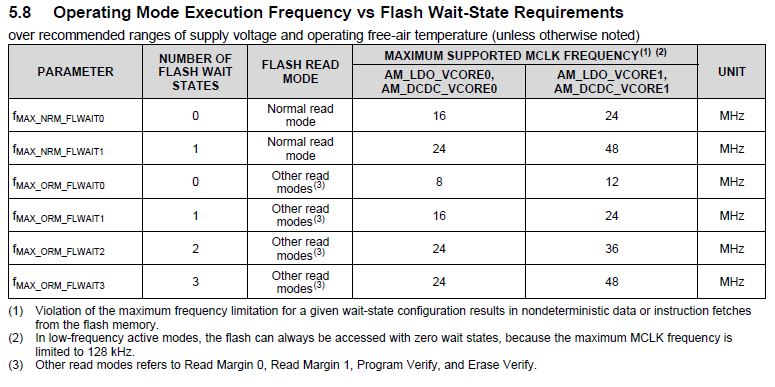
Also I have looked at the example code provided on the resource explorer (from the flash_program_memory example) which I replicated but am still not able to get my internal copy function to work. One thing I am doing differently from the example is not setting up the programming speed – I left that as default. Is that code (shown below) required?
/* Setting our MCLK to 48MHz for faster programming */
MAP_PCM_setCoreVoltageLevel(PCM_VCORE1);
FlashCtl_setWaitState(FLASH_BANK0, 2);
FlashCtl_setWaitState(FLASH_BANK1, 2);
MAP_CS_setDCOCenteredFrequency(CS_DCO_FREQUENCY_48);
Thanks for the advice!
Blake