This thread has been locked.

If you have a related question, please click the "Ask a related question" button in the top right corner. The newly created question will be automatically linked to this question.

MSP432 launchpad getting extremely hot (uC and debugger)

Sorry for resurrecting old thread, but I have the same issue with my MSP432P401R Launchpad. Everything was fine until recently when I updated my XDS110 firmware to 2.3.0.9. The MCU became very hot even for the simplest applications (as blink a LED). The current consumption, measured on the 3V3 pin between debugger and the MCU was ~280mA. As an additional feature, occasionally the board has not been recognized by CCS.
I've read some suggestions here and finally downgraded to firmware version 2.2.4.1. After the downgrade, the heat's gone (current consumption, measured on the 3V3 pin between debugger and the MCU is now ~120mA). But now, when I want to load the code (debug) Code Composer Studio (Version: 6.2.0.00050) is asking me to upgrade the firmware (ha ha).
Could you, please advise me what could be my approach in order to continue using my MSP432 and same toolchain (CCS), without these issues?
  • Jon,
    The 120mA still seems like a lot. Can you download a low power example and verify the current consumption?

    dev.ti.com/.../

    I have had issues with EOS on pins causing the IO to latch and pulling 90+mA. I would take an example similar to the one above and confirm that all of the IO are output low and then retest changing the polarity to output high. In my particular instance 2 of the pins were at some intermediate voltage indicating the IO was damaged.

    Regards,
    Chris
  • Also, can you provide the launchpad/silicon version that you are using.

    Thanks,
    Chris
  • Hi!

    Thank for the reply.

    I have MSP432P401R LaunchPad Rev 2.0 board.

    On the MCU chip itself it's written "REV C".

    I'll try the approach you suggested earlier and get back with the results.

    Thanks again.

    Regards

  • Hi again, Chris!
    I did as you advised, with the same example project (lpm3). I measured about 3.10 - 3.15V on pins when in high state and between 8 and 24mV (between GND and a pin) when in low state. The range is so wide, because my measurement equipment is sh.. low quality. I didn't noticed any significat difference among the pins' voltages.
    I also measured the current on the 3V3 pin and it stays the same - 240mA (when all pis are high) and 130mA (all pins low) - with both XDS110 firmware revisions. (actually whith the lower revision I get 210mA, against 240mA with the latest).
    I measure these values with lower grade multimeter, not prefesional, so some inaccuracy is presented.

    Best Regards
  • Jon,

       Thank you for going to the trouble or running those tests.  I am sorry that they were not more helpful or insightful.   With the LPM3 code you should be measuring something on the order of 1uA and not 200+mA.  

     I will talk with some of my colleagues to get some different ideas of what might be going on.

    Regards,

    Chris

  • I have seen this exact same issue on numerous boards that my students work on. This was occurring on the old MSP432 Launch board (blackboard) as well as on the new Launchpad (redboard). My students boards basically become unusable after they hit this state. The XDS can still communicate to them, but ADC functionality seems compromised. It relates to ADC in somewhat as it only starts occurring when my students start their ADC lab. Any update would be great.... I could ship in some boards that are currently in that state so you guys could debug if you want.
  • Alexander,

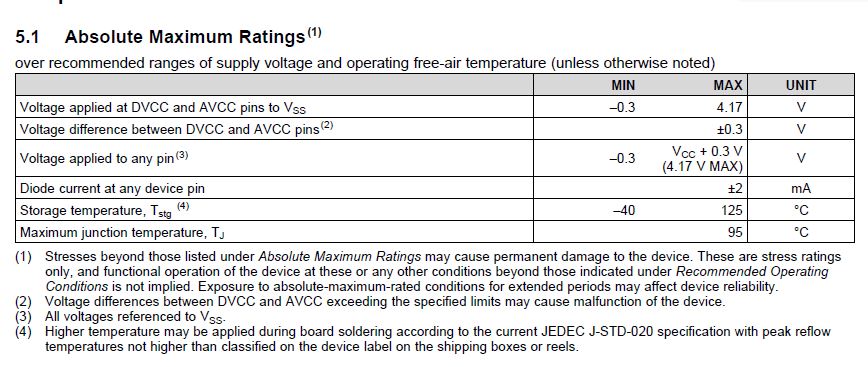
    This sounds like a case of EOS, but can you help me to confirm?  At no point during the lab should the ADC input be exposed to voltages outside the absolute maximum ratings.  Do not apply the ADC source while the device is not powered.

    (1) Load a simple low power project and check the current consumption with energy trace or a simple multi-meter.

    a.

    b.

    (2) I am assuming that you will find that the current being measured is beyond the range of energy trace and that you will receive an error.  Now determine which IO is damaged.

    a. Before setting the GPIO to the ADC peripheral set the GPIO to output mode

    b. Set to high and verify Vcc, set to low and verify GND.  I believe that you will find one or more IO are not going to the correct voltage and that the IO structure was damaged by over voltage.  If needed I can send you some code to do this or you can do this through the IDE by controlling the appropriate port registers.

    Regards,

    Chris

**Attention** This is a public forum