This thread has been locked.

If you have a related question, please click the "Ask a related question" button in the top right corner. The newly created question will be automatically linked to this question.

MSP430FR6989: Run MSPscripter and use MSP-FET. RST pin didn't change state after running scripter.

Part Number: MSP430FR6989
Other Parts Discussed in Thread: MSP-FET, MSPBSL

Hi Champs,

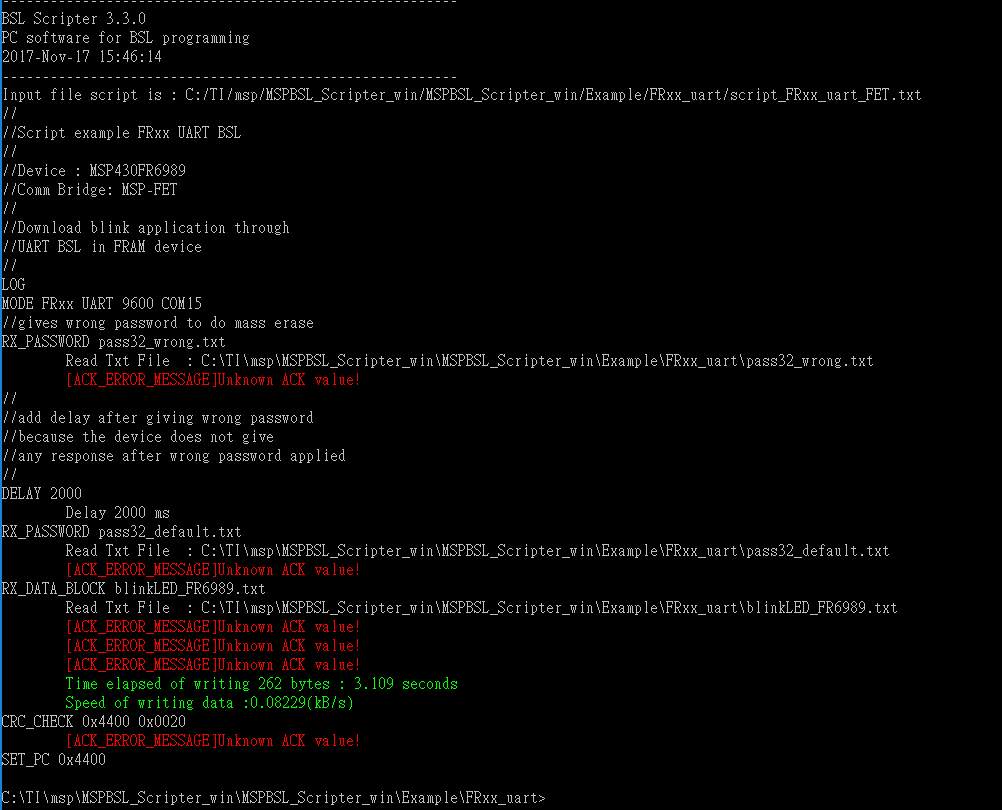
I ran MSPBSL Scripter and tried to use MSP-FET to do BSL. I used FR6989 launchPad and used MSPBSL_Scripter_win\MSPBSL_Scripter_win\Example. I put scripter.exe in same folder. I used script which is provided in folder. However, BSL process failed. Please see below picture. I used LA to measure waveform and found out MSP-FET didn't generate right BSL entry pattern (TEST/RST). When I used another FET and it can generated the correct entry pattern then BSL process update successfully. Could you please tell me is there any setting of MSP-FET to use in BSL communication mode? thanks !

1.Script
2. RST always pin keep high

  • Hello Lisa,

    To confirm, you were able to use the BSL with another MSP-FET? Can you proivde the serial numbers of the MSP-FET that failed and the one that worked? If you go back tot he original MSP-FET does it still fail or does it work now?
  • Hi Jace,

    Yes. I can used serial number:140100491 to do BSL. However, I can't use serial number : 170700016 to do BSL. Please see below waveform for workable MSP-FET.

  • Hello Lisa,

    You may have to update the BSLScripter to the latest and/or update the MSP-FET that does not work to the latest FW as well. There was a compatibility issue with the newest serial number MSP-FETs with some of the IDEs. This could be related.
  • Hi Lisa,

    the BSL Scripter 3.3.0 should work with any MSP-FET for MSP430. The update in the BSL SCripter that affect the use of MSP-FET would be to talk with the MSP432P. I talked to the developer of MSP-FET, one thing that you can try is to update the MSP-FET firmware using CCS or IAR, and try to debug anything, and the firmware update of MSP-FET is taking place.

    Let me know if you still face the same problem.

  • Hi Fatma/Jace,

    I tried to update MSP-FET firmware but there is no update window show up when I use CCS. However, when I connected MSP-FET which workable on scripter and CCS pop up a window which asked me to update firmware. It looked like previous MSP-FET firmware worked with scripter but newest MSP-FET firmware is not.....
  • Hi Lisa,

    thank you for your feedback here. I am going to test both version on my side and let you know the finding as soon as possible.

  • Hi Lisa,

    sorry it took some time. I tested with MSP-FET with serial number 140100077 and serial number 171000006, both are working. I updated it with the MSP430.dll  two different version (the two latest version) and they are both working. So my tests are 4 combination. I still could not reproduce your issue.

    I am forwarding this case to my colleague who develop the DLL, so he can assist you to have the update like I have here now. I was using internal tool to update the DLL.

    Thank you for your patience.

  • Hi Lisa,

    My colleague provide these steps to update the MSP-FET firmware:
    1. Create a blink LED CCS project and try to program the device
    2. This should trigger the MSP-FET firmware update by CCS
    3. Once it is updated, you can get the DLL version from MSP430.dll file properties under <CCS_INSTALLDIR>\ccs_base\DebugServer \drivers\msp430.dll

    Let me know which version that you see on step (3).
  • Hi Fatmawati


    Fatmawati_Santosa said:
    Hi Lisa,

    My colleague provide these steps to update the MSP-FET firmware:
    1. Create a blink LED CCS project and try to program the device
    2. This should trigger the MSP-FET firmware update by CCS
    3. Once it is updated, you can get the DLL version from MSP430.dll file properties under <CCS_INSTALLDIR>\ccs_base\DebugServer \drivers\msp430.dll

    Let me know which version that you see on step (3).

    [Lisa]: this version is 3.10.1.0. Now i click on debug and program the device, it didn't show update window. And i still can't use BSLscripter base on this version... Could you please help to check it ? thanks 

  • Lisa,

    Can you try replicating this on a different port of the PC you are using? Or on another PC as well?
  • Hi Jace,

    I changed different USB port and it didn't solve the problem. I will try it on different PC then update to you.
  • Lisa,

    have you been able to try a different PC yet?

**Attention** This is a public forum
