This thread has been locked.

If you have a related question, please click the "Ask a related question" button in the top right corner. The newly created question will be automatically linked to this question.

MSP430L092: Loader API functions don't seem to work

Part Number: MSP430L092


We are using the MSP430L092 in a product where it boots from an EEPROM.  We are downloading the program to the EEPROM and the processors boots up and runs fine.  However, we would like to put some calibration information into the EEPROM and want to use the loader API functions for that purpose.  In testing a few of the functions, none of them seem to return the value expected, or don't return at all (the processor seems to crash).  I can understand why we might have an issue with a function that actually talks to the EEPROM, but one function that does return is the SWID function, but the values in R12 and R13 are nothing like what would be expected.  I can understand why R12 might be different from the documentation since it refers to the loader software version, but R13, which contains the identifiers for TI and the MSP430, is also not correct.  We have reviewed the 'MSP430L092 Loader Code User's Guide' as well as Chapter 8 in the 'MSP430x09x Family User's Guide' which refers to the Loader Code.  It all seems so simple, it must mean we're missing something that we should be doing before calling the functions.  An example of our function call is:

CALL    &0xF884  ; SWID

We perform this call immediately after our firmware starts up, before we modify the clock speed or port configuration.  Is there something we need to do to make these functions available before calling the function vectors?  We have looked at the threads from Michael Pedigo titled 'None of the API functions of the loader seem to work', and it appears he is having a similar problem, but I don't see a solution there.


As for as the loader.h file, we've already recreated it from the information in the documentation, so unless that file actually contains different or additional information than the documentation, it would probably be no use to us.

Any help would be appreciated.

Thanks,

Robert Buchanan

  • Hi Robert,

    There have been several other requests similar to yours lately. You were even able to find one of them yourself. I'm going to be pushing our internal team on this to see if we can provide an explanation of the behavior your'e experiencing and an official loader.h file. Thank you for your patience in the meantime.

    I'll keep you updated and feel free to let me know if you make any progress or have any further questions.

    Best regards,
    Caleb Overbay
  • Hi Caleb,

    Thank you for the quick reply. If there's any additional information about what we're doing that mighthelp the team, just let me know.

    Regards,
    Robert Buchanan
  • Hi Caleb,

    Anything new on this subject?  We are reaching the point in development that I will have to find an alternative method of saving the configuration information. Unfortunately, this will probably require much more work when the production people are setting up the units and may require us to redesign the system using a different processor.

    Regards,

    Robert Buchanan

  • Hi Robert,

    I apologize for the delay in communication. It's been particularly difficult to track down the necessary information for this. Can you provide the loader.h file you've created so I can verify that everything is setup correctly?

    Best regards,
    Caleb Overbay
  • Hi Caleb,

    The file contains only the functions that we plan on maybe needing. The contents are:

    ;*****************************************************************************
    ;
    ; LoaderAPI.h
    ;
    ; This module contains definitions for the L092 loader code API
    ;
    ;*****************************************************************************
    #define SWID 0x0F884
    #define LedOn 0x0F886
    #define LedOff 0xF88A
    #define SpiReadByte 0x0F894
    #define SpiWriteByte 0x0F89C


    Again, we are using the IAR development system and programming in assembler language. According to the documentation, these addresses actually vectors to the functions rather than the address of the function themselves, so an example of out call to these would be:

    CALL &SWID

    and we would expect the result for this function to be in R12 and R13.

    Thanks,
    Robert
  • Hi Robert,

    Thanks for providing this. It looks like you're calling the SWID function correctly. What values are you seeing in the R12 and R13 registers?

    Also, are you able to probe the SPI lines with a logic analyzer when performing a read/write to see if there is any activity?

    Best regards,
    Caleb Overbay
  • Hi Caleb,

    I seem to have lost my notes when I did the testing for the SWID command. I can't use the emulator to easily get this, so it will take a while to get the system set back up to redo the test. I should have this information for you tomorrow morning. As for the SPI signals, I never checked them for the commands to read and write to the EEPROM. Since the SWID command didn't work and since it is just getting the internal loader's version information I didn't bother to delve more into the read/write commands. I will also try them and see if I see any SPI traffic. Our program does load up from the EEPROM fine though, so I know the basic SPI interface does work ok.

    If you have anything else you want me to look at, let me know and I will add that to my test.

    Regards,
    Robert Buchanan
  • Hi Caleb,

    In rechecking the registers from the SWID call, it would seem that the values in R12 and R13 are swapped versus what the documentation indicates. R13 is showing 0x0302 and R12 is showing 0x2843. I was initially only looking at R13 since that should have had the TI/MSP identifiers. Also when I tried the SpiReadByte function it locks up during the read. With a scope I do see activity on the clock, MOSI, and chip select signals, so it would appear that the function is trying to work. Our logic analyzer is being use to debug another project right now, but I should be able to move it over to this project tomorrow to take a better look at the signals. I will get back to you as soon as I have some more information.

    Thank you for your support,
    Robert Buchanan
  • Hi Robert,

    Thank you for the information. Can you also provide code that we can use to try to recreate the issue? It helps if the code is minimal and only contains what's necessary to recreate the issue.

    Best regards,
    Caleb Overbay

  • Hi Robert,

    Just a quick update. I looked into the source code for the SWID function and confirmed you're seeing the values in the correct registers. This was a typo in the documentation. Within the next week I'll be creating a loader.h file and example application to test out the functionality and hopefully reach a resolution to this issue. Have you made any progress on your end?

    Best regards,
    Caleb Overbay
  • Hi Caleb,

    Sorry for the delay.  Yes, we have made some progress.  I think the issue I'm having with the byte read function may be on our end.  I will be testing that some more today and will let you know.

    The official loader.h file would be great...thanks.

    Regards,

    Robert Buchanan

  • Hi Caleb,

    Sorry for the delay. Part of the problem with the read byte function was on our end and I think we have it fixed. But we are still having an issue. I should have some more information for you tomorrow.

    Regards,
    Robert Buchanan
  • Hi Caleb,

    We had one issue that we resolved with the EEPROM being powered down too soon.  But we are still having an issue with the SpiByteRead function.  If you can tell me what we're missing.  Below is the code for the test program.  It is very simplistic in that I don't change the clock speed or use interrupts before calling the API functions.

    //*****************************************************************************
    
    //
    
    //      LoaderAPI.h
    
    //
    
    //       This module contains definitions for the L092 loader code API
    
    //
    
    //*****************************************************************************
    
    #define SWID 0x0F884
    
    #define LedOn 0x0F886
    
    #define LedOff 0xF88A
    
    #define SpiReadByte 0x0F894
    
    #define SpiWriteByte 0x0F89C
    
    ;*****************************************************************************
    
    ;
    
    ;      main.s43
    
    ;
    
    ;       This module is a simplistic program to test the
    
    ; loader API functions
    
    ;
    
    ;*****************************************************************************
    
    #include "msp430.h"                     ; #define controlled include file
    
    #include "LoaderAPI.h" ; loader API definitions
    
           NAME    main                    ; module name
    
           PUBLIC  main                    ; make the main label vissible
    
                                           ; outside this module
    
    #define TRUE 1
    
    #define FALSE 0
    
           ;
    
           ; Interrupt Vectors
    
           ;
    
    #if DEBUG
    
    ORG 0FFE0h
    
    #else
    
    ORG 01C60h
    
    #endif
    
           DC16    INVINT                  ; invalid interrupt -- just return
    
           DC16    INVINT                  ; invalid interrupt -- just return
    
           DC16    INVINT                  ; invalid interrupt -- just return
    
           DC16    INVINT                  ; invalid interrupt -- just return
    
           DC16    INVINT                  ; invalid interrupt -- just return
    
           DC16    INVINT                  ; I?O Port P2 (P2IFG.0 to P2FIG.3)
    
           DC16    INVINT ; Timer0_A3 (TA0CCR1 CCIFG1) - Sample Interrupt
    
           DC16    INVINT                  ; Timer0_A3 (TA0CCR0 CCIFG0)
    
           DC16    INVINT                  ; I/O Port P1 (P1IFG.0 to P1IFG.6)
    
           DC16    INVINT                  ; A-Pool (CxIFG)
    
           DC16    INVINT                  ; WDTIFG
    
           DC16    INVINT                  ; Timer1_A3 (TA1CCR1 CCIFG1)
    
           DC16    INVINT                  ; Timer1_A3 (TA1CCR0 CCIFG0) - Transmit Interrupt
    
           DC16    INVINT                  ; User NMI (NMIFLG)
    
           DC16    INVINT                  ; System NMI (SVMIFG, VMAIFG)
    
           DC16    init                    ; reset vector address
    
           RSEG    CSTACK                  ; pre-declaration of segment
    
           RSEG    CODE                    ; place program in 'CODE' segment
    
    init:   MOV     #SFE(CSTACK), SP        ; set up stack
    
    main:   NOP                             ; main program
    
           MOV.W   #WDTPW+WDTHOLD,&WDTCTL  ; Stop watchdog timer
    
    BIS.B #0x60,&P1DIR
    
    BIS.B #0x40,&P1OUT
    
    #if FALSE ; test software ID function
    
    CALL &SWID
    
    #if FALSE ; check R13 for TI/MSP Versions
    
    CMP.W #0x2843,R13 ; this produces a failure
    
    #else ; check R12 for TI/MSP Versions
    
    CMP.W #0x2843,R12 ; this produces a success
    
    #endif
    
    JEQ IndSuccess
    
    JMP IndFailure ; no return from call
    
    #endif ; end SWID function test
    
    #if TRUE ; test EEPROM SPI Read Byte function
    
    test100
    
    // CALL &LedOn
    
    MOV.W #0,R12
    
    MOV.W #0,R13 ; read 1st byte of EEPROM
    
    CALL &SpiReadByte
    
    #if TRUE // delay in loop to enable scope/logic analyzer SPI monitoring
    
    NOP
    
    NOP
    
    NOP
    
    NOP
    
    NOP
    
    NOP
    
    NOP
    
    NOP
    
    NOP
    
    NOP
    
    NOP
    
    NOP
    
    NOP
    
    NOP
    
    JMP test100
    
    #endif
    
    CMP.B #055h,R12
    
    JEQ IndSuccess
    
    JMP IndFailure
    
    #endif ; end SpiReadByte function test
    
    ;
    
    ; indicate success -- up pulse
    
    ;
    
    IndSuccess
    
    BIS.B #040h,&P1OUT
    
    BIC.B #040h,&P1OUT
    
    NOP
    
    NOP
    
    NOP
    
    NOP
    
    NOP
    
    NOP
    
    NOP
    
    NOP
    
    NOP
    
    NOP
    
    NOP
    
    NOP
    
    NOP
    
    NOP
    
    JMP IndSuccess
    
    ;
    
    ;  indicate failure -- down pulse
    
    ;
    
    IndFailure
    
    BIC.B #040h,&P1OUT
    
    BIS.B #040h,&P1OUT
    
    NOP
    
    NOP
    
    NOP
    
    NOP
    
    NOP
    
    NOP
    
    NOP
    
    NOP
    
    NOP
    
    NOP
    
    NOP
    
    NOP
    
    NOP
    
    NOP
    
    JMP IndFailure
    
    INVINT NOP
    
    RETI
    
           END

    When checking the read function I have two options...one to check the returned value and indicate success or failure, the other is to loop and repeatedly call the read function to be able to easily check the SPI signals.

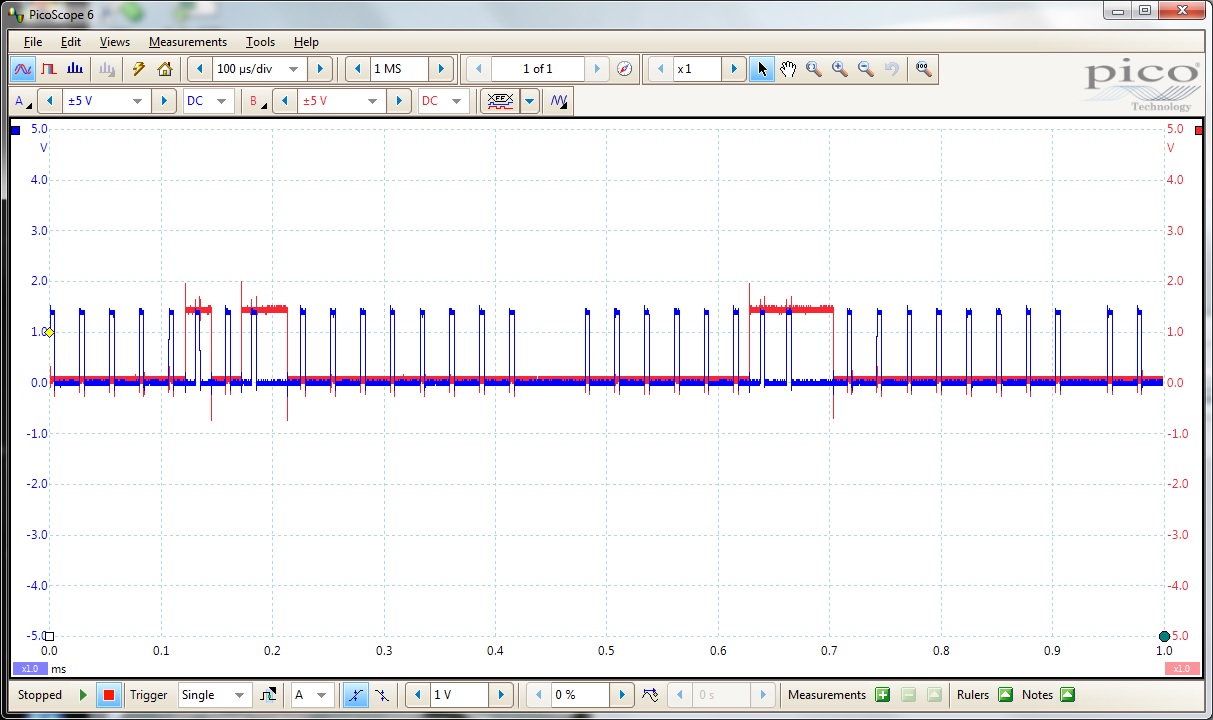
    Below is a scope screenshot of the clock (blue) and MOSI (red) during the initial program load.  The bit timing and voltage levels all look like I would expect and the processor is issuing a status read request then a byte read request.

    Below is a scope screenshot of the activity during the SpiByteRead calls.

    Two things shown here are the extremely slow SPI clock and an elevated base voltage levels.  As you can see from the code, I am not changing the processor clock speed or setting up and timers or other ports.  Perhaps there is something here that does need to be set up for the SPI functions to have a correct SPI clock.  As for the elevated base voltage, I have no idea...I hope you do.

    We are using the MM95512-DFDW6TP EEPROM and, as you can see from the first screen shot, the program load function at startup works fine, so I know the basic SPI interface is fine.

    Let me know if you need any more information.

    Regards,

    Robert Buchanan

  • Hi Robert,

    Is it possible something else could be driving the SPI line other than the MSP430L092?

    I just received a target board to test your code out on but I'm having some trouble getting the latest version of IAR to work properly with this device. What version of IAR are you using?

    Best regards,
    Caleb Overbay
  • Hi Caleb,

    As for the SPI signals, I don't see anything in my schematic that would affect the SPI signals after the program has started that wouldn't affect them during the program load.  But there were some patches made to the board in that area.  I will see if I can get a new schematic with those patches and check it out.

    The copy of IAR that I am using with this board has IDE version 6.30.1 and the common components are version 7.2.0.3640.

    Regards,

    Robert Buchanan

  • Hi Caleb,

    The only thing on the SPI signals are 47K pull-up resistors to +1.8V.  This doesn't affect the signals when the processor is loading the program, so I don't see why they would affect the signals after the program starts.  But do you think this might be an issue?  I think we have aL092 test target board here.  If I can find it I'll see if I can try my code in it.

    Regards,

    Robert Buchanan

  • Hi Robert,

    I've never heard of using pull-up resistors on SPI lines. Typically, pull-up resistors are used for I2C communication. Can you remove the resistors and try the communication again?

    Best regards,
    Caleb Overbay
  • Hi Caleb,

    Removing the pull-ups resolved the elevated baseline, now I'm getting good signal levels when I'm using the API. I still have the extremely slow clock rate and no or invalid information on the MISO. At this point I would assume the MISO issue has to be on our end. So until I get back to you with more information, I think the only thing left that I would like to have you ponder about is how can I increase the SPI clock rate. Again, the clock rate at program load is quite fine, it's just after the program has started and I'm using the API functions.

    Regards,
    Robert Buchanan
  • Hi Robert,

    It might help is you provide the MSP430 portion of your schematic to verify everything has been setup correctly. I'll also work to understand what could be causing the slower clock rate and possible fixes with our experts internal to TI.

    Best regards,
    Caleb overbay
  • Hi Caleb,

    I started initializing the clock yesterday and found, as would somewhat be expected, the SPI clock changed.  I will play around with that some more today and see what happens.  I now seem to be getting a consistent response back for each of the two SPI clock rates I tried yesterday, but the results were different between the two rates, and neither were close to what would be expected.  I'll let you know my test results.  I will also try to get you a copy of the schematic this afternoon, but I have to take out some proprietary info.  But other than the API during the calibration phase, the application itself seems to runs fine.

    Regards,

    Robert Buchanan

  • Hi Caleb,

    Below is the processor-relevant part of the schematic for our board.  There have been a few patches, but only related to keeping U11 enabled all the time to keep the EEPROM powered up and to use pins 11 and 12 on HDR1 for the EEPROM chip select signals.  I also now have R46 and R47 removed which made the correction for the low level of the clock and MOSI signals.

    I've also played around with setting the system clocks at different speeds.  The relevant clock seems to be MCLK.  If I run MCLK at 1 MHz, I get an SPI clock about half the speed that I see during the program load, but the signal is not a decent square wave nor as high of a signal that I see during the program load.  The screenshot is below:

    So there would appear that something else still needs to be setup to get proper results??

    I'm going to incorporate this byte read function at the startup of my normal application code after everything has been initialized and see what happens.  If there's anything else you want me to try or info you need from me let me know.

    Regards,

    Robert

  • Hi Robert,

    Does your modification include removing the U11 EN connection to the RST line of the MSP430? You have to practice extra caution when making connections to the RST pin to ensure the device never gets put into reset accidentally. Additionally, TI recommends a 1.1nF cap on the RST line.

    I assume you have some kind of voltage level translation between the MOSI_F, MISO_F, SCLK_F and MOSI, MISO, and SCLK connections? If not, I highly recommend it since the MSP and the EEPROM are operating off different voltages. You can find an example of a typical target hardware configuration for this device as well as adaption networks in sections 8.2 and 8.2.3 of the devices User's Guide.

    Could you explain the circuit connected to P1.1 of the MSP? Also where does the connection of P1.2 go to on the schematic?

    Finally, I'm working with our expert to understand if there is any kind of initialization that needs to take place before calling the API functions. Unfortunately, he is current out of office due to illness so an answer to this question will be delayed.

    Best regards,
    Caleb Overbay
  • Hi Caleb,

    The U11EN connection to the RST line is to supply power to the EEPROM when the system resets and maintain power for a few seconds to allow the processor to boot up from the EEPROM. But since we now want to use the EEPROM to hold firmware-generated calibration information, we are reworking that circuitry to allow the firmware to power the EEPROM up and down as needed.

    The EEPROM is being powered by ~1.8 V, so I imagine that our hardware engineer didn't see a need for a voltage translator for the SPI signals. But I will pass this information along with the recommended RST cap to him. When I gave you the schematic, I forgot to mention that the EEPROM it shows is not the one we are using. We replaced it with a MM95512-DFDW6TP EEPROM. I think I mentioned this before, but that was many messages ago.

    The P1.1 is an input signal from a frequency detector. We are going to use a very low range RF transmitter to provide control signals to the firmware.

    On another note, I just opened another ticket regarding the temperature sensor. I don't know if you can grab it or if it just gets assigned at random. But if you can take it I would appreciate it.

    Regards,
    Robert Buchanan
  • Hi Robert,

    I wanted to give you a quick update on this. The engineer who wrote the APIs and the loader.h file is back from his leave and I had a chance to sync up with him on the issues you're experiencing.

    It looks like there is some initialization that needs to be performed before using the APIs. Unfortunately, the loader code documentation is not very descriptive in this regard. I'm working on creating an assembly example for you to test things out and I'll try to get it to you by Monday afternoon at the latest.

    Keep in mind that I'm testing everything on our MSP-TS430L092 EVM so there may be some hardware differences between our setups. Additionally, we need to stay vigilant for hardware bugs in your setup that could be causing the SPI communication to behave incorrectly. Thanks again for your patience on this matter.

    Best regards,
    Caleb Overbay
  • Hi Caleb,

    Thanks for the update.

    Regards,

    Robert Buchanan

  • Hi Robert,

    I have good news! I think I got to the root of the problem. I found a few major issues when creating an example for this:

    1. The addresses provided in Table 2 of the MSP430L092 Loader Code User's Guide are incorrect
      1. You'll notice that the address for SWID is 0xFF86 and then the address for LedOn is 0xFF8A
        1. This was only supposed to be an increment by 0x02 not 0x04 and it threw off all the other addresses
      2. Can find the correct addresses in the loader.h file attached
    2. The API software registers need to be unlocked and initialized
      1. Referenced in section 2.7 of the MSP430L092 Loader Code User's Guide
      2. This includes providing addresses of functions for the LedOn and LedOff functions
    3. The user needs to disable JTAG to perform SPI communication
      1. The SPI pins share the same interface as JTAG pins
      2. Means you can't use a debugger to debug
    4. The user needs to initialize the SPI pins and Timer_A0 for PWM output

    I understand that none of this is clear in the documentation and I'll be taking actions to update it accordingly. Please find the attached test files that show how to correctly read a byte from SPI memory. I wrote the code using CCS so the syntax may be different than IAR. Let me know if you have any trouble getting things to work.

    0458.L092_API_Test.asm

    3162.loader.h

    Best regards, 

    Caleb Overbay

  • Hi Caleb,


    Thanks...great work!  The only problem I'm having with the code is that it seems to never return from the call to LedOff.  But since we control the EEPROM's power differently, I can read from the EEPROM fine now without the calls to LedOn and LedOff.  I don't have time today to test writing to the EEPROM and will be out for the rest of the week.  But I will try that as soon as I get back and let you know.

    Regards,

    Robert Buchanan

  • Hi Caleb,

    I tested the SpiWriteByte function and it seems to be working correctly.  I also found I had a typo when I was testing the LedOff function and it also seems to be working correctly.

    Thanks again for the great support!

    Robert Buchanan

**Attention** This is a public forum