This thread has been locked.

If you have a related question, please click the "Ask a related question" button in the top right corner. The newly created question will be automatically linked to this question.

CCS/MSP432P401R: External custom board error -261 and -615

Part Number: MSP432P401R
Other Parts Discussed in Thread: MSP-FET

Tool/software: Code Composer Studio

I am continuing to get 2 errors (randomly one will happen, then the other) while trying to load the out-of-the-box demo program using CCS 8.0.0.

The error numbers are in the title, and one of them is as follows:

Error connecting to the target:
(Error -615 @ 0x0)
The target failed to see a correctly formatted SWD header. The
connection to the target may be unreliable. Try lowering the
TCLK setting before trying again.
(Emulation package 7.0.188.0)

The other is:

Error connecting to the target:
(Error -261 @ 0x0)
Invalid response was received from the XDS110.
(Emulation package 7.0.188.0)

I have tried performing a reset on the XDS110, as well as using the reset buttons and power cycling. This issue started after the first time I loaded my custom program in debug mode which uses pins 1.0 - 1.4 as an output using TI-RTOS. I was unable to start the debug program because I am only using the 10 POS connector, not all the J8 connections. I have tried loading different programs onto the board and consistently get these errors like CCS can't connect to the board. Please help, as I need this custom board for a final project coming up.

In addition, I have tried looking on the forums and seeing the DAP factory reset, but since I am unable to connect to the target, it can't be performed.

  • James,
    I am trying to look back at your previous posts and understand the HW layout of your board. Please let me know if I have misread or misunderstood something.

    Do you have the ability to use the full JTAG instead of the single wire debug (SWD) to determine if there are still issues with connecting to the device? In the -615 error, it recommends changing the clock speed. Can you tell from the layout if there is a significant difference between the SWD lines such that the timing might be marginal? Have you tried to slow the SWD speed to possibly accomidate for the skew between the lines?

    For the settings in CCS can you select 'Use SWD Mode with SWO Trace disabled' ; www.ti.com/.../slau597f.pdf

    Chris
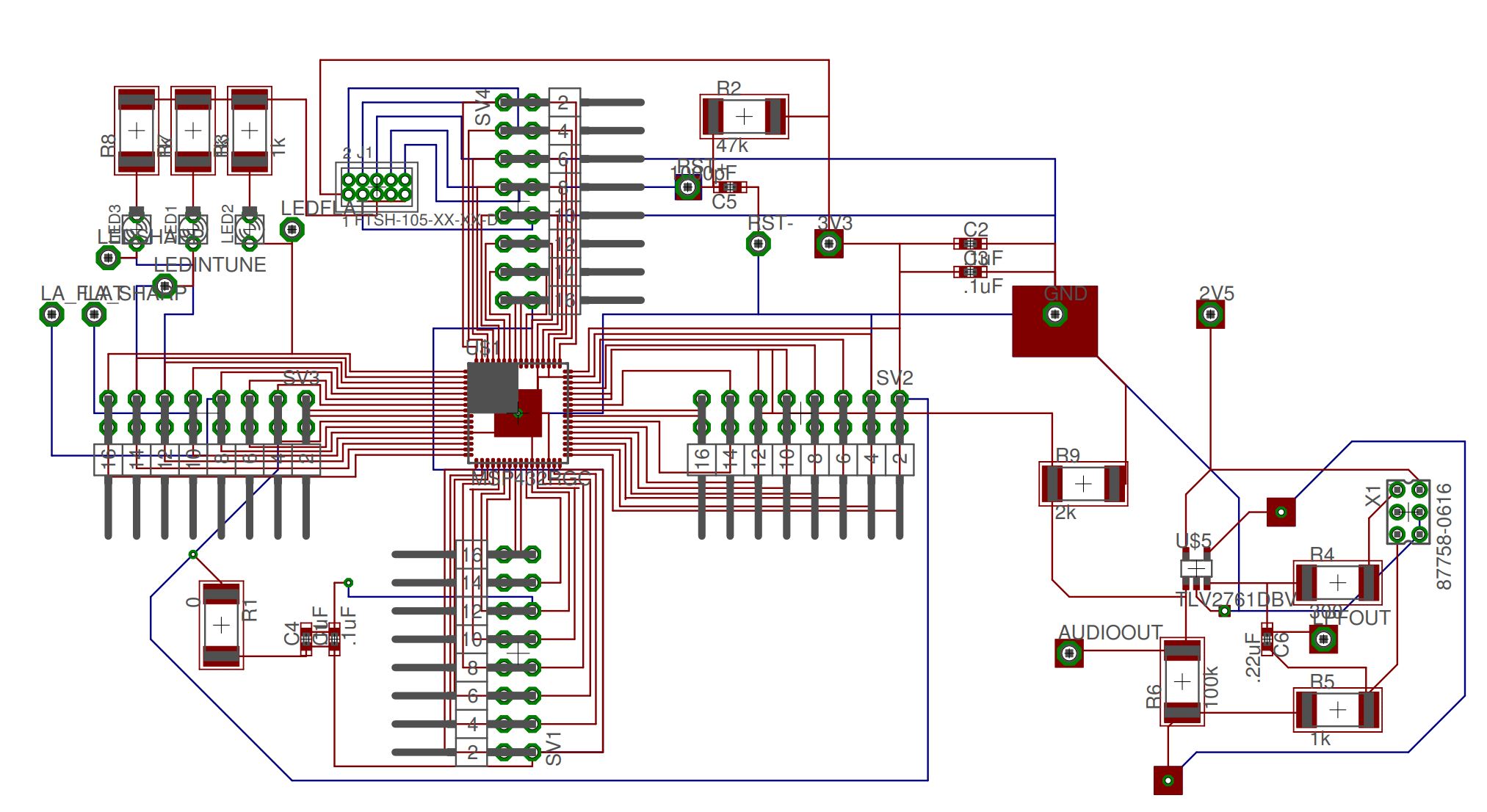
  • I am currently using the "XDS110 to External" connector on a Red Revision C board, with all lines connected. How would I set up JTAG from this? Just add RXD and TXD jumping wires? I will attach an image of my board below. The traces shouldn't differ that much where it would cause a problem. I tried to slow the clock speed down to .5 MHz as someone else did, but it still came up with 615 and 261 errors (615 comes up first, then when I replug the controller and hit retry, it comes up with 261)

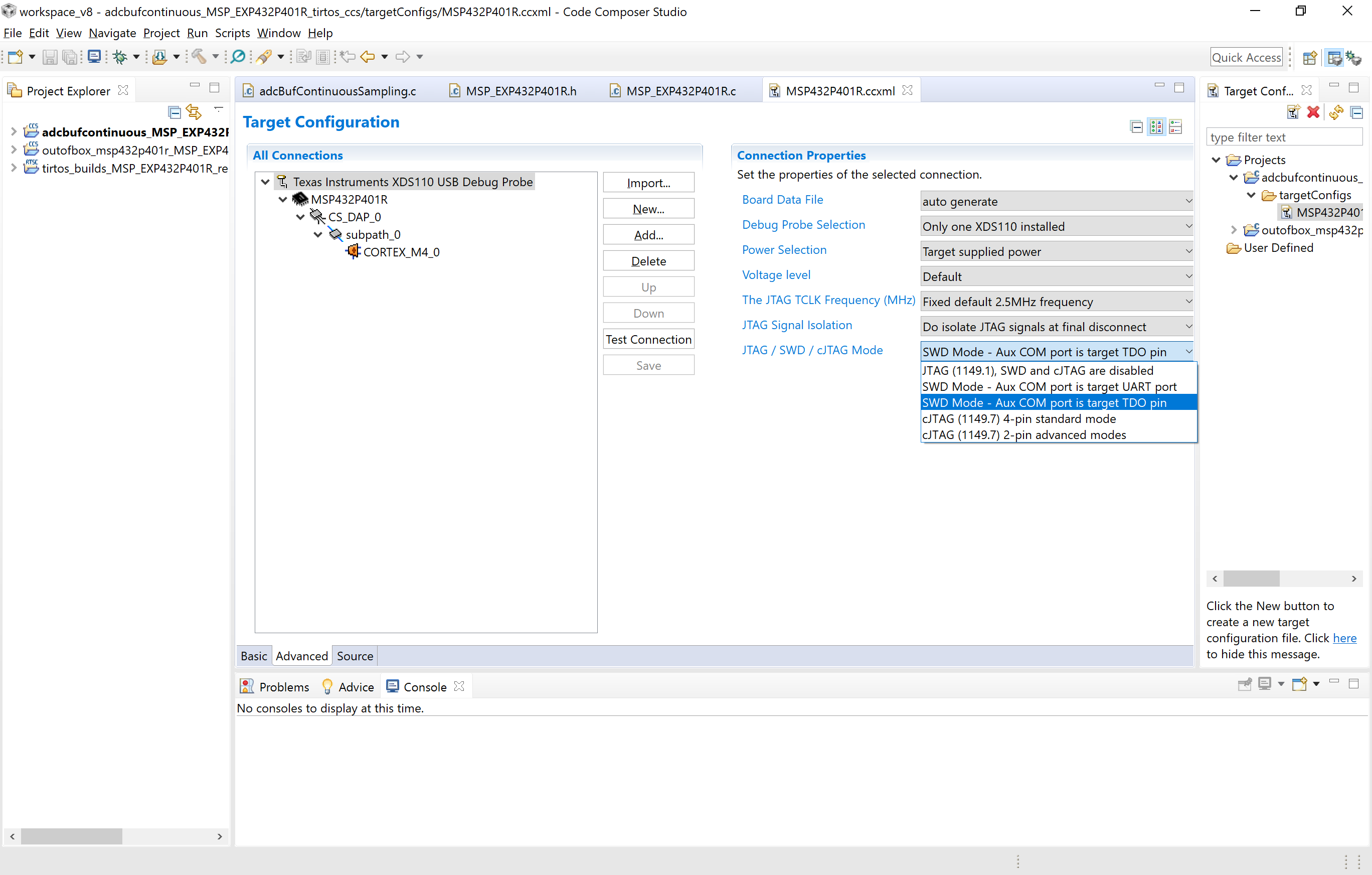
  • As for the SWD mode with SWO trace disabled, I don't see that option in CCS8.0.0. I do however have similar options, and I tried using both the UART and SWD modes to get it to connect, with the same errors.

    These are the options I get:

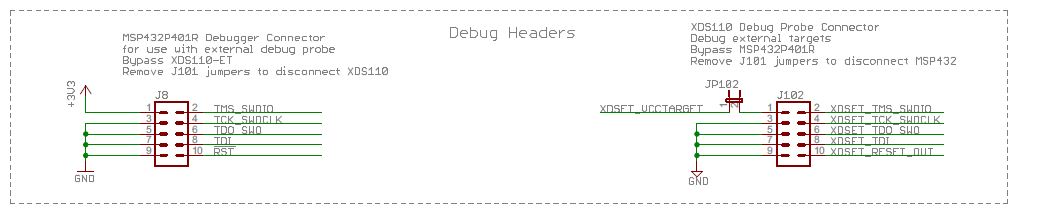
  • Thank James.  I have asked for the documentation to be updated.  Based upon your layout, it looks like the JTAG and SWD are both routed and available.  If you look at the XDS110 Debug probe connector you will see SWDIO and SWDCLK as well as the 4 JTAG lines.

    The jumper JP102 does not come populated.  How are you providing power to the board?  Does the XDS110 on the launchpad produce enough power for your entire board?  Can you try an external supply instead and/or try using the JTAG instead of SWD?

    How good is the ground connection on your board?  Do you have any other connections between the programmer and target besides through the 10-pin header? 

    Chris

  • The only part of the board I'm currently powering is the MSP432 side, which only contains the chip itself. The right side of the board (Anything to the right of the ground plane) is currently powered by a 2.5 V independent source. I am powering the 3 V side of the MSP432 with the J101 3V connector on the XDS side (removed all jumpers from J101, and connected a wire to the XDS side 3V). I have also tried using the JP102 with a jumper cable, but didn't realize until now that you also need to set Power Selection to power the external board using that, so I will try that later today.

    I will try the JTAG later today and get back to you. The ground connection on the board should be fine - soldered wire into the ground plane I have into the GND on the J101 block. No other connections between the programmer and target board besides the 10 pin header and the 3V and GND pins.
  • So I went into the lab, and noticed some of the pins didn't have a full connection. I reflowed all of them, and am trying now. I am only getting Error 261 now when trying all the different settings. "Test Connection" shows succeeded, but I can't actually connect to CS_DAP or the MSP432 to factory reset it.

    Edit: I performed the 2pin Advanced cJTAG test connection, and it says it failed with:

    This error is generated by TI's USCIF driver or utilities.

    The value is '-233' (0xffffff17).
    The title is 'SC_ERR_PATH_BROKEN'.

    The explanation is:
    The JTAG IR and DR scan-paths cannot circulate bits, they may be broken.
    An attempt to scan the JTAG scan-path has failed.
    The target's JTAG scan-path appears to be broken
    with a stuck-at-ones or stuck-at-zero fault.

    [End: Texas Instruments XDS110 USB Debug Probe]

    However, the JTAG regular test succeeds with

    -----[Print the reset-command software log-file]-----------------------------

    This utility has selected a 100- or 510-class product.
    This utility will load the adapter 'jioxds110.dll'.
    The library build date was 'Feb 8 2018'.
    The library build time was '18:36:28'.
    The library package version is '7.0.188.0'.
    The library component version is '35.35.0.0'.
    The controller does not use a programmable FPGA.
    The controller has a version number of '5' (0x00000005).
    The controller has an insertion length of '0' (0x00000000).
    This utility will attempt to reset the controller.
    This utility has successfully reset the controller.

    This test will use blocks of 64 32-bit words.
    This test will be applied just once.

    Do a test using 0xFFFFFFFF.
    Scan tests: 1, skipped: 0, failed: 0
    Do a test using 0x00000000.
    Scan tests: 2, skipped: 0, failed: 0
    Do a test using 0xFE03E0E2.
    Scan tests: 3, skipped: 0, failed: 0
    Do a test using 0x01FC1F1D.
    Scan tests: 4, skipped: 0, failed: 0
    Do a test using 0x5533CCAA.
    Scan tests: 5, skipped: 0, failed: 0
    Do a test using 0xAACC3355.
    Scan tests: 6, skipped: 0, failed: 0
    All of the values were scanned correctly.

    The JTAG DR Integrity scan-test has succeeded.

    [End: Texas Instruments XDS110 USB Debug Probe]

  • The cJTAG is not supported by the MSP432. processors.wiki.ti.com/.../XDS110

    With both the SWD and JTAG you are still getting periodic errors?

    Thanks,
    Chris
  • Yes with both (regular) JTAG and SWD, I am still consistently getting error 261 when trying to launch the program or connecting to the DAP for a factory reset.
  • James,
    I am concerned that there is an issue with the device; software-dl.ti.com/.../ccsv7_debugging_jtag_connectivity_issues.html . I tried some simple experiments where i removed pieces of the JTAG connection ( /RST and TMS) and found that the test connection would pass as you have shown above but I cannot connect to the DAP. I am getting error 1170 though. Can you go back and check the continuity of the JTAG connection -all four wires + reset. Can you swap out the part and try another?

    Regards,
    Chris
  • I have verified all connections on the 10-pin connector are correct. I do not have time to swap out the part and try another as my senior design project is due this week. I bought the MSP-FET debugger in hopes that it would work, but it looks like it's not recognizing the MSP432 either, and with no error code. Pretty disappointed, as I have noticed others on the forums with similar problems never get a solution to this either.

    On another note: Error 261 and 615 are both happening again.

  • James,
    I appreciate the disappointment and frustration. I understand that similar issues have been reported in this forum and I am concerned about the board assembly process. In this specific case it sounds as though you were able to re-flow some of the pins and influence the errors, if even only temporarily.

    The launchpad 'ecosystem' is provided to try and help minimize the fabrication and assembly process, but building a boosterpack to plug into the launchpad may not fit within the requirements of your senior design requirements. If an option, then this might be something worth considering to help reduce risk and design cycle time.

    Regards,
    Chris

**Attention** This is a public forum