This thread has been locked.

If you have a related question, please click the "Ask a related question" button in the top right corner. The newly created question will be automatically linked to this question.

tidud25a problem regarding LC sensor

Other Parts Discussed in Thread: CC1310, CSD23285F5, CSD23280F3, TIDA-01228

i am working on the tidud25a.pdf

In page 12, the diagram show the waveform of the output and trigger point

however , i try to make the same circuit

the waveform is completely different from it~

for software , i run the attached .scp file in the cc1310 launchpad

here is the attachement for my taping point

the scope 1 is the output of the LC

while scope 2 is the trigger point

thanks if any help or suggestion~

thanks~

Jeff

  • Dear Jeff,

    i can't see you .SCP file, so please upload again.

    Looking at the scope plot, it seems that the Trigger is starting the Oscillation but the latter is attenuated too fast.

    In addition, share the following:

    - your schematics and which FET are you using (the CSD23285F5 with the 0.5mm pitch) or the csd23280F3 with the 0.36mm

    pitch.

    - your BOM (which values are populated)

    - which Inductor and Capacitor are you using for the LC-tank

    Assuming the schematics and your PCB are correct, i think you can try the following (independent of each other):

    1. modify the Value of the Caps C5 and C6 (e.g increase them from 100nF to 220nF and even up to 470nF)
    2. increase the trigger pulse width inside the SCP file (e.g from 250ns to 500ns or even 1us)
    3. If you are using a different inductor then you will also need to adjust the values for C3 and C4 (which build the LC-tank).

    Regards,

    Milen

  • ok thanks~

    i got the error that i miss the bypass capacitor  c5...

    may i ask as i dont have the exact value of L3 (235uH)

    can i replace it by 470uH and how do i change the code?

    thanks

    Jeff

  • HI Milen,

    i have some further question on the work of reference design TIDA-01228

    this is the schematic of the reference design

    So far i think i can get the similar waveform to the one in P12.

    here is the one i get

    A)

    so now i run the scp  inside the TIDA-01228.zip(TIDA01228_F285.scp)

    i saw that the one line24 in the execution code

    tdcGetValue(tdcValueH, tdcValueL); // Get the TDC counter value

    didnt get anything change and the

    tdcValueL1 and tdcValueL2 uis always 2 ... so why ?

    B)

    and sometimes i got the value of the tdcValueL1 like this

    the tdcValueL1 oscillate between 35xx-4xxx to 2 , what does it imply?

    C) i saw the

    // Setting for errorLUT, which indicate that error transition happened

    n = 3; // This Table is not used in this code

    state.errorLUT[n] = 1;

    n = 9;

    state.errorLUT[n] = 1;

    n = 6;

    state.errorLUT[n] = 1;

    n = 12;

    state.errorLUT[n] = 1;

    and once i run , this flag is always set , and why ?

    D)

    For the hardware

    - your schematics and which FET are you using (the CSD23285F5 with the 0.5mm pitch) or the csd23280F3 with the 0.36mm

    pitch.

    - your BOM (which values are populated)

    - which Inductor and Capacitor are you using for the LC-tank

    Assuming the schematics and your PCB are correct, i think you can try the following (independent of each other):

    Replying the above,the FET i use are QS6M3 instead of TI one(due to leadtime, i will get TI one next week)

    Inductor and Capacitor-- Inductor i use is 470uH and Capcaitor i use is 100pF.

    thanks

    Jeff

  • Jeff,

    yes, on your previous question: you can use a larger or different inductor (as you probably already did) and the oscillation plot seems really nice.

    Now to the new items:

    A and B) the tdcValue counts the ticks of the internal 96MHz counter until the number of oscillation ( that are set in the SCP code) is reached or not. If you reach the number of oscillations before the timeout expires (e.g. 30usec) then you get a value of 35xx or 4xxx.

    if you do not reach the number in the period (that you can adjust in the SCP code) you will get a value of 2 (means never reached).

    That's why in the Users Guide we say to adjust the number of oscillations and the timeout period such that you have a number of 3xxx-4xxx when there is NO metal close to the Inductor (undampened oscillation) and 2 when the oscillation is dampened.

    Also note that this period can be different based on your supply voltage, so check that as well.

    B) You really want to have the change between the values of 2 and the large number of 96 MHz ticks (your 3xxx or 4xxx range).

    C) I didn't experiment much with the Error LookUp table But the idea is that when you have the rotation you normally will change from one state to the next before or after (depending on the disc turning direction).

    If you jump two states ahead or backwards that means that you missed a state, hence an error.

    As your code is not showing a clean pulse train on Inductor1 and Inductor 2 you get errors and these are shown in the LUT.

    The FINAL goal is to have a periodic pulse (High-low) sequence on Inductor1 and Inductor2, which are 90 degrees delayed when a disc is turning.

    That is also often called called Quadrature encoder signal. That's what i achieved in TIDA-01228 and what the SCP code can handle.

    D) OK

    In summary, you got an important milestone by having a good and reproducible oscillation.

    You can now change the code to always have the tdcValue around 3xxx-4xxx for both inductors (without Metal in close distance) - either by extending the wait period or reducing the number of full oscillations you expect in this timeout period.

    Next step: you can have your metal disc (or just a small screwdriver) and hold it close to the inductor and run the oscilloscope and the Sensor Studio tool to see how /when the tdcValue goes to 2 and how the oscillations are dampened due to the metal being close.

    That will give you a feeling how many periods you need to wait until you have reliable change between metal close and metal away and you can adjust the code to your hardware.

    Hope this helps you further!

    Regards,

  • HI milen ,

    thanks for your reply.

    I have some progress over this day but got a little different from what you say here:

    A and B) the tdcValue counts the ticks of the internal 96MHz counter until the number of oscillation ( that are set in the SCP code) is reached or not. If you reach the number of oscillations before the timeout expires (e.g. 30usec) then you get a value of 35xx or 4xxx.

    in the scp line 11,

    tdcSetTriggers(TDC_STOPTRIG_COMPA_HIGH, TDC_STOPTRIG_COMPA_HIGH, 22); //22 for Rev2 with 23285F5 and 38uSec timeout 4176/4100

    1.0) first of all, what does 22 imply? full 22 of oscillation BELOW the internal ref 1.27 V? or full 22 of oscillation ABOVE the internal ref 1.27 V? 

    1.1) i have count there is 18-2x oscillation appear, but once i set 22, it never be able to reached and so the tdcvalue appear to 2,

    1.2) for adjusting the value in the wait elapsed time (38us in the example scp)seem not much different in helping to get the result change

    1.3) and i would also like how can or which parameter i need to adjustso that it can accept various or max distance between the disc and my inductor

    1.4) if my disc is turning fast( i guess maybe 100rpm or more), the scp didnt function(while the 3rd generation of the TI ESI water meter refernce can), any limitation on that?

    1.5) in the whole setup, there is no calibration, under some circumstance the L/C or the internal reference voltage will vary, how the design compensate for it?

    thanks

    Jeff

  • Jeff,

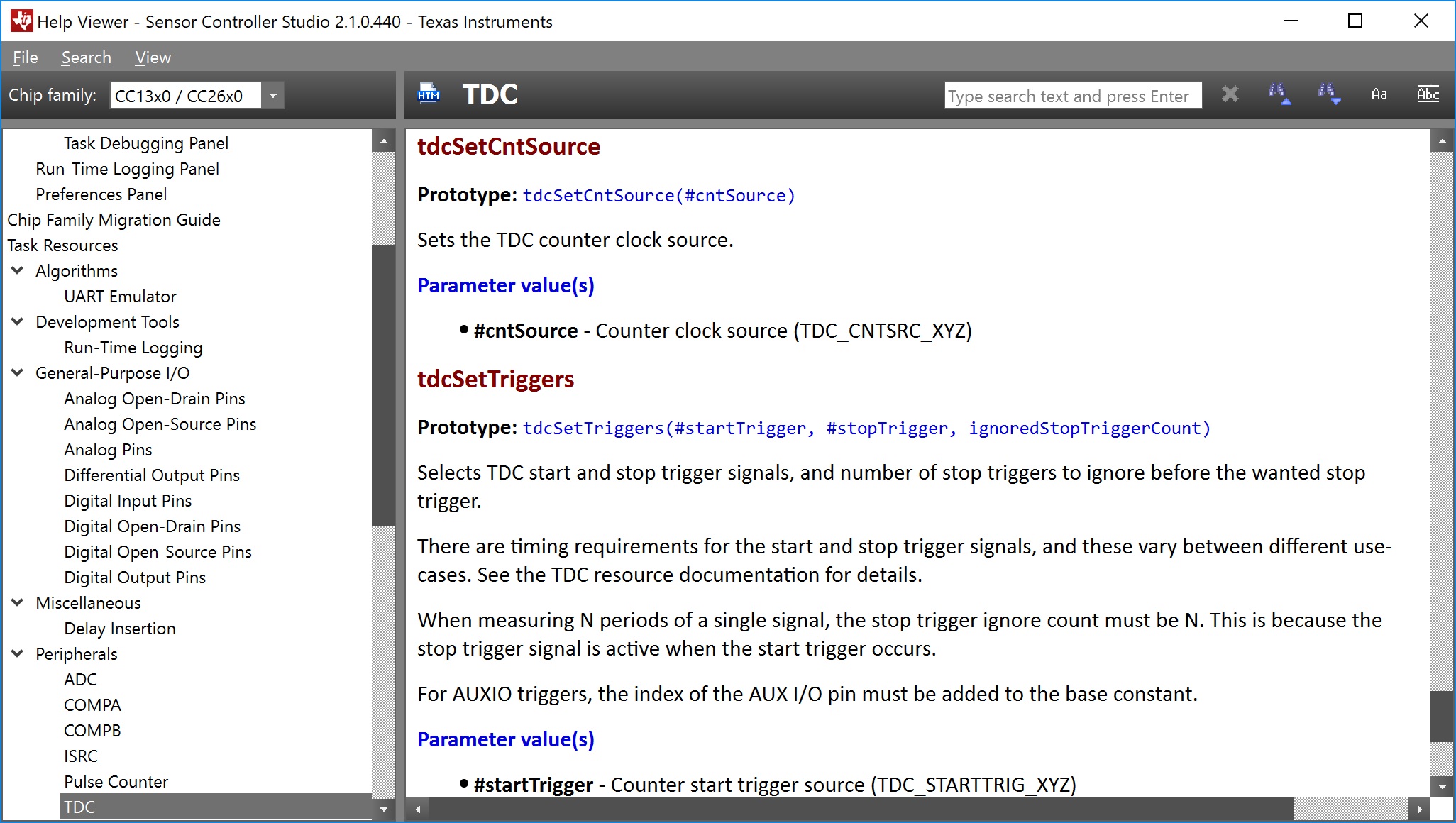
    It would be good if you use the HELP function in the Sensor Controller Studio and teh documentation of th efunctions (see bottom right: Available procedures window and do a double click), which describes all functions, triggers and so on - this will answer many of your questions.

    Here are my inputs:

    1.0) 22 implies that you will have full 22 of oscillation which reach a value ABOVE the internal ref 1.27 V BEFORE the timeout you have set in SCP (e.g. the 38us) expires.

    1.1) yes, correct. So, then please use 18 to begin with.

    1.2) if you reach the 18 oscillations, you can take the value you measured, for example 3000 ticks, and multiply by 1/96MHz to get the exact time duration of those 18 oscillations. Based on this calculation you can actually reduce or shorten the timeout value (you may leave some margin of 1-2us extra time there). This will help you sample faster.

    1.3) the max. distance is depending on the disc and its metal coating, the oscillation frequency and the mechanical adjustment of the inductors over the disc. There is no SW parameter you can adjust; you will have to test with other capacitors and  inductors to see if that improves the distance. You should also have a fixed mechanical setup (inductors over the disc area) for reproducible results. I've measured significant variation of the achievable distance based on a <1mm adjustment of the disc position in XY direction.

    1.4) yes, the TIDA-01228 is NOT meant to replace the ESI solution, which has been tuned for high performance and ultra-low power. TIDA-01228 is another way of doing rotation detection and one limitation is the Sensor Studio in Debug mode - it only runs the task in Debug mode up to 11-12 times per second! For faster rotation you will have to integrate the SCP code into a CCS studio file (see the provided TID FW) and then test with it!

    I tested up to 128 or 160 Hz (don't remember now exactly the max. number) using the CCS project (and not Sensor Controller Studio). There are comments in the C-code that show these changes for various sampling rates of the disc. That was also used to do the current consumption measurements, see User's Guide.

    1.5) after you have a stable HW and FW setup, you will have to test with different external VCC voltage to CC1310 to verify if that works with the Parameters in your SCP file (Timeout, number of oscillations, etc.).

    Please, re-read the TIDA-01228 User's Guide carefully!

    Regards,

    Milen

  • HI milen,

    teh documentation of th efunctions (see bottom right: Available procedures window and do a double click), which describes all functions, triggers and so on - this will answer many of your questions.

    sorry i cannot locate and get the above one,

    Jeff

  •  Jeff,

    attached is a snapshot of tdcSetCntSource() function call in your Execution Code window.

    A double-click in the bottom right opens the documentation and will look like this:

    regards,

    Milen

  • HI milen,

    is it possible to implement 3LC sensor from it?

    thanks

    Jeff

  • Yes,
    you can have 3 LC sensors, the TID shows actually 3 FETs with LC-tanks.
    The challenge is that with a small rotating disc I used and the dimensions of the inductor used you can only have 2 inductors above the disc.
    So i used only 2 in the SW; but in other applications (or for redundancy) there is no problem to add support for the 3rd inductor.

    Regards,
    Milen

**Attention** This is a public forum