This thread has been locked.

If you have a related question, please click the "Ask a related question" button in the top right corner. The newly created question will be automatically linked to this question.

CCS/MSP430FR2433: Using ProgramModelUart for Debug - unstable results (MSP430 FR2433)

Part Number: MSP430FR2433

Tool/software: Code Composer Studio

Hi,

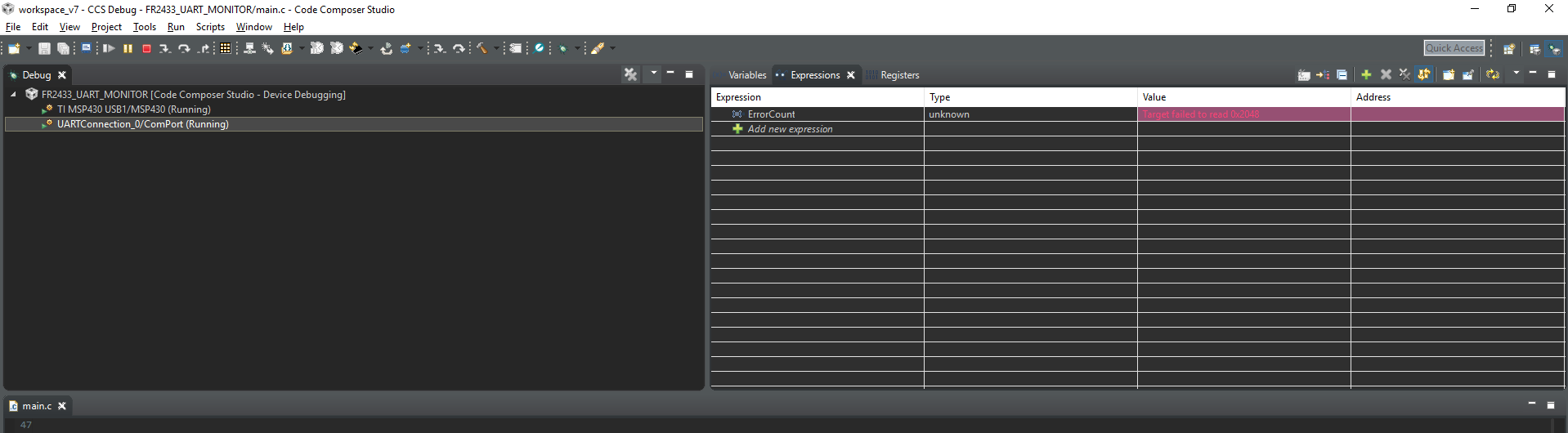
I try to use the ProgramModelUart method to debug some expressions in the debug window while running some simple code on the FR2433 LP.

Always using a refresh intervall of >=500ms but the results are unstable. Are there any known problems with this type of communication?

I attached the src and two pictures.

Links: http://processors.wiki.ti.com/index.php/ProgramModelUart_GuiComposer
  FR2433UARTmonitor.zip

  • Hi Ben,

    Will come back to you after running your code.

    regards
    KC
  • Hi Ben,

    MSP430 not support real time debug so with continuous refresh function it will halt the CPU then read out the value from ram and it seems have some problem some time, a workaround could be:
    1. add a break point in your code line 133 which close to the expression ErrorCount.
    2. in break point properties, set Action as UpdateView.

    Could you try that and see if it works for you?

    regards
    KC
  • Hi Xu,

    Sorry but I do not think you are right. The main goal should be to have a refresh function without halt the CPU - thas why it is using UART and the pointer structure. I had this thing running on a MSPG2553 LP earlier on. This was with a older Version of CCS on a WIN7 machine.

    Regards,

    Ben.

  • Hi Ben,

    I have installed the CCS6.2 on my laptop( WIN10 )and running the G2553 project with GUI Composer but got the same result, not able to reading Memory. And with CCS8.0 the uart_demo_app not work with GUI Composer 2. May I know how you running the ProgramModelUart with GUI Composer 2?

    Could you please try the solution I mentioned and see if it is a workaround? thanks.

    1. add a break point in your code line 133 which close to the expression ErrorCount.
    2. in break point properties, set Action as UpdateView.

    regards
    KC
  • The app was not running on GUI v2 - it was running on GUI v1. There also might be a way to run GUI v1 on CCS 8 or CCS 7.

    It was quite a while ago I was running this example but I am pretty sure that this was a continious process, without halting the processor. And this is in my opinion what the Serial_Cmd_Monitor files are used for.

    For example, if I create a LabView program and implement the protocol there, then I can retrieve virtually any variable via the addresses of the variables from the .map file - but unfortunately this is no longer possible via CCS.

  • Hi Ben,

    If you want to use PC GUI to monitor some data from MCU, could you just send the data VIA UART to PC? ( silimar as Serial_Cmd_Monitor has done)

    regards
    KC

**Attention** This is a public forum