This thread has been locked.

If you have a related question, please click the "Ask a related question" button in the top right corner. The newly created question will be automatically linked to this question.

MSP430G2452: MSP430G2452 programming instability, fused bit set and not working

Part Number: MSP430G2452
Other Parts Discussed in Thread: MSP-FET,

Hi,

I have a small production with the MSP430G2452IPW20R and have problems with the programming process. The programming interface uses pin 17 (TEST) and pin 16 (/RST) with a 47k pull up resistance. All wires are kept short. I'm using the MSP-FET programmer and the MSPFlasher 1.3.8 within a batch process. Sometimes, the uC is not working after programming. Unfortunately does the fuse bit is set and therefore I need to replace the uC (SMD!).

Under development I also noted some instability. Sometimes I was not able to reprogram the uC with the MSP-FET. So I needed to program it using the LaunchPad and than it was possible to use the MSP-FET again (all without setting the fuse bit)

Does someone has an explanation and workaround? 

Kind regards

  • Hello Stefan,

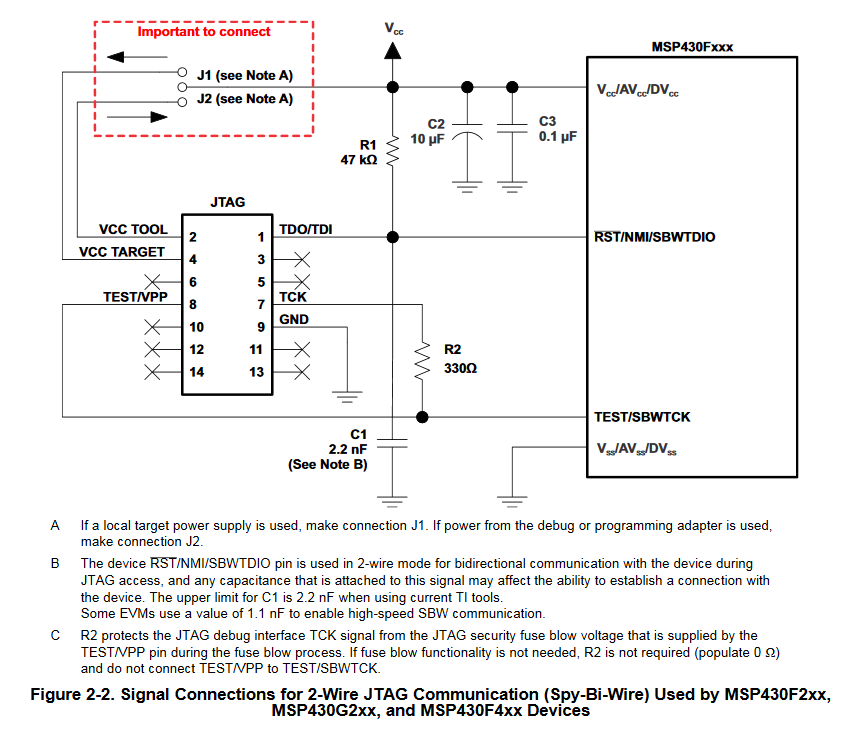
    Does your JTAG interface configuration match our recommended circuitry? See Chapter 2 in the MSP430 Hardware Tools User's Guide. Also, based on the described behavior, I suspect that your supply voltage isn't high enough for reliable Flash memory programming. According to Figure 1 in the MSP430G2452's datasheet, the supply voltage must be higher than 2.2VDC when programming the Flash memory. Please make sure these guidelines are being followed.


    Regards,

    James

    MSP Customer Applications

  • Hello James,

    thank you for your replay. The uC is powered with 3V3 and uses the internal RC clock with 12MHz. We have an exclusive and short connection between the MSP-FET and the uC. It's really strange that it performs the programming process, obviously burns the fuse bit but anyway does not works for 100 out of 1000pcs. 

    Regards Stefan

  • If your supply voltage drops while programming the device, the programming may not happen correctly. Then, when the JTAG fuse gets blown, there's not an easy way to check the device. For more advanced devices, the BSL could be used to read the memory after the JTAG fuse is blown, but that's not supported on the G2452. Another thing to check is your clock setup. Make sure you follow the recommendations in the user's guide and look at our code examples for initializing the DCO at 12MHz.

    Also, I'm assuming that you're using the 2-wire SBW JTAG interface. Please be sure you've followed the recommended connections shown in Figure 2-2 of the MSP430 Hardware Tools User's Guide.

    Regards,

    James

    MSP Customer Applications

**Attention** This is a public forum