This thread has been locked.

If you have a related question, please click the "Ask a related question" button in the top right corner. The newly created question will be automatically linked to this question.

MSP430F5528: MCU and USB reset

Part Number: MSP430F5528

Hello,

With many MSP430F5528 we face some reset issue: the MCU correctly gets out of the reset when power supply is active while the USB automate stays in a state which do not permit any access.

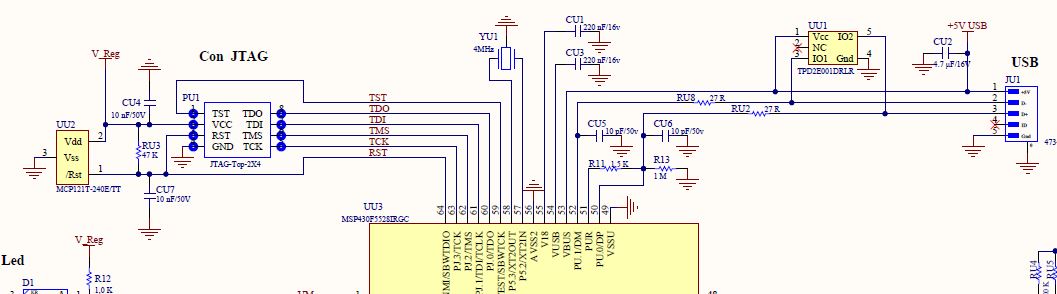
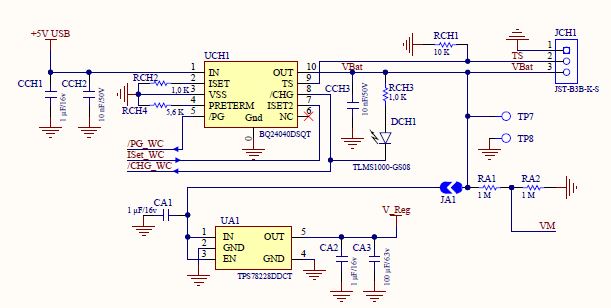
The USB 5V is linked to the VUSB pin + used to supply the battery. The battery supplies a 3.0V regulator which supplies the MSP430F5528 DVCC and an external reset (MCP121T-240B).

If after a while I manually trig a reset, everything is ok. The issue is that the customer can not access the reset pin inside the box.

Do you any idea?

Best regards

Mich

  • Hello Mich,

    Can you give some additional clarification here?

    When the part is having an issue, is it just non-responsive from the USB interface? Or is the part non-responsive outside of USB as well?
    What profile are you using for USB? (CDC?HID?)

    Can you post a schematic snippet of the power + USB connections? It wasn't very clear from the info above as I think you maybe getting VUSB and VBUS confused.
  • Hello Jace,

    The issue is only concerning the USB part. All the other parts are ok.

    We use the TI stack for the MSC.

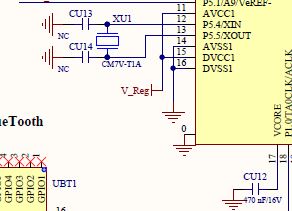
    Please find some schematics extracts:

    V_Reg as MSP430F5528 power supply:

    Best regards

    Mich

  • Mich,

    Schematic-wise, your USB connection look good. To clarify, are you resetting the part without disconnecting the USB cable? Have you tried, disconnecting/reconnecting the cable to see if the USB comes back up?
  • Hi Mich,

    When are you sending the reset to the MSC device in your application?  Which of the MSC examples are you running? 

    If you want to disconnect completely from the host you can try calling the following APIs in this order:

    USB_disconnect()

    USB_disable()

    When you are ready to re-connect to the host you can call the following functions in this order:

    USB_reset()

    USB-connect()

    Regards,

    Arthi

  • In case of trouble, disconnecting/reconnecting the cable does not change anything. I even tried another PC.
    A hardware reset solves the problem whatever the usb connection is. If the cable is connected, the "virtual disk" appears immediately on the PC side.
  • MSC: EXP430F5529LP\EXP430F5529LP_USB_API_M4\USB_API\USB_MSC_API from TI (may be 3 years old)
    I do not know when "you are ready to re-connect to the host" ???
    The msp430f5528 is inside a box, I can not change the PCB to add a wire to the usb 5V so I can not find the "ready" time
  • Sorry, I need more clarification. You did state that disconnecting/re-connecting the cable does not do anything. However you also state that when the USB cable is connected, the "virtual disk" appears immediately on the PC side. Is this not what you want to happen?

    What other way are you doing a hardware reset?

    I assumed that you were sending a software USB_reset() command that was not working for you. If that is not the case then you don't need to send any of the USB software commands I stated earlier.

    Regards,
    Arthi
  • Hi Arthi,

    I need to clarify the situation:
    The products are dataloggers. They record data during many days.
    Sometimes they are stopped because batteries are fully discharged. In such case, the battery security chipset cuts the power.

    Then the product is back to the office and plug to the USB of the PC.

    2 cases occur:

    => everything is ok: battery charges, MSP430F5528 correctly starts => the MCU starts (leds blink, push buttons work), the USB starts correctly (the virtual disk appears on the PC side and microSD/data are available)

    => battery charges and only the MCU part of the MSP430F5528 correctly starts => the MCU starts (leds blink, push buttons work), but USB does not start, no virtual disk appears on the PC side, when the box is opened to access to the debug port, plugs / unplugs of the USB cable do not trig any debug message, only a hardware reset can permit a return to a normal case....

    Best regards
    Mich
  • Okay, thanks for the clarification!  If I had to guess, I think this might be a timing issue where the host does not get a response back to its queries in a timely manner from the MSC and so puts it into suspend mode.  To clarify this, if you have access to the application and you can re-create your issue on demand, you can try lighting up an LED when the application goes into 'Suspend' Mode. 

    SLAA457A.pdf document is a good source for starting a USB design and it talks about sourcing DVCC and the system from a battery when USB is not connected and switching to VUSB and VBUS when host is present.  Also Figure 8 in the document shows how USB should be laid out.

    Finally, I just want to clarify about the statement you made that the LEDs blink and Push buttons work.  Are the LEDs and Push Button code in the application written in the while loop after USB_getConnectionState() API is called or before USB enumeration state?

    If you are connecting to a Windows 10 machine, there are new power saving features on the USB ports that places a device into suspend mode if there is no activity on the USB interface.  You can try turning this feature off for the port you connect your device to and see if that helps clear the issue.

    Regards,

    Arthi


  • Hello Mich,

    Did the above suggestions from Arthi resolve your issue? If no response soon, I'll assume you resolved your issue and I will close this thread.

**Attention** This is a public forum