This thread has been locked.

If you have a related question, please click the "Ask a related question" button in the top right corner. The newly created question will be automatically linked to this question.

RTOS/MSP-EXP432E401Y: extra chars in HTTP header

Part Number: MSP-EXP432E401Y


Tool/software: TI-RTOS

Hello,

I am having issues sending HTTP requests to a server. I'm using TIRTOS with the http library in <ti/net/http/httpclient.h>. I used the httpget example for CCS as a starting point. The server requires that I send a POST request containing a json payload in the body. The server keeps throwing various error codes in the response when I toggle different combinations of headers. I eventually tried removing all headers except for the Content-type header and that's when I finally received the following error:

HTTP Response Status Code: 415
{"detail":"Unsupported media type \"application/json \u0019\" in request."}

I believe the drivers are including an extra space and uni-code character after every header. I had previously had my authentication tokens rejected for containing an extra space in the token and noticed an unrenderable symbol on the server-side logs in place of the user-agent.

If anyone is able to help me remove these extra characters, your help would be much appreciated.

Thanks.

  • Hello Dheeraj,

    415 is for unsupported media type. Can you confirm that the correct HTTP header was used in the POST request?

    If you think the application code is correct, can you capture a Wireshark log and examine it to see if MSP432E4 is sending out packets as expected.

    From my past experience HTTP servers sometimes require a set of HTTP headers with each request. Can you also ensure that all the necessary HTTP headers are being sent?

    Another debug method that helped me in the past in isolating the issue is to emulate what the MSP432E4 will be doing with a script running on a PC. This gives a good understanding of what exactly the HTTP server requires.

    Thanks,
    Sai
  • Hi Sai,

    These are all the headers I would like to send:

            //User Agent
            ret = HTTPClient_setHeader(httpClientHandle,
                    HTTPClient_HFIELD_REQ_USER_AGENT, USER_AGENT,
                    strlen(USER_AGENT), HTTPClient_HFIELD_PERSISTENT);
            if (ret < 0) {
                printError("httpTask: setting request header failed", ret);
            }
            //Auth
            /*ret = HTTPClient_setHeader(httpClientHandle, HTTPClient_HFIELD_REQ_AUTHORIZATION, token, strlen(token), HTTPClient_HFIELD_PERSISTENT);
            if (ret < 0) {
                printError("httpTask: setting request header failed", ret);
            }*/
            //Content-type
            ret = HTTPClient_setHeader(httpClientHandle, HTTPClient_HFIELD_REQ_CONTENT_TYPE, "application/json", strlen("application/json"), HTTPClient_HFIELD_PERSISTENT);
            if (ret < 0) {
                printError("httpTask: setting request header failed", ret);
            }

    I had to remove the Authentication header and its requirement on the server because I would keep getting errors regarding an extra space in the token string making it invalid. The 'token' variable is set to a string constant in the following format "Token <token>". Using this code right now will trigger an 500 error for me with no additional information but I am able to see the User-Agent field in the web server logs which has the original string that I'm using followed by an unrenderable symbol in the browser. The USER_AGENT is a define that is set to "HTTPClient (ARM; TI)". When I only send the Content-Type header, that's when it gives the error shown in my initial post. As I'm using the string literal directly in the function, there is little room for it to be permuted by my own code. I have used all these headers(with and without the authentication) in curl requests to the server and they have worked fine. This is the curl request:

    curl -d '{"ticks": 2}' -H "Content-type: Application/json" -X POST <host name>/<endpoint>/

    I have not yet tried Wireshark. Thank you for pointing out this tool to me. With my current setup, it's a little tricky to use but I will make another post once I have set this up and gotten useful info.

    Thanks.

  • Using the above code, the following is a screenshot of the header packet captured by Wireshark:

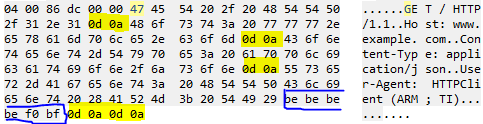
    The blue marker is just the hostname and path. At the end of Content-type: application/json, there is an extra space denoted by 0x20 and 0x19 which is identical to unicode \u0019, end of medium. User-agent has an extra 4 spaces followed by a 0xF0 and 0x18. The body is sent in another packet and seems to be fine.

  • Hello Dheeraj,

    I added the following line to the file httpget.c

        ret = HTTPClient_setHeader(httpClientHandle,
                HTTPClient_HFIELD_REQ_CONTENT_TYPE, "application/json",
                strlen("application/json"), HTTPClient_HFIELD_PERSISTENT);
        if (ret < 0) {
            printError("httpTask: setting request header failed", ret);
        }

    immediately after the lines

    ret = HTTPClient_setHeader(httpClientHandle,
                HTTPClient_HFIELD_REQ_USER_AGENT, USER_AGENT,
                strlen(USER_AGENT), HTTPClient_HFIELD_PERSISTENT);
        if (ret < 0) {
            printError("httpTask: setting request header failed", ret);
        }

    The following is my wireshark log. As you can notice the highlighted text is the end of lines. This seems to be right. The only extra characters are the one inside the blue box (be, be, be, be, f0 and bf). I will check to see why these are being sent, but not sure if these cause an issue.

    Thanks,

    Sai

**Attention** This is a public forum