This thread has been locked.

If you have a related question, please click the "Ask a related question" button in the top right corner. The newly created question will be automatically linked to this question.

MSP430 Via LabView

hello everyone,

i wrote a C programm to test the RAM (using IAR workbench). everything is fine.

now i want to use the output file (from the linker or so) to interface with the MSP430 via LabView (using the Flash Emulation Tool) and perform the test.

can someone give me a hint how to begin, or where to find some info about it. ?


thank you for any help.

  • Arthur,

          I'm curious about what you're going to do with your MSP<--> LabView link.  I've never tried get LabView to access the MCU through TI's FET, although that sounds like a very reasonable place to start.  If you happen to come across how to manipulate the FET from LabView I'd be really interested!

          Here's some things that I HAVE tried and gotten to work:

    1) NI USB SPI/I2C link: http://sine.ni.com/nips/cds/view/p/lang/en/nid/202368

    This worked great, and was pretty simple to use for communication, although it sounds like you're interested in programming.

    2) NI DAQ cards, link to the cheapest: http://sine.ni.com/nips/cds/view/p/lang/en/nid/207404

    Using the TI JTAG programming user guide I made a VI that would take a binary from CCS and convert it into a set of memory accesses, that I then turned into a digital waveform that I piped through a DAQ card's digital I/Os (or one of the spiffy High Speed Digital I/O cards if you want to go high class).  I can't find the VI but it was actually relatively simple to generate an access and then chain together a ton of accesses that played with the MSP's Flash write component, and writing to RAM would be even easier.


    Here's where I started: http://focus.ti.com/lit/ug/slau320/slau320.pdf

  • memoryleak,


    >> I've never tried get LabView to access the MCU through TI's FET, although that sounds like a very reasonable place to start.  If you happen to come across how to manipulate the FET from LabView I'd be really interested!

    i know, no one tried it bevor, but it is my job to find out wether it is possible to  manipulate the FET from LabView.


    i will contact you again in case of progress.


    thank you

  • Gents, please also check this application report from NI. It show how using the LabVIEW C Generator to Develop Algorithms for the Texas Instruments MSP430 Microprocessor in combination with CCS.
    http://zone.ni.com/devzone/cda/tut/p/id/11977

    Regards, Tom

  • Hello,

    actually i have the C code. what i want now ist to use this Code (the output file) with labView to contoll the MSP430, without any use of IAR or CCS now.

    and everyone would be able to test the MSP without having to install IAR or CCS.


    Regards

  • Arthur,

         Here's a post with ~5 really decent ideas: http://www.embeddedrelated.com/groups/msp430/show/15791.php

         The final post looks the easiest to implement (just call that from labview and viola! programmed!).  Alternatively, it looks like IAR and CCS access the FET via a few DLL files, which can likely also be accessed by labview: http://processors.wiki.ti.com/index.php/MSP430_JTAG_Interface_USB_Driver

         Good luck!


    -memoryleak

  • I'm using Labview to programme/ckeck/validate our MSP430 system, I'm using the programmer from Elprotonic which include a DLL to have access to all programmer command.

    I thinck the DLL is useable with other hardware programmer.

  • yes you are right, i just read :

     MSP430.DLL library allows use the USB programming adapter like FET (Flash Emulation Tool) with the IAR (which i want / should avoid ).

     Fast MSP430 Flash Programmer (from Elprotonic for example) can be remotely controlled from other software  applications (Visual C++, Visual Basic, LabView etc.) via DLL library .

    so i am still looking for a way to access the msp430FET, via Labview, without using IAR or any IDE ( only the output files from IAR : file.hex, or file.txt....)
    i didnt test the ideas from memoryleak's post yet, but i dont 't think it would be that simple :(
    Arthur
  • Arthur said:

     MSP430.DLL library allows use the USB programming adapter like FET (Flash Emulation Tool) with the IAR (which i want / should avoid ).

    I don't really know what I'm talking about, but I'm not sure IAR has any part in it other than calling the correct functions within the dll.

    I'm not going to test this because I'm happy with my jtag waveform generation, but if I were to want to play with the msp430.dll from LabView, I think I'd start here:
    http://mail.millennium.berkeley.edu/pipermail/tinyos-contrib-commits/2004-December/000752.html

    I found the DLL living here (I use code composer):
    C:\Program Files\Texas Instruments\ccsv4\DebugServer\drivers

    Dropping down a Call Library Function node in LabView I got a list of function names, and then I started googling some of the more esoteric names with the hopes of finding source code (ex MSP430_ProgramFile, MSP430_FET_Reset).  Given the function prototypes I'll bet you can get LabView to do anything :)

    Good luck!


  • I really think I don't understand what you want to do:(

    What is the problem with the DLL for using it only with IAR? You want tu use the debug .d43 files with Labview?

    Get a look here: http://www.elprotronic.com/files/DLL-User-Guide.pdf for all the command available.

    If you tell me precisely what you want to do I perhaprs will help and even create an example vi.

  • @Argailo

    >>What is the preoblem with the DLL for using it only with IAR


    it is not that i don't want to use IAR, but i must not, thast what i have been told.

    ich want to be able to test the msp430 on any PC without having to install IAR, we can't require from anyone who want to test the same msp to install IAR.

    and right i want to use the .d43 file with labview ( there is other possible outputs, i don't know yet what to take).

    am going to take a look at your link, thank you.

    @memoryleak

    thank you for the infos, and the link, it looks like i have much to read this night.


    Arthur

  • Ok, the .d43 is a proprietary file from IAR I understand why you can't use it with labview.

    But you have other way to communicate with MSP430, far example what I've done one time is putting a test program (.txt), make a wait loop in labview, when the test is done, it will write some bits on flash, and then I read the flash with the FET to interprete them with labview, fast and easy, but not useable for all application.

  • Arthur said:
    thank you for the infos, and the link, it looks like i have much to read this night.

    Hehehe.. story of my life :)  At least the stuff us engineers get to read up is usually interesting! :)

    -memoryleak

  • Argail said:

    If you tell me precisely what you want to do I perhaprs will help and even create an example vi.


    i want to do something like this but using labview.

    http://www.elprotronic.com/files/FET-Pro430-Brochure.pdf

    as you can see, the software uses file.txt oder file.hex ....to programm the msp430, and msp430.dll to communicate with the FET.

    like memoryleak claimed, IAR and other IDE uses MSP430.dll as interface to communicate with FET and also Labview should do it this way

    i read this in your link :

    MSP-FET430UIF can be remotely controlled from other sotfware( VS++, LabView...).

    i read in Labview dokumentation:

    If you have existing code in C and need to reuse it in LabVIEW, one technique is to build the code as a DLL and call it using the Call Library Function Node

    so what i know now is :

    i will definitely need the msp430.dll to comunicate with the MSP-FET430UIF, and i am contemplating whether to use an output file from IAR (file.hex, file.d43 ......)

    or build my C-code as a DLL with visual studio C++.

  • Arthur said:

    i want to do something like this but using labview.

    http://www.elprotronic.com/files/FET-Pro430-Brochure.pdf

    It is completely possible to do this with labview spending some time:) (I've made a reduced version of this programmer for including it in my labview production tools).

    In the newest version of the FlashPro software, a labview library was created by Elprotronic for interfacing with her Programmer, juste select le LLB, this will list the command available, select which one you want and put on you vi.

    It is possible to use the dll  from the lite version but you have to build your own block to interface with the DLL and handle all the functionnality (what was made before elprotronic programm it's own library)

    Here is an example of a VI to programm the msp430 (yet the autoprogram block is available directly from the LLB).

    Before calling this VI, it is necessary to call the "read code file block" to put the code file in the fet memory. Using this fonctionnality requires to compile your file in .txt, the debug file is not compatible, and actually not used for this fonctonnality.

    Begin with doing a really simple application, read code file from a path an put in on the MSP.


    But yes, you will always need an IDE to code and compile your program, but it is not necessary for programming the MSP. You only have to send the compiled files to your customer.

  • Hello,


    @memoryleak

    the good news i got the prototypes of all functions defined in msp430.dll, i am trying now to call them in labview ( not that easy :(


    @Argail

    ich now trying to only fix a connection between LabView and FET. i have the problem with the datatypes of the functions defindes in msp430.dll

    example: i want to start with the following ones :

    1.

     STATUS_T WINAPI MSP430_Initialize CHAR *  port,
    LONG *  version

    port : port should point to the string 'TIUSB' or just 'USB'.

    version:  The version number of the MSP430 DLL is returned

    2.

    STATUS_T WINAPI MSP430_FET_FwUpdate LPTSTR  lpszFileName,
    MSP430_FET_NOTIFY_FUNC  callback,
    LONG  clientHandle

    lpszFileName set to NULL

    callback :This parameter can be set to NULL

    clientHandle : can be set to FALSE

    Returns:

    STATUS_OK: Firmware update was done successfully.
    STATUS_ERROR: Errors occured during firmware update.


    you know how to pass the parameter (NULL, FALSE) in LabView especially for the second function. i use the call library funktion node.


    Thanks 

  •  I never used the Fet firware update function, as the update are really rare. 

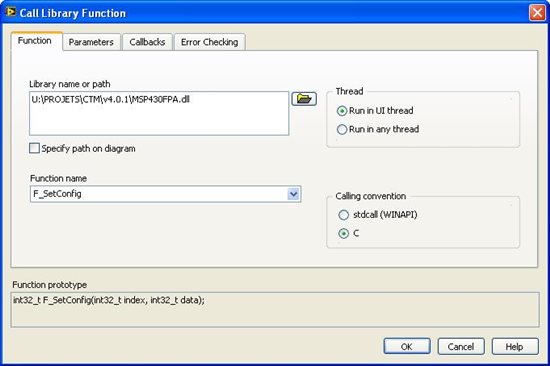
    But if you interface the dll with the "call library function node" you have to manually set the parameters, then corresponding connectors will be displayed on the block.

    For example:

    Dll connection

    Parameters configuration

    And the use onf the call dll:


    NOTE: this is the library made by Elprotronic 


    For connecting the programmer you have to call:

    F_OpenInstancesAndFPAs but all is nice described in the elprotronic documentation.

  • hallo Argail,


    Thank you for your help.

    actually am just getting started in labview, and just finished reading about clusters,case/event structures...and can somehow understand you block diagram.


    i have now a funktion, it has 4 parameter:     

      STATUS_T WINAPI MSP430_Memory(LONG address, CHAR* buffer, LONG count, LONG rw);

        address: The starting address of the device memory to be read or written.
       buffer:  The buffer into which device memory is read, or from which device memory is written.
       count:   The number of bytes of device memory read or written.
       rw:      Specify a read (READ) or write (WRITE) operation.

    returned :

       status_ok = 0

       status_error=-1

    i want for example to write at adress 0x0202 the tow bytes FF FF.

    i dont know how to use hexnumbers in labview, and how to define buffer, is it an array (decimal numbers, or hex), it ist string?? i tried everything, nothing seems to work.


    do u have an idea how to do this ??.


    Thanks.

  • Hi Arthur

    You can use the "programming>numeric>numeric constant" and then change the parameter to display in hex format, but this is only useable with constant, but this could be use to know if all is ok.

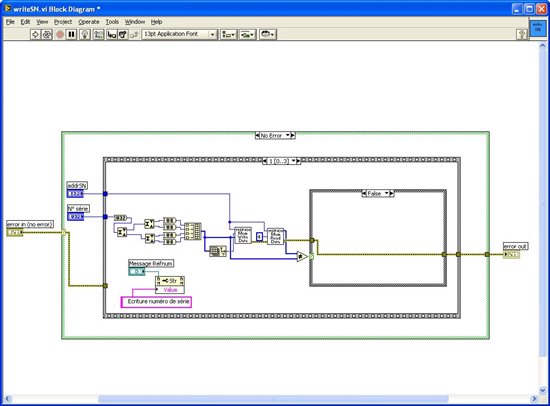
    What I usually do with "variable" is to define a global variable where I write and read the parameters. In this variable there is a list of numeric (single variable) and 1D array (more than one). The format has only matter for displaying information, you could use decimal or hex for programming, of course the value set should be the right one, but you will write the data in bytes in little endian, so if you use a 32 bits single parameter you have to transform it in 4 byte with the correct implementation, the follow image will present how I write a 32bits value on msp430:

    So my multiple variale "interface" is a 1D array of 8bit integer, and I arrange the date before setting them in the array, I only do this with 16 bits variable, which is funny to do.

    I think the buffer is the internal buffer of the FET, you probably have a command to write to it, but if you only want to programm some bytes, I think you should rather use the F_Memory_Write_Data function.

    With the Elprotronic DLL there is different function for writing/reading the Buffer, depending the memory destination (RAM or Flash) and 0x0202 is a RAM address, and I never use the buffer function so I can't tell if it is ok or not, I use F_Memory_write and F_ReadCodeFile for writing a compiled file.

    Don't forget you can only clear bit when you write on Flash, so you have to erase the Flash before writing to have the right value in it.

    One other thing, you have to configure your FET before using it, something like:

    Open connection -> initialise -> config the microcontroller type -> config the interface (Jtag/BSL) -> and so on


    Hope it's help

  • Hello Argail,


     everything is working fine at the moment.  ;) .


    Thank you very much.


    thank you memoryleak.

  • Hi Arthur,

    My scenario is almost similar to your situation. I would like to download my code to the target from LabVIEW, but through IAR. In short, I want to communicate with IAR from LabVIEW. I didn't find any dlls for IAR that might be helpful. Have you encountered any dlls or APIs for IAR?

    If communicating with IAR is not possible, I might go your way (i.e), communicating with FET directly from LabVIEW. I believe you have succeeded in your goal and I would like some inputs from you.

    1) Is the MSP430.dll independent of FET ? If "NO", what needs to be done when the FET is changed and which FET are you using?

    2) Were you able to use the .d43 files of IAR? Or as you mentioned in one of your replies, you built a dll from C code?

    3) If you can send me the document describing the protocols of the functions in MSP430.dll, it would be helpful.

    Inputs from other members are also welcome.


    Thanks in advance.

    Satish Rajagopal

  • can you tell me where to get the document that  defined the prototypes of all the functions in msp430.dll? or maybe send me that document?


    Thanks

  • > where to get the document that  defined the prototypes of all the functions in msp430.dll?

    The source code of MSP430.DLL is distributed on "MSP Debug Stack" wiki.

    MSP430.DLLv3_OS_Package_3_2_1_9.zip
    http://processors.wiki.ti.com/images/e/e0/MSP430.DLLv3_OS_Package_3_2_1_9.zip

    MSP Debug Stack
    http://processors.wiki.ti.com/index.php/MSP_Debug_Stack

    Tsuneo

**Attention** This is a public forum