This thread has been locked.

If you have a related question, please click the "Ask a related question" button in the top right corner. The newly created question will be automatically linked to this question.

CCS/MSP-EXP432P401R: External XDS110 with MSP-EXP432P401R

Part Number: MSP-EXP432P401R


Tool/software: Code Composer Studio

Hi,

I'm trying to hook up an External XDS110 with MSP-EXP432P401R. But the green LED102 stops glowing as soon as I connect the 10 pin  debug probe from the XDS110 to the MSP432.

This is the procedure I have followed:

1.Remove TDI,TDO,TMS,TCK,RST Jumpers from J101 Isolation Block

2.Connect the MSP432  to the PC using USB Cable(Green LED Glows)

3.Connect the external XDS110 to the PC using USB Cable

4.Connect the 10 pin debug probe from XDS to MSP432 In port. The Green LED stops glowing and  the on board debugger starts getting heated up.

Note: The board works fine when using the on board debugger. The issue is seen only when I try to connect an external XDS110

Thanks,

Aishwarya

  • Hello Aishwarya,

    you mentioned that you have removed TDI,TDO,TMS,TCK,RST Jumpers from J101. You should remove all jumper.

    The issue most properly is a power supply conflict where the XDS110 and the on board debugger providing a voltage to supply the MSP432 but on different levels. So with removing all jumpers (esp. the VCC jumper) the issue should be gone.

    See also Schematic (3 of 6) in SLAU597

    Was there a specific reason why you left the other Jumpers on the board?

    Regards,

    Stefan

  • Hi Stephan,

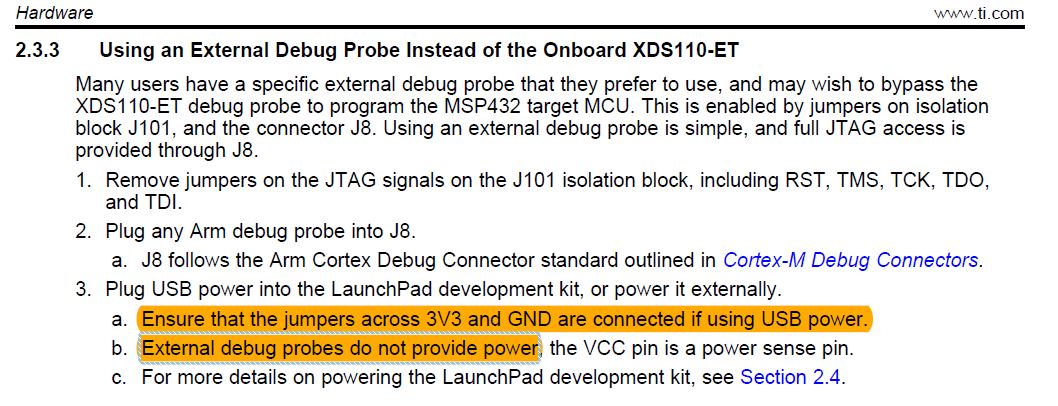
    Thanks for the reply. The reason I left the other jumpers was because of the reason highlighted. I am not using the Aux probe on the XDS to power the board

    I tried removing all the jumpers and gave power through the aux probe. Still showed an error "an overcurrent has been detected since the last time the xds110 was power cycled. please check target connection to probe and power cycle the xds110."

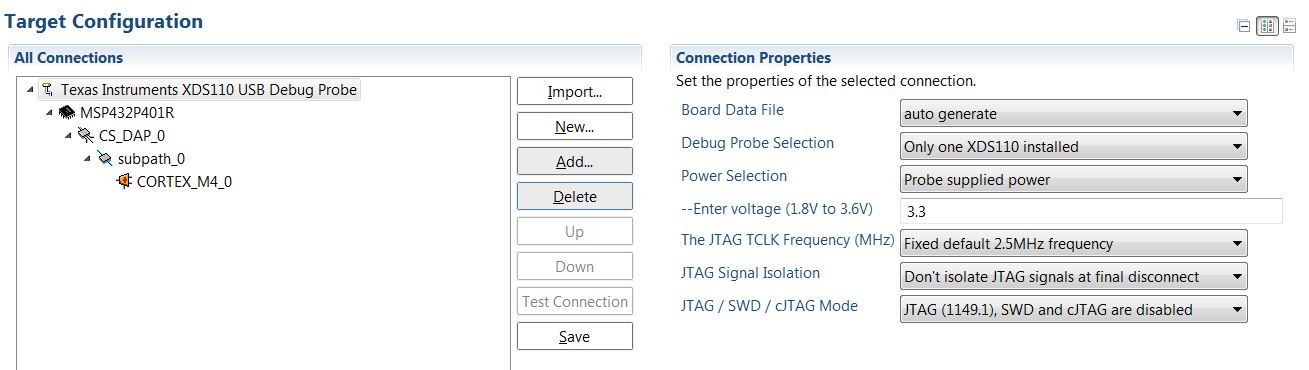
    Could you please help me out with the target config .ccxml options? These are the options I selected when using the Aux probe from the XDS110 to power the MSP432:

  • Hello Aishwarya,

    you are right the supply pins need to stay on the board to supply the device as the debugger is not providing the supply voltage.

    I rebuild you setup here without seeing any issue.

    When you say the green LED goes dark -which one; the onboard debugger or the external XDS110

    Can you do a few test to narrow down the problem:

    with the onboard debugger you do not have an issue - right

    removing all jumpers and using the external XDS110 should report an error message that the supply is not valid (internal debugger not powered)

    removing all jumpers and using the external XDS110 should report an error message that the supply is not valid (internal debugger powered)

    adding GND and VCC jumper -> debugger should start (green LED on onboard debugger is on) (green LED on XDS goes off when starting the debugger in the GUI)

    Regards,

     Stefan

  • Hi Aishwarya,

    could you solve the issue or do you have further questions regarding this topic?
    If solved, please select "Resolved" for the post that solved your issue so this thread can be closed out. If you have a different question, please select "Ask a related question" or " Ask a new question".
    Thanks a lot!

    Best regards,
    Stefan
  • Hi,

    I suppose that you were able to move on with your application as you didn't reply anymore, so I'll close this post.
    Please feel free to comment again if you look for further assistance regarding this topic, it will re-open the thread. If you have a different question, please select "Ask a related question" or " Ask a new question".

    Best regards,
    Stefan

**Attention** This is a public forum