This thread has been locked.

If you have a related question, please click the "Ask a related question" button in the top right corner. The newly created question will be automatically linked to this question.

CCS/MSP432P401R: Code Composer watch window fails to display a variable- instead it says says "target is running".

Part Number: MSP432P401R


Tool/software: Code Composer Studio

The ability to read variables while code is running is one of the most useful features of thes system but this is the first time I've seen this problem.

One of my students is trying to read a simple unsigned int while code is running, but CCS won't read it.  Instead of a vaue there is a message that says "Target is running" (screenshot below).

Is there a setup bit somewhere that got changed?
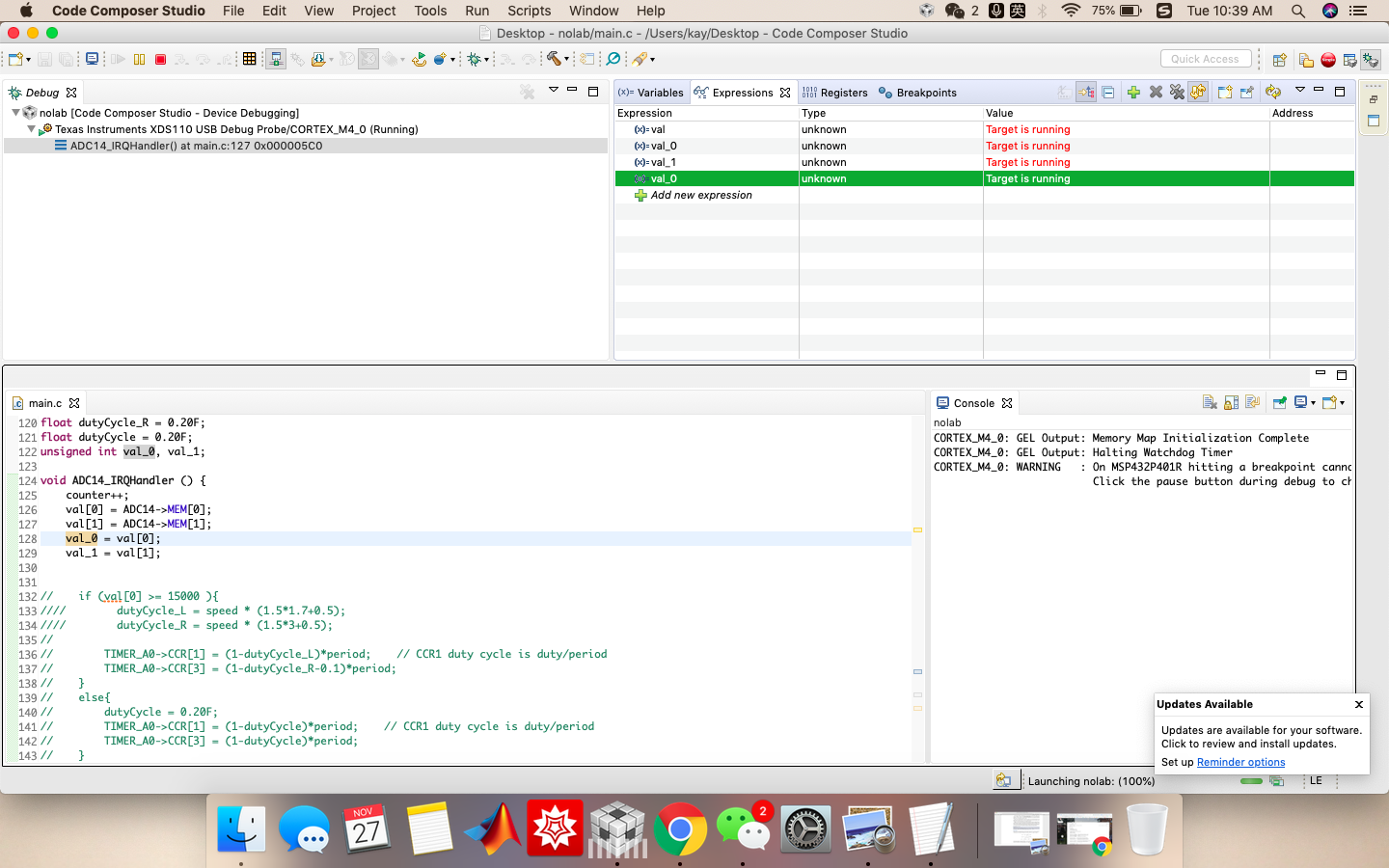
 t do it.

  • Hello James,

    In my experience with using CCS the Watch Window does not display values when the application is running.

    You can instead "View Memory" of the variable by right clicking on the variable name in the "Watch" window and selecting "View Memory". This will launch a new "Memory Browser" window. In this "Memory Browser" window, click on "Continuous Refresh" icon on top of the "Memory Browser" window. This will display the updated values continuously.

    Hope this helps!

    Thanks,
    Sai
  • Oh heck, sure it does.  This is a great feature that I have been using regularly for months now- see attached screenshot  (I wasn't able to grab a screen shot when it was displaying a yellow background highlight- indicating a changed value- since this happens only for a split second after the value changes).  Why this is considered an "expression" instead of "something like "variable watch" I don't know.

    I tried what what you said and I can also get a real time/continuous update in the "Memory Browser" window.  It's an oddly formatted display, but it works.  But so so does the "Expressions" window.

    So I'm still uncertain why my student's display gave us this unusual message.

  • Still having this issue on one of my student's computers. Not seeing it on any other computer. We tried rebuilding and reloading code to no avail.
    I also verified that the variable in question was indeed a static variable.

    Any other ideas?
  • Hello James,

    I did test this on the MSP432P4 and I am able to read the value of variables continuously on the Watch window, as you have mentioned.

    Apologize for my earlier statement that Watch window will not update values when the application is running. This was based on my experience with MSP432E4 devices, which, as I have now learnt, handles the way variables are read differently than MSP432P4 device.

    This is not my area of expertise but it looks like CCS reads the variables on the MSP432P4 MCU through the DAP. I am wondering if there is some issue with the specific development board due to which CCS is not able to read the values. If already not done, can you change the development board and see if CCS, on that specific students PC, still can't read variables continuously.

    Thanks,
    Sai
  • James,
    This has sit idle for a while. Have you found any issues with the board and/or resolution?

    Thanks,
    Chris

**Attention** This is a public forum