This thread has been locked.

If you have a related question, please click the "Ask a related question" button in the top right corner. The newly created question will be automatically linked to this question.

EVM430-FR6047: About using the USS calibration function.

Part Number: EVM430-FR6047

Hi,

I'm using USS_02_20_00_15 and UltrasonicWaterFR604x_02_20_00_04.

I tried calibration according to the flow chart I received.

What I did was :

1. configure parameter check. [waveform & ADC capture result]

2. calibration table setting. [I tried two methods, (1)runtime calib, (2)manual calib]

figure 1. Calibration Table Setting.

3. generate header in configuration tab [I tried two methods, (1)check adv, calibration Table (2) not check adv. calibration table

4. modify demo code. In usslibguiapp_init() function, comment out line of code.

//gUssSWConfig.algorithmsConfig->numOfMeterCalibrationRanges = 0;

5. recompile target board.

6. connect GUI & board, testing.

The results are as follows.
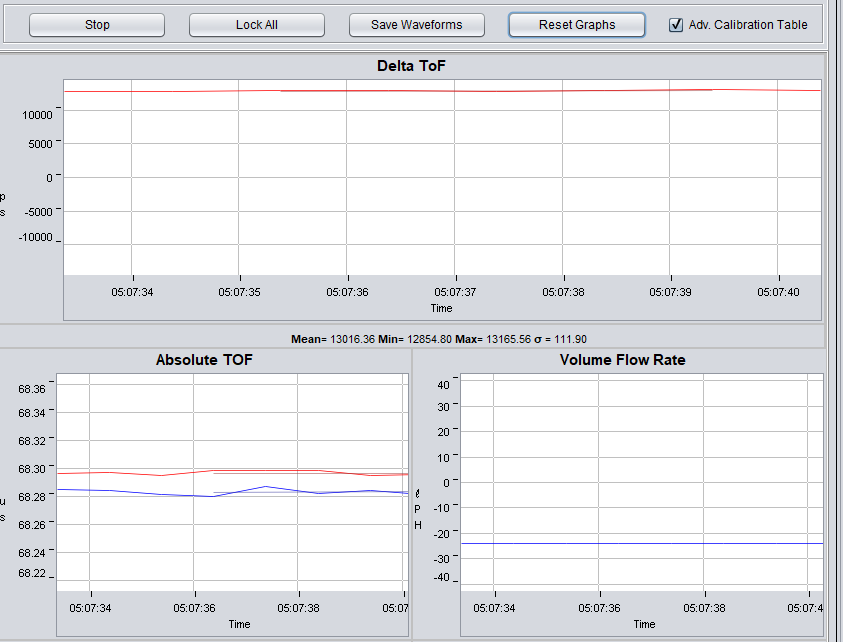
figure 2. At a flow rate of 98 L / h, adv. calibration table check
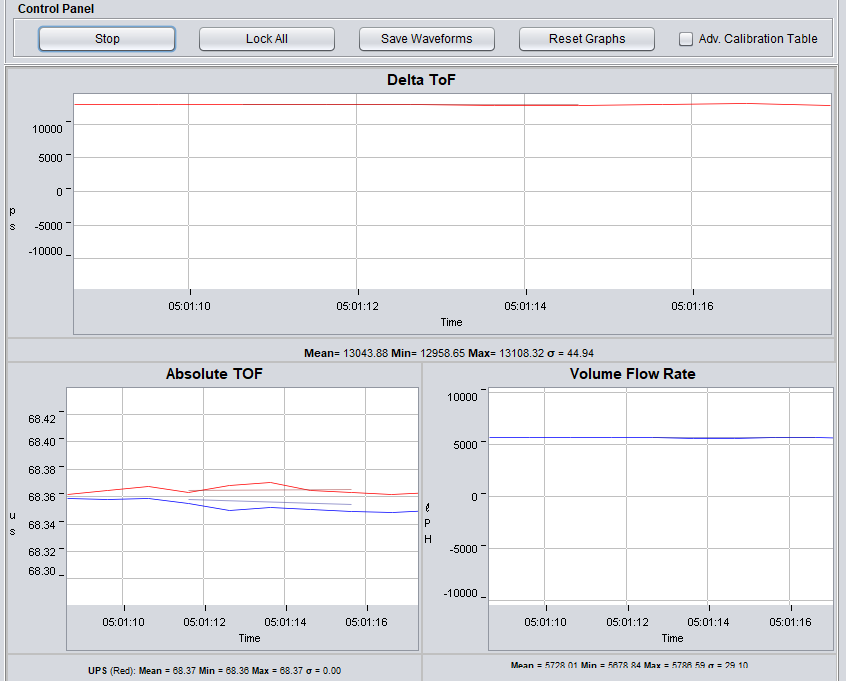
figure 3. At a flow rate of 98 L / h, adv. calibration table not check

The result of not using the calibration function. [figure 4]

figure 4. The result of not using the calibration function. 98L/h

Wrong way to use the calibration function?

Please let me know how to resolve this issue.

Best Regards,

  • Hi Junsu,

    Did you make use of the Calibration feature WITHOUT Generating header file and recompiling? You should be able to use the Calibration with the default example water demo project which internally updates the table after calibration. I wanted to check if you are getting different results WITH and WITHOUT "Generating header file".

    Srinivas
  • Hi Srinivas,

    I created a header file and copied it to the demo project.

    I compiled again, and then used the calibration feature.

    with "Generating header file" & Recompile result is figure 2,3.

    The original result without "Generating a header file" is figure 4.
  • Hi Junsu,
    In your original message, you mentioned Figure 4 is the original result without using the calibration function: "The result of not using the calibration function. [figure 4]". You can use the calibration function and NOT "generate the header files and recompile". You can still continue to use the result of the calibration function as the computed calibration table will be updated by the handshake between the GUI and the application code. Did you try this approach?
    Srinivas
  • Hi Srinivas,

    I understood that the correction function can be executed without regenerating the header file. it is correct?

    The memory was not correct for a long time, but the expected correction value did not come out.

    I've already tried this way. But An error has occurred that is smaller than Flow Minimum.

    Or unexpected results as shown in figures 2 and 3.
  • Hi Junsu,
    So you still have some problems while using the calibration function? What can we do for you now?

    Best regards,
    Cash Hao
  • Hi Cash Hao,

    Eventually I did not find a way to use calibration function.
    But i made custom calibration function and using it.

    so i don't need help in this part.
    So it is okay to terminate this thread.

    thank you.

**Attention** This is a public forum