This thread has been locked.

If you have a related question, please click the "Ask a related question" button in the top right corner. The newly created question will be automatically linked to this question.

MSP430F5659: FATFs problem: FR_INVALID_OBJECT retuned by validate function

Part Number: MSP430F5659

Good morning everybody!

Today I'm here because I was trying to deal with an issue related to FAT32 system module interfaced with micro SDHC Card 8GB.

I stored a .txt file in SD Card from my PC and the aim of what I'm trying to do is to read what I previously wrote in this file. prova.txt: "qwertyuiop123456789"

FATFS FatFS;
FIL elba;
DIR dir;
FRESULT fat_ret0, fat_ret;

As you can see from my definitions I'm using FATFs library from TI. In the main I call:

fat_ret0=f_mount(0,&FatFS);
fat_ret=f_open(&elba,"prova.txt", FA_READ);
if(fat_ret==FR_OK)
fat_ret=f_read(&elba, &readDATA_buffer, 20, &bytes_read);
f_close(&elba);

The issue happens in f_read function when static FRESULT validate function is called.

if (!fs || !fs->fs_type || fs->id != id) 
 return (FR_INVALID_OBJECT)

I really don't understand why I have this result, especially since I can see my .txt file correctely in the expression windows of CCS.
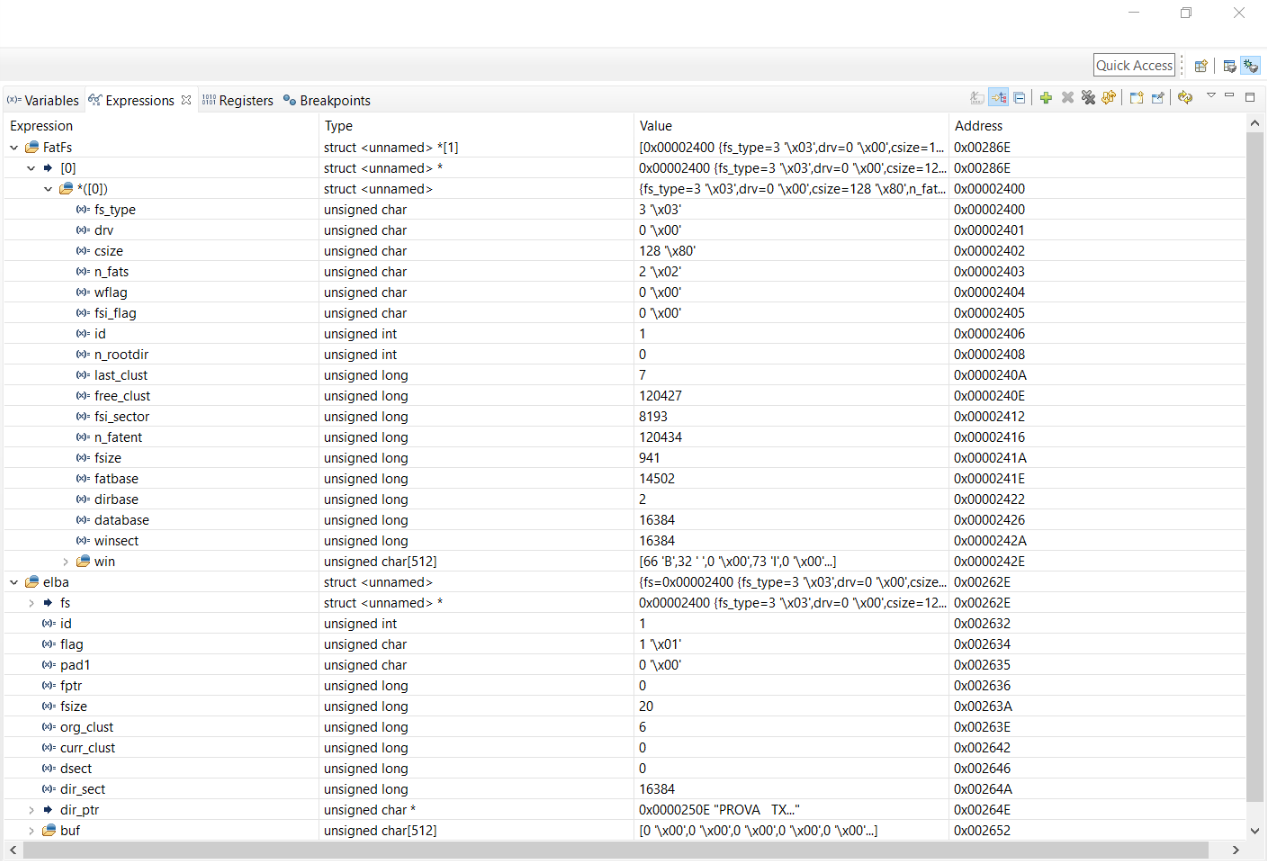
  

I really would appreciate any comment, help and advice in order to understand better if there is a problem related to my file or to FATFs interface with the SDHC card.

Many Thanks & Kind Regards,

Maria Angela

  • Hello Maria,
    FAT32 and FATFS are different filesystems.
    Format your card to FATFS mode, copy needed files and should be O.K.
  • Hello Maria,
    Tomasz is right, the format difference will probably the main reason for the issues, you're experiencing.

    Best regards
    Peter
  • Good morning Tomasz & Peter,

    First of all thank you for your replies at my queston.

    Ok, I understand that there are differences between the 2 formats mentioned in the first post, FAT32 and FATFS.

    As I said before I'm using the FatFs library by TI in my project and I try to format again my SDHC card but the only 3 available choices I have are:

    • FAT32
    • exFAT
    • NTFS

    So, I think I have to change something in the code I included, don't I?

    In this case what are the main important changes I have to make so that I can finally read my .txt file from my SDHC card?

    I'd really appreciate some advice and help to understand how to fix this issue in the best way as soon as possible.

    Best Regards,

    Maria Angela

  • Good afternoon,
    use exFAT on your PC/laptop.
    TI FATFS lib does not support FAT32 and NTFS.
  • Hello Maria,
    do you still need support on this? TI's library is unfortunately only supporting the documented format.
    If you do not have additional questions on this, please close the thread. Many thanks in advance.

    Best regards
    Peter
  • Good morning,

    So, if I understand correctely what you wrote in the previous posts:

    if I want to format my 8 GB SDHC card using FAT32 (as it is by default) this is not possible because this format isn't support by TI's FATfs library, right?

    2. Is there an application note or something I could study to understand how to move on with my project using FAT32 format with my SDHC card interfaced via SPI with my uP?

    3. I see a lot of posts on TI E2E community related to FAT32 formatting in SD cards interfaced via SPI with TI processors, but nothing like a sort of guide in order to explain what format are supported by TI 's FATfs library. I think it could be really useful for many developers and engineers like me have a starting point like that for our work projects.

    Waiting for your answers,

    Thank you for your help in advance,

    Best Regards,

    Maria Angela


  • Maria Angela Cianci said:
    if I want to format my 8 GB SDHC card using FAT32 (as it is by default) this is not possible because this format isn't support by TI's FATfs library, right?

    YES. Use FATfs and extFAT. 

    Maria Angela Cianci said:
    2. Is there an application note or something I could study to understand how to move on with my project using FAT32 format with my SDHC card interfaced via SPI with my uP?

    You would need FAT32 support on your MCU. 
    Microelectronica provides FAT32 libs for some of its products:  libstock.mikroe.com/.../fat32-library
    Porting one of their libs would be a separate project. 
    Real red light could be their license. Check their license before you start porting.

    Regarding efsl implementation, please check this: e2e.ti.com/.../242326

    Maria Angela Cianci said:
    but nothing like a sort of guide in order to explain what format are supported by TI 's FATfs library.


    Most of what you need to start is here: dev.ti.com/.../

  • Goodmorning Tomasz,

    Thank you for your clear reply.

    This morning I tried to format my SDHC card in exFAT 512 byte format. Then I saved my .txt file on it and now I'm triying to read it.

    I execute the same functions I write in the first post related to this issue.

    Among the other things the f_open function calls check_mounted function and store its result in the variable res; in my case res=FR_NO_FILESYSTEM

    res = chk_mounted(&path, &dj.fs, (uint8_t)(mode & ~FA_READ));


    In chk_mounted function I have:

     /* Search FAT partition on the drive. Supports only generic partitionings, FDISK and SFD. */
        fmt = check_fs(fs, bsect = 0);                                      /* Check sector 0 if it is a VBR */
        if (fmt == 1){                                          /*
                                                                 * Not an FAT-VBR, the disk may be partitioned
                                                                 * Check the partition listed in top of the partition table
                                                                 */
            tbl = &fs->win[MBR_Table + LD2PT(vol) * 16];                    /* Partition table */
            if (tbl[4]){                                                    /* Is the partition existing? */
                bsect = LD_DWORD(&tbl[8]);                                  /* Partition offset in LBA */
                fmt = check_fs(fs, bsect);                                  /* Check the partition */
            }
        }
        if (fmt == 3){
            return ( FR_DISK_ERR) ;
        }
        if (fmt){
            return ( FR_NO_FILESYSTEM) ;                                    /* No FAT volume is found */
        }

    What's wrong now? Is it possible that the root of the problem is my 8GB SDHC card? Is it too much big?

    Thanks in advance for your help,

    Best regards,

    Maria Angela

  • Hello Maria,

    according to the last link I have provided for you:
    FF_FS_EXFAT
    This option switches support for the exFAT filesystem in addition to the FAT/FAT32 filesystem, Enabled (1) or Disabled (0). To enable exFAT, also LFN must be enabled and configureing FF_LFN_UNICODE >= 1 and FF_MAX_LFN == 255 is recommended for full-featured exFAT function. Note that enabling exFAT discards ANSI C (C89) compatibility because of need for 64-bit integer type.

    Have you did that?
  • Good morning Tomasz,

    not yet but I'm going to try it today.

    However yesterday I was able to read my .txt file stored in another 2 GB SD card simply changing the base time of my project.

    Today I'm also going to have some experiments on different dimensions and classes' SD cards to verify if the routine I wrote is robust or not.

    Thank you very much for your help and for your clear explanation.

    Best Regards,

    Maria Angela

**Attention** This is a public forum