This thread has been locked.

If you have a related question, please click the "Ask a related question" button in the top right corner. The newly created question will be automatically linked to this question.

MSP430FR6989: MSP430FR6989 BSL invocation with FT232R

Part Number: MSP430FR6989
Other Parts Discussed in Thread: MSP-FET

Hello everyone,

I'm trying to invoke the BSL of the MSP430FR6989 with a FT232R using UART communication, through the BSL Scripter. All the components are connected on their respective pins in order to make that invocation possible. But it seems that the invocation sequence is not well produced by the inverted DTR and RTS pins when I try to execute the txt file in the BSL Scripter.

The produced sequence looks like that:

(Nb.1 is the inverted DTR signal, while Nb.2 is the inverted RTS signal)

And it will have to look like that:

The txt file that I'm trying to run is an example located in the instalIation folder of the BSL Scripter.

//Script example FRxx UART BSL
//
//Device : MSP430FR6989
//Comm Bridge: MSP-BSL Rocket
//
//Download blink application through
//UART BSL in FRAM device
//
LOG
MODE FRxx UART 9600 COM11
//gives wrong password to do mass erase
RX_PASSWORD pass32_wrong.txt
//
//add delay after giving wrong password
//because the device does not give
//any response after wrong password applied
//
DELAY 2000
RX_PASSWORD pass32_default.txt
RX_DATA_BLOCK blinkLED_FR6989.txt
CRC_CHECK 0x4400 0x0020
SET_PC 0x4400

I don't know why I am not able to start the BSL sequence properly. May it be a problem of the FT232R?

I would appreciate so much your help.

Best regards

  • Hi Christian,

    you have a resolution of 10ms on your scope are there any other edges within are area of the rising edges?

    Can you please post a snapshot of the schematic how you connected TEST and RST on the MSP part?

  • BSL-Scripter does not generate the BSL invoke sequence on DTR and RTS.  It relies on an approved hardware interface to do that when it changes the baud rate to 9601.  Approved interfaces are the Rocket and MSP-FET.  My Github repo on using an interface similar to the FT232 might be useful:

    https://github.com/gbhug5a/CP2102-with-BSL-Scripter-for-MSP430

  • Hi Dietmar,

    Thank you for your support. I forgot to change the resolution to a lower one for this picture, but the problem persists and keeps the same despite the resolution. 

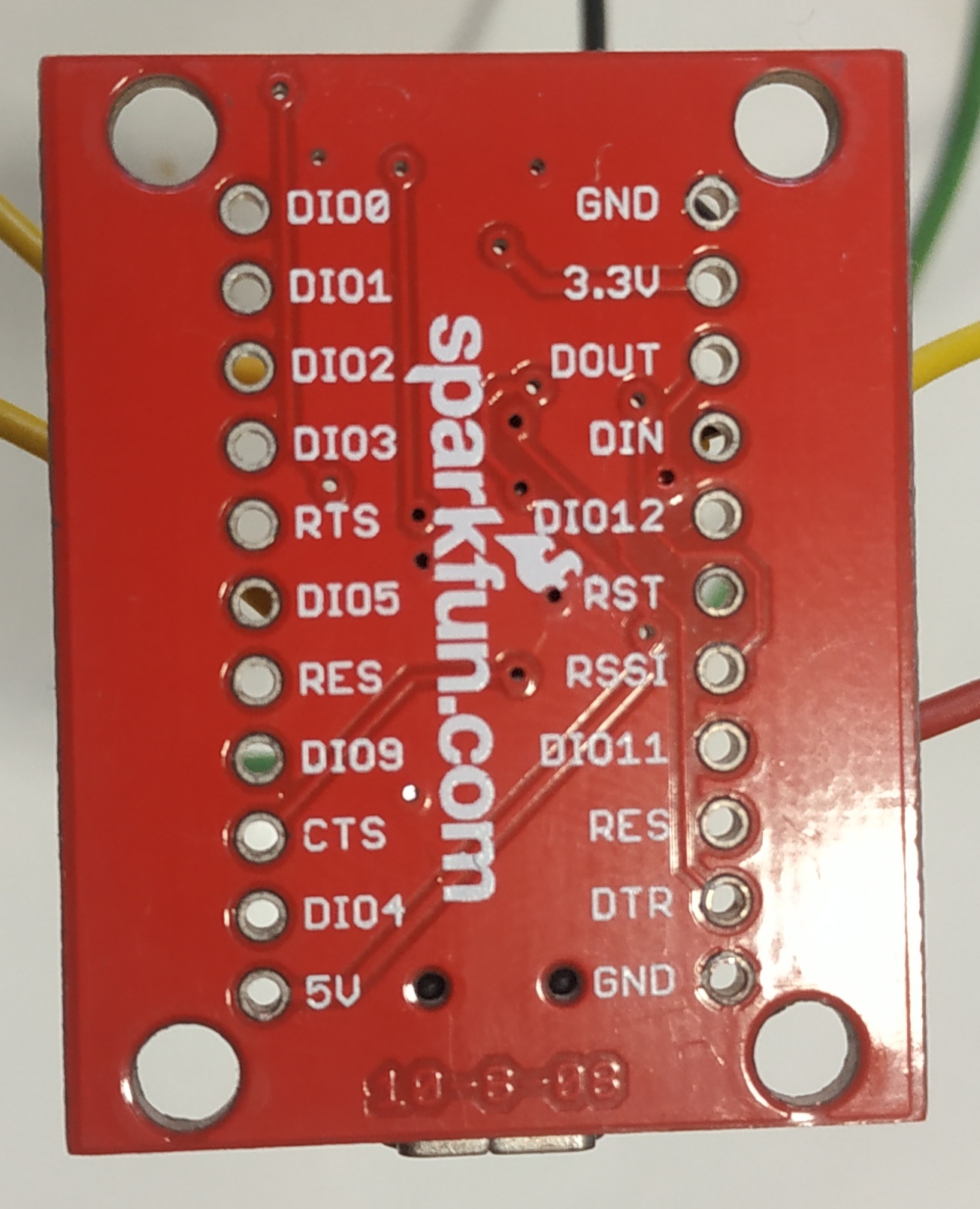
    The connections are:

    Inverted DTR FT232R -->  inverted RST of the Board

    Inverted RTS FT232R -->  TEST/SBWTCK of the Board

    GND FT232R --> GND Board

    3.3V FT232R --> 3.3V Board

    DIN FT232R --> P2.1 (BSLRX) Board

    DOUT FT232R --> P2.0 (BSLTX) Board

    The DTR and RTS of the FT have been inverted by software.

    Best regards

  • Hi Christian,

    the comment from George is absolutly correct the BSL_SCRIPTER SW works only with dedicated HW like the BSL_Rocket.
    In case you use a different HW you need to realize the INVOKE on your own.
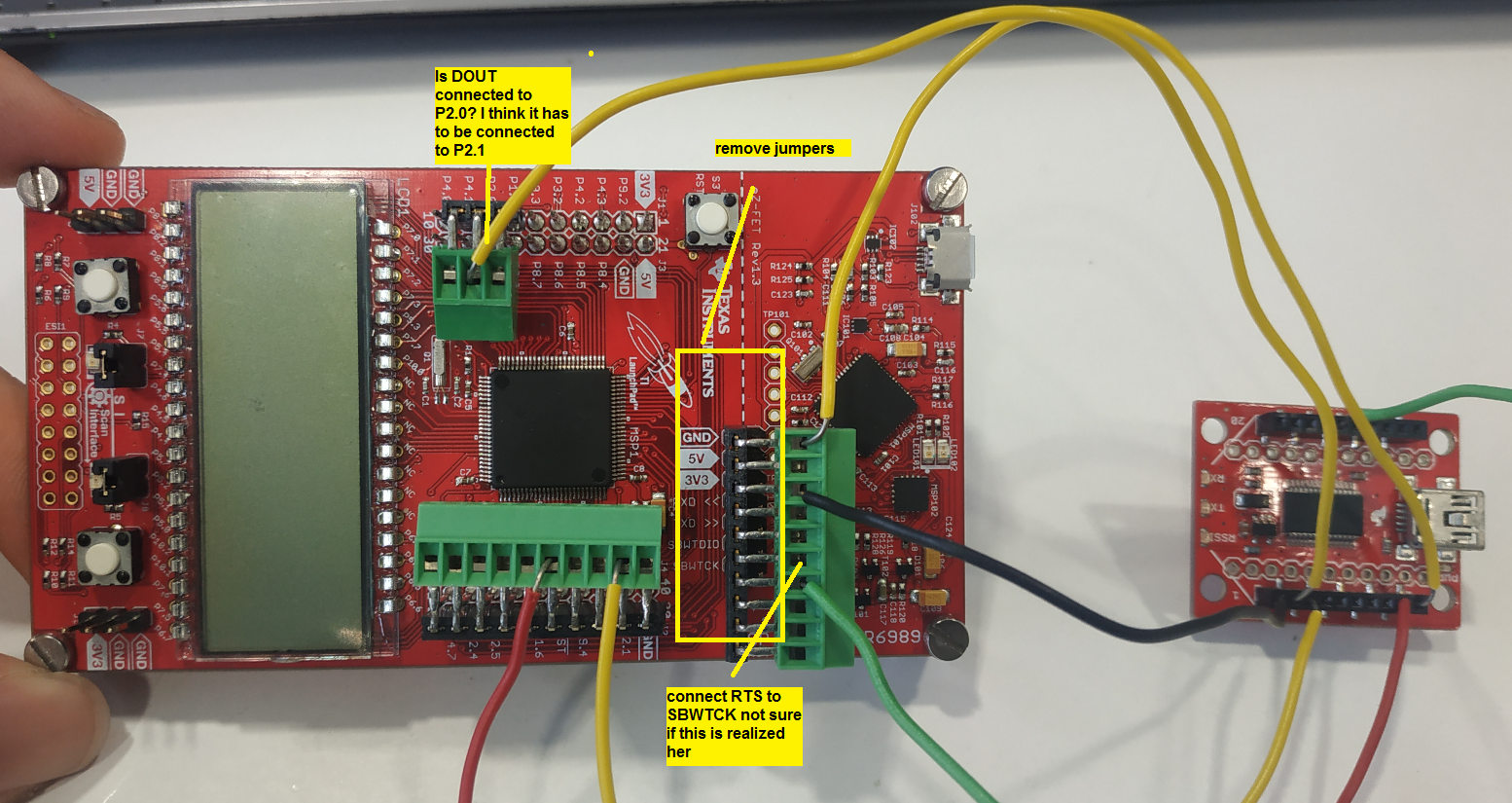
  • Christian, I guess I'm confused about what you're doing. From the picture, you are using the 6989 Launchpad, so I don't understand why you he can't just use JTAG for flashing via USB.

    You say you are inverting DTR in software. Did you modify Scripter, or some other program? And from the first scope trace, it looks like both DTR and RTS are inverted somehow. When I run Scripter with a USB adapter, both lines are low.

    I can't tell from the picture, but if you are powering the 6989 directly from the FT, you would need to remove all of the "dotted-line" jumpers to protect the unpowered emulation section of the Launchpad.

    Finally, it depends on how things are labeled, but usually the TxD of the USB adapter connects to the RxD of the target. So you may need to cross the data lines.
  • Again,

    the BSL scripter is working only with dedicated HW so I expect you have alinged it to your solution right? Besides this I'm not sure the connections are correct, also please follow George 's recommendation to remove the jumpers.

  • Hi George,

    I'm using external hardware as the FT232 in order to invoke the Bootloader through its sequence, that's why I am not using JTAG.

    In order to invert both DTR and RTS, I have used FT_Prog program that allows inverting them.

    Then, there are no jumpers connecting the ez-FET and the microcontroller or vice-versa. This component only allows connecting wires to each pin independently.

    Finally, the TX and RX of the target are connected to the DIN and DOUT respectively, which will be the correct configuration. I realized that I wrote it wrong in the previous answer.

    Thanks for your support.

    Best regards

  • Hi Dietmar,

    Thanks for your attention. As BSL scripter is just working with dedicated HW, the link George shared previously in which a similar component to FT232 is used has been very useful. Now I'm working with it but I still haven't been able to correctly access the bootloader.

    Finally, all the connections have been checked and are well connected.

    Best regards.

  • Cristian, I'm still not clear about what you are doing.  I've never used F_Prog, and don't understand why it is needed.  The INVOKE.EXE program for Windows included in the Github link should generate the correct sequence on DTR and RTS on a standard, unmodified FT adapter (set to 3.3V)  just as it does on the CP2102.  That sequence is shown in Figure 2 (Section 3.3.2) of SLAU550S.PDF.  You should see that pattern on your scope when you run INVOKE.EXE.  But if you can generate that pattern with F-Prog, that's fine.

    Then you have to run Scripter after generating the invoke pattern.  But the first thing Scripter does is bring DTR low, which cancels the BSL session in the FR6989, and puts it into Reset, which is not what we want to happen.  So after you generate the invoke pattern, you must disconnect DTR from the FR6989 before running Scripter.  One way to do that is to have a batch file that runs INVOKE, then a Pause, then runs Scripter.  During the Pause, you just manually disconnct the DTR jumper. (The Reset pin on the FR6989 should have a pullup resistor.on the Launchpad, but I don't know which side of the dotted line it is placed, so you might need to add one.)

    Also remember that you will have to include the PARITY option in the MODE line in your Scripter text.

    I have tested this procedure with a CP2102 and FR2311, and it does work.

  • Christian,

    were you able to generate the invoke sequence as required according to Geroge's information in the Gitub link?

    So normally I always use the BSL-Rocket which generates the BSL sequence but what ever you will use is to generate the correct BSL entry sequence to communicate via UART and prevent an additional RESET in between.

    So please let us know if it worked on your site and what else do you need to get it working. Otherwise I will close this thread by end of the week.

    Thanks.

  • I start using FT_prog in order to be able to invert both DTR and RTS pins of the FT232. Now, I'm not supposed to need it as INVOKE.txt generates the correct sequence, inverting DTR and RTS by itself, isn't it? So I disabled all the parameters that I changed in FT_prog, in order to let INVOKE.exe invert those pins by itself.

    So, when I run INVOKE.exe, now I'm obtaining what seems to be the correct sequence but completely inverted, even if I try to invert those signals again through FT_prog.

    What should the problem be?

    Thanks for everything.

  • Cristian, I'm afraid I have given you bad advice.  I originally tested INVOKE with the CP2102 adapter, and was successful programming an FR2311.  But at the time I did not have either FT232 or CH340 adapters to test.  I assumed the generic adapters and their drivers would all work the same way, but it turns out that is not true.

    This morning I borrowed a CH340G adapter and an FT232RL adapter to test.  When I plug either one into my computer USB, but with nothing connected at the other end, and run INVOKE, my scope shows that it generates the pattern, but then ends by returning both lines high.  I believe RTS must remain low for my method to work, so that means neither CH or FT will work with INVOKE.

    When I first plug in the FT adapter, I get several seconds of meaningless pulses on both DTR and RTS, ending with both lines high.  Then when I run INVOKE, it behaves strangely, but then generates the pattern, then ends with both lines high.  It appears the polarity of both lines is the opposite of what your scope shows.  I will attach a picture.

    As the picture shows, there is a long low pulse on both lines before the pattern is produced, and that should not happen, and does not happen with the CP2102.  I will try to modify INVOKE so that doesn't happen,  but even if successful, I don't know how to stop RTS from going high at the end since that is a driver issue.  So for now, it appears my method works only with the CP2102.  I don't know how you can program your FR6989 with an FT adapter.  I'm very sorry I took you down this path.

    Edit:  No, I was right the first time.  It DOES work.  See my next post.

  • Cristian, I spoke too soon. It works after all. I was able to flash an FR2311 with the FT232RL adapter. My batch file is as follows:

    invoke.exe COM6
    Pause
    BSL-Scripter.exe script.txt

    The MODE line in the script includes the PARITY option.

    During the Pause, you must disconnect both DTR and RTS from the FR6989. (I'm assuming you have a pullup resistor on the /Reset pin.) Then hit any key to run BSL-Scripter.

    It appears that RTS can go high after the invoke sequence is generated so long as it goes back low again before communications begin. Since the Test pin has an internal pull-down resistor, disconnecting it from RTS will bring it back low. Then when Scripter runs, nothing it does on DTR and RTS will get through to the MCU, but the TX and RX communications will still work.

    The alternative of using the MOSFET circuit, and deleting the Pause, works only for the CP2102.

    I still need to test the CH340G, and do more testing with the FT232, but so far it looks promising. The key is to get your polarities right, as shown in the picture in my previous post, and disconnect DTR and RTS during the Pause.
  • Thank you so much George! I'm still trying to invert the signals correctly, and if I get them, I will try to do it as you said. In case of not being able, I will change the FT232 for another one.

  • George, thanks a lot for your support and valuable inputs.

    Christian,
    were you able to resolve you challenge with his inputs? If yes please mark this thread as resolved.
    If there will be no furhter activity I will close this thread.

  • Dietmar, please leave this thread open for a couple more days. I think news is forthcoming shortly that will provide a solution.
  • Hi George, as I was not able to solve it, I finally decided to buy the Rocket and now I have no problems. So, I would consider this thread as finished.

    Despite this, I want to thank you both for your help. 

    Best regards

  • I'm sorry I wasn't able to help you, Cristian. But progress has been made on modifying Scripter so it will generate the invoke sequence directly. I hope to post that solution here in the next few days.
  • George Hug said:
    I'm sorry I wasn't able to help you, Cristian. But progress has been made on modifying Scripter so it will generate the invoke sequence directly. I hope to post that solution here in the next few days.

    As predicted:

    https://e2e.ti.com/support/microcontrollers/msp430/f/166/t/785580

  • Perfect! I will took a look. Thank you so much.

**Attention** This is a public forum