This thread has been locked.

If you have a related question, please click the "Ask a related question" button in the top right corner. The newly created question will be automatically linked to this question.

MSP430FR6989: MSP-EXP430FR6989 Launchpad board

Part Number: MSP430FR6989
Other Parts Discussed in Thread: MSP-EXP430FR6989

Can someone help me using the MSP-EXP430FR6989 board and the MSP-FET430UIF programmer using SPIWIRE?

  • Hi Nick,

    Could you please provide additional detail on what you are trying to accomplish with the MSP-EXP430FR6989 and the MSP-FET430UIF. The Launchpad itself has an on-board eZ-FET emulator so that you do not need a programmer to debug code on the board.

    Best regards,

    Matt
  • Yes. I use IAR Workbench and have an MSP-FET430 programmer with SPY-Bi_Wire to debug my other TI processors. I would just like to use that setup with the MSP-EXP430FR6989 board. Unless you have an idea how I can use the EZFET with the IAR debugger?

    Thank you for your time.

    Nick

  • Nick,

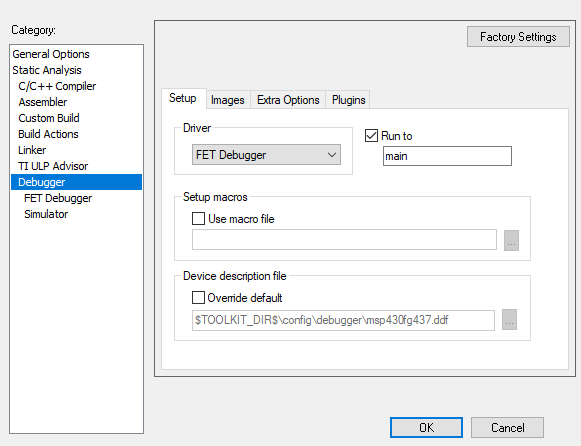
    If you go to the project "Options" window and make sure that the correct target is set and that the debugger driver is set to "FET Debugger", then you should be able to just plug your Launchpad directly into the computer and press the "Download and Debug" button to program the board and start a debug session in IAR.

    Best regards,

    Matt

  • Thank you Matt. Where I was having the issue was in the Debugger->FET Debugger, you have to set it to Automatic and then click on the ... icon and choose the port.

    Thanks for the help.

    Nick

**Attention** This is a public forum