This thread has been locked.

If you have a related question, please click the "Ask a related question" button in the top right corner. The newly created question will be automatically linked to this question.

MSP430FR6047: MSP430FR6047 correlation DToF

Part Number: MSP430FR6047
Other Parts Discussed in Thread: TIDM-1019,

Hi,

I am currently exploring the evaluation board TIDM-1019 with MSP430FR6047 MCU with USS design center (demo).

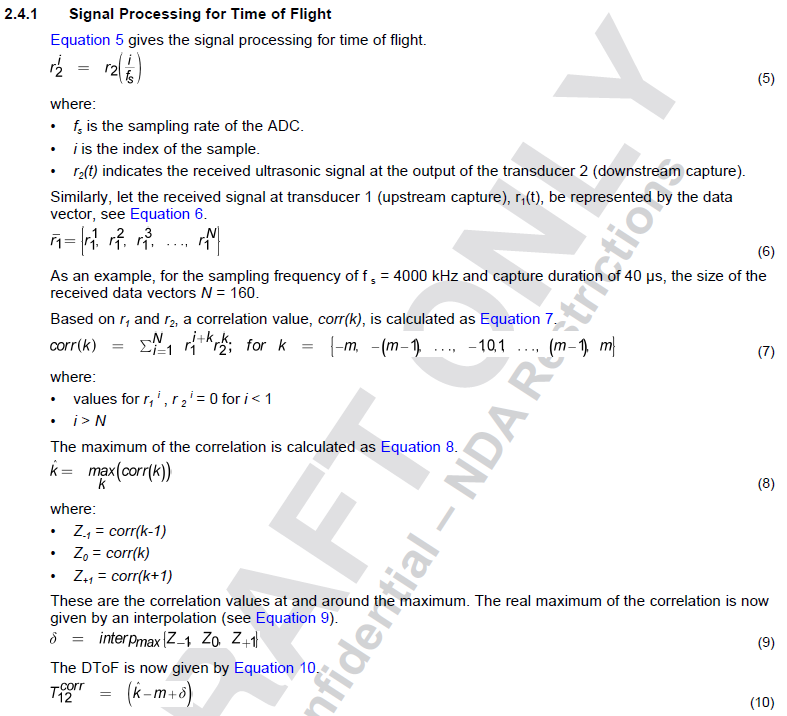
The difference in TOF is calculated based on correlation (based on a few points of the measured upstream and downstream signals). I have read the 'Ultrasonic Sensing Subsystem Reference Design for Water Flow Measurement' from TI.

However, it is not clear for me which zone in the signal is used (the full signal, the zone around the peak of the signal or a zone in the signal).

I thus would like to ask if:

- This chip allows to choose which zone to be cropped for correlation (if yes, how to change in the USS design center)

- There are any documents describing in detailed the method

Regards,

TDL

  • Hi

    The most clear description should be in the 'Ultrasonic Sensing Subsystem Reference Design for Water Flow Measurement' part 2.4.1 but the equations are not clear there you can refer to this one


    For efficient implementation we usually use few points(about 20 maybe) to it with equation 7.

    Best regards

    Gary

  • Hi Gary,

    Thank you for your response. 

    The description is just general how one would do correlation as described in the document.

    However, my question is where the USS software choose these points of the signal to use it with equation 7.

    For example: you mention about 20 points but where exactly do these 20 points locate in the signal (i call it a time zone in the signal). The time zone can be right at the beginning of the signal. Or it can be somewhere in the middle of the signal.

    I believe the USS software does not allow the user to choose the time zone for correlation. Still i would like to know the default setting of the software where they select the time zone.

    Furthermore, I would like to know if the IC allows user to decide where to crop the time zone. And if it does, are there any document describing how to do that with your library.

    Regards,

    TDL

  • Hi

    You can't choose the time zone for correlation. But what we choose is optimized to make sure the best SNR.

    Thanks
    Gary
  • Hi Gary,

    Thank you for the prompt response.
    From what you said, the time zone is chosen automatically by TI for the best SNR.
    Meaning TI does not even allow developers to select their own time zone of interest.

    Please help me to re-confirm that statement because it is crucial for us in the development/design phase if we choose to use MSP430FR6047.

    Regards,

    TDL

  • Hi TDL,
    The zone around the peak of the signal are used for the correlation. We believe that it has the best SNR result through the whole signal.

    Best regards,
    Cash Hao
  • Hi TDL,
    To add to the above replies, I would like to separate out the MSP430FR6047 chip vs. Ultrasonic SW library provided for download at www.ti.com/.../MSP-ULTRASONIC-DESIGN-CENTER

    MSP430FR6047 Chip:
    You can develop the algorithm that is suitable for your application. The chip does not put any of the restrictions that are mentioned in the queries above. Your algorithm can search and pick the peak that you are interested in.

    Ultrasonic SW Library:
    The library is developed for a broad set of residential water flow meter and gas meter applications. The samples used in the correlation is impacted by the following settings:
    (a) Windowing is disabled: Windowing can be disabled by setting USS_ALG_ENABLE_WINDOWING = false in USS_userConfig.h. The correlation algorithm that computes the DeltaToF (DToF) is run over the entire captured signal.
    (b) Windowing is enabled: Windowing can be enabled by setting USS_ALG_ENABLE_WINDOWING = true in USS_userConfig.h. With this setting, the received signal is first windowed before running the correlation. The window is specified as a trapezoidal and specified by the parameters below defined in USS_userConfig.h:

    #define USS_ALG_WIN_START_INDEX_BACK_OFF_NUM_CYCLES 2
    #define USS_ALG_WIN_TRAP_RAMP_NUM_CYCLES 4
    #define USS_ALG_WIN_NUM_CYCLES_DELTA 3
    #define USS_ALG_WIN_NUM_CYCLES (USS_NUM_OF_EXCITATION_PULSES + \
    USS_ALG_WIN_NUM_CYCLES_DELTA)

    As an example, 4 “CYCLES” above indicates a duration of 4 transducer cycles; for a 1 MHz transducer with 4 MSPS ADC sampling, 4 cycles indicates 16 samples. The default setting for USS_NUM_OF_EXCITATION_PULSES is 20. Again, for 1 MHz transducer and 4 MSPS sampling, the constant portion of the window is about 92 samples (=4*23) and the trapezoidal portion of the window when it rises from 0 to 1 is 16 samples on either side. Usually, this window is such that it includes not just a few samples around the peak but lot of tones. You can also vary the above parameters to modify the window further if your application and transducer choice requires different settings.

    Srinivas

  • Hi Srinivas,

    Thank you for you response. It is a great information since the chip gives us freedom to crop our window for correlation.

    Do you have any related document describing in detail all the options of chip (and the reference library from TI to configure their parameters)?

    Regards,

    TDL

  • Hi TDL,

    The relevant documentation that discusses the different parameters are

    (a) Help section of the Ultrasonic sensing Design Center. You will find this at file:///C:/ti/msp/USS_02_20_00_16/USS/docs/UserGuide/UserGuide/index.html when you install the latest GUI & SW from www.ti.com/.../MSP-ULTRASONIC-DESIGN-CENTER. This section describes the parameters that are available for modification from the GUI and are usually sufficient for generic water flow meter developers.

    (b) Library Users Guide. This is also part of the above installation. This is also available in the "doc" sub-directory in the same installation directory. You can find it at file:///C:/ti/msp/USS_02_20_00_16/USS/docs/LibUsersGuide/markdown/index.html or <C:\ti\msp\USS_02_20_00_16\USS\docs\lib_users_guide.html> and <C:\ti\msp\USS_02_20_00_16\USS\docs\api_guide.html>. Each of the individual parameters of the data structures are defined.

    (c) We also have a Ultrasonic FAQ for water flow and gas flow meters available at www.ti.com/.../slaa837. You can find this in the "Technical Documents" section of the device www.ti.com/.../technicaldocuments. This addresses some frequently asked questions and suggested usage of the parameters.

    Srinivas

**Attention** This is a public forum