This thread has been locked.

If you have a related question, please click the "Ask a related question" button in the top right corner. The newly created question will be automatically linked to this question.

MSP-EXP430F5529: wrong usb ram contents, wrong com ports and can't connect from TDC7201-ZAX-EVM GUI

Part Number: MSP-EXP430F5529
Other Parts Discussed in Thread: TDC7201, , MSP430WARE

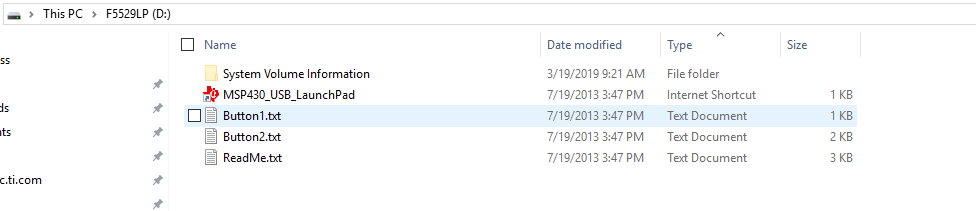
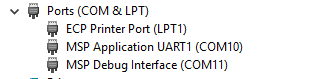
I'm trying to evaluate TDC7201.  I got a MSP-EXP430F5529LP board from disty this month.  My Launchpad setup doesn't match the April 2017 users guide 1) it doesn't have the right files in the usb ram (see screen pics) 2) it doesn't install on the same com ports and the port names are wrong 3) when running the TDC7201 GUI it doesn't connect on any of the port choices.  Thanks.

  • Hi Don,

    1) In order to confirm that you have the correct "Out of Box Demo" loaded onto the Launchpad, please navigate to the TI Resource Explorer within CCS (View -> Resource Explorer) and find the latest O.O.B. demo for that board ( Software -> MSP430Ware - v: [Latest] -> Development Tools -> MSP-EXP430F5529LP -> Demos -> Out of Box Experience)

    Once imported and downloaded to your board, please unplug and plug back in the board to confirm that the USB devices initialize properly. The contents within the file system should look like this:

    2) Once the device enumerates correctly, this is what the COM ports on the "Device Manager" should look like (perhaps with different port numbers):

    3) I am not sure yet what your issue is with the TDC7021 GUI interface. What version of CCS are you using? What version of the TDC7021 software are you using? I am using CCS v8.3 and downloaded the latest software from the TDC7201-ZAX-EVM Landing Page (v2.1.8.0) There is a walk-through guide in the EVM User's Guide which steps you through the process of setting up the EVM for the demo.

    Best regards,

    Matt

**Attention** This is a public forum