This thread has been locked.

If you have a related question, please click the "Ask a related question" button in the top right corner. The newly created question will be automatically linked to this question.

MSP430F5529: Print data from IAR to the different terminal

Part Number: MSP430F5529
Other Parts Discussed in Thread: ADS1293, , ADS1293EVM, MSP-FET

Hello,

I am working on a project which contains acquisition of ECG data with the ADS1293EVM. MSP430F5529 is part of this board as well. For the communication between analog part of the board and microcontroller, I am using SPI ("MSP430 Interface to ADS1293 Code Library") and there is also FET Debugger from TI to program the microcontroller. Now I am printing data using printf to a terminal I/O which is part of the IAR Embedded Workbench software.

However, I would like to print ECG data to the terminal app in PC or to LabView, not in Terminal I/O in IAR software. The board is connected to the PC by USB so there is UART port in device manager. Is there any possibility?

Thank you,

Daniel

  • Hello Daniel,
    in principle this can be done. If the PC HW manager shows the MSP430F5529 as COM port, than there is a virtual COM port implemented.
    If not, this would mean you need to implement it yourself.
    This would be of course a major task, thus not sure whether you'd like to go that path. We're offering for these purposes the USB developer's package.
    If you're interested in that, please let me know.

    Best regards
    Peter
  • Hello Peter,

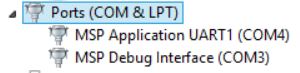
    actually, this is how ports look like when I connect FET Debugger from the board to PC.

    Could you please describe me more both paths? I am interested in USB developer's package as well.

    Thank you,

    Daniel

  • Hello Daniel,
    ok, so this is standard for the FET. As I am not familiar with the ADS EVM, I was thinking, the EVM potentially using the built-in USB module of the MSP430F5529 USB module. That's why I spoke about the USB developer's package.
    Our debuggers, like the MSP-FET and also the debugger sections on our LaunchPads always offer the virtual COM port, as you have seen in your screen shot. But this requires the debugger being connected. If you want to utilize that, that's of course fine.
    Regarding the developer's package, this would enable you, using the integrated USB module of the MSP430F5529, through USB directly with the PC. Of course under the assumption the FET HW would support this connection.
    The developer's package can be found under the following link www.ti.com/.../MSP430USBDEVPACK

    Best regards
    Peter
  • Hello Peter,

    I appreciate your advice. I was trying to connect to the offered ports but it did not work. Regarding that, I am going to try to make a virtual COM.

    I just want to make sure if it makes sense. I can obtain analog signal from the ADS1293 and after that I can send these data through the SPI to the MSP430F5529. In that microcontroller, I would like to manage the processing of the received data. Then, send the processed data through the virtual COM port for example to the LabView or external terminal.

    Thank you,
    Daniel
  • Hello Daniel,
    if you have one of the many MSP430 LaunchPads, the virtual COM port is available with any of those, you should be able to test the principle with LabView, and decide, whether you want to spend the effort of implementing the virtual COM port yourself with the MSP430F5529.

    Another option would be to use e.g. HTerm as a more comfortable terminal program, but of course then you need to manually copy the data into another file.

    Best regards
    Peter
  • Hello Peter,

    I am sorry, I know I am asking you still about the same but this topic is very hard to understand for me. Could you please describe to me how would you do that? My idea is to make a virtual COM port (using TI's USB developer's package) and after that use UART communication code (from MSP430 Interface to ADS1293 Code Library) for data transfer to the external Serial monitor. Is that right idea? If you have any other advice for me I will be grateful.

    Thank you,
    Daniel
  • Hello Daniel,

    no problem. As mentioned, before making the final decision, whether you want to spend the time on implementing a virtual COM port yourself, I would recommend you testing the functionality with one of our tools, like a LaunchPad or the MSP-FET. As you have seen in the HW manager of your PC in one of your previous posts, there was a virtual COM port enumerated at COM4.

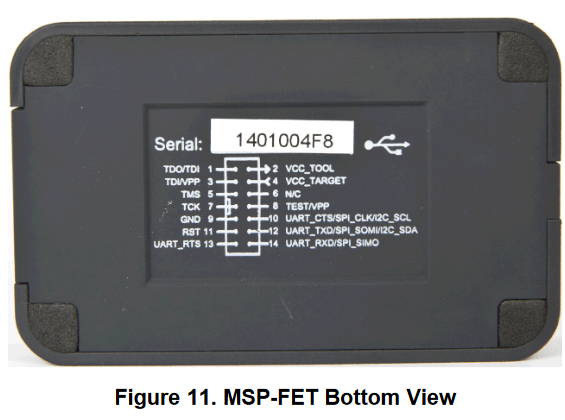
    The RXD/TXD UART connections are described in the MSP430 Debuggers User's Guide

    e.g. this figure from the UG gives you that information.

    So what you could do, is select the virtual COM port for the tool you want to use on your PC, like LabView, and use these RX/TX lines to transmit data from the MSP in UART format to the PC/LabView. If it works out, you know your PC tool can work with this data, and based on that you could decide, whether you want to implement such a USB based interface yourself, or just use e.g. the FET's COM port, and just transmit the data to the PC using UART format on the MSP430 side.

    Best regards

    Peter

  • Hello Daniel,
    I assume your questions have been answered sufficiently. In case not, please let us know.

    Best regards
    Peter
  • Hello Peter,

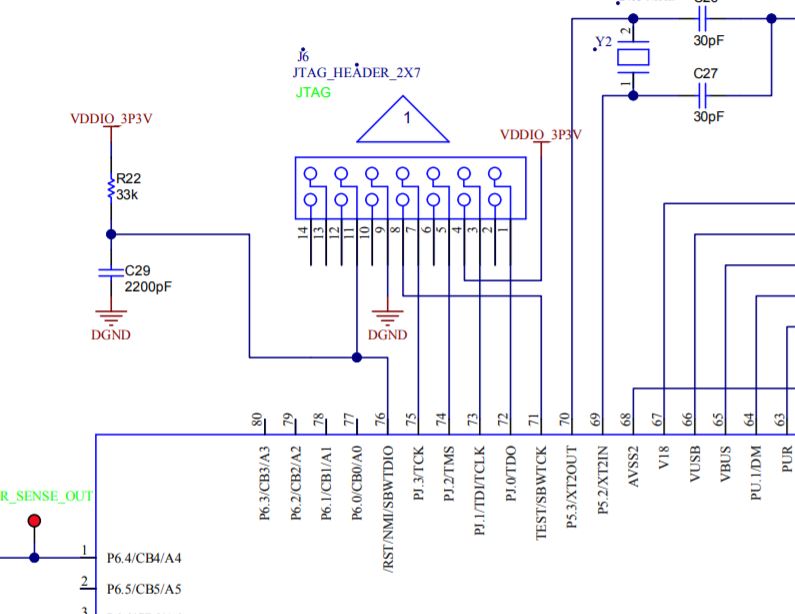
    I am sorry for not responding. I found out that your suggestion is not possible in the case of MSP430F5529 because there is no connection as you can see in the ADS1293EVM User's Guide. JTAG header is used for communication with MSP-FET. 

    Nevertheless, I started to use Code composer studio where data plotting is possible. I also found that is possible to use GUI Composer from TI. Maybe I will try this instead of LabView. Are there any examples for MSP430F5529 for GUI Composer?

    Thank you,

    Daniel 

  • Hi Daniel,
    you're right. If you do not have to use LabView, the CCS GUI Composer would be also an option.
    There are many instances also on our web page available as knowledge and information source for the CCS GUI Composer, but most probably the best one is this TIWIKI page processors.wiki.ti.com/.../Category:GUI_Composer

    Best regards
    Peter
  • Hello Daniel,
    do you have any further questions, related to these topics? If that's the case you can re-open the thread.

    Best regards
    Peter

**Attention** This is a public forum