This thread has been locked.

If you have a related question, please click the "Ask a related question" button in the top right corner. The newly created question will be automatically linked to this question.

MSP430F5529: MSP430F5529 switch between USB and UART bootloader

Part Number: MSP430F5529
Other Parts Discussed in Thread: MSP-FLASHER, MSP430G2553, MSP-EXP430F5529LP

Hi guys,

I've been struggling to erase my factory programmed USB bootloader of my MSP430F5529 target and to change it with an UART BSL. So far I have no luck ...

This thread is not efficient:

https://e2e.ti.com/support/microcontrollers/msp430/f/166/t/658145?MSP430F5529-Switch-between-UART-BSL-and-USB-BSL

and leads me nowhere.

I tried to download TI's UART bootloader from here:

http://software-dl.ti.com/msp430/msp430_public_sw/mcu/msp430/MSPBSL_CustomBSL430/latest/index_FDS.html

and flash with mspdebug the HEX file:

MSP430BSL_1_01_00_00/Released_BSL_Images/MSP430F552x_550x_Family/UART BSL/BSL.00.07.05.04.txt

but I get an error:

Writing 1900 bytes at 1000...
tilib: MSP430_Memory: Could not perform access, BSL memory segments are protected (error = 62)

I'm on Ubuntu 18.04, 64-bit. I can flash a simple blinky with mspdebug or with Code Composer Studio, but I cannot unlock the BSL segment to rewrite the bootloader.

I'd like to hear if someone managed to make the switch between USB BSL -> UART BSL on an MSP430F5529, I don't care if it's Windows or Linux.

Regards,

L. B.

  • Hi Lubomir,

    I suspect the BSL section is protected and has something to do with the  SYSBSLPE bit in the SYSBSLC register (referring to SLAU208Q 5xx6xx family users' guide, section 1.15.2).

    When you say you flash the uart BSL hex file with mspdebug, you are using a MSPFET430 or other programmer?

  • Lubomir,

    Don't know how this can be done by msp-debug. Here you can see command line for MSP-Flasher....

    https://e2e.ti.com/support/microcontrollers/msp430/f/166/t/381443

    Just take care to not set fuse values (that are in BSL area), because with blown soft fuse (value different than 00000h and 0FFFFh) and broken BSL, device is bricked.

  • I'm actually using the built-in debugger ezfet of MSP-EXP4305529LP board. It is accessible with mspdebug and tilib (libmsp430.so) driver.

    I've connected an external UART dongle to pin P1.1 and P1.2, where the UART BSL communication is supposed to be.

    And yes, I suspect that I might have to write to registers to unlock the BSL, but I wanted to ask first, because as I read, I could theoretically lock and brick my board with those registers :-)

  • Oh, I completely forgot about the MSPFlasher! I will try it and will write back what happened. I will be careful with the fuses!
  • Well, I managed to change the bootloader from USB to UART (I think) with the command (as shown in the link above):

    MSP430Flasher.exe -n MSP430F5529 -b -w BSL.00.07.05.04.txt -v

    I've noticed that the USB BSL is gone now because I don't see a drive enumared on my PC, as it did before. I believe I've loaded the UART BSL on top of it. The command passed without errors.

    And now what? How do I enter the BSL? I read I have to pull P1.3 low on some devices or do the "Makarena" sequence as described in SLAU319I:

    1. RST low

    2. TCK low

    3. TCK high

    4. TCK low

    5. RST high

    6. TCK high

    but nothing happens - the blinky application I've loaded with CCS is still starting ... this means I've got the wrong boot sequence. Does anyone know what should I do next?

    p.s. I've looked in the source of the bootloader, it's an IAR assembly project, and I don't quite get it ...

  • Hi Lubomir,

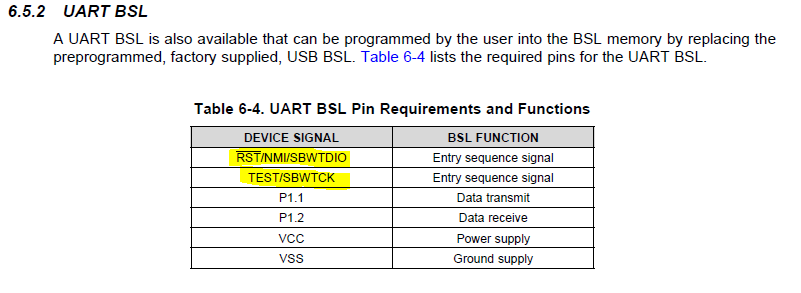
    I believe you use the RST and TEST pins for BSL entry.

    From the MSP430F5xx6xx family user's guide:

  • Yes, by TCK I meant TEST/SWBTCK and by RST I meant RST/NMI/SBWTDIO. But it didn't work :/

  • Ok,

    Let me see if I can duplicate on my side.
  • Lubomir,

    I was successful to update the BSL from USB to UART on my MSP430F5529 LP using the MSPFlasher just as you did. I then used the BSL-Scripter with one of the example scripts ( had to modify a little) and it replaced my pre-programmed blink_red_led program with blink_green_led program.

    So it appears it is possible.
  • Ok, thanks for taking your time! I'll try the BSL Scripter and will write back what happened...

  • Well, it appears that I have to put the MSP430F5529 in UART BSL with another board - I used MSP430G2553 launchpad with this code (MSP_RST connected to SBWTDIO and MSP_TCK to SWBTCK) :

    #include <msp430.h>
    
    #define MSP_RST 0x02
    #define MSP_TCK 0x01
    
    int main(void)
    {
      volatile unsigned long i;
      WDTCTL = WDTPW | WDTHOLD;
      P1DIR = 0x03;
      P1REN = 0x00;
      P1OUT = 0x00;
    
      P1DIR |= 0x40; //LED
    
      P1OUT &= MSP_RST;
      for(i = 0; i < 2000; i++){ }
      P1OUT |= MSP_TCK;
      for(i = 0; i < 2000; i++){ }
      P1OUT &= ~MSP_TCK;
      for(i = 0; i < 2000; i++){ }
      P1OUT |= MSP_TCK;
      for(i = 0; i < 2000; i++){ }
      P1OUT |= MSP_RST;
      for(i = 0; i < 2000; i++){ }
      P1OUT &= ~MSP_TCK;
      for(i = 0; i < 2000; i++){ }
    
      P1DIR &= ~(MSP_RST | MSP_TCK);
    
      while (1){
          P1OUT ^= 0x40; //LED
          for(i = 0; i < 2000; i++){ }
      }
    }

    now I can see that the MSP430F5529 stops executing its preloaded program (probably entering boot). But when I try to use BSL scripter I get:

    bsl-scripter-linux-64 /home/user/programs/ti/bsl_scripter/ScriptExampleLinux/5xx_uart_lubo/script_5xx_uart.txt
    ---------------------------------------------------------
    BSL Scripter 3.4.0.1

    PC software for BSL programming
    2019-May-07 23:32:47
    ---------------------------------------------------------
    Input file script is : //home/user/programs/ti/bsl_scripter/ScriptExampleLinux/5xx_uart_lubo/script_5xx_uart.txt

    LOG
    MODE 5xx UART /dev/ttyUSB0
        Baud rate setup for UART is not given / wrong
        It will be setup to the default 9600baud
    VERBOSE
        Verbose mode is now on!
    //mass erase the memory
    MASS_ERASE
        [80] [01] [00] [15] [64] [a3]
        [ACK_ERROR_MESSAGE]Unknown ACK value!
    RX_DATA_BLOCK blinkLED_f5529.txt
        Read Txt File  : /home/user/programs/ti/bsl_scripter/ScriptExampleLinux/5xx_uart_lubo/blinkLED_f5529.txt
        [80] [24] [00] [10] [00] [44] [00] [81] [00] [00] [44] [b1] [13] [90] [00] [0c]
        [93] [02] [24] [b1] [13] [00] [00] [0c] [43] [b1] [13] [6c] [00] [b1] [13] [94]
        [00] [32] [d0] [10] [00] [fd] [3f] [75] [6e]
        [ACK_ERROR_MESSAGE]Unknown ACK value!
        [80] [ca] [00] [10] [d2] [ff] [00] [1a] [44] [1a] [44] [1a] [44] [1a] [44] [1a]
        [44] [1a] [44] [1a] [44] [1a] [44] [1a] [44] [1a] [44] [1a] [44] [1a] [44] [1a]
        [44] [1a] [44] [1a] [44] [1a] [44] [1a] [44] [1a] [44] [1a] [44] [1a] [44] [1a]
        [44] [1a] [44] [00] [44] [2a] [14] [40] [18] [1a] [42] [5c] [01] [40] [18] [b2]
        [40] [80] [5a] [5c] [01] [8f] [00] [00] [00] [9f] [00] [00] [00] [13] [24] [89]
        [00] [00] [00] [88] [00] [00] [00] [0c] [3c] [0c] [09] [7f] [4c] [5f] [06] [00]
        [18] [5f] [4f] [00] [00] [a9] [00] [04] [00] [0d] [09] [4f] [13] [a9] [00] [04]
        [00] [d9] [08] [f2] [23] [7a] [c2] [3a] [d0] [08] [5a] [40] [18] [82] [4a] [5c]
        [01] [8f] [00] [00] [00] [9f] [00] [00] [00] [09] [24] [8a] [00] [00] [00] [03]
        [3c] [6a] [13] [aa] [00] [04] [00] [9a] [00] [00] [00] [fa] [23] [28] [16] [10]
        [01] [f1] [03] [b2] [40] [80] [5a] [5c] [01] [d2] [d3] [04] [02] [d2] [e3] [02]
        [02] [b1] [40] [10] [27] [00] [00] [91] [83] [00] [00] [81] [93] [00] [00] [f6]
        [27] [fa] [3f] [03] [43] [1c] [43] [10] [01] [03] [43] [ff] [3f] [be] [7a]
        [ACK_ERROR_MESSAGE]Unknown ACK value!
        Time elapsed of writing 230 bytes : 2.002 seconds
        Speed of writing data :0.1122(kB/s)
    SET_PC 0x4400
        [80] [04] [00] [17] [00] [44] [00] [42] [0f]

    where script_5xx_uart.txt is my custom script file:

    LOG
    MODE 5xx UART /dev/ttyUSB0
    VERBOSE
    //mass erase the memory
    MASS_ERASE
    RX_DATA_BLOCK blinkLED_f5529.txt
    SET_PC 0x4400

    Could you share your script file? Maybe I'm doing something wrong here ...

    Regards,

    Lubo

  • Sure. First, here is the code that I program into my 5529 LP by default (blinks red led).
    I change the #define to build the other version and use that version with the BSL (blinks green led).
    This is how I know the blink red led gets updated to blink green led.

    #define BUILD_A (0) // BUILDS BLINK GREEN LED
    #define BUILD_B (1) // BUILDS BLINK RED LED
    #define BUILD BUILD_A

    int main(void)
    {
    WDTCTL = WDTPW | WDTHOLD;

    #if BUILD == BUILD_B
    P1DIR |= BIT0;


    while(1)
    {
    P1OUT |= BIT0;
    _delay_cycles(100000);
    P1OUT &= ~ BIT0;
    _delay_cycles(100000);
    }
    #else
    P4DIR |= BIT7;

    while(1)
    {
    P4OUT |= BIT7;
    _delay_cycles(100000);
    P4OUT &= ~ BIT7;
    _delay_cycles(100000);
    }
    #endif
    }

    Next, here is the bsl-scripter script. I modified one of the example 5529 scripts:
    Keep in mind I am using an MSPFET as the programmer.
    //
    //Script example FRxx UART BSL
    //
    //Device : MSP430F5529
    //Comm Bridge: MSPFET
    //
    //Download blink application through
    //UART BSL in FLASH device
    //
    LOG
    MODE 5xx UART 9600 COM43
    //gives wrong password to do mass erase
    RX_PASSWORD pass32_wrong.txt
    //
    //add delay after giving wrong password
    //because the device does not give
    //any response after wrong password applied
    //
    DELAY 2000
    RX_PASSWORD pass32_default.txt
    RX_DATA_BLOCK 5529_green_led.txt
    CRC_CHECK 0x4400 0x0020
    SET_PC 0x4400
  • Thank you for sharing your script file! It worked!


    So here is a complete HOW-TO switch between USB and UART BSL on an MSP430F5529:


    1. Download the latest BSL and install from here:

    http://software-dl.ti.com/msp430/msp430_public_sw/mcu/msp430/MSPBSL_CustomBSL430/latest/index_FDS.html

    2. Download and install MSPFlasher.
    3. Take the corresponding BSL file, for MSP430F5529 this is:
    MSP430BSL_1_01_00_00/Released_BSL_Images/MSP430F552x_550x_Family/UART BSL/BSL.00.07.05.04.txt

    and flash it to the chip with MSPFlasher:

    MSP430Flasher.exe -n MSP430F5529 -b -w BSL.00.07.05.04.txt -v (Windows)

    ./MSP430Flasher -n MSP430F5529 -b -w BSL.00.07.05.04.txt -v (Linux, not tested)

    Thanks zrno soli for this part!

    4. Take another demo board. I chose MSP430G2 launchpad with an MSP430G2553 target.
    5. Install Code Composer Studio. Create a project for MSP430G2553 and copy and paste the following code:

    #include <msp430.h>
    
    #define MSP_RST 0x02
    #define MSP_TCK 0x01
    
    int main(void)
    {
      volatile unsigned long i;
      WDTCTL = WDTPW | WDTHOLD;
      P1DIR = 0x03;
      P1REN = 0x00;
      P1OUT = 0x00;
    
      P1DIR |= 0x40;
    
      P1OUT &= MSP_RST;
      for(i = 0; i < 2000; i++){ }
      P1OUT |= MSP_TCK;
      for(i = 0; i < 2000; i++){ }
      P1OUT &= ~MSP_TCK;
      for(i = 0; i < 2000; i++){ }
      P1OUT |= MSP_TCK;
      for(i = 0; i < 2000; i++){ }
      P1OUT |= MSP_RST;
      for(i = 0; i < 2000; i++){ }
      P1OUT &= ~MSP_TCK;
      for(i = 0; i < 2000; i++){ }
    
      P1DIR &= ~(MSP_RST | MSP_TCK);
    
      while (1){
          P1OUT ^= 0x40;
          for(i = 0; i < 2000; i++){ }
      }
    }

    6. Press Debug button. This will program the MSP430G2553. Terminate the debug session.
    7. Create a project for MSP430F5529. Copy and paste the following code:

    #include <msp430.h>
    
    int main(void)
    {
      volatile unsigned long i;
    
      WDTCTL = WDTPW+WDTHOLD;                   // Stop WDT
      P1DIR |= BIT0;                            // P1.0 set as output
    
      while(1)                                  // continuous loop
      {
        P1OUT |= BIT0;
        for(i=5000;i>0;i--);
        P1OUT &= ~BIT0;
        for(i=5000;i>0;i--);
        P1OUT |= BIT0;
        for(i=5000;i>0;i--);
        P1OUT &= ~BIT0;
        for(i=5000;i>0;i--);
        P1OUT |= BIT0;
        for(i=5000;i>0;i--);
        P1OUT &= ~BIT0;
        for(i=5000;i>0;i--);
    
    
        for(i=50000;i>0;i--);
      }
    }

    8. Press Debug button. This will program the MSP430F5529. Terminate the debug session. Now the MSP-EXP430F5529LP will blink
    its red LED with three short blinks and one long pause.
    9. Disconnect jumpers J4.1 and J4.2 (SBWTCK and SWBTDIO) on the MSP-EXP430F5529LP board.
    10. Connect P1.1 from MSP430G2 board to SBWTCK from MSP-EXP430F5529LP board (target side) and P1.2 to SWBTDIO (target side) respectively. Connect common grounds.
    11. Connect a USB-to-UART converter in the following way:

    MSP-EXP430F5529LP's P1.1 (solder on the button, signal not on breakout connector) to the RX of the USB-to-UART
    MSP-EXP430F5529LP's P1.2 (available on breakout connector) to the TX of the USB-to-UART

    12. Reset the target of the MSP430G2 board. This should issue BSL entry sequence to the MSP430F5529. The "three-short-blink" program should now terminate and the red LED should not blink. The
    MSP430F5529 should now be in boot mode.
    13. Install BSL scripter. I used the Linux version, but it is the same for Windows. NOTE: go to the install dir and unzip bsl-scripter-linux-64.zip (for Linux). This contains the binary. Export

    /home/lbogdanov/programs/ti/bsl_scripter

    to the PATH environment variable. You should be able now to invoke the scripter from terminal.

    14. Go to the directory:

    /home/lbogdanov/programs/ti/bsl_scripter/ScriptExampleLinux

    and make your own dir, e.g.:

    /home/lbogdanov/programs/ti/bsl_scripter/ScriptExampleLinux/5xx_uart_my_bsl

    Copy and paste the following files to your newly created dir:

    /home/lbogdanov/programs/ti/bsl_scripter/ScriptExampleLinux/5xx_usb/blinkLED_f5529.txt
    /home/lbogdanov/programs/ti/bsl_scripter/ScriptExampleLinux/5xx_usb/pass32_default.txt
    /home/lbogdanov/programs/ti/bsl_scripter/ScriptExampleLinux/5xx_usb/pass32_wrong.txt

    15. Create a text file script_5xx_uart.txt in your dir:

    /home/lbogdanov/programs/ti/bsl_scripter/ScriptExampleLinux/5xx_uart_my_bsl/script_5xx_uart.txt

    16. Open this file and copy and paste the following:

    MODE 5xx UART 9600 /dev/ttyUSB0
    VERBOSE
    //mass erase the memory
    RX_PASSWORD pass32_wrong.txt
    DELAY 2000
    RX_PASSWORD pass32_default.txt
    DELAY 2000
    RX_DATA_BLOCK blinkLED_f5529.txt
    DELAY 2000
    CRC_CHECK 0x4400 0x0020
    DELAY 2000
    SET_PC 0x4400

    where /dev/ttyUSB0 is the name of the USB-to-UART converter in Linux (could also be /dev/ttyACM0, /dev/ttyACM1 ...) or just COM1, COM2, etc in Windows.

    Thanks Dennis Lehman for your support!

    17. Open a terminal and issue the command:

    bsl-scripter-linux-64 /path/to/bsl_scripter/ScriptExampleLinux/5xx_uart_my_bsl/script_5xx_uart.txt

    An example output would be:

    bsl-scripter-linux-64 /home/lbogdanov/programs/ti/bsl_scripter/ScriptExampleLinux/5xx_uart_lubo/script_5xx_uart.txt
    ---------------------------------------------------------
    BSL Scripter 3.4.0.1

    PC software for BSL programming
    2019-May-08 21:54:21
    ---------------------------------------------------------
    Input file script is : //home/lbogdanov/programs/ti/bsl_scripter/ScriptExampleLinux/5xx_uart_lubo/script_5xx_uart.txt

    MODE 5xx UART 9600 /dev/ttyUSB0
    VERBOSE
        Verbose mode is now on!
    //mass erase the memory
    RX_PASSWORD pass32_wrong.txt
        Read Txt File  : /home/lbogdanov/programs/ti/bsl_scripter/ScriptExampleLinux/5xx_uart_lubo/pass32_wrong.txt
        [80] [21] [00] [11] [ff] [ff] [ff] [ff] [ff] [ff] [ff] [ff] [ff] [ff] [ff] [ff]
        [ff] [ff] [ff] [ff] [ff] [ff] [ff] [ff] [ff] [ff] [ff] [ff] [ff] [ff] [ff] [ff]
        [ff] [ff] [00] [00] [91] [fb]
        <80> <02> <00> <3b> <05> <c5> <94>
        [ERROR_MESSAGE]BSL Password is error!
    DELAY 2000
        Delay 2000 ms
    RX_PASSWORD pass32_default.txt
        Read Txt File  : /home/lbogdanov/programs/ti/bsl_scripter/ScriptExampleLinux/5xx_uart_lubo/pass32_default.txt
        [80] [21] [00] [11] [ff] [ff] [ff] [ff] [ff] [ff] [ff] [ff] [ff] [ff] [ff] [ff]
        [ff] [ff] [ff] [ff] [ff] [ff] [ff] [ff] [ff] [ff] [ff] [ff] [ff] [ff] [ff] [ff]
        [ff] [ff] [ff] [ff] [9e] [e6]
        <80> <02> <00> <3b> <00> <60> <c4>
        [80] [21] [00] [11] [ff] [ff] [ff] [ff] [ff] [ff] [ff] [ff] [ff] [ff] [ff] [ff]
        [ff] [ff] [ff] [ff] [ff] [ff] [ff] [ff] [ff] [ff] [ff] [ff] [ff] [ff] [ff] [ff]
        [ff] [ff] [ff] [ff] [9e] [e6]
        <80> <02> <00> <3b> <00> <60> <c4> <00> <00> <00> <00> <00> <00> <00>
        BSL Password is correct!
    DELAY 2000
        Delay 2000 ms
    RX_DATA_BLOCK blinkLED_f5529.txt
        Read Txt File  : /home/lbogdanov/programs/ti/bsl_scripter/ScriptExampleLinux/5xx_uart_lubo/blinkLED_f5529.txt
        [80] [24] [00] [10] [00] [44] [00] [81] [00] [00] [44] [b1] [13] [90] [00] [0c]
        [93] [02] [24] [b1] [13] [00] [00] [0c] [43] [b1] [13] [6c] [00] [b1] [13] [94]
        [00] [32] [d0] [10] [00] [fd] [3f] [75] [6e]
        <80> <02> <00> <3b> <00> <60> <c4>
        [80] [ca] [00] [10] [d2] [ff] [00] [1a] [44] [1a] [44] [1a] [44] [1a] [44] [1a]
        [44] [1a] [44] [1a] [44] [1a] [44] [1a] [44] [1a] [44] [1a] [44] [1a] [44] [1a]
        [44] [1a] [44] [1a] [44] [1a] [44] [1a] [44] [1a] [44] [1a] [44] [1a] [44] [1a]
        [44] [1a] [44] [00] [44] [2a] [14] [40] [18] [1a] [42] [5c] [01] [40] [18] [b2]
        [40] [80] [5a] [5c] [01] [8f] [00] [00] [00] [9f] [00] [00] [00] [13] [24] [89]
        [00] [00] [00] [88] [00] [00] [00] [0c] [3c] [0c] [09] [7f] [4c] [5f] [06] [00]
        [18] [5f] [4f] [00] [00] [a9] [00] [04] [00] [0d] [09] [4f] [13] [a9] [00] [04]
        [00] [d9] [08] [f2] [23] [7a] [c2] [3a] [d0] [08] [5a] [40] [18] [82] [4a] [5c]
        [01] [8f] [00] [00] [00] [9f] [00] [00] [00] [09] [24] [8a] [00] [00] [00] [03]
        [3c] [6a] [13] [aa] [00] [04] [00] [9a] [00] [00] [00] [fa] [23] [28] [16] [10]
        [01] [f1] [03] [b2] [40] [80] [5a] [5c] [01] [d2] [d3] [04] [02] [d2] [e3] [02]
        [02] [b1] [40] [10] [27] [00] [00] [91] [83] [00] [00] [81] [93] [00] [00] [f6]
        [27] [fa] [3f] [03] [43] [1c] [43] [10] [01] [03] [43] [ff] [3f] [be] [7a]
        <80> <02> <00> <3b> <00> <60> <c4>
        Time elapsed of writing 230 bytes : 0.2952 seconds
        Speed of writing data :0.7609(kB/s)
    DELAY 2000
        Delay 2000 ms
    CRC_CHECK 0x4400 0x0020
        [80] [06] [00] [16] [00] [44] [00] [20] [00] [fe] [3b]
        <80> <03> <00> <3a> <4d> <a7> <65> <70>
        CRC calculated from BSL: 0xa74d
    DELAY 2000
        Delay 2000 ms
    SET_PC 0x4400
        [80] [04] [00] [17] [00] [44] [00] [42] [0f]

    18. Power off the MSP-EXP430F5529LP board. Remove the MSP430G2 launchpad connections. Power on the MSP-EXP430F5529LP board. You're ready to go! The red LED now should blink with even time intervals.


    ****************************************************************************************************************************************************************************************************************************************
    My advice to TI developers - please make the BSL entry sequence a more simple one. NXP for example have only one dedicated pin for boot and when held low after reset goes to boot. Another dedicated
    pin selects between the two types of bootloaders - UART/USB.

    Regards,
    L. Bogdanov

  • If you do not wish to use the BSL-Scripter you can also use:

    mspdebug flash-bsl --long-password -d /dev/ttyUSB0 'prog /path/to/bsl_scripter/ScriptExampleLinux/5xx_uart_my_bsl/blinkLED_f5529.txt'

    but setting up mspdebug on Linux is a bit tricky.

**Attention** This is a public forum