This thread has been locked.

If you have a related question, please click the "Ask a related question" button in the top right corner. The newly created question will be automatically linked to this question.

CCS/MSP430FR5969: CCS getting Stuck in Debugging Mode

Part Number: MSP430FR5969

Tool/software: Code Composer Studio

Hi,

I am using Code Composer Studio for my Project work. I came across one thing, that when I initialise my array with 128 values. There is no error and debugger works fine(Code get successfully dumped to the board)

and now, when I change my input size to 256. There is still no error and debug is also fine. Here, in the debugging mode, I am not able to get the Play icon as I only get terminate. I have no idea why I am not able to run my code (or it is already running or what??).

Is there any way to sort this out. 

Could anyone explain this to me.

Thanks in advance.


Regards,

Neeraj 

  • Hi Neeraj

    Could send your code to me? Thanks
  • My first guess is the Watchdog. Make sure that

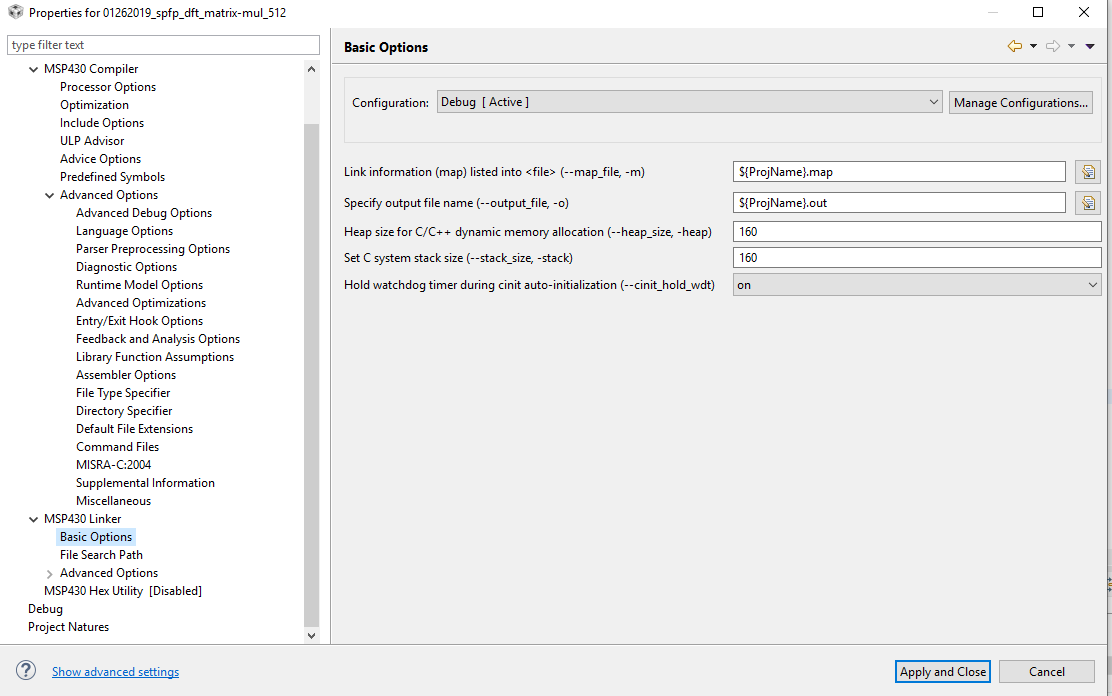
    Project->Show Build Settings->Linker->Basic->Hold watchdog timer during cinit

    is set to ON.
  • Hold watchdog timer during cinit  is already ON.

  • The Program is on my Git account you can see it on .

    In this program, the cases until Samp_128 are working. But when I select Samp_256 the debugging environment gets stuck.

  • Hi 

    You can change the dynamic memory size to 260 in the basic options like below

  • Hi Gary,
    I tried to change the dynamic memory size to 260 in the basic options. And I increased it to 1800 but it was still stuck.
    I am assigning my Array inputs into FRAM. Then, I use SRAM for computations and The output gets stored back to FRAM.

    I don't know How the Mapping of SRAM and FRAM are taking place for my case. Could you help me?

    Regards,
    Neeraj
  • Hi Neeraj

    That is a good point to use FRAM as RAM. Here are some comments to help you to implement it

    First, in your C-code declare the variables that you would like to be placed in FRAM with read + write permissions similar to how you would do this for the default use-case. To place variables or arrays in FRAM in CCS, simply use the #pragma PERSISTENT (x) where x is the variable. This should be done at the declaration of the global variable or array.
    // Declaring variables and arrays to be placed in FRAM with read/write access
    #pragma PERSISTENT (framArray1)
    uint8_t framArray1[0xFFFF] = {0};
    #pragma PERSISTENT (framArray2)
    uint8_t framArray2[0xFFFF] = {0};
    #pragma PERSISTENT (framArray3)
    uint8_t framArray3[0x3802] = {0};
    #pragma PERSISTENT (framVariable)
    uint8_t framVariable = 0xAA;
    When using the PERSISTENT keyword, an initialization value must be provided. This value will only be used at initial program load - after that, unlike RAM, at each reset the variable will not be re-initialized, so that it can keep whatever value has been retained through power loss from previous execution due to the non-volatile nature of FRAM.
    Constants will also be placed in FRAM with read-only access. This happens automatically when the const keyword is used.
    // Constants are also placed in FRAM due to const keyword, with read-only access
    const uint8_t framLookupTable[10] = {1,2,3,4,5,6,7,8,9,10};
  •  Hi Gary! I didn't understand your point. Could you check my method of declaring variables in FRAM?

    #define PERSISTENT __attribute__((section(".sysmem")))

    unsigned int i PERSISTENT, j PERSISTENT, count PERSISTENT;

    unsigned int k PERSISTENT, n PERSISTENT;

    Complex Arr_in[SAMPLES] PERSISTENT;

    Complex Arr_out[SAMPLES] PERSISTENT;

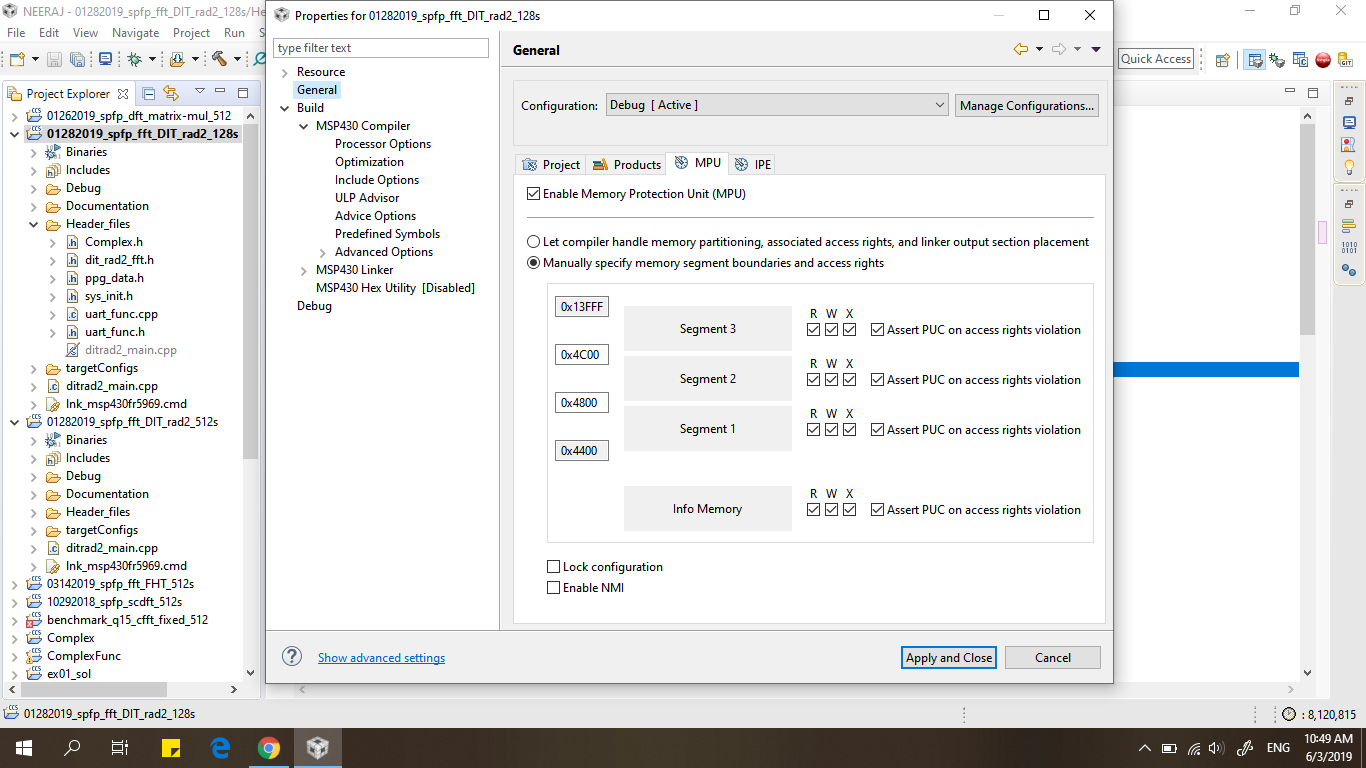
    Is it correct? or? and for the read and write permissions,  I am providing it in the settings of MPU(Memory Protection Unit).

    If your point is to declare variables in this manner

    #pragma PERSISTENT (framArray1)

    uint8_t framArray1[0xFFFF] = {0};

    then I have a question where can I mention the size of the array? 0xFFFF is the memory address.

    and what about declaring multiple variables.

    #pragma PERSISTENT (framVariable)

    uint8_t framVariable = 0xAA;

    as it is for only one variable.

    Thanks in advance.

    Regards,

    Neeraj

  • Hi Neeraj

    Yes, just make sure the address is writable. The 0xFFFF is the size of the arry not the address. For the address is automatic allocated by the compiler. If you want to see the address you can see the .map file for details.

    Best regards
    Gary
  • Hi Gary,

    Now I am testing to create a program that uses general variable arrays and storing them into FRAM.

    Now, what I implement is:


    #include <msp430fr5969.h>
    #include <stdint.h>
    /**
    * main.c
    */

    #pragma PERSISTENT (framArray_in)
    uint8_t framArray_in[10] = {1,2,3,4,5,6,7,8,9,10};

    #pragma PERSISTENT (framArray_out)
    uint8_t framArray_out[10] = {0};

    #pragma PERSISTENT (i)
    uint8_t i = 0;

    int main(void)
    {
    WDTCTL = WDTPW | WDTHOLD; // stop watchdog timer
    // int arr_in[10]= {1,2,3,4,5,6,7,8,9,10};
    // int arr_out[10], i;

    for(i=0;i<10;i++)
    {
    framArray_out[i]=2*framArray_in[i];
    }

    return 0;
    }

    Then according to this, the two arrays are declared in FRAM but I didn't understand about the read and write access for it.
    Do you mean that I should use the Memory Protection Unit(in setting) for it? By tick mark the read and write boxes.

    If not then please explain me. How can I take large arrays into FRAM, they get computed in SRAM and then the result stores back to FRAM
    (For my above-mentioned case).
  • Hi Neeraj

    You don't need to care about the MPU. Because it has been defined in the CMD file

    GROUP(RW_IPE)
    {
    GROUP(READ_WRITE_MEMORY)
    {
    .TI.persistent : {} /* For #pragma persistent */
    .cio : {} /* C I/O Buffer */
    .sysmem : {} /* Dynamic memory allocation area */
    } PALIGN(0x0400), RUN_START(fram_rw_start)

    GROUP(IPENCAPSULATED_MEMORY)
    {
    .ipestruct : {} /* IPE Data structure */
    .ipe : {} /* IPE */
    .ipe_const : {} /* IPE Protected constants */
    .ipe:_isr : {} /* IPE ISRs */
    .ipe_vars : type = NOINIT{} /* IPE variables */
    } PALIGN(0x0400), RUN_START(fram_ipe_start) RUN_END(fram_ipe_end) RUN_END(fram_rx_start)
    } > 0x4400

    We can see the .TI.persistent is in the READ_WRITE_MEMORY group.

    Best regards

    Gary

  • Hi Gary,

    Maybe my approach of initialising variables in FRAM is wrong or not?

    #define PERSISTENT __attribute__((section(".sysmem")))

    Complex Arr_in[SAMPLES] PERSISTENT;

    Now when I change this to yours approach i.e mentioned above.

    pragma PERSISTENT (Arr_in)
    Complex Arr_in[SAMPLES];

    This given me an error i.e. error #18: expected a ")"

    Now, How to solve this problem??

    Regards,

    Neeraj

  • Hi

    Did you miss the #?

  • Hi Gary, 

    I didn't miss the #. But still I am getting an error i.e. error #18: expected a ")".

    Am I initialising the variable in FRAM correctly or??

    Thank you in advance.

    Regards,

    Neeraj

  • Hi Gary,

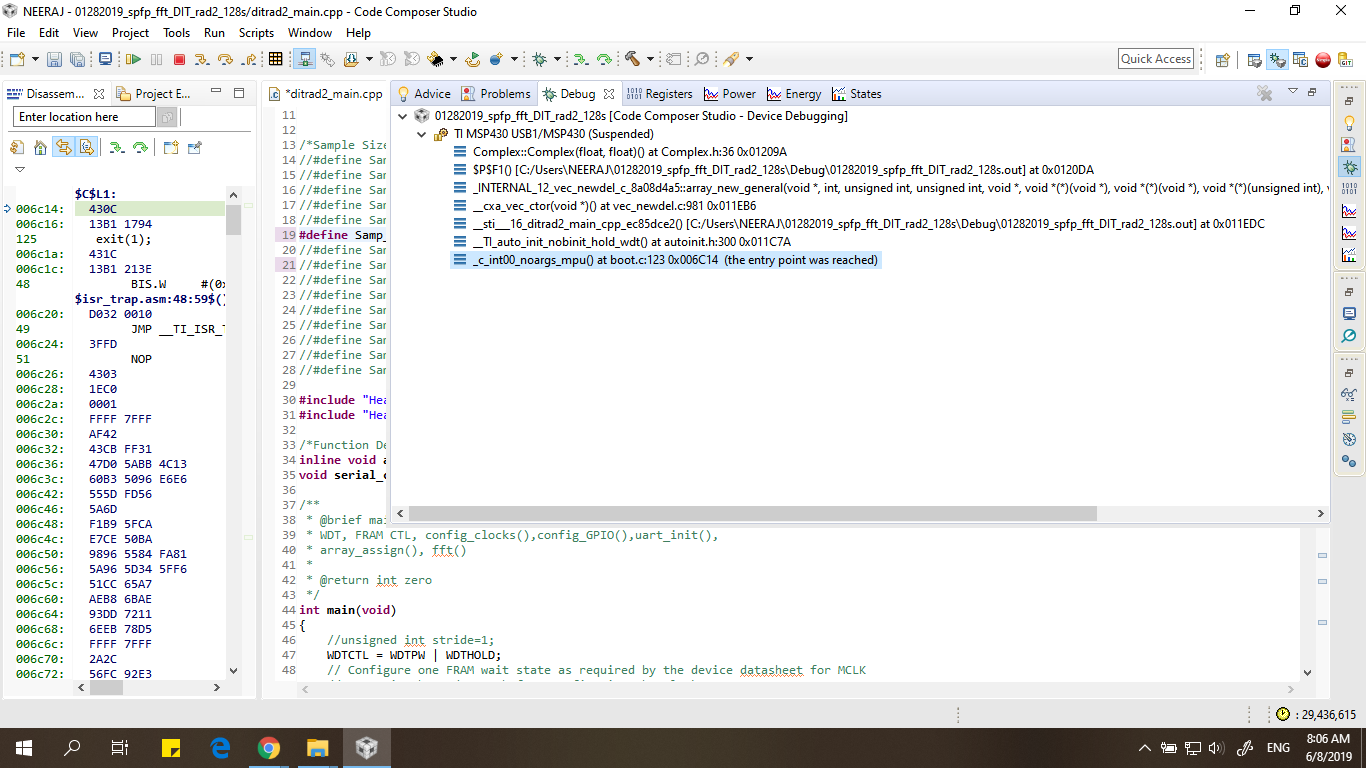
    Now I noticed how the program is getting stuck. This picture shown is the debug screen in which the program goes to boot.c in the function _c_int00_template it goes to the condition main(0);

    Regards,

    Neeraj

  • Hi,

    This Issue has not been resolved yet.

    Regards,

    Neeraj

  • Hi Neeraj

    I can't find the file


    Could you make your project be similar ?

    Best regards

    Gary

  • -0.000,-0.025,-0.049,-0.074,-0.098,-0.122,-0.147,-0.171,-0.195,-0.219,-0.243,-0.267,-0.290,-0.314,-0.337,-0.360,
    -0.383,-0.405,-0.428,-0.450,-0.471,-0.493,-0.514,-0.535,-0.556,-0.576,-0.596,-0.615,-0.634,-0.653,-0.672,-0.690,
    -0.707,-0.724,-0.741,-0.757,-0.773,-0.788,-0.803,-0.818,-0.831,-0.845,-0.858,-0.870,-0.882,-0.893,-0.904,-0.914,
    -0.924,-0.933,-0.942,-0.950,-0.957,-0.964,-0.970,-0.976,-0.981,-0.985,-0.989,-0.992,-0.995,-0.997,-0.999,-1.000,
    -1.000,-1.000,-0.999,-0.997,-0.995,-0.992,-0.989,-0.985,-0.981,-0.976,-0.970,-0.964,-0.957,-0.950,-0.942,-0.933,
    -0.924,-0.914,-0.904,-0.893,-0.882,-0.870,-0.858,-0.845,-0.831,-0.818,-0.803,-0.788,-0.773,-0.757,-0.741,-0.724,
    -0.707,-0.690,-0.672,-0.653,-0.634,-0.615,-0.596,-0.576,-0.556,-0.535,-0.514,-0.493,-0.471,-0.450,-0.428,-0.405,
    -0.383,-0.360,-0.337,-0.314,-0.290,-0.267,-0.243,-0.219,-0.195,-0.171,-0.147,-0.122,-0.098,-0.074,-0.049,-0.025,
    -0.000,0.025,0.049,0.074,0.098,0.122,0.147,0.171,0.195,0.219,0.243,0.267,0.290,0.314,0.337,0.360,
    0.383,0.405,0.428,0.450,0.471,0.493,0.514,0.535,0.556,0.576,0.596,0.615,0.634,0.653,0.672,0.690,
    0.707,0.724,0.741,0.757,0.773,0.788,0.803,0.818,0.831,0.845,0.858,0.870,0.882,0.893,0.904,0.914,
    0.924,0.933,0.942,0.950,0.957,0.964,0.970,0.976,0.981,0.985,0.989,0.992,0.995,0.997,0.999,1.000,
    1.000,1.000,0.999,0.997,0.995,0.992,0.989,0.985,0.981,0.976,0.970,0.964,0.957,0.950,0.942,0.933,
    0.924,0.914,0.904,0.893,0.882,0.870,0.858,0.845,0.831,0.818,0.803,0.788,0.773,0.757,0.741,0.724,
    0.707,0.690,0.672,0.653,0.634,0.615,0.596,0.576,0.556,0.535,0.514,0.493,0.471,0.450,0.428,0.405,
    0.383,0.360,0.337,0.314,0.290,0.267,0.243,0.219,0.195,0.171,0.147,0.122,0.098,0.074,0.049,0.025,
    
    1.000,1.000,0.999,0.997,0.995,0.992,0.989,0.985,0.981,0.976,0.970,0.964,0.957,0.950,0.942,0.933,
    0.924,0.914,0.904,0.893,0.882,0.870,0.858,0.845,0.831,0.818,0.803,0.788,0.773,0.757,0.741,0.724,
    0.707,0.690,0.672,0.653,0.634,0.615,0.596,0.576,0.556,0.535,0.514,0.493,0.471,0.450,0.428,0.405,
    0.383,0.360,0.337,0.314,0.290,0.267,0.243,0.219,0.195,0.171,0.147,0.122,0.098,0.074,0.049,0.025,
    0.000,-0.025,-0.049,-0.074,-0.098,-0.122,-0.147,-0.171,-0.195,-0.219,-0.243,-0.267,-0.290,-0.314,-0.337,-0.360,
    -0.383,-0.405,-0.428,-0.450,-0.471,-0.493,-0.514,-0.535,-0.556,-0.576,-0.596,-0.615,-0.634,-0.653,-0.672,-0.690,
    -0.707,-0.724,-0.741,-0.757,-0.773,-0.788,-0.803,-0.818,-0.831,-0.845,-0.858,-0.870,-0.882,-0.893,-0.904,-0.914,
    -0.924,-0.933,-0.942,-0.950,-0.957,-0.964,-0.970,-0.976,-0.981,-0.985,-0.989,-0.992,-0.995,-0.997,-0.999,-1.000,
    -1.000,-1.000,-0.999,-0.997,-0.995,-0.992,-0.989,-0.985,-0.981,-0.976,-0.970,-0.964,-0.957,-0.950,-0.942,-0.933,
    -0.924,-0.914,-0.904,-0.893,-0.882,-0.870,-0.858,-0.845,-0.831,-0.818,-0.803,-0.788,-0.773,-0.757,-0.741,-0.724,
    -0.707,-0.690,-0.672,-0.653,-0.634,-0.615,-0.596,-0.576,-0.556,-0.535,-0.514,-0.493,-0.471,-0.450,-0.428,-0.405,
    -0.383,-0.360,-0.337,-0.314,-0.290,-0.267,-0.243,-0.219,-0.195,-0.171,-0.147,-0.122,-0.098,-0.074,-0.049,-0.025,
    -0.000,0.025,0.049,0.074,0.098,0.122,0.147,0.171,0.195,0.219,0.243,0.267,0.290,0.314,0.337,0.360,
    0.383,0.405,0.428,0.450,0.471,0.493,0.514,0.535,0.556,0.576,0.596,0.615,0.634,0.653,0.672,0.690,
    0.707,0.724,0.741,0.757,0.773,0.788,0.803,0.818,0.831,0.845,0.858,0.870,0.882,0.893,0.904,0.914,
    0.924,0.933,0.942,0.950,0.957,0.964,0.970,0.976,0.981,0.985,0.989,0.992,0.995,0.997,0.999,1.000,
    

  • Hi Gary,

    You can add these files into the array using preprocessor directive # include<path of text file>

    Regards,

    Neeraj 

  • Hi Neeraj

    I have an other problem

    Best regards

    Gary

  •     1,     2,     3,     4,     5,     6,     7,     8,     9,    10,    11,    12,    13,    14,    15,    16,
       17,    18,    19,    20,    21,    22,    23,    24,    25,    26,    27,    28,    29,    30,    31,    32,
       33,    34,    35,    36,    37,    38,    39,    40,    41,    42,    43,    44,    45,    46,    47,    48,
       49,    50,    51,    52,    53,    54,    55,    56,    57,    58,    59,    60,    61,    62,    63,    64,
       65,    66,    67,    68,    69,    70,    71,    72,    73,    74,    75,    76,    77,    78,    79,    80,
       81,    82,    83,    84,    85,    86,    87,    88,    89,    90,    91,    92,    93,    94,    95,    96,
       97,    98,    99,   100,   101,   102,   103,   104,   105,   106,   107,   108,   109,   110,   111,   112,
      113,   114,   115,   116,   117,   118,   119,   120,   121,   122,   123,   124,   125,   126,   127,   128,
      129,   130,   131,   132,   133,   134,   135,   136,   137,   138,   139,   140,   141,   142,   143,   144,
      145,   146,   147,   148,   149,   150,   151,   152,   153,   154,   155,   156,   157,   158,   159,   160,
      161,   162,   163,   164,   165,   166,   167,   168,   169,   170,   171,   172,   173,   174,   175,   176,
      177,   178,   179,   180,   181,   182,   183,   184,   185,   186,   187,   188,   189,   190,   191,   192,
      193,   194,   195,   196,   197,   198,   199,   200,   201,   202,   203,   204,   205,   206,   207,   208,
      209,   210,   211,   212,   213,   214,   215,   216,   217,   218,   219,   220,   221,   222,   223,   224,
      225,   226,   227,   228,   229,   230,   231,   232,   233,   234,   235,   236,   237,   238,   239,   240,
      241,   242,   243,   244,   245,   246,   247,   248,   249,   250,   251,   252,   253,   254,   255,   256,
    

  • Hi Neeraj

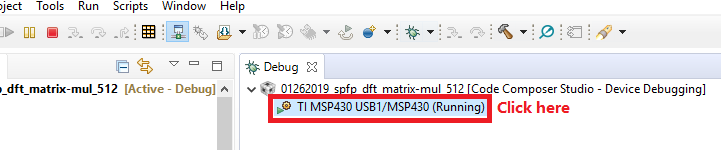
    You can click here and you can stop or run it for debug

**Attention** This is a public forum