This thread has been locked.

If you have a related question, please click the "Ask a related question" button in the top right corner. The newly created question will be automatically linked to this question.

MSP430FR2512: Terminology question - offset scale/offset level vs parasitic offset/offsetTap

Part Number: MSP430FR2512


I have a question about the documentation for the MSP430FR2512 - specifically about the capacitance sensing feature. The documentation online here:

http://software-dl.ti.com/msp430/msp430_public_sw/mcu/msp430/CapTIvate_Design_Center/latest/exports/docs/users_guide/html/CapTIvate_Technology_Guide_html/markdown/ch_library.html#gain-and-offset

talks about having both an offset scale and offset level. In the actual unit and documentation with the CaptivateDesignCenter I have only found reference to something called 'parasitic offset' or 'offsetTap'. It seems to have the same function as the offset scale and offset level, but I was curious if you could explain any differences there might be - and the reason for the naming change?

Thanks,

Brian

  • Hi Brian,

    I have reached out to one of our capacitive sensing experts to give some insight on this.

    Thanks,

    Mitch

  • Hi Brian,

    This is a good question.

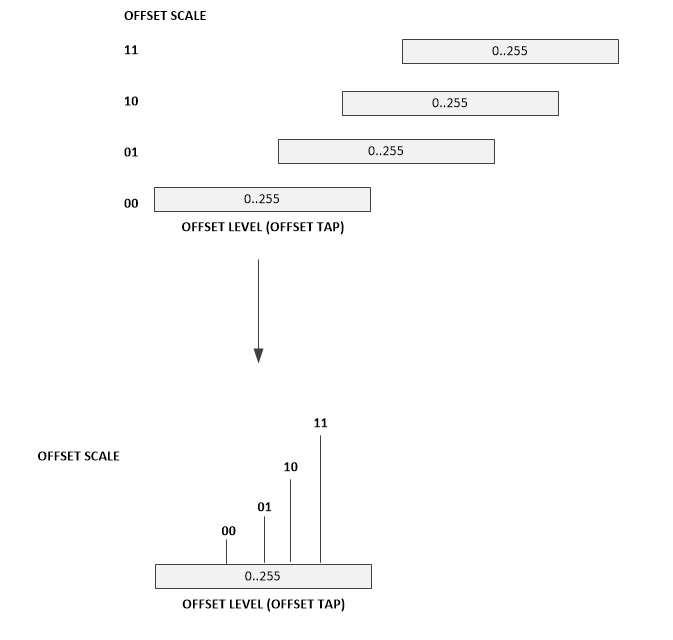
    The offset scale refers to the ranges of sensitivity.  There are 4 selectable ranges or "taps".  Think of this as the 1v, 10v, 100v range you find on a DMM.

    For example the offset scale taps are 00,01,10,11.

    This is also the "Parasitic Offset Scale" parameter in the CapTIvate design center conversion control of a sensor.

    The offset level has 255 selectable points or "taps" within each of the 4 ranges.

    This is also the "Parasitic Offset Level" parameter in the CapTIvate design center conversion control of a sensor.

    There is no way to directly set these controls.  These values are calculated and set as part of the calibration and are based on the conversion_gain and conversion_count parameters.

    The offset scale and offset level work together to effectively remove some of the parasitic or baseline capacitance, making the capacitance appear smaller and thus more sensitive to the change in capacitance when the electrode is touched.

  • Hi Dennis,

    Thank you for the explanation, but I'm still unsure about something - I agree the 'parasitic offset level' is read-only in the CaptivateDesignCenter, but it is read-write capable in the code as a parameter of the button element. I am able to manipulate the 'coarse gain', 'fine gain', and 'offset tap' (which is read as 'parasitic offset level in CaptivateDesignCenter) with code modified from the output of the CaptivateDesignCenter. But I do not see any reference to the 'offset scale' variable and 'offset tap' seems to take the place of 'offset level'. It seems odd to have access to all the other gain variables except 'offset scale'. Is there any place I can view the offset scale in code?

    Thanks,

    Brian

  • Hi Brian,

    Let me re-cap a few things so everyone else following this thread can understand our conversation.

    There are 4 parameters that control the measurement system's sensitivity:

        coarse gain
        fine gain
        offset scale
        offset level a.k.a. offset tap


    The coarse gain, fine gain and offset level values are contained in each element's data structure (tCaptivateElementTuning).      
    These values are not directly settable from the CapTIvate design center, rather, they are calculated and set during a sensor calibration.
    The gain and offset level are based on the conversion_gain and conversion_count parameters, which are user configurable parameters in the Captivate design center.

    Generally, it's not recommended for the application software to modify these values during run-time.  This should be left to the calibration routine.

    To your question, no, there isn't an offset scale setting in any structure that can be directly manipulated, like the gains and offset level.
    The offset scale is selected through a hardware decoder, based on the offset level (offset tap).
    This is because there is overlap in the offset level values (0..255) in each of the 4 offset scales.
    The hardware decoder eliminates this overlap, allowing the correct offset scale to be chosen automatically based only on the offset level.

    At the end of the day, unless there is a very, very specific reason you need to modify these values, I wouldn't.  Leave it to the Captivate library calibration to determine these values.

    Does this help?

**Attention** This is a public forum