This thread has been locked.

If you have a related question, please click the "Ask a related question" button in the top right corner. The newly created question will be automatically linked to this question.

MSP432E411Y: How to install LM Flash Programmer with USB-DFU support

Part Number: MSP432E411Y
Other Parts Discussed in Thread: MSP-EXP432E401Y

Dear TI-Expert,

I just installed LM Flash Programmer on a Windows 10 computer. After starting it and selecting manual configuration I don't see the USB-DFU option. On other computers with Code Composer Studio installation this option is available (Windows 7 and Windows 10). The MSP432E4 gets detected by the computer as "Stellaris Device Firmware Update".

What do I have to install on top? (Installing CCS is not my favorite, because it takes too long.)

  • Hi Sven,

    If you update the firmware on one of your other computers with CCS, then move to the one without, do you still have the same issue?

    Thanks,

    Alexis

  • Hi Alexis,

    I don't understand your question. Which firmware do you mean? There is only an USB cable.

    My scenario is to program an emtpy MSP432E4 via USB DFU. As I understood from the linked post TI only offers the LM Flash Programmer software for DFU. This works fine if the USB DFU option is available in LM Flash. But on a computer witout CCS installation it is not available ...

  • Hi Sven, 

    Are you using a launchpad or custom board? If using a launchpad, can you indicate which of the 2 USB ports you are using?

    Thanks,

    Alexis

  • Hi Alexis,

    I'm using a custom board. When I connect it to a Windows 7 or Windows 10 computer I can see the entry "Stellaris Device Firmware Update" in the device manager, thus the connection is OK.

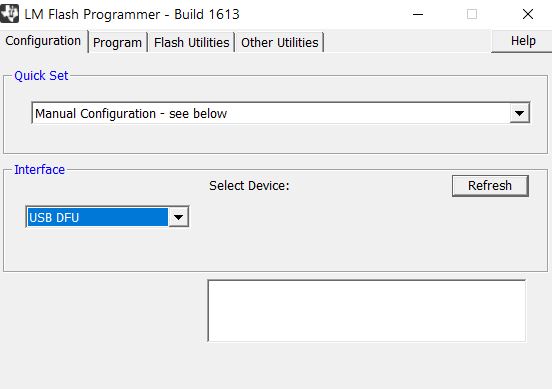
    After starting LM Flash Programmer and selecting in the Configuration tab the "Quick Set" entry "Manual Configuration - see below" I can select on some computers as "Interface" the choice "USB DFU". It doesn't matter if a MSP432E4 is connected to the computer or not!

    On other computers the choice "USB DFU" is missing. This seems to be correlated to CCS being installed.

    Any idea how to get the "USB DFU" choice without installing CCS??

  • Hi Sven,

    Here's what I got from one of the subject matter experts:

    "When we connect to USB DFU, we do not need the usblib from SDK. The BSL Scripter has all USB drivers built statically.

    First step is to have the device empty. Erase the flash of the MSP432E4 device (using CCS)

    Then we do the programming

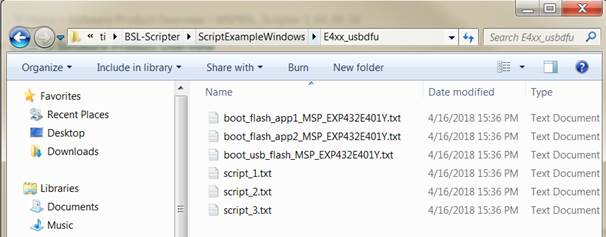
    Under:


    The examples are:


    We can run the BSL Scripter through cmd (without changing anything):

    • BSL-Scripter.exe ScriptExampleWindows\E4xx_usbdfu\script_1.txt "

    I hope this clears things up. Let me know if you have any questions regarding this information.

    Thanks,

    Alexis

  • Hello Alexis,

    it's good to hear, that BSL scripter now supports USB DFU. Nevertheless it seems not to be able to program our software onto the hardware (whereas LM Flash Programmer does).

    We developed two PCBs, let's call them BP and BL. For each board we programmed a destict software, let's call those SP and SL. When the wrong software gets programmed, an LED indicates the issue for 2 seconds, then the software erases itself using the folloing code:

    __attribute__((ramfunc))
    void BoardHAL_eraseApplication(void)
    {
        volatile bool success;
        /* disable CPU interrupt input */
        ROM_IntMasterDisable();
        /* erase 16kB page starting at address 0 */
        success = ROM_FlashErase(0x0) == 0;
        /* software reset */
        MAP_SysCtlReset();
    }


    When I program SP on BP or when I program SP on BL everything works (almost) as expected. Thus programming software P works on both boards.

    But programming SL fails on both boards, when using BSL scripter. (not with LM flash programmer). There got something programmed (the device manager entry disappears), but it is not working at all.

    In all cases the reboot / reset does not work with BSL scripter.

    Could you help in solving these 2 issues? Otherwise we will not be able to use BSL scripter. If it helps your software developers I could send the .txt and the .bin files of both software by email.

  • See my previous post.

  • Hello Sven,

    Apologize for the delay in getting back!

    Sven Probst said:
    But programming SL fails on both boards, when using BSL scripter. (not with LM flash programmer). There got something programmed (the device manager entry disappears), but it is not working at all.

    This is very interesting. I wonder why the same file would fail with BSL Scripter when it works with LM Flash programmer. Please send the files so that I can test them.

    Thanks,

    Sai

  • Hello Sai,

    the files are not the same, because LM flash programmer needs *.bin while BSL scripter needs *.txt.

    I generated the files at the same build using

    for .bin post build step:

    "${CCE_INSTALL_ROOT}/utils/tiobj2bin/tiobj2bin.bat" "${BuildArtifactFileName}" "${BuildArtifactFileBaseName}.bin" "${CG_TOOL_ROOT}/bin/ofd470.exe" "${CG_TOOL_ROOT}/bin/hex470.exe" "${CCE_INSTALL_ROOT}/utils/tiobj2bin/mkhex4bin.exe"

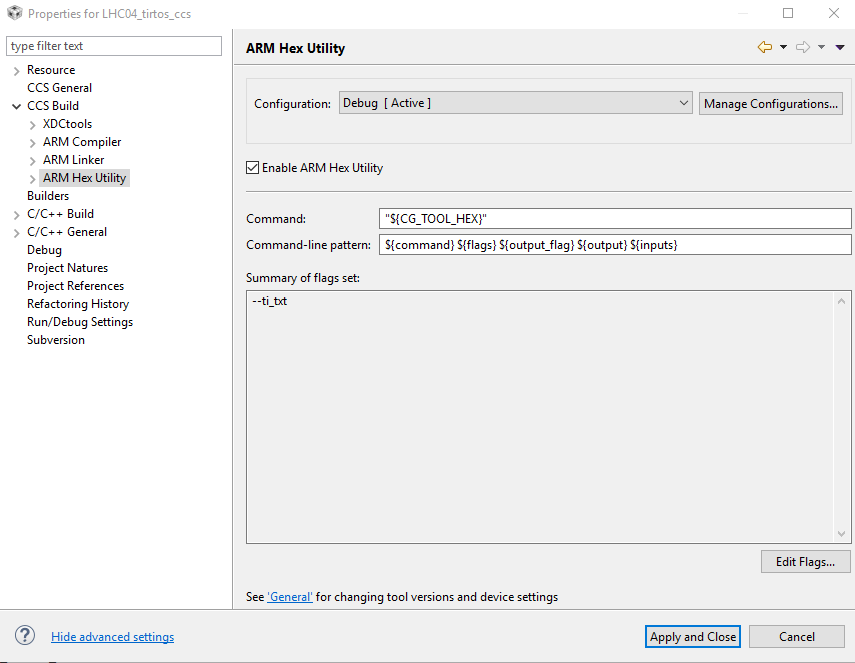
    and for .txt the following settings:

    Could you send me an email address to send the files to? (I don't want to post those.)

  • My email address:

    - deleted -

  • Hello Sven,

    I will close this thread as there is no activity for 2 weeks. You can always post below to reopen when you are ready. If the thread is locked, you can create a new thread by clicking the "Ask a related question" button at the top of the page.

    Thanks,

    Sai

  • Hello Sai,

    I want to link to another post which gives a hint to the issue with LM Flash Programmer:

    It works after replacing USBDFU driver files lmdfu.dll etc. in the windows folder by those in following folder

    C:\ti\ccs910\ccs\ccs_base\emulation\drivers\stellaris\icdi\i386

    I'll check our most recent software with BSL Scripter to see, if the issue with BSL scripter persists.

  • Hello Sai,

    I have an issue with the BSL scripter installation on my new Windows 10 computer. The installer does not start, but windows complains about missing access rights. I have full access to the folder where the install file is in, but I don't have administrative rights on this computer. On my old Windows 7 the installer starts without administrative rights. Really disappointing.

    Is the installer only extracting files or does it something with the system? In other words: Is it sufficient just to copy the extracted files?

    Edit: The executeable runs without installation, too. Remaining question: Get driver files installed by installer?

  • Hello Sai,

    I just sent you the files.

    I made an interesting observation: The issue of not starting SL seems somehow to be related to the hibernation module, because after disconnecting VBat the software SL starts / runs on BL.

    This is very surprisingly, as only powercycling all processor supplies but VBat was not sufficient.

    Now I have a very big issue with board P after programming SP via BSL scripter: There is something on the processor because it does not appear in the device manager. Via an XDS110 on an MSP-EXP432E401Y eval board I cannot connect to the processor in CCS, error:

    CORTEX_M4_0: Error connecting to the target: (Error -1063 @ 0x0) Device ID is not recognized or is not supported by driver. Confirm device and debug probe configuration is correct, or update device driver. (Emulation package 8.2.0.00004)

    The JTAG chain itself is working, no error when I test the connection in CCS.

    Do you have any idea how to recover from this situation?

    Edit: using SWD results in same error:

    CORTEX_M4_0: Error connecting to the target: (Error -1063 @ 0x0) Device ID is not recognized or is not supported by driver. Confirm device and debug probe configuration is correct, or update device driver. (Emulation package 8.2.0.00004)

    Edit 2: I now programmed a new BP with SP using LM Flasher => everything OK. But I need a solution without need for administrative rights and I have again trouble with LM Flash Programmer on a new computer ...

  • Hello Sven,

    Were you able to recover the device? If not, did you try the "Unlock Sequence"? 

    To Unlock the device, refer the section “Executing Unlock Sequence” in the following App Note: 

    I will look at the files you sent me tomorrow and get back with what I find.

    Thanks,

    Sai

  • Hello Sai,

    I didn't know about .

    I'm going to try this unlock.

    Please let me know, if you find something with the files. In the meantime we found a bug with an uninitialized pointer, which might have caused trouble. I'll send you the most recent files.

  • Hi Sven,

    Were you able to resolve your issue with the bug you found?

    Thanks,

    Riz

  • Hi Riz,

    I'm currently busy with new features in our software, thus we keep on using LM Flasher. I already sent Sai a bundle of files without the bug of the incorrect pointer. Maybe he could compare the .txt and .bin files for equal content to check if the txt file generation is maybe buggy. I'm quite sure, that the issue with bsl scripter still persists, but I didn't check - I don't want to make another hardware unusable.

    I'm going to try bsl scripter next week.

  • Sven,

    Sounds good. Please let us know. 

    BR,

    Seong

  • Hey Sven, 

    Any updates after trying the bsl scripter?

    BR,

    Seong

  • Sven,

    I haven't heard from you in a while so I will be closing this thread. Please start a new thread for any other queries.

    Thanks,

    Seong

  • Hello Seong,

    there is still an unanswered question:

    "

    I have an issue with the BSL scripter installation on my new Windows 10 computer. The installer does not start, but windows complains about missing access rights. I have full access to the folder where the install file is in, but I don't have administrative rights on this computer. On my old Windows 7 the installer starts without administrative rights. Really disappointing.

    Is the installer only extracting files or does it something with the system? In other words: Is it sufficient just to copy the extracted files?

    Edit: The executeable runs without installation, too. Remaining question: Get driver files installed by installer?"

    Could you answer this?

  • Hi Sven Probst,

    the BSL Scripter should be executable without installation. It is a static build exe file that should run without other files / drivers needed. You can try to run the script mode example by having the command in terminal:

    > BSL-Scripter.exe script.txt

    The example is available under ScriptExampleWindows folder.

    To answer previous question, this is the option to run USB DFU programming under LM Flash Programmer:

  • Hello Fatmawati Santosa,

    I want to close this thread because it was originally related to LM Flash Programmer. We got the USB DFU entry available by replacing some files in the windows\system32 and windows\sysWOW64 folder. The files are available in the attached zip file. Even though they have the same name, they are different versions:

    driverWindows10.zip

    I hope that it solves the issue of the missing USB DFU entry in all cases.

    With respect to BSL scripter I'll open a new thread as soon as I have time to test it again.

**Attention** This is a public forum