This thread has been locked.

If you have a related question, please click the "Ask a related question" button in the top right corner. The newly created question will be automatically linked to this question.

MSP430F6736A: i2c speed causing issues

Part Number: MSP430F6736A


Hi there

i'm using the eUSCI_B0 i2c peripheral on my chip in INTERRUPT mode to communicate with a FRAM chip. .

I'm wanting to establish why i have to drop my i2c clock to 130KHz in order to communicate "reliably" with a Rohm FEDR44V100A fram 1Mb chip.

To clarify, when i set the i2c clock to 400KHz, the FRAM chip 'sometimes' seems to send back just 0s (best case, or random data worst case), yet when i set the i2c clock to 130KHz, everything works superbly.
I am assuming it is the FRAM chip that is sending bad data & not the i2c port receiving bad data as i cannot "consistently" reproduce the error so as to capture it on a logic analyser.

From the FRAM datasheet, the chip can operate at clock speeds up to 1MHz.
My MSP430 is operating at 16.77MHz

the rise time on SCL & SDA is less than 200nS.
the pullup resistors are 2K

 the setup for the i2c is:
UCB0CTLW0 |= UCMST | UCMODE_3 |  UCSSEL__SMCLK;
UCB0BRW_L = 128; .................this is for 130KHz
UCB0BRW_L = 40;....................this is for 400KHz
UCB0BRW_H = 0;
UCB0I2COA0 = 0; 
UCB0I2CSA = theSalveAddress;


the interrupt bits of UCB0IE are set/cleared at the relevant times.

I might point out that i had no problems whatsover communicating to a Microchip 47L16 EERAM chip at 400KHz which would indicate the problem lies (100%) with the ROHM chip...but why?
Any pointers as to what i could do to try & improve the speed would be appreciated.

thanks in advance

  • > UCB0BRW_L = 40;....................this is for 400KHz

    This is actually around 420kHz (+5%). Does it act any differently with BRW=42 (399kHz)?  

    This isn't a great theory, since I don't recall a device that is quite that finicky, but who knows?

    If you have the patience, it might be informative to step down from 400kHz to see what the actual break-point is.

  • Hi Bruce
    Yeah, the speeds are +/- what i gave...
    And, yes, i had tried all the various speeds down to what i eventually found worked.


    It just does seem very puzzling as BOTH devices are capable of > 400K & the fact that i used it without problems on a different chip does point to a suspect FRAM chip.
    But i cant believe that ROHM would be selling such a device if it was faulty....ergo it begs the question - "what is wrong?"

  • You might want to check the pullup resistor values. Lower gives you better rise times but can stress the output drivers.

  • now THAT is an interesting statement...can you say what the symptoms of an over stressed driver might be (apart from odd i2c behaviour)?

  • TI has a document on selecting I2C pullup resistors. slva689

    The main problem with too small a resistor is that some device on the bus doesn't see a logic low. A deep dive into all of the data sheets is required to see if it is a problem.

  • yes, i had seen that doc & 2K seemed ok from that...tho it didn't mention anything about stressing the drivers.

    nonetheless, i replaced the 2K with 4.7K & pushed the speed back to 400K...but the larger resistors didn't help at all...in fact the rise time was now probably too long so it caused more issues..however, it was a blessing in disguise (i think) as i've just been doing further testing and noticed on the scope that once it starts misbehaving i see that the FRAM chip is responding with all zeros (sometimes for a few mS & sometimes for long stretches).

  • Hi moshe,

    Is there any I2C bus waveform captured by an oscilloscope here? These may be helpful for us to discuss and analyze problems.

    Best Regards

    Johnson

  • Hi Johnson

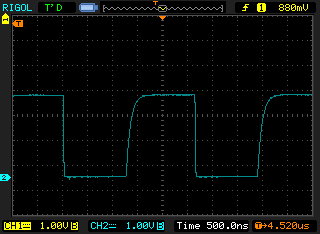
    I believe the waveform is fine..see pic. of SCL...SDA has similar shape.
    i am beginning to suspect that the problem lies with the FRAM chip misinterpreting or even missing the address to set to read from..strange as that may sound.
    i have 2 read statements in a function that is called every sec, the 1st may show invalid data, the 2nd (which is immediately after) returns correct data.
    The problem is that it appears to be random.

    regards

    moshe

  • It is also possible that it has something to do with your code. I2C is fairly complicated and I know it gives me fits. My first use of it was bit banged on a 8 bit PIC but dealing with the MSP430 I2C hardware was a lot harder.

  • yes....that is ALWAYS a possibility & in most cases a PROBABILITY, but in this case i would expect 2 consecutive reads to reads the same result - but still, i relook at my code again.

  • Hi moshe,

    There are some example code about I2C maybe useful for you:

    https://dev.ti.com/tirex/explore/node?node=AE87oPVbIejNDDlHj4jznw__IOGqZri__LATEST

    Best Regards

    Johnson

  • Hi Johnson...and anyone else reading this thread.

    i have resolved my problem.

    When i used the Microchip EERAM chip i found i had to place a dummy byte in TxBUF immediately BEFORE setting the Tx interrupt...ie like this:

    UCB0TXBUF = 0x55;
    UCB0IE = UCTXIE0;

    If I didn’t do this the 1st byte of the address in the chip I wanted to write to was not sent.

    HOWEVER...that line caused the problem with the FRAM chip as, SOMETIMES, the 0x55 was actually transmitted as the 1st byte to set the address in the chip i wanted to write to.

    I am unclear why this only happened SOMETIMES & it was found by using a logic analyser to repeatedly grab 2 secs worth of comms, &, i noticed the 0x55 when it should have been a different value transmitted (as well as the fact that 3 bytes were transmitted for the address & not just 2).

    Further, in the ISR I also had the line UCB0TXBUF = 0xFF; immediately before i cleared the Tx interrupt..ie like this

    UCB0TXBUF = 0xff; // to prevent UCB0IFG from having TXBuf empty flag
    UCB0IE &= ~UCTXIE0; // disable TX intr

    i have now changed this & now clear the IFG setting AFTER disabling the interrupt...ie like this

    UCB0IE &= ~UCTXIE0;
    UCB0IFG &= ~UCTXIFG0;

    Thank you to all who tried to help

    moshe

    ps..i am now successfully communicating at 1MHz.         

**Attention** This is a public forum