This thread has been locked.

If you have a related question, please click the "Ask a related question" button in the top right corner. The newly created question will be automatically linked to this question.

MSP430FR2676: Is 3D Gesture using MSP430FR2676 possible?

Genius 5840 points

Part Number: MSP430FR2676
Other Parts Discussed in Thread: CAPTIVATE-FR2676, MSP430FR2633

Hello,

I read following threads.

And I have CAPTIVATE-PROXIMITY board I bought previously. 

I would like to run 3D gesture demo.

Could you upload previous version that supports gesture example?

If it is possible, can 3D gesture of MSP430FR2676(gen2) achieve 10cm?

regards,

U-SK

  • Hello U-SK,

    If you are thinking to connect the CAPTIVATE-PROXIMITY board to the CAPTIVATE-FR2676 MCU module, then yes, it will work.

    10cm - probably not.  5cm is more realistic.

    The demo software for the CAPTIVATE-PROXIMITY board is no longer provided in more recent versions of the Captivate Design Center installation.

    I have attached it here.

    5040.CAPTIVATE-PROXIMITY.zip

    You will need to rebuild the code for the FR2676, but this will generate errors because the FR2676 requires a large code/data model and different libraries compared to the FR2633.  So I would use the GUI and open the .ser project that comes in the zip file but change the MCU to the FR2676.  You can then generate an output project that can be imported into CCS.  Then go through the original FR2633 demo software and copy over all the other sw required for the gesturing and driving the LEDS on that board.

  • Hi Dennis,

    Thank you for your reply.

    I am trying to run CAPTIVATE-PROXIMITY project by using MSP430FR2633 firstly.

    But swipe LEDs on CAPTIVATE-PROXIMITY seems not to function.

    Are there any project swipe LED works well?

    If possible, I would be happy if you provide previous CapTIvate Design Center Installer file for Windows that include CAPTIVATE-PROXIMITY demo.(including swipe LED function)

    Regards,

    U-SK

  • Hi Dennis,

    Do you have any updates?

    Regards,

    U-SK

  • Hi U-SK,

    This is the only demo that has swipe gesture.  When it is up and running it does work well.

    I have attached the last version (1.70.00.04) of the Captivate Design Center that supported the proximity PCB.

    CapTIvateDesignCenter_1.70.00.03.zip

  • Hi Dennis,

    Thank you for reply.

    The demo runs well using CAPTIVATE-PROXIMITY demo in zip file.

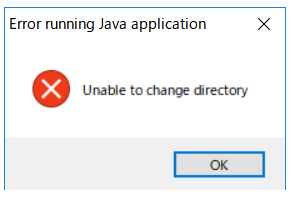
    But when I try to install CapTIvate Design Center v1.70.00.03, error is occurred as follows:

    My PC is following spec.

    ・Windows 10

    ・64bit

    Could you tell me how to fix it?

    Regards,

    U-SK

  • Hello U-SK,

    It's been a few days since I have heard from you so I was wondering if you were able to move forward with your project.
    If this isn’t the case, please click the "This did NOT resolve my issue" button and reply to this thread with more information.
    If this thread locks, please click the "Ask a related question" button and in the new thread describe the current status of your issue and any additional details you may have to assist us in helping to solve your issues.


**Attention** This is a public forum