This thread has been locked.

If you have a related question, please click the "Ask a related question" button in the top right corner. The newly created question will be automatically linked to this question.

MSP432P4111: BSL custom bootloader app SLAU622J issue

Part Number: MSP432P4111

Hi Everybody , 

I m on CCS10  , using vanilla  code  from http://software-dl.ti.com/msp430/msp430_public_sw/mcu/msp430/MSPBSL_CustomBSL432/latest/index_FDS.html  

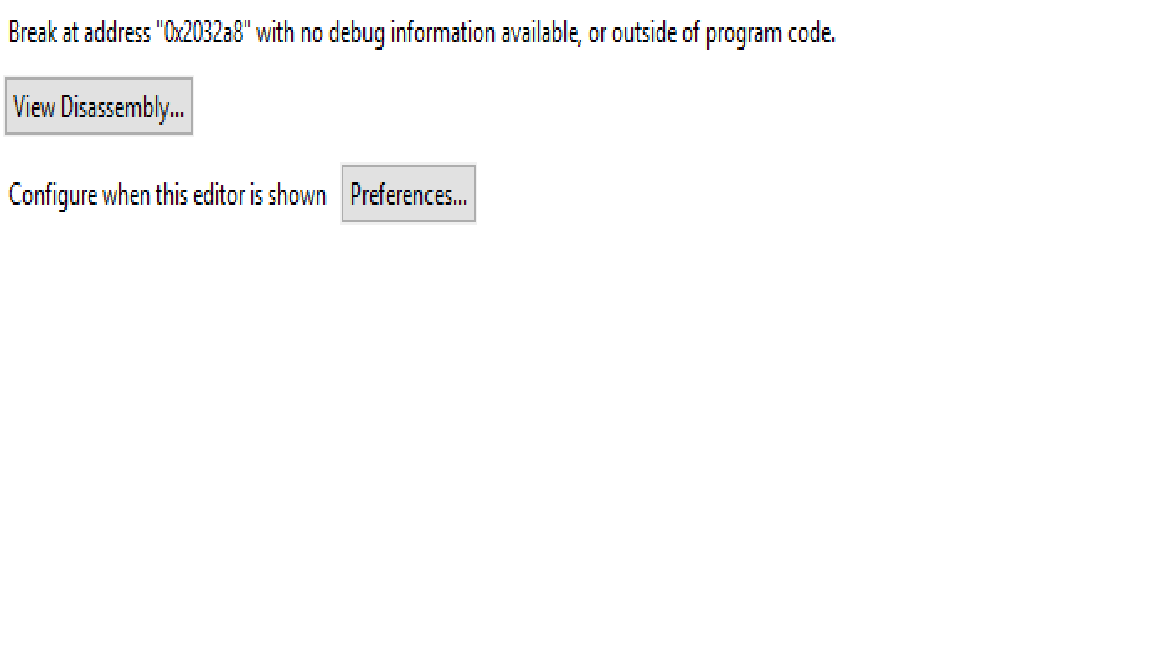
I can impot project , compile  and launch debugger  on launchpad  but then I get an error  when running :  BREAK  @ 0X2032a8 

where am I wrrong  ?

what shoudl I do ?

thank you veyr much 

best regards

Carlo

  • Hi everybody , 

    I am attaching the gif of the error 

    thks

    Carlo

  • Hi Carlo,

    Colombo Carlo said:
    impot project

    That particular codebase has lot of projects. Which specific project have you imported that is giving you this problem? I need to recreate this on my side. 

    Srinivas

  • hi Srinivas 

    I have imported the example for  MSP432P4111 and i have tried to compile in the Debug configuration, The selected config file (by default) msp432p4x11_debug_flash.cmd 

    According to chapter 5 of  SLAU622J, i have tried to run the BLS but when i try to connect the target the error reported appears.

    Stefano 

  • Hi Stefano,

    I tested with the MSP432P401r and I get a similar error.

    Let me check internally with the team.

    Srinivas

  • Hi Srinivas , 

    please any news ? it is getting urgent 

    thank you 

    best regards

    Carlo

  • Hi All 

    any news ?

    regards

    Carlo

  • Hi Carlo,

    I imported the BSL432_MSP432P4111 example project and tried running on my MSP432P4111 Launchpad. I get a similar error but at a different address:

    "Break at address "0x3d5e" with no debug information available, or outside of program code.". Looking at the generated memory map file (BSL432_MSP432P4111.map), this address 0x3d5e corresponds to a function that is part of msp432p4xx_driverlib.lib:

    00003d10 0000008c msp432p4xx_driverlib.lib : spi.o (.text:SPI_registerInterrupt)

    I cannot find the address 0x2032a8 which is the address at which you get the error. Can you please tell me from your memory map the corresponding function where this error occurs?

    Srinivas 

  • Hi Sriniva ,

    you have screenshot in one of the first post of this thread , it seems out of  prgram code .

    please could you have the example runnig on LP   and share the code first ?

    thanks

    regards

    Carlo

  • Hi Carlo,

    I ran a few tests today using MSP432P4111 with the Launchpad and CCS v10.1.1.

    Following the step-by-step from slau622j, I assume you are getting stuck executing code after step 10, is that correct?

    As I ran my step-by-step, I noticed a difference in Step 10 since address 0x2020 is not the start of code (in this case _c_int00). I don't see anything in the linker file forcing _c_int00 to this address, so my assumption is that the linker is just changing the location.

    Also, after comparing the .MAP files, there seem to be some differences in the CCS libraries. The default binaries seems to use boot.obj, while the new one is boot_cortex_m.c.obj.

    So, looking at my new MAP file, I see the following entry:

    If I replace 0x2020 for 0x3F44 as my start address in step 10 and 11, then I can force my PC to start in _c_int00_noargs and the code seems to run fine after that.

    Can you double-check your start address and give this a try? If you keep having issues, please let me know your CCS and compiler version.

    Regards,

    Luis R

  • Hi Luise

    Following the step-by-step from slau622j, the issue appears at step 6. 

    this is my configuration :

    - Launchpad MSP432P4111 rev 1.0 

    - CCS  Version: 10.0.0.00010 

    - Compiler Version : TI v15.12.7.LTS ( i have tried with TI v.20.2.2.TLS too)

    Following step-by-step from slau622j i have created a new configuration file .ccxml with default setting. 

    Open the target configuration, click in launch selected configuration and then click on Connect Target. At this point the error occurs.

    Bottom i have reported the screenshots about the step 6 and the releated issue.  

     Searching in my map file i can't find no info about the 0x27cb8 address. 

    Attacched you can find the generated map setting as active the Release_BLS_P4111 configuration and the related msp432p4x11.cmd file.

    /cfs-file/__key/communityserver-discussions-components-files/166/MY_5F00_BSL432_5F00_MSP432P4111.txt

    Best Regards
    Stefano

  • Hi Carlo,

    Luis had earlier provided the following when I tried to recreate on my side:

    -----------------------------------------------

    • Step 6:

    After connecting to target device, the CPU might be somewhere in the woods.

    This is normal and expected since there is no debug information loaded.

    The specific address can also be different depending on the state of the device.

    • Step 7-8:

    After loading, the device will start running but it doesn’t really have a valid reset vector, so it’s again just somewhere in limbo.

    If you try halting, you’ll get the error below: (this is also ok)

    • Step 9:

    After halting the CPU, you should be able to verify the code, which is a good indication that it worked:

    • Step 10-11:

    With the CPU still halted, we can force the PC to the start of execution:


    -----------------------------------------------

    Srinivas

  • Hi

    After the Step 8, TI XDS110 USB Debug Probe is in Reset

    And i can't verify the program (the option is disable). So i try to reset the target and in this way the debug is running 

    i have changed the file map at the indicated entry 

    now i have run the vefirication step but the following error occurs. now i think that i can make a mistake in the map file. 

    The map file modification is correct? there are some other point where i have to change the start address?

    Best Regards

    Stefano

  • Hi Stefano,

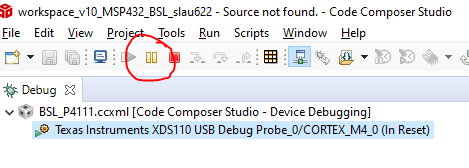
    After Step 8, before you go try Step 9 (Verify Program), you need to "pause" the device/program. If you do not pause, you will not have the option of "Verify Program". That is why it is greyed out.

    So, before you try Step9, after Step 8, please pause by pressing the pause button. After that, you will be able to try Step 9 & "Verify the Program".

    For Step 10, which is what you are trying by modifying the linker script, can you follow the procedure in Step 10 in the document but specify the address for _c_int00_noargs from your .map file.

    Srinivas

  • Thank you, now it works.

    there is a way to generate a .map file automatically with the right address for the c_int00 function?

    Best Regards

    Stefano

  • Hi Stefano,

    Stefano Marano said:

    there is a way to generate a .map file automatically with the right address for the c_int00 function?

    I don’t think there is a simple way to force it without changing the source of boot code.

    Srinivas

  • Hi Stefano,

    Luis gave an additional input.

    You can tell the linker to put the _c_int00_noargs at the top. This can be done via Project Properties -> Build -> ARM Linker -> Advanced Options -> Miscellaneous. You can +(Add) the _c_int00_noargs as below:

    If you rebuild the .out file after this, the _c_int00_noargs is placed at 2020h. This is what I get on my side similar to the document:

    Hope that resolves the issue for you.

    Srinivas

  • Thank you

    Now it's ok. 

    Best Regards

    Stefano

**Attention** This is a public forum