This thread has been locked.

If you have a related question, please click the "Ask a related question" button in the top right corner. The newly created question will be automatically linked to this question.

MSP432P401R LanchPad - Out of Box Experience - crashed on debug


Hi,

Today I received MSP432P401R LanchPad. 

I downloaded and installed CCS and MSPware. Then CCS updated itself several times. It was a bit surprising: what the point to distribute software that needs to be updated immediately after installation?


Finally I was trying to go through the first sample, "Out of Box Experience". All went OK until I reached the final Step 4: " Debug the imported project When I invoked it, yet another software update window appeared, and after that debug keeps crashing with the following message:

Error connecting to the target:
(Error -1063 @ 0x0)
Device ID is not recognized or is not supported by driver. Confirm device and debug probe configuration is correct, or update device driver.
(Emulation package 6.0.14.5)


I is not very nice out of box experience :(

Is it possible to fix the LanchPad? Where can I get a new device driver?

  • There is a big list of installed software at the CCS Help/Installation Details. The last line is very suspicious:

    Tiva/Stellaris ICDI Debug Probe 2.1.1.15071 com.ti.tiva_stellaris.setup.win32.feature.group Texas Instruments

    I am not very familiar with all TI products, but it looks like it installed a driver for a different microcontroller.
  • Alex,
    I'll look into this issue to see if there is a better fix. But I found a similar problem. Do you have an XDS110v2? Take a look here:
    e2e.ti.com/.../431831

    Best regards,
    Cameron
  • Hi Cameron,


    Sorry, I have only MSP432P401R LanchPad and do not have any other TI development gear.  So far I use microcontrollers from other vendors.

    When MSP432P401R is connected to PC, Device Manager shows two virtual COM ports:

    • XDS110 Class Application/User UART
    • XDS110 Class Auxiliary Data Port

    But I guess it is not XDS110 you mentioned, is it right?

    I was trying to do factory reset, but CCS says "No scripts available".

    Regards

      Alex

  • Alex,

    The v2 is an external version of the onboard XDS110.

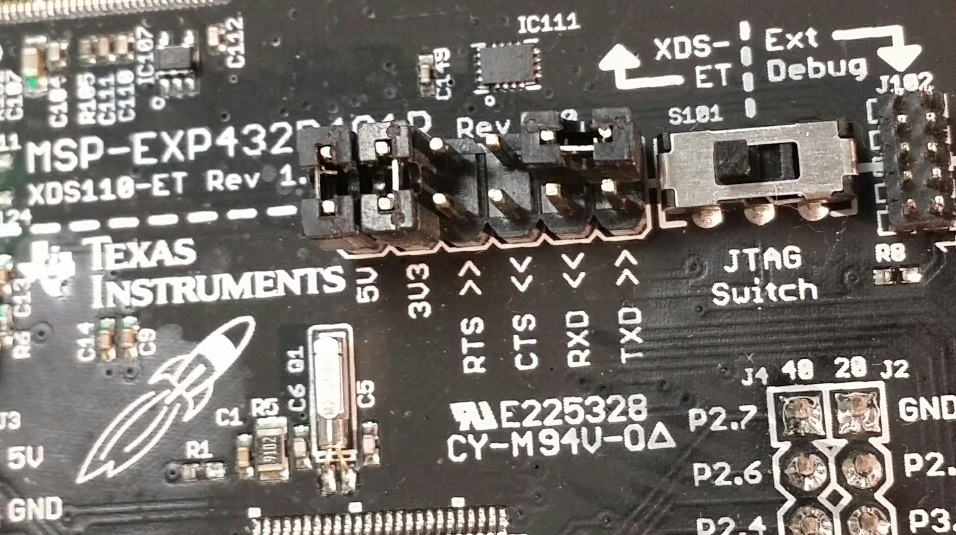
    Let's do a couple tests.  Romove your RXD and TXD jumpers. and connect the top RXD and TXD pins as shown. Also make sure your JTAG swith is in the same postion as mine, selecting XDS-ET.

    Next open a serial terminal, such as TeraTerm, and connect to the Port labelled as Class Application UART. Type something into the terminal, and it should echo each charactar as you type, (it will look like your just typing into the window). If you don't see anything type into the window, then there is a problem that we'll have to dive into. Otherwise, we have confirmed that this part of the board is ok, and you can move on to the next portion.

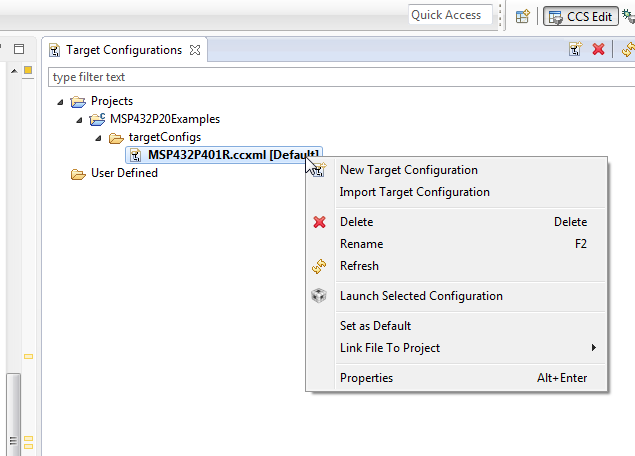
    Now, replace the jumpers as they were and open CCS. Go to the View Mnu and click "Target Configurations."

    In that tab, expand any MSP432 Project, and right click on the Target Config .ccxml and click "Launch Selected Configuration".

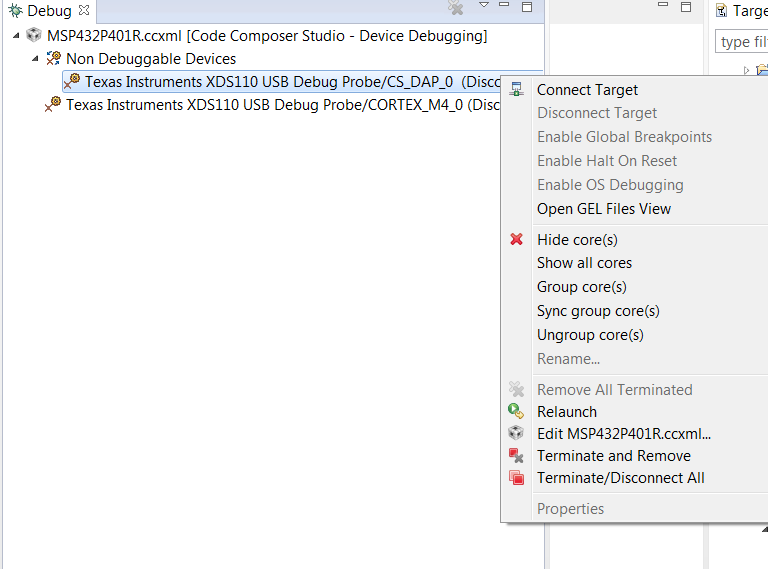
    Right Click on anything in the Debug tab, and click "Show all cores."

    Expand "Non Debuggable Devices".

    Right Click the CS_DAP Debug Probe, and click "Connect".

    The "(Discconected)" next to the probe should go away. If you recieve an error here, follow its instructions to update the the XDS firmware, then repeat the above steps to get back to this point.

    Now, click on the Scripts Menu, and you should be able to use the Factory Reset now.

    It's rare that something like this is needed, in my experience. Let me know if this solves your issue.

    Best regards,

    Cameron

  • Hi Cameron,

    1. Echo test works OK. Using Putty I can talk to the "Class Application" port.

    2. When I exit "CCS Simple mode", I could follow your instructions.

    After executing "factory reset" script I've got a message "CS_DAP_0: GEL Output: Mass erase executed. Please terminate debug session, power-cycle and restart debug session." I closed CCS and unpluged the board, the I started again. Initially it kind of works: there were no error messages, but target keeps resetting. I stopped it and then I started debug again. Now another error message appears:

    Error connecting to the target:
    (Error -614 @ 0x0)
    The target indicates there is an error condition from a previous SWD
    request. Clear the error the condition, and try the SWD request again.
    (Emulation package 6.0.14.5)

    Thank you very much for your help. I have very convincing out of box experience. I have no more questions.

    Regards

      Alex.

  • Were you able to correct the new error you received?
  • No, I could not correct the problem. Then I decided not to use this microcontroller because it consumes too much of my time.

**Attention** This is a public forum