This thread has been locked.

If you have a related question, please click the "Ask a related question" button in the top right corner. The newly created question will be automatically linked to this question.

MSP-FET cannot always set breakpoints

Other Parts Discussed in Thread: MSP430G2553, MSP-FET, RF430FRL152H, MSP430FR5849, TRF7970A

Hi,

I'm having a strange problem with the latest version of CCS, working with a MSP430G2553 and MSP-FET.

Until now, everything went fine, but in the last days, it is having problems to set breakpoints at most locations, I get a message on the Console window saying things like:

MSP430: Trouble Setting Breakpoint with the Action "Continue or Finish Stepping" at 0xc53a: Address is past the end of memory

MSP430: Trouble Setting Breakpoint with the Action "Remain Halted" at 0xc552: Address is past the end of memory

MSP430: Trouble Setting Breakpoint with the Action "Remain Halted" at 0xc570: Address is past the end of memory

Those memory positions lie withing the program memory bounds, and actually that is where my code is. I have tried with two different MSP-FETs, I'm thinking that something got corrupted in my CCS install.

Any help is greatly appreciated!

  • Hi,

    i have the same problem since days.

    CCS Version: 6.1.2.00015
    CPU rf430frl152
    "MSP430 Assembler Code Template for use with TI Code Composer Studio"

    The first Breakpoint works. Setting the second causes end or past of memory errors.
    If i remove the first Breakpoint i can set anoter one. But only one.
    Also StepOver does not work.
    The Breakpoints are set within .text Section.

    Many Thanks
  • Pedro, Andreas,

    The errors you are seeing may be related to this thread. I will move this thread to the MSP forums where the experts there can help you best. 

  • Hello AartiG ,

    the Thread Page does not exist.

    Many Thanks

  • Andreas Beranek said:
    the Thread Page does not exist.

    Sorry about that. I fixed the link.

  • i tried the Downgrade. But it faails:

    *****************************************************************

       WARNING

       Do NOT run this downgrade utility with more than one emulator connected.

       Multiple connected MSP-FET430UIF or eZ430 emulators may cause the downgrade
       to fail and render the interfaces unusable.

       Please ensure to disconnect all interfaces except one MSP-FET430UIF.

    ******************************************************************

    Enter 'y' to confirm: y


       Initialize: done
       MSP430_FET_GetFwVersion()
       Firmware Version: 30700011
    Status: Starting firmware update with 'Uifv3Downgrader.txt'!

       Initializing bootloader...
       Programming new firmware...
       100 percent done
       Update complete.

       100 percent done

       Finishing...
       Initializing bootloader...
       Programming new firmware...
       100 percent done
       Update complete.

       100 percent done

       Finishing...   100 percent done
       Update complete.

       100 percent done

       Finishing...Error, firmware update failed during load of V2 core and EEPROM image


      Press any key to close this application.

    HW?

  • In the same folder is a batch file called V2V3, that upgrades the FET tool to V3 from V2. Can you try running this now? The firmware upgrader/downgrader tools can be very finicky.

    If you have a second FET tool you can try, please do so, and lets see if the problem exists on both tools.

    Thanks,
    Mike
  • Hi, 

    Nice to see that I'm not the only one with this problem.

    I can confirm identical behaviour to everythin that Andreas has said, It really looks like the same issue definitely.

    I have tried both batch files, and I get identical result as Andreas. In the same way as moshe on the other thread, when I run the V2V3, it finishes correctly, but I still experience the wrong behaviour regarding the breakpoints that moshe has seen.

    I have done this with two different MSP-FETs and they do exactly the same thing.

    I have not gone into the last suggestions on the other thread because my debugger is not a FET-430UIF.

    Quite annoying, indeed.

  • Hi Pedro
    my debugger is not a FET-430UIF but the MSP430-FET (the black one)....i was wrong about the debugger model.

    i'm puzzled only 3 of us have this issue...it seems to me the debugger thinks it is debugging a MCU with very little memory.
    What is annoying is that we cant get back to the version before all this started.

    Moshe
  • Hi moshe,

    I had the same feeling, it looks like the debugger thinks the memory map is a different one. But there is a case that speaks against this possibility, the first breakpoint send to not have any limitation regarding address, it is only from the second breakpoint that there is this problem.

    I believe more people must be having this problem too, but didn't find time to write, or are waiting for other people to write about it, I guess.

    Nice tests you are doing by the way. let's see if we get this fixed as soon as possible and we can get back to work.

    best regards,

  • Hello All,


    i tried again both Batch Files. Both fail with an Error

       Initialize: done
       MSP430_FET_GetFwVersion()
       Firmware Version: 0
    Status: Starting firmware update with built in image!
    Error, firmware update returned an error

    Unfortunately i have no second FET


    Many Thanks,

    Andreas

  • Andreas, Pedro, Moshe,

    We are working on trying to replicate this issue locally so we can better debug it. Please bear with us while we do this. We will keep you updated on our status as we go.

    Thanks,
    Mike
  • , , ,

    I just tried to see if I could replicate the issue that you seem to be having but was not able to do so (I tried using CCS versions 6.1.2.00015, 6.1.1.00022, and 6.1.0.00104). I am using the MSP430G2553 with the MSP-FET in debug mode. I tried setting multiple breakpoints and also tried stepping through my code with no issues. 

    Could you please report the following information:

    • CCS Version (Help --> About Code Composer Studio)
    • Compiler Version (Right click on Project --> Properties --> General)
    • MSP430.dll Version (Navigate to the installation folder and go to ...\ccsv6\ccs_base\DebugServer\drivers --> Right click on MSP430.dll --> Properties --> Details)

    Can you try creating a new project with some example code to see if you still have the issue when doing that? Also, can you try reinstalling CCS and import your project to see if that fixes the issue?

    Regards,

    Akash Patel

  • CCS Version:  Version: 6.1.2.00015

    Compiler: TI v4.4.7

    Linker Command File: lnk_rf430frl152h.cmd

    MSP430.dll: 3.7.0.11

    I created the default Assembly Project without modifications:

    ;-------------------------------------------------------------------------------
    ; MSP430 Assembler Code Template for use with TI Code Composer Studio
    ;
    ;
    ;-------------------------------------------------------------------------------
                .cdecls C,LIST,"msp430.h"       ; Include device header file
                
    ;-------------------------------------------------------------------------------
                .def    RESET                   ; Export program entry-point to
                                                ; make it known to linker.
    ;-------------------------------------------------------------------------------
                .text                           ; Assemble into program memory.
                .retain                         ; Override ELF conditional linking
                                                ; and retain current section.
                .retainrefs                     ; And retain any sections that have
                                                ; references to current section.

    ;-------------------------------------------------------------------------------
    RESET       mov.w   #__STACK_END,SP         ; Initialize stackpointer
    StopWDT     mov.w   #WDTPW|WDTHOLD,&WDTCTL  ; Stop watchdog timer


    ;-------------------------------------------------------------------------------
    ; Main loop here
    ;-------------------------------------------------------------------------------


    ;-------------------------------------------------------------------------------
    ; Stack Pointer definition
    ;-------------------------------------------------------------------------------
                .global __STACK_END
                .sect   .stack
                
    ;-------------------------------------------------------------------------------
    ; Interrupt Vectors
    ;-------------------------------------------------------------------------------
                .sect   ".reset"                ; MSP430 RESET Vector
                .short  RESET
               

    Setting the first Breakpoint on RESET works.

    Setting the second Breakpoint on StopWDT fails

    MSP430: Loading complete. There were 16 (code) and 30 (data) bytes written to FLASH/FRAM. The expected RAM usage is 0 (uninitialized data + stack) bytes.
    MSP430: Trouble Setting Breakpoint with the Action "Remain Halted" at 0xf844: Address is past the end of memory

    I tried Windows 8.1 and Windows 10 64Bit as Host.

    Many Thanks

  • Akash

    I believe that one needs to have a FET with the firmware from january or december and THEN start a debugging session letting CCS update the firmware as it does. As that seems to do different things if you are not getting these issues.
    But here is some more information:

    If i remove 'main' in the 'debug-configurations/settings/target/ auto_run_&_launch_options' settings and set some breakpoints elsewhere in the program whilst i am in edit mode (so at this stage they are s/w bps), it launches fine and executes to ONE of the bps....the other bps i noticed were now disabled. I also noticed that the bps have changed from s/w bps to h/w bps.

    if i now try and re-enable another of the bps i get the message "MSP430: Trouble Setting Breakpoint with the Action "Remain Halted" at 0x4e74: Address is past the end of memory" EVEN THO THAT MEMORY location is below the bp that the program stopped at.

    If i disable the bp that the program stopped at i can re-enable ONE other bp...EVEN THO a few secs earlier it gave that message about the location being beyond the endd of memory.

    if i try and single step the program at this stage, my SD24 interrupt kicks in and i can single step in the interrupt function which is at 6BE8. At some point in that function the debugger suddenly decides that its had enough and presents this message..."MSP430: Trouble Setting Breakpoint with the Action "Continue or Finish Stepping" at 0x6c4e: Address is past the end of memory"

    if i then disable the bp that i had at around 4E74hm i can now set a new bp at 6C50h. ie at a location BEYOND where the message was.

    So clearly the issue has nothing to do with memory and everything to do with the portion of the firmware dealing with breakpoints.

    moshe

  • I'm having the same issues with the MSP-FET while debugging an MSP430FR5849. I tried using a debugger with an older firmware by selecting "ignore" on the firmware update prompt, but the problem still remains.

    I also have to disable and enable the bp and reset the device in debugging, otherwise all breakpoints will simply be ignored.

    This all happens with the most up-to date version of CCS on Windows.

    For now I installed an older version of CCS v6.1. Once I let this CCS version "update" the MSP-FET everything is working again. Before the MSP-FET firmware downgrade,  stepping was also not possible, but the error message was simply "No single step" or something along that line.

    Cheers,

    Johannes

  • Andreas, Moshe, and Johannes,

    Thank you for providing additional information regarding the issue. We are still trying to replicate the issue on our end. I have reached out to someone on the tools team for further assistance.

    Regards,
    Akash Patel
  • Sometimes you can not set the breakpoint where you want it 
    due to Optimization high have rearranged the code so much with inlining and custom subroutines
    that the line in C code no longer exists, so change to Optimization low and try again.

  • Good Morning,

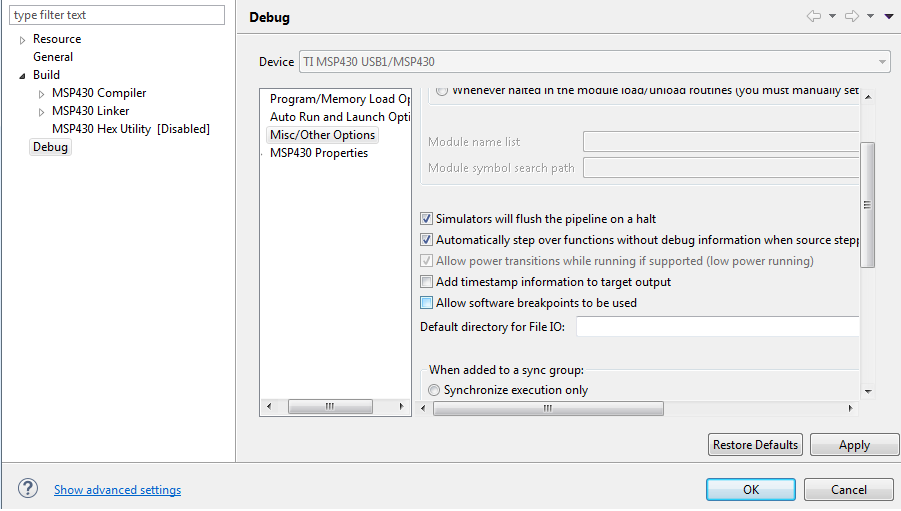
    The original problem "MSP430: Trouble Setting Breakpoint with the Action "Continue or Finish Stepping" at 0xc53a: Address is past the end of memory" can temporally fixed by disabling the Software Breakpoints in CCS. Uncheck "Allow software breakpoints to be used". We are currently working on an update for this behavior.

    The batch file for downgrading (V3V2) the MSP-FET430UIF will not work with the MSP-FET (Black color). The batch file (V2V3) is only legacy, CCS is doing the update from V2 to V3 of the driver. This file will be removed in newer versions.

    Regards

    Florian

  • Hi Tony

    Thank you...that is quite an interesting point. I have never encountered such a situation but  i will certainly bear it in mind when other strange things happen.

    But that is not the case in this instance.

    moshe

  • thanks for the workaround Florian...good to hear TI has the problem in hand.
  • yes...but i am limited to 3 breakpoints. Not a complete train smash at this stage, but it is irritating to have to constantly change locations.
  • I always have to turn software breakpoints off in IAR too (unless in simulation mode)
    G2553 only have one breakpoint, but you can hopscotch with it.

  • Hi,

    I was offline for a couple of days, here go my info:

    CCS Version: 6.1.1.00022

    Compiler Version: TI v4.4.3 (tried changing to TI v4.4.6 and the error still persists)

    MSP430.dll version: 3.7.0.11

    I have installed CCS on another computer and tried with one of the two MSP-FETs that were failing, it sent an updated firmware to the msp-fet and it worked correctly. Then I took that same msp-fet to the original computer where I was having the problems, and it said that the msp-fet needs an update.... strange, because I had updated it with the recently installed software just 5 minutes before. So it programmed a new firmware, and it is not working again.

  • Hi out there..

    Thanks for the workaround...
    Maybe some hints to the same problem.

    I'm facing this problem since approx 1hour.
    I was just working on a project using the MSP430G2553 connected via the MSP-EXP430F5529 Launchpad.

    Code Composer claimed to have updates available, and i did ;-(

    after the uptdate and the next compile and run, Code Composer updated the MSP-EXP Firmware... Since that time
    the BreakPoint Problem poped up.

    Hope that helps to surrounder the error
  • Just chiming in with "me too" on this issue, but with an extra scenario that may be of interest, and if not part of the root cause, is a separate bug in its self.

    Firstly though, I confirm, disabling software breakpoints does work around the problems previously mentioned by others.

    Here's my scenario:
    I received the MSP-FET this morning (first use of any MSP-FET). The mandatory FW upgrade on first use with CCS went ok, and actually I don't remember any initial problems with breakpoints or single stepping straight after this. For me the problem seemed to show up after this subsequent step : after playing with a TI example project in the debugger for a while, I used MSPFlasher_1.3.8 to verify I could flash the target, and on first use, MSPFlasher *also* prompted me to upgrade the FW, even though I'd just let CCS do this an hour earlier. So, ok, I let it go & do the upgrade. Everything still worked fine with MSP430Flasher after this - flashed the target, read it back. Then when I went back to using CCS, and *once again* it prompted me to upgrade the FW (as though MSP430Flasher had downgraded it, or corrupted the version number ... I don't know what).

    So to reiterate, I have had three FW upgrades applied to the MSP-FET since first plugging it in this morning - 1:on initial use to debug in CCS, 2:on initial use with MSP430Flasher, then 3: on going back to CCS to use the debugger again ... actually I just tried MSP430Flasher again and it is still prompting to do a FW upgrade, so this is repeatable.

    Everything is up-to-date with regard to my install - I have the latest CCS ( Version: 6.1.2.00015), installed last week, 3 month trial active, with brand new MSP-FET arrived this morning, using it with TI's TRF7970A_EVM. My real purpose is to eval the TRF7970 RFID chip via a TI eval kit (using TI's example project from sloc300a.zip as a basis), and I hit this snag while single-stepping.
  • Hi All

    I have just set up ccs 6.1.0.00104 (as per help/about)...interestingly on installing it said ver 6.1.1.00015 & yes its the version currently available off the TI site....on a win10 installation running under vmware on a mac. That all works which is quite interesting in itself for those upgrading to win10.

    i ported my projects (the EMETER project plus my own one) over to the win10 machine & yes it was a mission getting the projects to build due to all the different paths. 

    I took my FET from the win7 machine & connected it to the win10 machine and started a debug session . CCS then said it needed to 'update' the FET which i let it do, and after that I continued on to debug without any issues whatsoever!!!...so this earlier version of CCS is just fine for debugging.

    I then took that same FET with the 'upgraded' flash back to the win7 pc (which has ver 6.1.1.00022) and reconnected it and started a debug session. Sure enough CCS said it needed to 'upgrade' the FET, BUT, i clicked on 'ignore'. BUT, despite that i STILL got the error relating to the breakpoints....

    Akash please note that 6.1.0.00104 (or 6.1.1.0015 i'm still confused about the numbering) does work fine as you found on March 2nd above...so it really does appear to be something in the 6.1.1.00022 release that is the problem.

    AND:

    1. is there any way to downgrade the CCS from 6.1.1.00022 to the 'upgrade' before that one?

    2. why did the installation i did on win10 initially indicate 6.1.1.00015 but in help/about it shows 6.1.0.00104? 

    cheers

    moshe

  • Hi Trevor,

    The MSP-FET firmware updates are related to which version of the MSP430.dll is being used by the application. I suspect the reason you get an update every time you switch between applications (CCS and MSP430Flasher) is they are using different DLL versions. If you go into the install directory for each of those applications and find the MSP430.dll it uses, you can find the version information in the DLL properties.

    This is expected behavior, and can be removed by determining which application has the newest DLL version, and copy/pasting it to the other application. I recommend creating a backup copy of the old .dll somewhere just in case you run into issue so you can restore if necessary. We (TI) won't guarantee that you can always swap between dll versions like this, but for this particular case, you should be fine.

    Mike
  • Moshe,

    Your CCS specific questions would probably be better addressed to the CCS forums, as they have more knowledge about the tools, and revision information.

    You questions about the FET "upgrading" when switching between CCS versions is likely due to the dll version mismatch (like what Trever is experiencing). The same approach of finding the newer dll version of the two, and replacing the older dll should work here as well (in terms of preventing the update required every time you switch between machines).

    Mike
  • Hi Mike

    Thanks for the advice - yes, the DLLs were different by one minor rev (two days). Updating the older one works (debugger still functions correctly in CCS)

    cheers

    Trevor

  • Hi Mike

    I think you have just nailed the problem!!

    i looked at the msp430.dll on my win10 installation (ver 3.4.3.4 of 2/5/15) vs the msp430.dll on the win7 installation (ver 3.7.011 of 17/2/16).
    i copied the dll from the win10 installation to the win7 installation and launched ccs on the win7 machine....
    1. there was an update indicated...i had a peek to see what it wanted to update...sure enough it was msp430.dll so i cancelled that update.
    2. i then started a debug session.....wow....absolutely NO issues whatsoever.

    So it appears the problem is in the latest msp430.dll of last week (or when this issue started)...so how can i locate the version of the msp430.dll
    just before the last update?

    [update....my mistake, the update that ccs wants to do is for the msp432 emulators...i have just done that and it did not affect the msp430.dll so it remained the one i copied from my win10 installation and thus i can still debug without issues...]
    moshe

  • HI moshe,


    As I said before in the post, TI was working on a fix for this issue.


    It’s now public available. Please check for updates in your CCS. The version is v6.3.1.10.


    Yes, you are correct the issue is locked in the MSP430.DLL, which is the MSPDebugStack driver for your debug probe.

    By the way I would not recommend to copy MSP430.DLL version form one CCS version to another. There is the case that a newer CSS version is using API functions, which are not supported by an older version of the MSP430.DLL.


    Thanks & Regards

    Florian


  • Please also make sure that you update your CCS version to 6.1.2.

    Thanks & Regards
    Florian
  • Hi Florian

    Thanks for that...as of 10:10 GMT 16/03 my CCS reports that there are no updates...perhaps they haven't filtered thru yet.
    Presumably those updates will also bring my CCS up to 6.1.2??

    Yes, i am aware for the dangers of transporting dll's across versions...as they say, "desperate times call for desperate measures"....fortunately in this case it was ok. 

    cheers

    Moshe

  • Hi Moshe,

    No the update do not update your CCS version. You can download it here:

    processors.wiki.ti.com/.../Download_CCS

    You can check your CCS version under /Help/About Code Composer Studio.

    Regards
    Florian
  • Florian,

    I'm still not seeing an available update to the MSP430 Emulators in my CCS Installation Details.

    Do you know when this will go live? Is it already supposed to be live? 

    Below is a screenshot showing my current version, and the failure to find an update.

  • Hi Florian,,,to add to Tyler

    i updated my CCS to 6.1.2.00015...but that did not do anything about updating the msp430.dll that i had....was it supposed to??

    And, the 1st time i ran a debug session after updating, it did NOT pick up the fact my msp430.dll was over a year old (it remained the same one i had copied from win10)!!!
    So I then replaced that DLL with the DLL that was the original one that i had had (yes, i had made a backup) with my previous ccs ver (6.1.1.00022) and started a debug session. NOW it said that the FET needed updating and proceeded to update it....BUT THEREAFTER I WAS BACK TO THE SAME PROBLEM with the the breakpoints.
    So all i surmise from this is that the msp430.dll has to be synchronised with the flash on the FET (or vice versa).
    What i also surmise from all this is that the new dll has not been put in the public domain yet...as of 16/03/16 22:30GMT.

    Like Tyler, checking for new updates produces "No updates were found".

    if its of any use, the debug server version seen in installation details in ccs is 6.1.0.1449 (is THIS the line that should have changed to 6.3.1.10 and if not where would i look to see what my installation is??

    cheers
    moshe
  • Add me to the list of dissatisfied customers. My original post is at "Grace source folders "/" out. Can't set breakpoints on __no_operation();" Unlike Moshe's issue, I have a clean install on Win-10. I am running CSS 6.1.2 and v6.3.1.8 of MSP430 Emulators, but when I check for updates it does not show anything out of date. (minor version?) My breakpoint problem definitely happens when I try to set the second breakpoint. I can believe the part may only have one hardware breakpoint but is there a debug setting I'm missing that would add software breakpoints? First time using the G2203 but never had the single breakpoint issue before with MSP-FET.

    Regards,
    Jeff Rockel
  • HI Moshe,


    Have you checked for updates in CCS6.1.2? The is an update for the MSP430 Emulators v6.3.1.10 This fixes the breakpoint issues.


    By the way the MSP430.dll always includes an firmware image of the MSP-FET. When CCS starts it checks if MSP430.dll and the firmware on the MSP-FET are in sync. If not an updates is requested. Due to this fact it can sync. with the MSP-FET.


    I have also attached a picture of my tested and working CCS version.


    Thanks & Regards

    Florian


  • My MSP430 Emulators Version is 6.3.1.8.

    Search for Updates says "No Updates Found".

    How can i get the Update?

    Thanks

  • Hi Florian
    I see that mine shows 6.3.1.8
    An update done now (after Andreas below) still indicates no updates....you must be on an TI intranet network for your updates but they are not reflecting in the public internet...its been a while now that you say it should be available, so that means something else in the process is now broken!
  • Hi,

    The problem is interesting. I have installed a blank version of CCS 6.1.2 and then directly updated to the new package. (v6.3.1.10) – from the external Web.
    If I install first the version v6.3.1.8. I also could not see the newer update package. We are currently looking into that. There will be a solution during the next days.

    Thanks & Regards
    Florian
  • I can confirm what Florian said is valid.

    I "bit the bullet" so to speak and did a fresh install of CCS 6.1.2 and was able to update to the new package (v6.3.1.10).

    I can now set multiple SW breakpoints and run to them with no problems at all.

  • Tyler, thanks for the positive feedback.
  • Have you checked for updates in CCS6.1.2? The is an update for the MSP430 Emulators v6.3.1.10 This fixes the breakpoint issues.

    As others such as   has shown our CCS6.1.2 shows version 6.3.1.8 for MSP430 Emulators and says no updates are available. Please, how do we get this update???? Where do we download it????

    Respectfully,

    Jeff Rockel

  • Florian, My apology for the last post. For whatever reason, the intervening posts did not show up when I followed the e-mail link. My reply was to a post that doesn't now appear in this thread. Perhaps that fact that multiple threads have the same name are causing this problem.

    I truly hope I don't have to re-install CCS. Just making the file available at an FTP site (remember those) would make this so much less painful. My history as an engineer is primarily in hardware and it is this sort of issue that keeps me from immersing myself further into the software world. Time after time I have had "required updates" put a wrench into what was working and costs numerous days of lost work. I just don't experience this in the hardware world.

    Again respectfully,
    Jeff Rockel
  • Hi All,


    There is  a new update (v6.3.2.0) for CCS 6.1.2, which is visible even without installing a fresh version of CCS  6.1.2.


    Let me know if this works for you.


    Thanks & Regards

    Florian

  • Hi Pedro,


    Just to let you (and others) know I had the same problem.

    I also got the trouble setting breakpoint Address is past the end of memory error.

    It seems that when you change your source code in CCS and rebuilt and had breakpoints already set this error sometimes occurs. I'm using the newest MSP-FET emulator/programmer tool.

    When I have this error I can get around it by removing all breakpoints (right click in the breakpoint window and select 'remove all'). Then rebuild if not done already and set new breakpoints. Now if I start debugging the error does not occur anymore (until I change the source code again).

    This error does however not always occur when you change your source code.

    Please let us know if this workaround also works for you. Needless to say that I still regard this as a bug.

    BTW: I am using the latest version of MSP430 Emulators dll (6.3.1.8)

  • Hello Florian,

    it works.

    Many Thanks,


    Andreas

  • This works for me too, though not the first time:

    A trap for people not used to CCS though : Inside the "Installed Software" list it's necessary to specifically select "MSP430 emulators" then "Update..." --- I was expecting simply clicking "Update..." to go and search for a list of all possible updates, then select from that list which ones I actually wanted. If you do click "Update..." without selecting anything you *wont* get a warning to say you haven't selected anything to update ... you'll just get a message saying there are no updates.

    (Florian / Mike ... perhaps this is what confused others previously including myself when there should have been an update available but people said they did not find one)

**Attention** This is a public forum